1. Introduction
Thank you for choosing the MINISO MS128 TWS Wireless Bluetooth Earbuds. These earbuds are designed to provide a high-quality audio experience with features like HiFi stereo sound, Environmental Noise Cancellation (ENC), and intuitive touch controls. This manual will guide you through the setup, operation, and maintenance of your new earbuds.
2. Important Safety Information
WARNING: Please mind potential fire risk and strictly follow the instruction manual for charging and storage. For disposal, please check your local authority's website for more information and dispose of the lithium-ion battery safely in accordance with the applicable legal requirements.
The object of the declaration is in conformity with the relevant legislation: (EU) 2023/1542 Batteries and Waste Batteries, 2014/53/EU Radio equipment, 2011/65/EU ROHS.
3. Package Contents
Please check the box for the following items:
- 2 x Headphones (Earbuds)
- 1 x Charging Case
- 1 x Instruction Manual
- 1 x Charging Cable (Type-C)

4. Product Overview
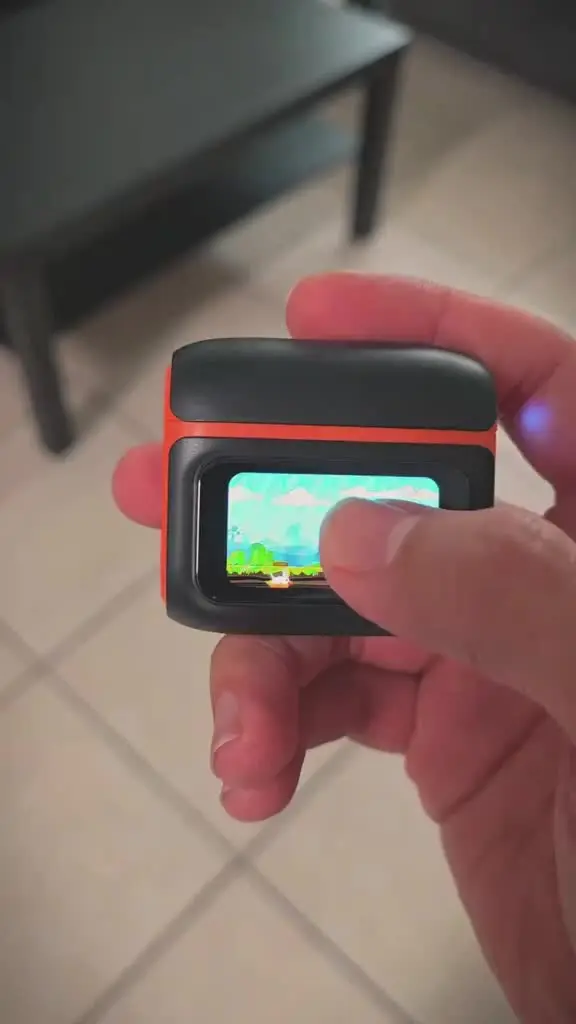
The MINISO MS128 earbuds feature a compact design with a smart charging case that includes a full-color touchscreen for easy control and information display.

4.1 Earbud Components
- Multi-function key/Touch position: For controlling playback, calls, and other functions.
- Bluetooth LED: Indicates connection and pairing status.
- Display light: Provides visual feedback.
- Charging Contacts: For charging the earbuds inside the case.
4.2 Charging Case Components
- Full-Color Touchscreen: Displays battery level, time, and various control options.
- Type-C Interface: For charging the case.

5. Setup and First Use
5.1 Charging the Earbuds and Case
Before first use, ensure both the earbuds and the charging case are fully charged.
- Earbuds: Place the earbuds into the charging case. A red light on the earbuds will indicate charging. The light will turn off once fully charged.
- Charging Case: Connect the charging case to a power source using the provided Type-C cable. The full-color touchscreen will display the battery level. It will show 100% when fully charged. The display will automatically turn off after about 30 seconds of inactivity; slide the screen to re-enter the display.

5.2 App Download & Installation
To unlock the full potential of your MINISO MS128 earbuds, download the companion app:
- Search for the official app in major app stores (e.g., Google Play Store, Apple App Store).
- Alternatively, scan the QR code below to install the app.
- After your phone connects to the earbuds via Bluetooth, open the app's "Home" page and tap "Add New Device". Once the app connects successfully, you can start using it.
This software is free to use for a lifetime and does not charge any fees.
6. Bluetooth Pairing
6.1 Initial Pairing (No Prior Record)
- Take both earbuds out of the charging case. They will automatically power on.
- The left and right earphones will automatically pair with each other. After successful pairing, you will hear two beeps.
- Enable Bluetooth on your device (smartphone, tablet, etc.) and search for "MINISO MS128" in the list of available devices.
- Select "MINISO MS128" to connect. Once connected, the earbud indicator light will turn off, and you will hear a confirmation sound.
6.2 Reconnection (Existing Pairing Record)
If the earbuds have been previously paired with your device:
- Take both earbuds out of the charging case. They will automatically power on.
- The earbuds will automatically connect back to the last paired device. You will hear a "beep" sound upon successful reconnection.
7. Earbud Controls
The MINISO MS128 earbuds feature intuitive touch controls on each earbud. The charging case's touchscreen also provides additional control options.
7.1 Basic Earbud Touch Controls
| Function | Action | Description |
|---|---|---|
| Power On/Off | Press and hold 3s/5s | Power on (3s) or power off (5s) the earbuds. |
| Answer/Hang Up Call | Tap x1 | Single tap to answer an incoming call or hang up an ongoing call. |
| Reject Call | Tap x2 | Double tap to reject an incoming call. |
| Voice Assistant | Tap x3 | Triple tap to activate your device's voice assistant. |
| Play/Pause Music | Tap x1 | Single tap to play or pause music. |
| Volume Up/Down | Tap x2 (Left/Right) | Double tap left earbud for volume down, right earbud for volume up. |
| Next/Previous Track | Tap x3 (Left/Right) | Triple tap left earbud for previous track, right earbud for next track. |
7.2 Charging Case Touchscreen Controls
The charging case's full-color touchscreen allows you to view power, switch modes, and access various functions directly from the case. Swipe or tap the icons on the screen to navigate through options like music playback, equalizer settings, stopwatch, games, finding your earbuds, and phone controls.

8. Maintenance and Care
- Cleaning: Regularly clean the earbuds and charging case with a soft, dry, lint-free cloth. Do not use harsh chemicals or abrasive materials.
- Charging Contacts: Ensure the charging contacts on both the earbuds and the case are clean and free of debris to maintain proper charging.
- Storage: When not in use, store the earbuds in their charging case to protect them from dust and damage. Store in a cool, dry place.
- Water Resistance: The earbuds are IPX5 waterproof, meaning they are resistant to sweat and light splashes. Do not submerge them in water or expose them to heavy rain.
9. Troubleshooting
9.1 Earbuds Not Pairing/Connecting
If your earbuds fail to pair with each other or connect to your device:
- Clear Bluetooth Pairing History: If both earbuds cannot be paired, you need to clear all connected devices from your phone's Bluetooth list. Then, with the earbuds out of the case, tap both earphones 5 times simultaneously. This will clear their internal pairing history.
- Reset Earphones: If the earphones fail to pair or reconnect to each other, reset them by tapping both earphones five times simultaneously. Note: Resetting the earphones will clear the Bluetooth pairing history.
- Re-pair: After clearing the history/resetting, follow the initial pairing steps (Section 6.1).
9.2 No Sound or Low Volume
- Ensure the earbuds are properly connected to your device.
- Check the volume levels on both your device and the earbuds.
- Make sure the earbuds are fully charged.
- Try resetting the earbuds as described above.
9.3 Charging Issues
- Ensure the charging cable is securely connected to both the case and the power source.
- Check the charging contacts on the earbuds and inside the case for any obstructions.
- Try using a different charging cable or power adapter.
10. Product Specifications
| Feature | Specification |
|---|---|
| Model Product | MINISO-MS128 |
| Material | Plastic, Silica Gel |
| Bluetooth Version | V6.0 |
| Effective Range | Approximately 10m |
| Driver Diameter | 10mm |
| Frequency Response Range | 20 - 20000Hz |
| Impedance Range | up to 32 Ω |
| Sensitivity | 28dB |
| Battery Capacity (Earbud) | 250 mAh |
| Battery Life (Earbud) | Up to 13 hours (one-time standby 5h) |
| Charging Time (Earbud) | ~1.5 hrs |
| Earphone Input | 5V === 50mA |
| Charging Method | Charging case (Type-C) |
| Waterproof Rating | IPX5 |
| Features | Waterproof, With microphone, Active Noise Cancelling (ENC) |
| Volume Control | Yes |
| Control Button | No (Touch Control) |

11. User Tips
- For optimal sound quality and noise cancellation, ensure the earbuds fit snugly in your ears. Experiment with different ear tip sizes if provided (not explicitly mentioned in package contents, but common for in-ear earbuds).
- Regularly check for app updates to ensure you have the latest features and performance improvements.
- If experiencing latency during gaming, ensure your device's Bluetooth is optimized and try to minimize interference from other wireless devices. The earbuds feature 0.05s ultra-low latency for gaming.

12. Warranty and Support
For warranty information, technical support, or service inquiries, please refer to the warranty card included in your package or contact MINISO customer service through their official website or the companion app. Keep your purchase receipt as proof of purchase.
A user manual in PDF format is available for download: MINISO MS128 User Manual (PDF)
13. Product Video
Watch this video for a visual overview and demonstration of the MINISO MS128 TWS Wireless Bluetooth Earbuds.