
1. Introduction
Thank you for choosing the MINISO MS122 TWS Wireless Earbuds. This manual provides essential information for setting up, operating, and maintaining your new earbuds. Please read it carefully before use and keep it for future reference.
2. Important Safety Information
WARNING: Please mind potential fire risk and strictly follow the instruction manual for charging and storage. For disposal, please check your local authority's website for more information and dispose of the lithium-ion battery safely in accordance with the applicable legal requirements.
The MINISO MS122 TWS Wireless Earbuds comply with the relevant legislation:
- (EU) 2023/1542 Batteries and Waste Batteries
- 2014/53/EU Radio equipment
- 2011/65/EU ROHS
3. Package Contents
Ensure all items are present in your package:
- MINISO MS122 TWS Wireless Earbuds (Left and Right)
- Charging Case
- USB Type-C Charging Cable
- User Manual
- Additional Ear Tips (various sizes)
Visual Reference:

MINISO MS122 TWS Wireless Earbuds and charging case.
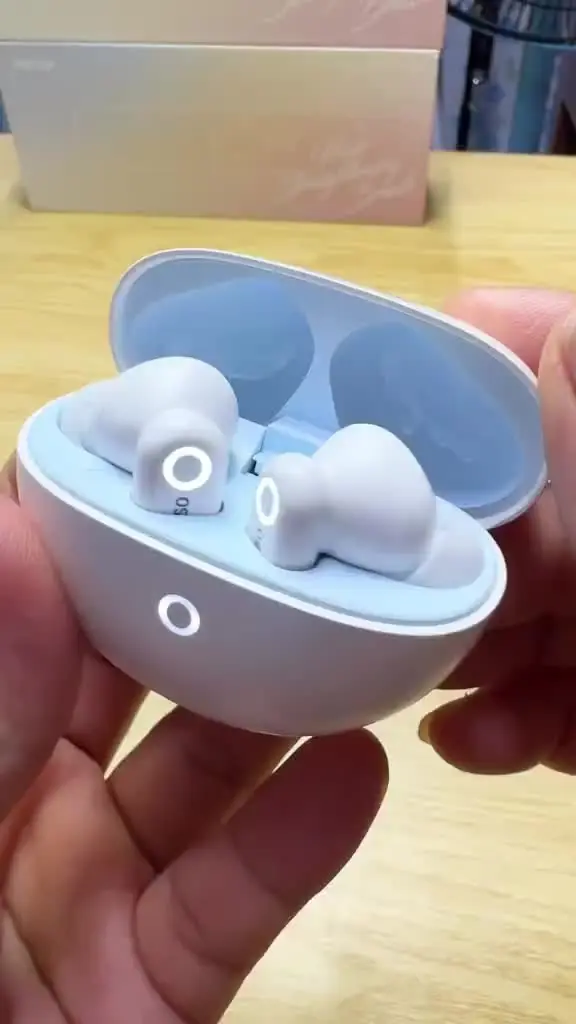
Unboxing and initial setup of the MINISO MS122 TWS Wireless Earbuds, showing the earbuds, charging case, and accessories.
4. Specifications
| Feature | Specification |
|---|---|
| Model | MS122 |
| Material | Plastic, Silica Gel |
| Battery Capacity (Earbud) | 250 mAh |
| Battery Life (per charge, ANC OFF) | Up to 7 hours |
| Total Playtime (with charging case) | Up to 40 hours |
| Quick Charge | 10 minutes charge = 2 hours playtime |
| Maximum Wireless Range | <10m |
| Sound Isolating | No (features ENC Call Noise Reduction) |
| Earcups Type | Open-back |
| Max Output | 10mW |
| Number Of Drivers | 2 |
| Charging Method | Charging case (Type-C) |
| Headphone Pads Material | Silicone |
| Driver Diameter | 12mm Bi-Diaphragm Dynamic Speakers |
| Total Harmonic Distortion | 1% |
| Impedance Range | Up to 32 Ω |
| Bluetooth Version | 6.0 |
| Features | Waterproof, With microphone (6 AI-Enhanced Mics), ENC Call Noise Reduction, AI Translation |
| Codecs | AAC, SBC |
| Waterproof | Yes |
| Frequency Response Range | 20 - 20000Hz |
| Sensitivity | 28dB |
| Function | Internet Bar, Monitor Headphone, Video Game, Common Headphone, Mobile Phone, HiFi Headphone, Sport, Hearing Aid, Outdoor, Office, Sleep, Study |
| Active Noise-Cancellation | No (features ENC Call Noise Reduction) |
| Volume Control | Yes (via touch control) |
| Control Button | No (features Intelligent Touch Control) |
| Wireless Type | Bluetooth |
| Connectors | Type-C |
| Certification | CE |
| Resistance | 16 Ω |
| Weight (Earbud) | 3.7g per earbud |
| Package Weight | 0.09 kg |
| Package Dimensions (L x W x H) | 11cm x 8cm x 4cm |
5. Setup Guide
5.1 Wearing the Earbuds
- Gently insert the earbud into your ear canal.
- Adjust the earbud to ensure a comfortable and secure fit.
Visual Reference:

Proper wearing technique for the earbuds.
5.2 Initial Connection (SayMi APP)
For full functionality, including AI translation and customized audio settings, download the SayMi APP.
- Scan the QR code below to download the SayMi APP.
- Take out the earphones from the charging case to power them on and enter pairing mode.
- Log in to the SayMi APP.
- Follow the in-app instructions to connect your headphones.
QR Code for SayMi APP:
Scan this QR code to download the SayMi APP.
5.3 Wireless Pairing Mode (Bluetooth)
The earbuds support instant one-step pairing for a stable, low-latency connection.
- First-time Pairing: When there is no pairing record for the left and right earphones, they will automatically pair with each other after being turned on. After successful pairing, you will hear two beeps.
- Subsequent Connections: When the left and right earphones have pairing records, they will automatically connect back to your last paired device when they are turned on. A single "beep" prompt will sound.
Visual Reference:

Bluetooth 6.0 connection for instant pairing.
6. Operating Instructions
The MS122 earbuds feature intelligent touch control for various functions.
6.1 Basic Touch Operations
The multi-function key is located on the touch-sensitive surface of each earbud.
| Action | Function |
|---|---|
| Touch and hold for 3-5 seconds | Power On/Off |
| Single tap (x1) | Answer/End Call, Play/Pause Music |
| Double tap (x2) on Left earbud | Volume Down |
| Double tap (x2) on Right earbud | Volume Up |
| Triple tap (x3) on Left earbud | Previous Track |
| Triple tap (x3) on Right earbud | Next Track |
| Touch and hold for 2 seconds | Reject Call, Activate Voice Assistant |
Visual Reference for Touch Controls:
Overview of earbud touch controls.
6.2 Indicator Light Description
The Bluetooth LED display light on the earbuds and charging case provides status information:
- Headset Turned On: The white light flashes.
- Headset Turned Off: The red light stays on for 2 seconds and then turns off.
- Pairing Status: White light flashing.
- Connection Successful: No light.
- Headphone Charging: The red light stays on for a long time. After being fully charged, the red light goes off.
- Charging Case Charging: The charging case display screen shows the battery level. When fully charged, the charging case screen shows 100%.
Note: After the charging status is displayed on the display screen of the Charging Case, it will automatically turn off after about 30 seconds of inactivity. Sliding can enter the display screen.
7. Charging Your Earbuds
To charge the earbuds, place them back into the charging case. To charge the case itself, connect the provided USB Type-C cable to the charging port on the case and a power source.
Visual Reference:

Earbuds charging in the case, indicating longer battery life.

Day-and-Night Playtime and quick charge capabilities.
8. Advanced Features
8.1 ENC Call Noise Reduction
The earbuds feature ENC (Environmental Noise Cancellation) for calls, utilizing 6 AI-Enhanced Microphones. This effectively filters out environmental wind noise and noisy human voices, ensuring clear and stable outdoor calls.
Visual Reference:

Clear voice calls with AI-enhanced microphones.

Advanced noise reduction technology for calls.
8.2 HiFi High-Fidelity Bass & Customized Audio
Equipped with 12MM Bi-Diaphragm Dynamic Speakers, the sound unit is finely tuned for balance, offering rich bass and clear treble and midrange. This provides an excellent experience for listening to music and watching TV series. The SayMi APP allows for adjustable sound settings for a personalized experience, including sleep, nature, and ASMR sound options.
Visual Reference:

Detailed view of the 12MM Bi-Diaphragm Dynamic Speakers.

Customized audio settings available through the app.
8.3 AI Translation
The earbuds feature AI-powered natural, instant translation for over 100 languages, accessible via the SayMi APP.
Visual Reference:

AI-powered instant translation feature.
9. Maintenance
- Cleaning: Regularly clean the earbuds and charging case with a soft, dry cloth. Avoid using harsh chemicals or abrasive materials.
- Storage: Store the earbuds in their charging case when not in use to protect them and keep them charged. Keep them in a cool, dry place away from extreme temperatures.
- Charging: Use the provided Type-C charging cable. Avoid using damaged cables or chargers.
- Water Resistance: The earbuds are waterproof, but avoid prolonged submersion in water. Dry them thoroughly if they get wet.
10. Troubleshooting
10.1 Earbuds not pairing with each other or device
- Ensure both earbuds are charged.
- Place both earbuds back into the charging case, close the lid, and then open it again.
- If the issue persists, clear the Bluetooth pairing history: Take out the earphones and tap both earphones five times simultaneously. This will reset them and clear the Bluetooth pairing history. Then, try pairing again.
10.2 No sound or low volume
- Check the volume level on your connected device and on the earbuds (via touch control).
- Ensure the earbuds are properly seated in your ears.
- Check if the earbuds are connected to the correct device.
10.3 Charging issues
- Ensure the charging cable is securely connected to both the case and the power source.
- Check if the charging port is clean and free of debris.
- Try using a different charging cable or power adapter.
10.4 App connection issues
- Ensure Bluetooth is enabled on your device.
- Make sure the SayMi APP is updated to the latest version.
- Restart the SayMi APP and try connecting again.
- If necessary, uninstall and reinstall the SayMi APP.
11. User Tips
- For optimal sound quality and noise reduction, ensure you select the correct size of ear tips for a snug fit.
- Regularly update the SayMi APP to access the latest features and improvements, especially for AI translation.
- To maximize battery life, always place the earbuds back into their charging case when not in use.
- Experiment with the customized audio settings in the SayMi APP to find your preferred sound profile for different activities like sleeping or listening to music.
12. Warranty and Support
MINISO products are designed to meet high-quality standards. For warranty information and customer support, please refer to the documentation provided with your purchase or contact MINISO customer service directly. Keep your proof of purchase for any warranty claims.