
1. Introduction
Thank you for purchasing the MINISO 3600mAh Portable Fan. This compact and versatile fan is designed to provide a refreshing breeze wherever you go. Featuring a powerful brushless motor, 120 stepless wind speeds, and a smart display, it's perfect for personal cooling at home, in the office, or on the go. Please read this manual carefully before use to ensure proper operation and maintenance.
2. Important Safety Instructions
- Do not insert fingers or any objects into the fan grille.
- Keep the fan away from water and moisture. This product is not waterproof.
- Do not disassemble or attempt to repair the fan yourself. Contact customer support for assistance.
- Keep out of reach of children.
- Do not expose the fan to extreme temperatures or direct sunlight for extended periods.
- Use only the provided USB-C cable for charging.
3. Package Contents
Please check the package for the following items:
- MINISO 3600mAh Portable Fan
- USB-C Charging Cable
- User Manual (this document)
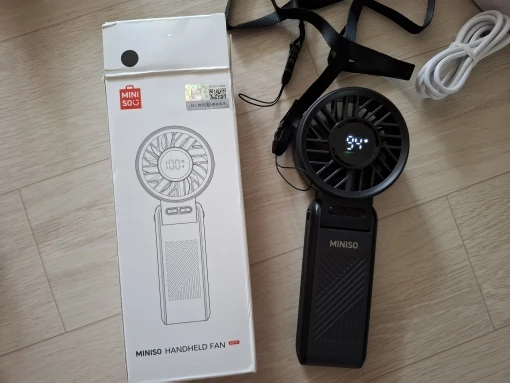
4. Product Overview
The MINISO Portable Fan features a foldable design, allowing it to be used as a handheld fan or a desk fan. It includes a smart display for battery and speed indication.


5. Initial Setup and Charging
Before first use, fully charge the fan.
- Connect the provided USB-C charging cable to the fan's charging port.
- Connect the other end of the cable to a compatible power source (e.g., adapter, cellphone charger, laptop, car charger).
- The smart display will indicate charging status. A full charge takes approximately 3 hours.

6. Operating Instructions
The fan offers 120 stepless wind speeds for customized cooling.
Power On/Off
- To Turn On: Press the power button once.
- To Turn Off: Press and hold the power button for approximately 2 seconds.
Adjusting Wind Speed
- Increase Speed: Press the '+' button. Each press increases the speed by 20 levels.
- Decrease Speed: Press the '-' button. Each press decreases the speed by 20 levels.
Usage Modes
- Handheld Mode: Hold the fan by its handle for personal cooling.
- Desk Fan Mode: Fold the fan to stand it upright on a flat surface. This is ideal for use while working or applying makeup.


7. Care and Maintenance
- Cleaning: Gently wipe the exterior of the fan with a soft, dry cloth. Do not use harsh chemicals or abrasive cleaners. Do not immerse the fan in water.
- Storage: When not in use for an extended period, store the fan in a cool, dry place, away from direct sunlight. Ensure the battery is partially charged before storage to prolong its lifespan.
8. Troubleshooting
| Problem | Possible Cause | Solution |
|---|---|---|
| Fan does not turn on | Low battery; Power button not pressed correctly | Charge the fan; Press and hold the power button for 2 seconds to ensure it's turning on/off. |
| Weak airflow | Low battery; Fan speed set too low | Charge the fan; Increase the fan speed using the '+' button. |
| Fan makes unusual noise | Obstruction in fan blades; Internal malfunction | Turn off the fan and check for any obstructions. If noise persists, discontinue use and contact support. |
9. Specifications
| Feature | Detail |
|---|---|
| Brand | MINISO |
| Model | 3600mAh Portable Fan |
| Type | Cooling Only |
| Power (W) | 11W |
| Voltage | DC 5V |
| Battery Capacity | 3600mAh |
| Battery Voltage | 3.7V |
| Use Time | Approx. 2-8 hours (2 hours at 120 speed) |
| Charging Time | Approx. 3 hours (via USB-C) |
| Wind Speeds | 120 Stepless Speeds |
| Motor Type | Ultra High Speed Brushless Motor (10000RPM) |
| Material | ABS+PP+Electronic Components |
| Product Size | 17.7 x 6.9 x 2.4 cm (6.97 x 2.76 x 0.94 inches) |
| Net Weight | 180g (0.4 lbs) |
| Origin | Mainland China |
| Timing Function | No Timing |
| Remote Control Function | No |
10. User Tips
- To prevent accidental power on/off, the power button requires a 2-second press to turn off. This is a design feature to avoid unintended operation.
- While the fan is compact, it delivers strong airflow. Some users note a slight noise at higher speeds, which is typical for powerful portable fans.
- The smart display is useful for monitoring battery life and current speed setting.
11. Warranty and Support
For warranty information or technical support, please refer to the seller's policy or contact the MINISO customer service directly. Keep your purchase receipt as proof of purchase.
A PDF version of the user manual is available for download here.