
Introduction
Welcome to the MINISO MS106 Bluetooth Earphone TWS Wireless Headphones user manual. This guide provides detailed instructions on how to set up, operate, maintain, and troubleshoot your new earphones. Please read this manual carefully before use to ensure optimal performance and longevity of your device.

MINISO MS106 TWS Earphones in their charging case, highlighting comfort, long standby, spatial audio, and noise reduction features.
Important Safety Instructions
WARNING: Please mind potential fire risk and strictly follow the instruction manual for charging and storage.
- For disposal, please check your local authority's website for more information and dispose of the lithium-ion battery safely in accordance with the applicable legal requirements.
- The object of the declaration is in conformity with the relevant legislation: (EU) 2023/1542 Batteries and Waste Batteries, 2014/53/EU Radio equipment, 2011/65/EU ROHS.
Package Contents
Ensure all items are present in the package:
- A pair of Headphones (Earbuds) x 1
- Charging case x 1
- Charging cable x 1
- Silicone protective case x 1
- User Manual x 1 (PDF version available here)

The MINISO MS106 Wireless Earbud MS106 product box.
Product Overview
The MINISO MS106 TWS Earphones are designed for comfort and long-lasting audio experience, featuring spatial audio enhancement, noise reduction, and smart translation capabilities.

Diagram showing the MINISO MS106 earbuds and charging case.
Key Components:
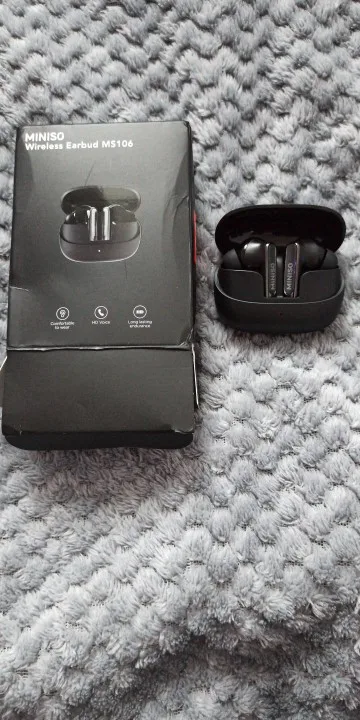
Diagram illustrating the multi-function touch key, Bluetooth LED, display light, and charging contacts on the earbuds.
- Multi-function touch key: For controlling various functions.
- Bluetooth LED: Indicates connection status.
- Display light: Provides status information.
- Charging Contacts: For charging the earbuds within the case.
- Type-C Interface: For charging the case.
Setup Guide
1. Charging the Earphones and Case
Before first use, ensure both the earphones and the charging case are fully charged.
- Headphone Charging: The red light on the earbuds stays on during charging and turns off when fully charged.
- Charging Case: The charging case display screen shows the battery level. When fully charged, it shows 100%. The display will automatically turn off after about 30 seconds of inactivity.

The earbuds feature an IP55 waterproof rating, suitable for use during rain or sweat.
2. App Download (SayMi APP)
For enhanced features like translation and AI chat mode, download the SayMi APP:
- Scan the QR code provided in the manual or search for "SayMi APP" in your app store.
- Download and install the application.
- Login to the APP.
- Enter the APP to connect your headphones.

The SayMi APP interface showing intelligent tools for the MINISO MS106 earphones.
3. Initial Pairing
- Take out the earphones from the charging case. They will automatically turn on.
- If there is no previous pairing record, the left and right earphones will automatically pair with each other. After successful pairing, you will hear two beeps.
- Enable Bluetooth on your mobile phone and search for "MINISO MS106" in the list of available devices.
- Select "MINISO MS106" to connect.
Once connected, the Bluetooth LED on the earphones will turn off.

Product demonstration video showing unboxing, charging, pairing, and usage of the MINISO MS106 TWS Earphones.
Operating Instructions
Power On/Off
- Power On: The white light flashes when the headset is turned on. (Typically happens automatically when removed from case).
- Power Off: The red light stays on for 2 seconds and then turns off. (Typically happens automatically when placed back in case).
- Alternatively, long press the multi-function touch key for 3-5 seconds to manually power on/off.
Touch Controls
The MINISO MS106 earphones feature personalized touch settings for smooth operation:
Visual guide to the touch controls for calls, media playback, voice assistant, and noise reduction modes.
- Call: Answer/Hang up: Double-click left or right earbud.
- Call: Reject: Long press for 2 seconds (left or right earbud).
- Non-call: Play/Pause: Double-click left or right earbud.
- Non-call: Activate voice assistant: Three taps (left or right earbud).
- Switch between noise reduction mode/transparency mode/normal: Long press for 2 seconds (left or right earbud).
Advanced Features (via SayMi APP)
The SayMi APP unlocks the full potential of your MINISO MS106 earphones, including:
- AI Chat Mode: Engage in intelligent conversations.
- Free Talk Mode: Experience seamless two-way translation for global negotiations or travel. One earbud per person allows for instant translation, enabling you to speak any language and hear your own.
- Translation Machine Mode: Supports translation for up to 134 languages, improving efficiency in multilingual meetings.
- Headphone+Phone Mode: Integrates earphone and phone functionalities.
- Voice Notes: Record and manage voice notes.

Demonstration of Free Talk Mode for two-way translation during conversations.

The core bidirectional simultaneous interpretation technology allows users to communicate face-to-face with foreign friends.
Sound Experience
- Spatial Audio Enhancement: Enjoy an immersive audio feeling.
- Noise Reduction: Adaptive noise reduction up to -50dB, effectively isolating 99.7% of ambient noise.
- Ultra-low Latency: 58ms ultra-low latency for audio and video synchronization, ideal for gaming.
- Panoramic Spatial Sound: Simulates a three-dimensional sound field for a realistic listening experience in Cinema Mode or Music Mode.
Illustration of the -50dB adaptive noise reduction capability.

Visual representation of panoramic spatial sound effects for an immersive audio experience.
Maintenance
- Cleaning: Regularly clean the earbuds and charging case with a soft, dry cloth. Avoid using abrasive materials or harsh chemicals.
- Charging Contacts: Ensure the charging contacts on both the earbuds and the case are clean and free of debris to maintain proper charging.
- Storage: When not in use, store the earphones in their charging case to protect them and keep them charged. Store in a cool, dry place away from extreme temperatures.
- Water Resistance: The earphones have an IP55 waterproof rating, meaning they are resistant to sweat and light rain. However, they are not designed for submersion in water. Avoid exposing them to strong water jets or prolonged water exposure.
Troubleshooting
Earphones not pairing or connecting:
- Clear Bluetooth pairing history: If both ears cannot be paired, you need to clear all connected devices from your phone's Bluetooth settings. Then, tap the left and right earphones 5 times simultaneously.
- Reset the earphones: If the earphones fail to pair or reconnect to each other, reset them by tapping both earphones five times simultaneously. Note: Resetting the earphones will clear the Bluetooth pairing history.
- Ensure the earphones are charged and within range of your device.
- Try restarting your mobile phone's Bluetooth function or the phone itself.
No sound or low volume:
- Check the volume levels on both your earphones and your connected device.
- Ensure the earphones are properly seated in your ears.
- Verify that the earphones are correctly paired and connected to your device.
Charging issues:
- Ensure the charging cable is securely connected to both the case and a power source.
- Check if the charging contacts on the earbuds and inside the case are clean.
- Try using a different charging cable or power adapter.
Specifications
| Feature | Specification |
|---|---|
| Brand Name | MINISO |
| Model | MS106 |
| Style | Tws in-ear headphones |
| Communication | Wireless (Bluetooth) |
| Bluetooth Version | 5.3 |
| Maximum Wireless Range | <10m |
| Battery Capacity (Earbuds) | 28mAh (per ear) |
| Battery Capacity (Charging Case) | 180mAh |
| Battery Life (Single Charge) | Up to 12 hours |
| Total Battery Life (with Case) | Up to 55 hours |
| Charging Time | 1.5 hours |
| Charging Method | Charging case |
| Connectors | Type-C |
| Waterproof Rating | IP55 / IPX5 (Resistant to sweat and light rain) |
| With Microphone | Yes |
| Active Noise-Cancellation | No (Features Adaptive Noise Reduction) |
| Volume Control | Yes |
| Control Button | Yes (Touch Control) |
| Vocalism Principle | Dynamic |
| Driver Diameter | 10mm |
| Impedance Range | up to 32 Ω |
| Frequency Response Range | 20 - 2000 Hz |
| Sensitivity | 23 dB |
| Weight (Earbud) | 3.9g |
| Material | Metal, Silica Gel |
| Features | Waterproof (IP55), With microphone, Apple Siri Support, Dual Connection, Adaptive Noise Reduction, Spatial Audio Enhancement, Real-time Translation |
| Codecs | AAC, sbc |
| Certification | CE |
Note: Some specifications are derived from product images and may vary slightly.
User Tips
- Sound Quality: Users report good sound quality with strong bass.
- Comfort: The earbuds are generally found to be comfortable to wear.
- App Integration: Take time to get used to the SayMi app for full functionality, especially for translation features.
- Battery Life: The earphones offer significant battery life (up to 12 hours on a single charge, 55 hours with the charging case), making them suitable for extended use.
- Call Quality: The microphone performance for calls is noted to be very good.
Warranty and Support
For warranty information, technical support, or service inquiries, please refer to the seller's policies or contact MINISO customer service directly. Keep your proof of purchase for any warranty claims.
A PDF version of the user manual is available for download: MINISO MS106 User Manual (PDF).