
1. Introduction
Thank you for choosing the WARSUN SQ03 EDC Pocket Flashlight. This manual provides essential information for the safe and efficient use of your device. Please read it thoroughly before operation and keep it for future reference.

Figure 1: WARSUN SQ03 Flashlight illuminating a path.
2. Package Contents
- WARSUN SQ03 EDC Pocket Flashlight
- Type-C Charging Cable (not explicitly listed but implied by Type-C port)
- User Manual (this document)
3. Setup and First Use
3.1 Battery Installation and Preparation
- Remove Insulation Sheet: Before first use, please remove the battery-end insulation sheet located inside the flashlight. This sheet is in place to keep the flashlight safe during shipping.
- Ensure the battery (1*21700 or 1*18650) is correctly inserted with the positive (+) end facing the flashlight head.
3.2 Charging the Flashlight
Your WARSUN SQ03 flashlight uses a Type-C charging port for fast and convenient charging.
- Connect the Type-C charging cable to the flashlight's charging port.
- Connect the other end of the cable to a 5V phone charger or a compatible USB power source.
- The blue indicator light will flash while charging.
- The blue indicator light will remain steadily lit once the flashlight is fully charged.
- Important: Only charge with a 5V phone charger. Charging with other voltages is strictly prohibited.
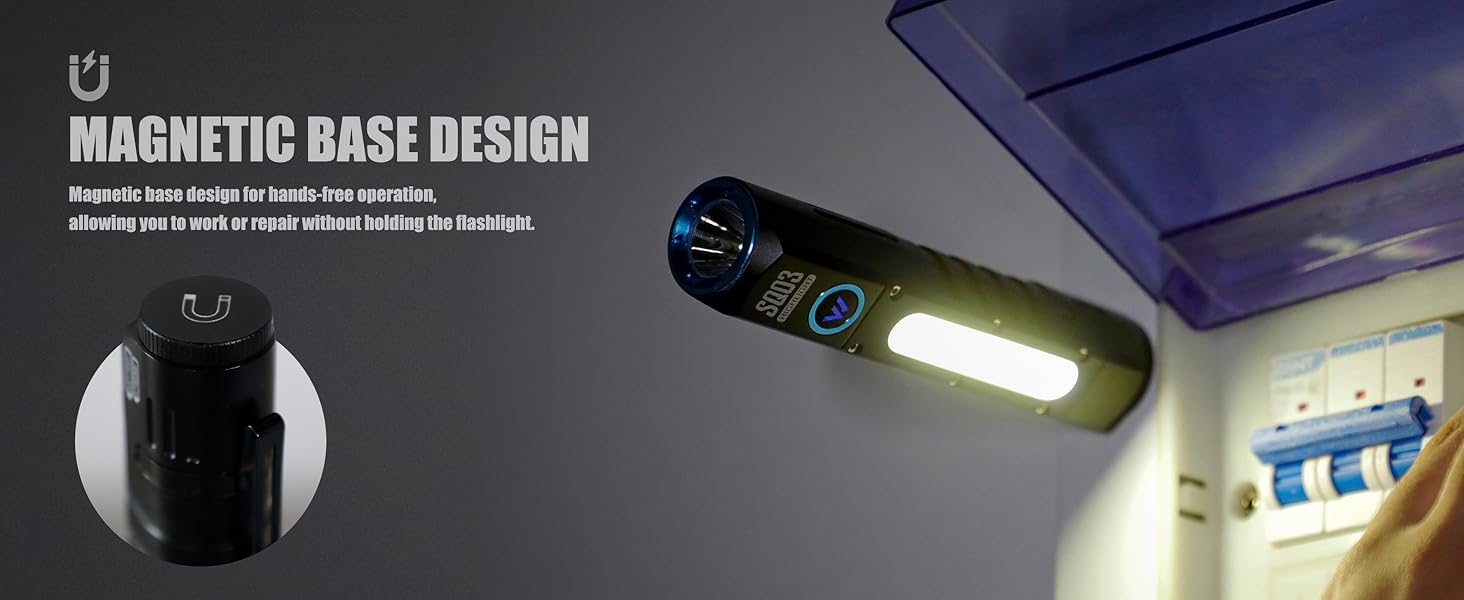
Figure 2: Type-C charging port and charging status indicator.
4. Operating Instructions
4.1 Power On/Off and Mode Selection
The WARSUN SQ03 features a main light (spotlight) and a side light (COB floodlight) with multiple modes.

Figure 3: Overview of the 8 available light modes.
- Main Light Modes: Normal, High, Super, Strobe.
- Side Light Modes: Normal, High, Super, SOS (Red Flashing).
- To Activate Main Light: Briefly press the power switch. Each subsequent brief press will cycle through the main light modes (Normal > High > Super > Strobe).
- To Activate Side Light: Press and hold the power switch. Each subsequent brief press will cycle through the side light modes (Normal > High > Super > SOS).
- To Turn Off: If any mode has been active for more than 10 seconds, a single brief press of the power switch will turn the flashlight off directly. Otherwise, cycle through modes until off.

Figure 4: Switch between focused LED spotlight and wide COB floodlight.
4.2 Special Features
- Magnetic Base: The tail cap of the flashlight is equipped with a strong magnet, allowing it to be securely attached to metal surfaces for hands-free operation during tasks like vehicle repair or working in dark spaces.
- Pocket Clip: A convenient pocket clip is integrated into the design, enabling secure attachment to pockets, belts, or backpack straps for easy carrying and quick access.

Figure 5: Magnetic base in action for hands-free lighting.

Figure 6: Convenient pocket clip design for everyday carry.
4.3 Product Demonstration Video
Video 1: WARSUN SQ03 Flashlight features and usage demonstration.
5. Maintenance and Care
- Battery Care: To prolong battery life, fully charge the flashlight before long-term storage. This prevents self-discharge, over-discharge, and potential battery damage.
- Cleaning: Wipe the flashlight body with a soft, damp cloth. Do not use abrasive cleaners or solvents.
- Water Resistance: The SQ03 is rated IPX4 (splash-proof). Avoid submerging the flashlight in water or exposing it to heavy rain for extended periods. Products not marked with a waterproof rating or indicated as not waterproof at the tail do not have waterproof capabilities and should avoid operations that may allow water ingress.
- Operating Temperature: The optimal operating temperature range is -20°C to 40°C. Using it beyond this range may cause damage or malfunction.
- General Handling: Do not throw, drop, or hit the flashlight randomly during use to prevent damage to the light and battery.

Figure 7: The flashlight's water resistance (Note: Marketing images show IPX6, but the manual states IPX4. Please adhere to IPX4 for safety).
6. Troubleshooting
- Flashlight Not Turning On: Ensure the battery insulation sheet has been removed. Check if the battery is correctly inserted and fully charged.
- Dim Light Output: The battery may be low. Recharge the flashlight fully.
- Overheating: Parts of the flashlight may become hot during prolonged use, especially on high modes. This is normal. If it becomes excessively hot, turn it off and allow it to cool.
- Charging Issues: Ensure the Type-C cable is properly connected and the power source is active. Use a standard 5V charger.
- General Malfunctions: Do not disassemble the light. If you encounter persistent issues, please contact customer support for assistance.
7. Specifications

Figure 8: Detailed product parameters.
| Feature | Specification |
|---|---|
| Model | SQ03 |
| Material | Aluminium Alloy + PC |
| Light Source | S3+COB |
| Protection Level | IPX4 |
| Switch Modes | 8 Light Modes |
| Battery | 1*21700 (5000mAh) / 1*18650 (3000mAh) |
| Product Size | 28*28*135mm (1.10*1.10*5.31 inches) |
| Weight | 146g |
| Max Lumen | 1000 Lumens |
| Runtime | 3-30 Hours |
| Lighting Distance | > 500 meters |
| Certification | CE, EMC, FCC, ROHS |
8. User Tips
- Hands-Free Convenience: Make full use of the powerful magnetic base to attach the flashlight to metallic surfaces when you need both hands free for tasks like car repairs, working under the sink, or in a workshop.
- Versatile Carrying: The integrated pocket clip is perfect for securing the flashlight to your belt, pocket, or backpack strap, ensuring it's always within easy reach for your daily adventures or work.
- Battery Longevity: For optimal battery health, remember to fully charge your flashlight before storing it for extended periods. This simple step helps prevent battery degradation.
9. Warranty and Support
WARSUN products are manufactured to high-quality standards. This product comes with a limited warranty.
- Warranty Coverage: The warranty covers manufacturing defects. Please note that the battery is typically not covered under the standard warranty.
- Service: Do not attempt to disassemble or repair the flashlight yourself. Unauthorized disassembly will void the warranty.
- Support: For any quality issues, technical support, or warranty claims, please contact the seller or manufacturer's customer service.
For further assistance, please refer to the official WARSUN website or contact your point of purchase.