
1. Product Information
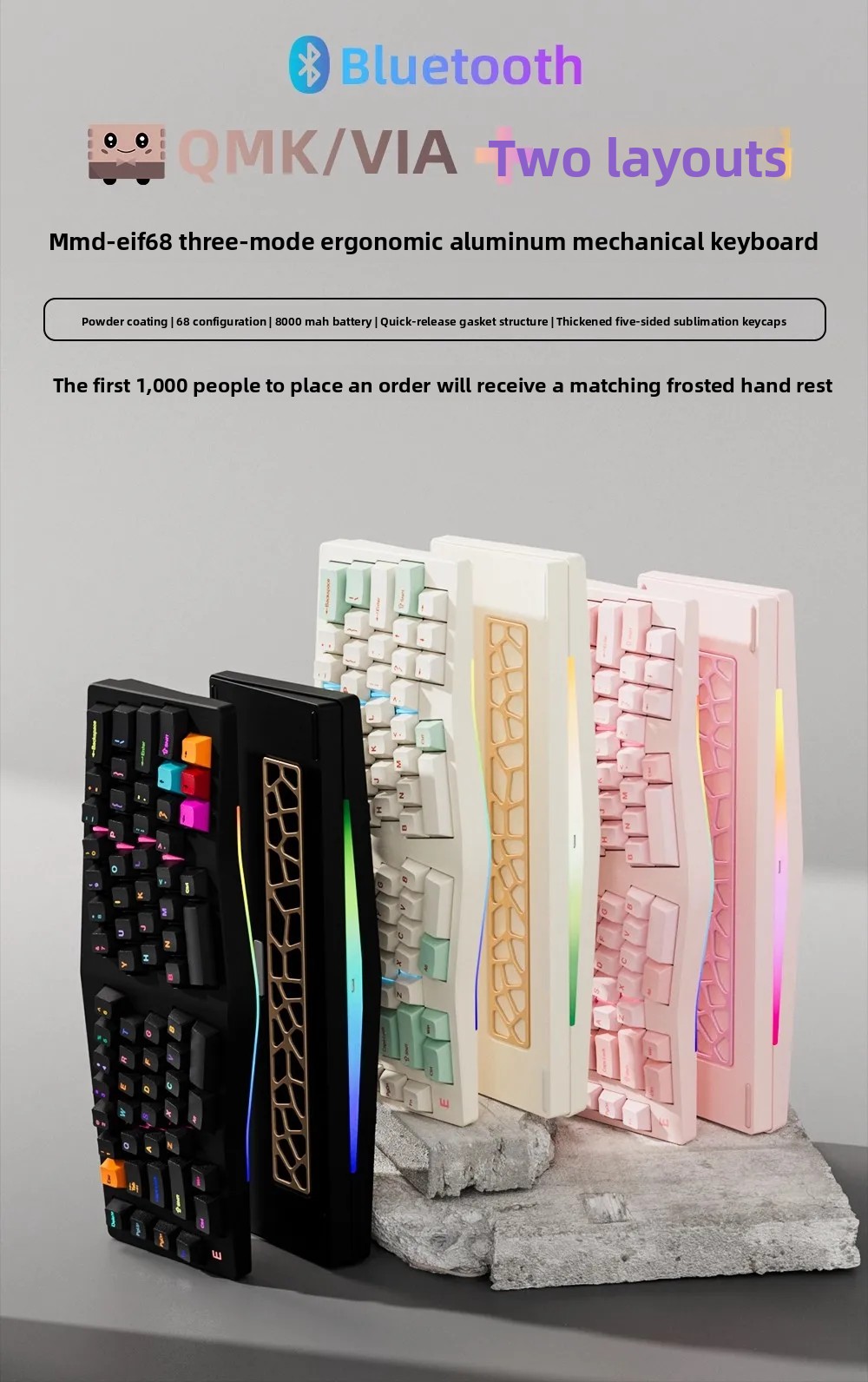
The MMD Alice EIF68 is an ergonomic aluminum body mechanical keyboard designed for enhanced comfort and performance. It features a three-mode connection, hot-swappable switches, and customizable layouts via QMK/VIA software.
2. Safety & Warnings
ATTENTION: Not suitable for children under three years due to small parts.
CHOKING HAZARD - Small parts. Not for Children under 3 years.
General warning: User restrictions should at least include the user's minimum or maximum age, and, where appropriate, the user's ability, the user's maximum or minimum weight.
3. Setup
3.1 Unpacking and Initial Inspection
- Please use soft scissors or a utility knife to open the box. It is strictly prohibited to scratch the body directly with the tip of the knife to avoid scratching the paint surface, rubbing the color, and breaking parts.
- When taking out the keyboard, only hold the hard, stressed parts such as the main body. Avoid pulling fragile accessories to prevent breakage and deformation.
- Transparent blister packaging, cable ties, and fixing glue should be removed slowly to avoid loss of accessories.
- After unpacking, check the list of accessories (main body, replacement parts, etc.) to confirm that there are no missing parts, broken parts, or paint defects.
3.2 Assembly
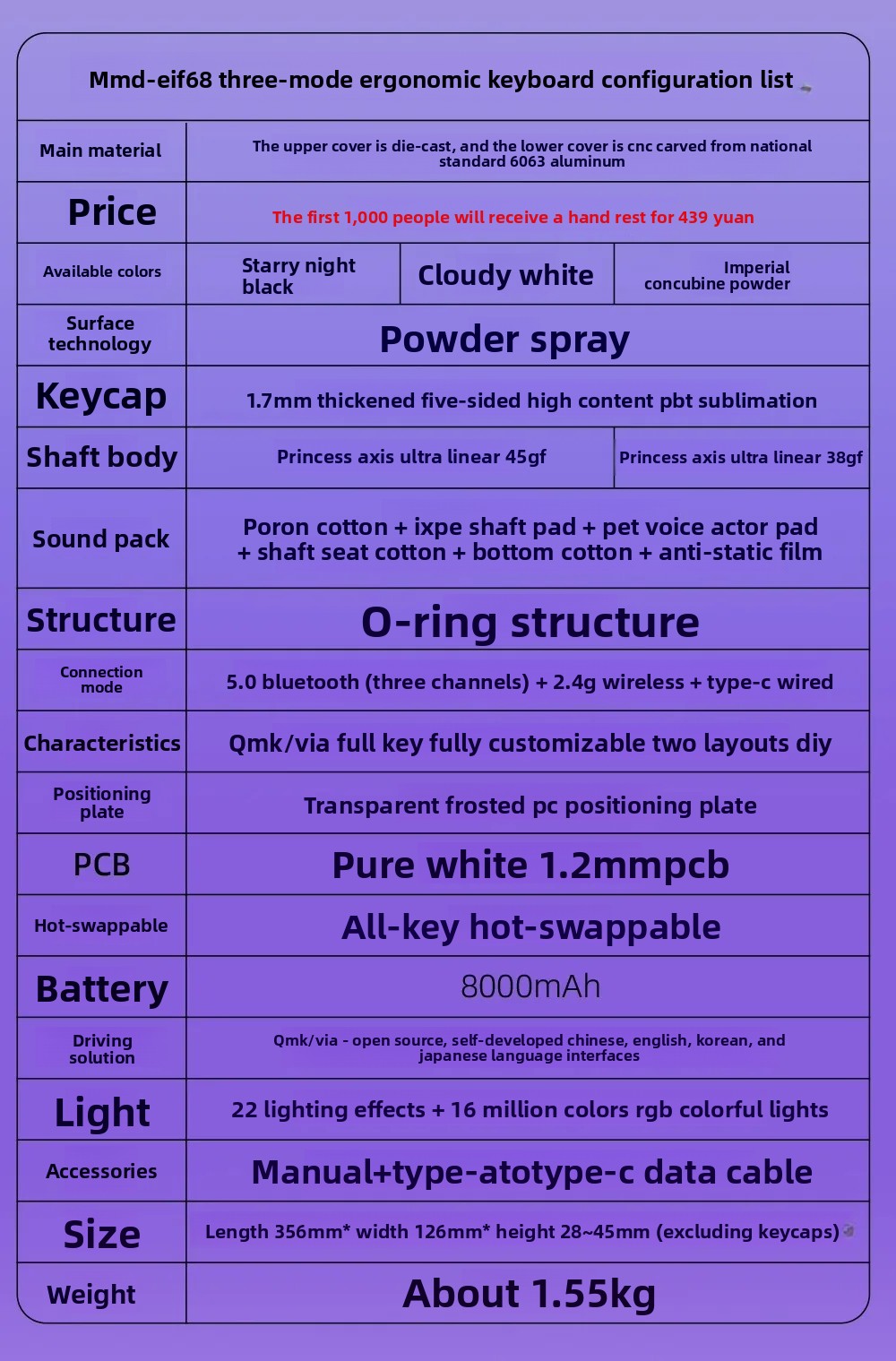
The MMD Alice EIF68 keyboard supports two layouts for directional keys. Customization requires some DIY skills to assemble and position the mounting plate and stabilizers.
When assembling accessories, move gently, aim at the jack/card slot, and push it in slowly. It is forbidden to press hard or plug hard to avoid cracking the interface.
4. Operating Instructions
4.1 Connectivity
The MMD Alice EIF68 supports three connection modes: Bluetooth 5.0 (three channels), 2.4G wireless, and Type-C wired connection. This allows for seamless switching between multiple devices.

4.2 QMK/VIA Customization
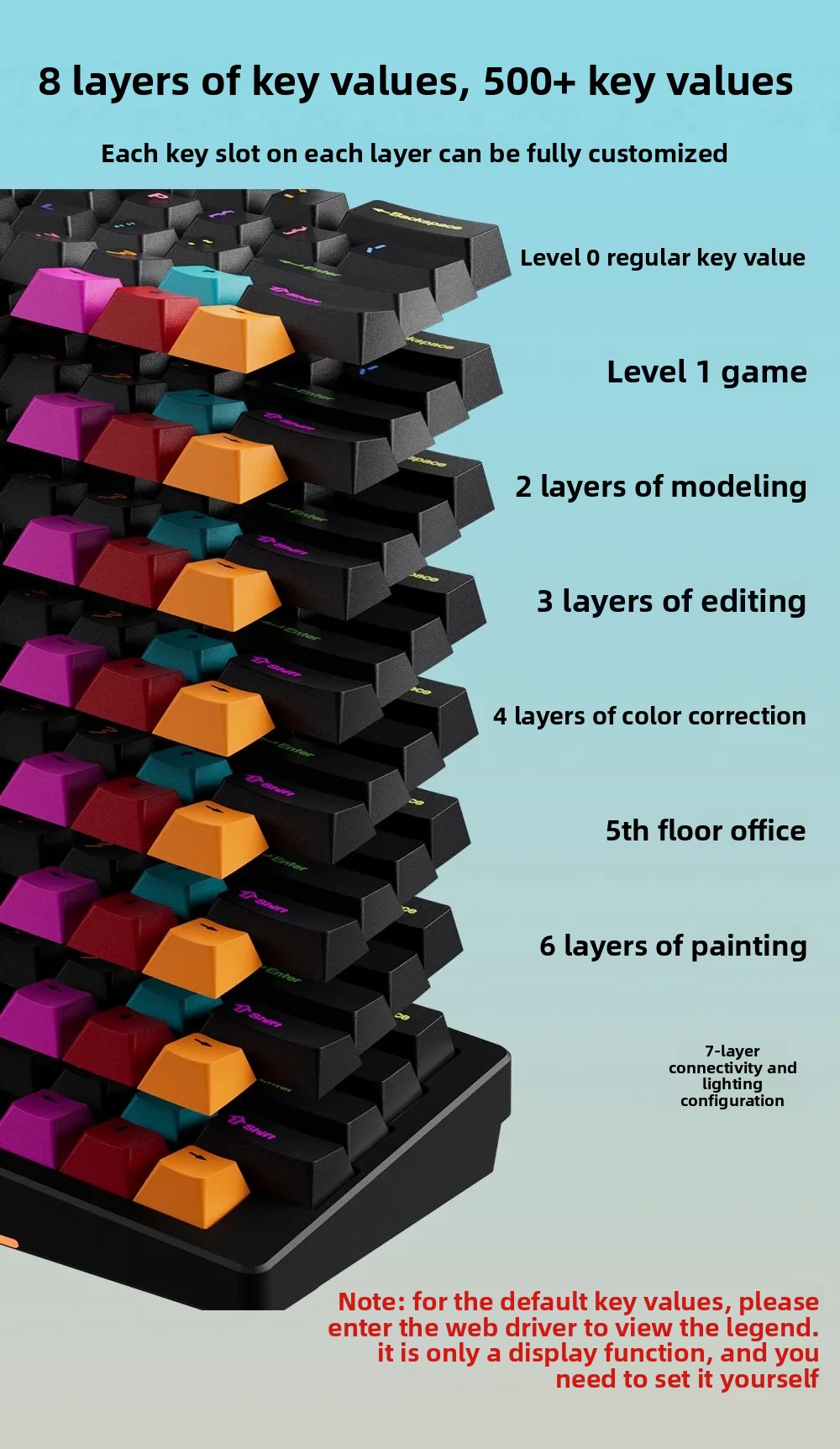
The keyboard features an open-source QMK/VIA solution, allowing for full key customization. It supports 8 layers of key values and over 500 actual usable key values. You can configure different layouts and functions for various applications.

4.3 RGB Lighting
The keyboard features 22 lighting effects and 16 million colors RGB colorful lights. Multiple light output positions allow for personalized lighting configurations.
4.4 Battery and Charging
The keyboard is equipped with an 8000mAh ultra-large lithium battery for long battery life. For charging, please use a computer USB interface by default. Avoid using fast charging or high-power charging heads, as battery or PCB damage caused by non-computer USB interfaces is not covered by the warranty.
5. Maintenance
5.1 Daily Cleaning
Only use a dry soft brush, anti-static dust cloth, and air blower to sweep the dust. It is forbidden to rub hard with dry wiping.
5.2 Deep Cleaning
When contaminated with fingerprints and oil stains, use clean water with a small amount of neutral detergent. Gently wipe with a soft cloth, immediately rinse with clean water, and completely dry in the shade (do not expose to the sun, dry with a hair dryer, or wipe with a paper towel).
5.3 Prohibited Chemicals
Strictly prohibit the use of alcohol, disinfectant, banana water, strong detergents, wet wipes, polishing agents, and other chemicals. These can dissolve the paint surface, corrode the material, and cause whitening and paint peeling.
5.4 Storage
For long-term storage, place the keyboard in its original box with moisture-proof paper/desiccant, seal it, and store it in a dry drawer. Open the box regularly for ventilation.
6. Troubleshooting
6.1 QC Standards (Appearance)
Minor imperfections on the keyboard face (such as tiny pits, air bubbles, bumps, or black specks) are acceptable, as long as they don't exceed 1mm in size. On the sides and bottom surfaces, 4-6 defects with a diameter of ≤0.9mm and a spacing of ≤5mm are permissible. The 30cm viewing surface should be free of obvious machining marks, scratches, or dents. Slight tool marks at the seams are also acceptable.
6.2 QC Standards (Internal)
Internal quality control (QC) is not performed on products during mass production. Normal knife marks, hanging point marks, and minor bumps at corners are considered normal occurrences. Aluminum alloy die-casting molds, powder coating processes, and coarser surface finishes compared to standard anodized coatings are typical.
7. Specifications
| Feature | Description |
|---|---|
| Brand Name | olevo |
| Model | MMD Alice EIF68 |
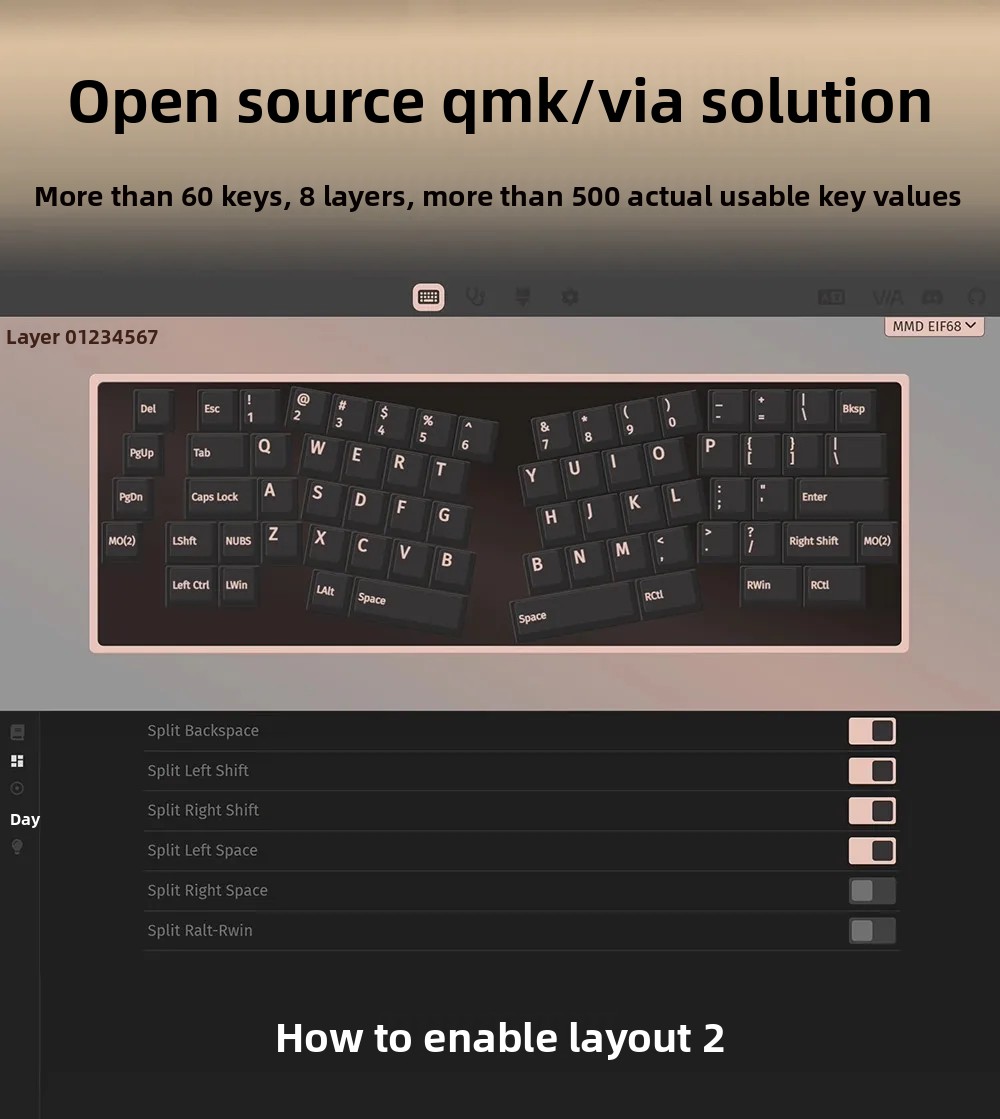
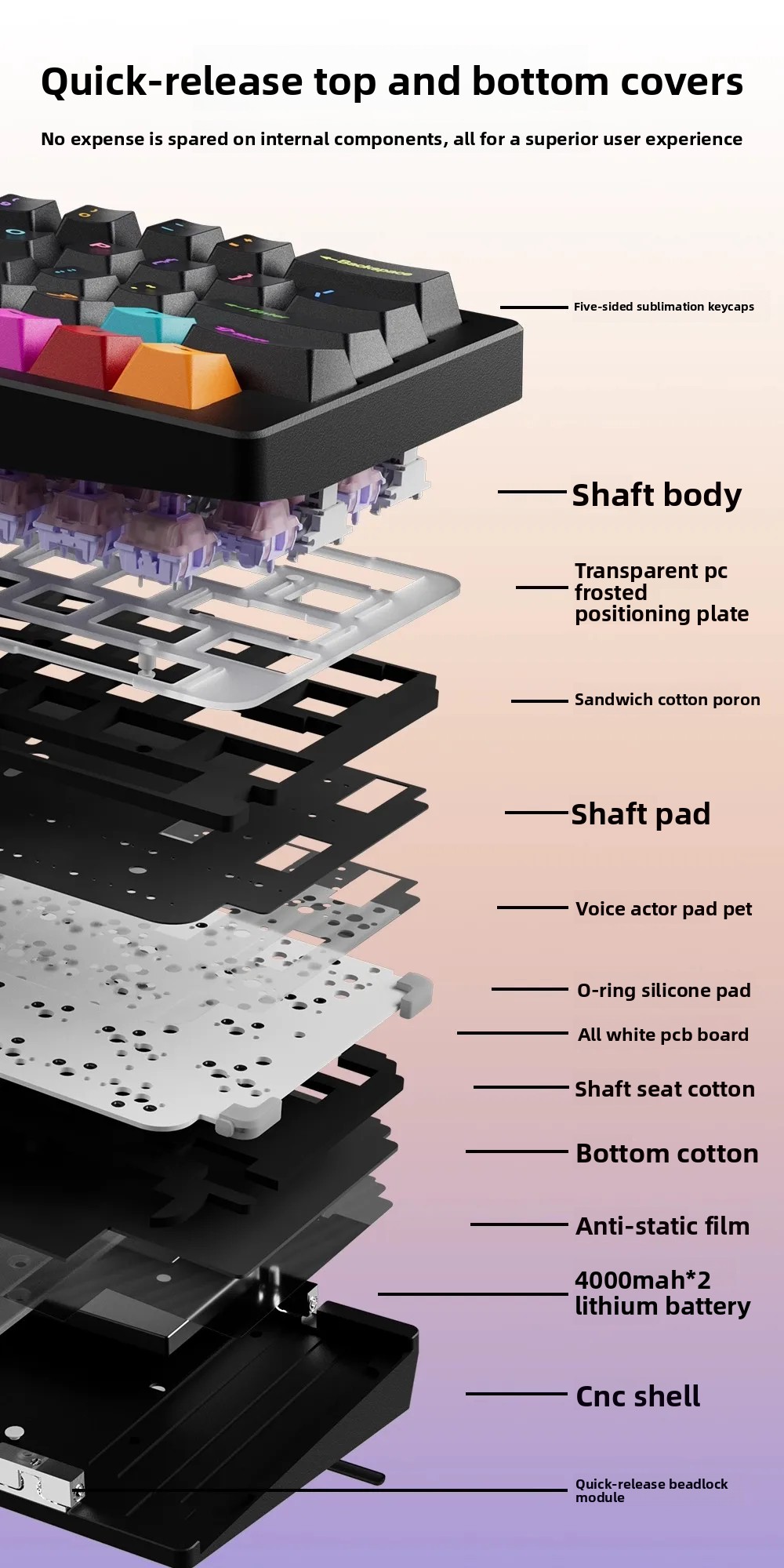
| Main Material | Aluminum CNC body (upper cover die-cast, lower cover CNC carved from 6063 aluminum) |
| Keyboard Standard | 68 keys |
| Operation Style | Mechanical |
| Switches Hot Swap | Yes (All-key hot-swappable) |
| Backlight Type | Multicolor (22 lighting effects + 16 million colors RGB) |
| Connectivity | 3-mode (Bluetooth 5.0 (three channels), 2.4G wireless, Type-C wired) |
| Battery | 8000mAh lithium battery |
| Keycap | 1.7mm thickened five-sided high content PBT sublimation |
| Structure | O-ring structure, Silent Gasket structure, quick disassembly of collision beads |
| Positioning Plate | Transparent frosted PC |
| PCB | Pure white 1.2mm PCB |
| Driving Solution | QMK/VIA (open source, self-developed Chinese, English, Korean, Japanese interfaces) |
| Dimensions (L*W*H) | 356mm * 126mm * 28-45mm (excluding keycaps) |
| Weight | About 1.55kg |
| Application | Desktop, Laptop, Tablet |
| Language | English |
| Certification | GMP |
| Wrist Support | Available (some configurations or accessories may include a wrist rest, though the base model is without) |

8. Warranty & Support
8.1 Warranty
The product enjoys a one-year warranty service. If quality problems occur during this period, please contact customer service to send it back for inspection.8.2 Manufacturer Information
Company Name: Chongqing Muxingren Construction Engineering Co., Ltd
Full Address: No. 5-23, Building 1, No. 12 Caiyun Avenue, Jiulongpo District, Chongqing, China
Email/Website/Telephone: 86-18696668352, caohui18696668352@163.com
8.3 EU Authorized Representative
Company Name: MJCM SARL
Address: 78 avenue des Champs Elysees Bureau 326, PARIS, FR
Email: mjcm190928@gmail.com

8.4 User Manual (PDF)
A detailed user manual in PDF format is available for download. Please refer to the official product page or contact customer support for the link.
9. User Tips
- Gentle Assembly: When installing or replacing components, always apply gentle pressure. Forcing parts can damage the interface or cause cracking.
- Joint Rotation: If your keyboard has movable joints (e.g., for wrist rest adjustment), rotate them within a moderate range. Exceeding the limit can cause white marks, breakage, or detachment. For long-term placement, it's recommended to fix the posture to reduce frequent stress.
- Proper Charging: Always charge the keyboard using a computer's USB port. Using fast chargers or non-computer USB power sources can damage the battery or PCB and may void the warranty.
- Regular Cleaning: For daily maintenance, use a soft brush or anti-static cloth to remove dust. For deeper cleaning, a slightly damp cloth with neutral detergent is effective, but ensure it's dried completely in the shade.
- Avoid Harsh Chemicals: Never use alcohol, disinfectants, or other strong chemicals, as they can damage the keyboard's finish and materials.