
1. Introduction
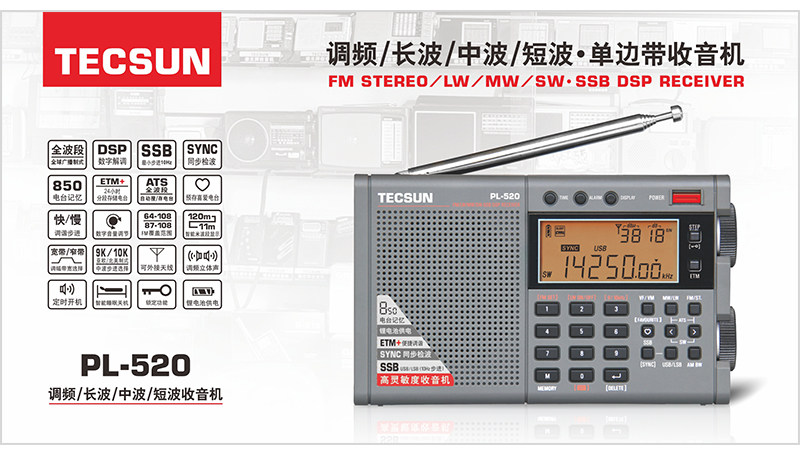
The Tecsun PL-520 is a high-sensitivity, multi-functional portable radio receiver designed for enthusiasts and general listeners. It incorporates modern DSP digital demodulation technology to enhance listening sensitivity, selectivity, signal-to-noise ratio, and anti-interference capabilities. This manual provides detailed instructions for setting up, operating, maintaining, and troubleshooting your PL-520 radio.

2. Package Contents
Please check the package for the following items:
- 1 x Tecsun PL-520 Radio Receiver
- 1 x BL-5C Rechargeable Battery
- 1 x USB Micro Type-B Charging Cable
- 1 x Special Protective Bag
- 1 x Earphones
- 1 x Chinese Manual (for reference)
3. Setup
3.1 Battery Installation
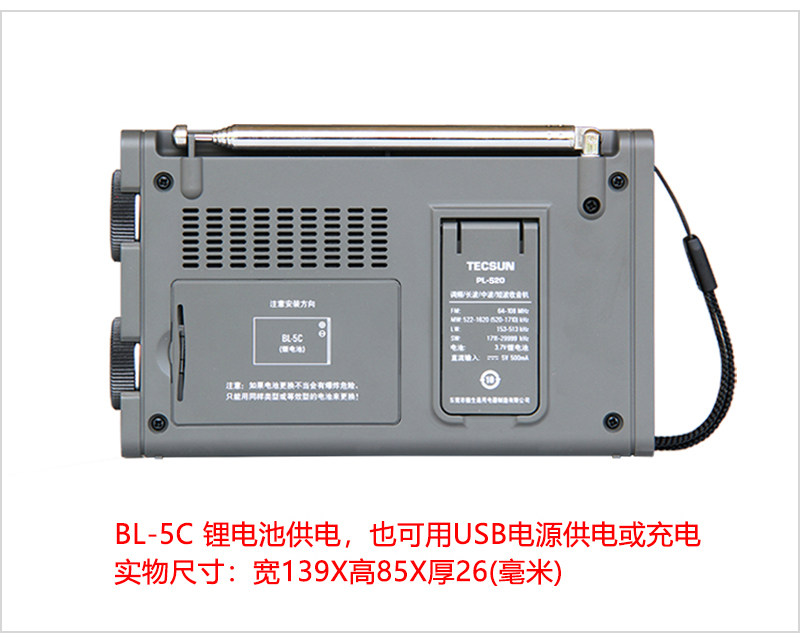
- Locate the battery compartment on the back of the radio.
- Open the battery compartment cover.
- Insert the provided BL-5C rechargeable battery, ensuring correct polarity.
- Close the battery compartment cover securely.
The radio can be powered by the BL-5C lithium battery or via a USB 5V DC power source for operation and charging.

3.2 Connecting External Devices
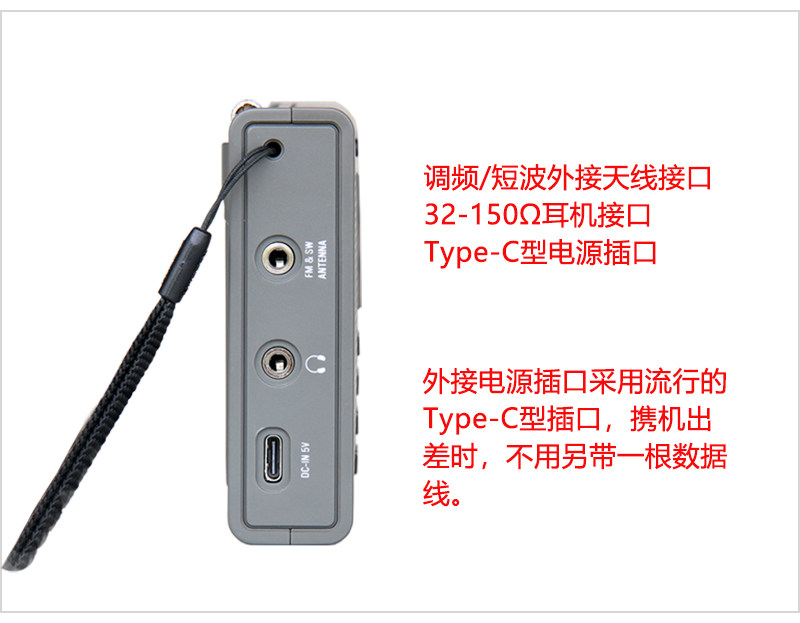
- External Antenna: For improved reception on Shortwave (SW) and FM bands, connect an external antenna to the dedicated jack on the side of the radio.
- Earphones: Plug in the provided earphones (or your own 32-150Ω earphones) into the headphone jack for private listening and FM stereo reception.
- Power/Charging: Use the Type-C power port for charging the internal battery or for continuous power supply.
4. Operating Instructions
4.1 Power On/Off
Press the POWER button located on the top right of the radio to turn it on or off. The radio features a user-friendly power switch function, allowing you to set an automatic shutdown timer (1-120 minutes) or disable it entirely.
4.2 Band Selection
Use the dedicated buttons (FM, MW, LW, SW) to select your desired frequency band. The radio supports FM stereo, Medium Wave (MW), Long Wave (LW), Short Wave (SW), and Single Sideband (SSB) communication signals.
4.3 Tuning Methods
The PL-520 offers seven convenient ways to tune into stations:
- ETM (Easy Tuning Mode): For convenient tuning with a radio frequency schedule function, making tuning faster.
- Automatic Search and Browse: Automatically scans and browses radio frequencies.
- Automatic Search and Browse Stored Stations: Scans through your saved stations.
- Manual Search (VF - Variable Frequency): Manually search for station frequencies.
- Manual Search (VM - Variable Memory): Manually search for stored stations.
- Direct Frequency Input: Directly enter the desired frequency using the numeric keypad.
- Direct Stored Station Address Input: Directly input the address number of a stored station.

4.4 SSB (Single Sideband) Operation
For Shortwave (SW) reception, the PL-520 supports Single Sideband (SSB) with a minimum step of 10Hz. Both Upper Sideband (USB) and Lower Sideband (LSB) can be received independently. Use the SSB button to toggle this mode and the SYNC/LSB/USB buttons for fine-tuning.
4.5 Storing and Recalling Stations
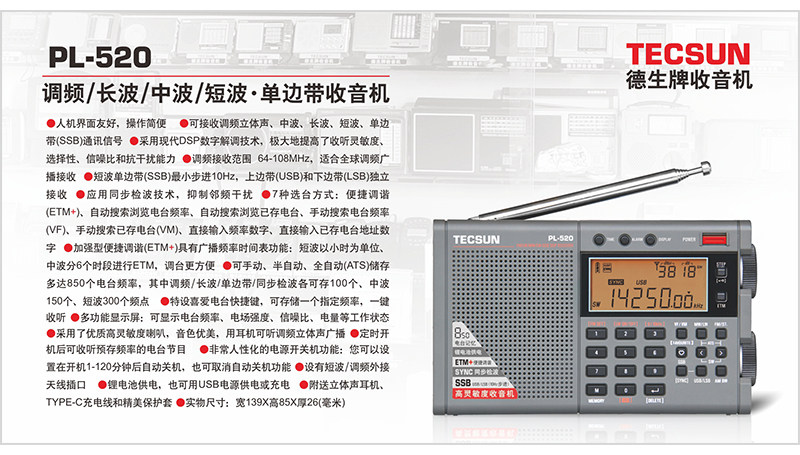
The radio can store up to 650 radio frequencies:
- 100 stations for FM/Long Wave
- 150 stations for Medium Wave
- 300 stations for Short Wave
Stations can be stored manually, semi-automatically, or fully automatically (ATS). Use the MEMORY (M) button to manage stored stations.
The "Favourite" function allows for quick, one-click access to your most frequently listened-to stations.
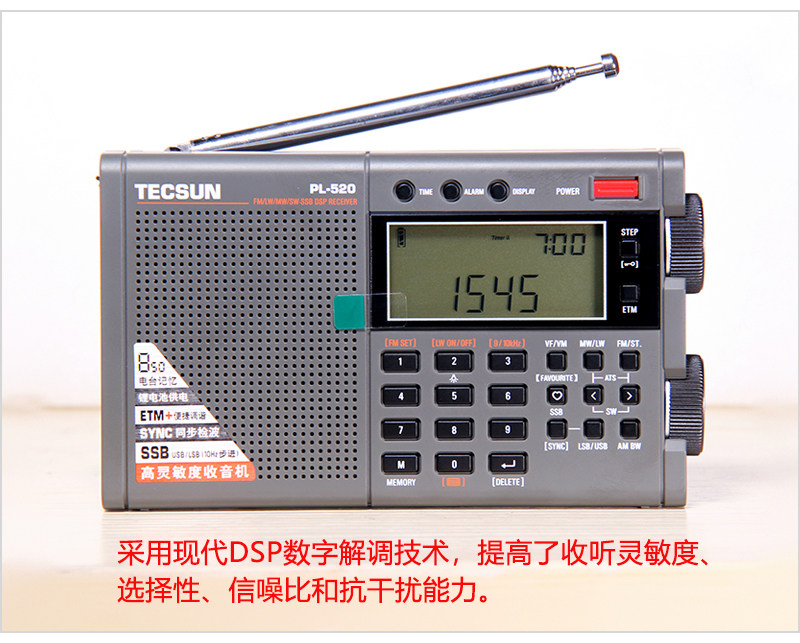
4.6 Display Information
The multi-function display shows various operational statuses, including:
- Radio frequency
- Electric field intensity
- Signal-to-noise ratio (S/N)
- Battery capacity
- Time and alarm status
4.7 Volume and Audio
Adjust the volume using the dedicated knob. The radio features high-quality, high-sensitivity speakers for clear sound. For stereo listening, use earphones with FM broadcasts.
5. Maintenance
5.1 Battery Care
- Use only the specified BL-5C rechargeable battery or a compatible equivalent.
- Charge the battery using the provided USB Micro Type-B cable and a 5V DC power source.
- Avoid overcharging or completely draining the battery to prolong its lifespan.
- If the radio will not be used for an extended period, remove the battery.
5.2 Cleaning
- Wipe the radio's exterior with a soft, dry cloth.
- Do not use liquid cleaners, abrasive pads, or chemical solvents, as these may damage the finish.
5.3 Storage
- Store the radio in a cool, dry place away from direct sunlight and extreme temperatures.
- Use the provided protective bag to prevent scratches and dust accumulation.
6. Troubleshooting
If you encounter issues with your Tecsun PL-520, please refer to the following common problems and solutions:
| Problem | Possible Cause | Solution |
|---|---|---|
| Radio does not power on. | Battery is drained or incorrectly installed. | Charge the battery or ensure it is installed with correct polarity. |
| Poor reception/static. | Weak signal, internal antenna not extended, or no external antenna connected for SW/FM. | Extend the telescopic antenna fully. For SW/FM, connect an external antenna if available. Try moving to an open area away from interference. |
| Display is blank or unresponsive. | Low battery or temporary software glitch. | Charge the battery. Try turning the radio off and on again. |
| Cannot tune to specific frequencies. | Incorrect band selected or tuning step. | Ensure the correct band (FM, MW, LW, SW) is selected. Check the tuning step settings (e.g., 9KHz/10KHz for MW). |
For more detailed troubleshooting, please refer to the included Chinese manual or contact customer support.
7. Specifications
| Feature | Detail |
|---|---|
| Brand Name | Tecsun |
| Model Number | PL-520 |
| Type | FM, MW, SW, LW, SSB |
| Body Material | Plastic |
| Style | Portable |
| Function | Built-In Speaker |
| Screen | Yes |
| Power Supply | Rechargeable Battery Pack (BL-5C), USB 5V DC |
| Battery Included | Yes |
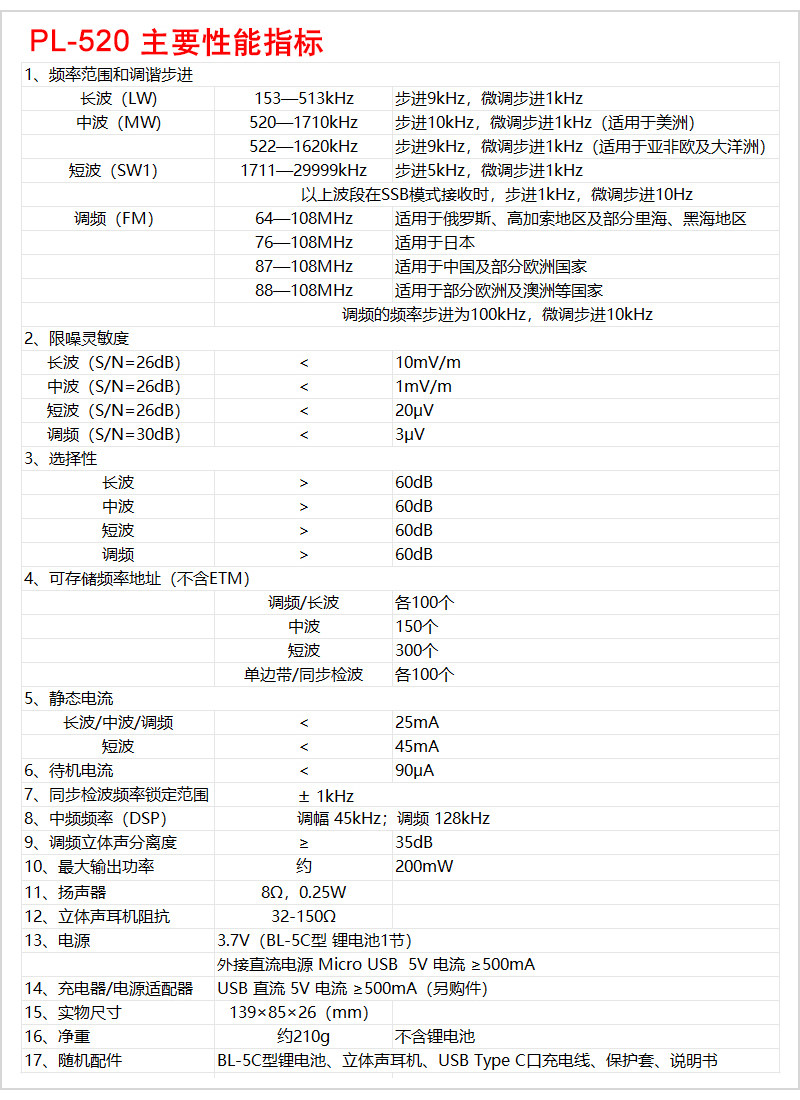
| Dimensions (WxHxD) | 139 x 85 x 26 mm |
| Weight | 210g (without battery) |
| FM Frequency Range | 64-108 MHz (Global), 87.5-108 MHz (EU, USA), 76-108 MHz (Japan), 64-108 MHz (Russia) |
| LW Frequency Range | 153 - 513 kHz (9kHz step, 1kHz fine-tune) |
| MW Frequency Range | 520 - 1710 kHz (10kHz step, 1kHz fine-tune for America) |
| SW Frequency Range | 1711 - 29999 kHz (5kHz step, 1kHz fine-tune) |
| FM Sensitivity (S/N=30dB) | < 3 uV |
| MW Sensitivity (S/N=26dB) | < 1 mV/m |
| LW Sensitivity (S/N=26dB) | < 10 mV/m |
| SW Sensitivity (S/N=26dB) | < 10 mV/m |
| FM Selectivity | > 60dB (±150KHz) |
| MW Selectivity | > 60dB (BW=3kHz, ±9KHz) |
| LW Selectivity | > 60dB (BW=3kHz, ±9kHz) |
| SW Selectivity | > 60dB (BW=3kHz, ±5kHz) |
| FM Stereo Crosstalk | > 35 dB |
| Audio Output (10% Distortion) | 200mW |
Note: Specifications are subject to change without notice.
8. User Tips
- Optimize Reception: For best Shortwave and FM reception, always extend the telescopic antenna fully. Consider using an external antenna for critical listening or in areas with weak signals.
- "Favourite" Function: Utilize the "Favourite" function to quickly save and access your most frequently listened-to stations. This is particularly useful for quickly switching between preferred broadcasts.
- ETM+ for Travel: The ETM+ (Easy Tuning Mode) with its radio frequency schedule function is ideal for travelers. It helps in quickly finding local stations when you are in a new region.
- Battery Life: To maximize battery life, consider using the automatic shutdown timer, especially when listening before sleep.
- SSB Fine-Tuning: When listening to SSB, use the 10Hz fine-tuning step for precise adjustment and clearer voice reception.
9. Warranty and Support
For warranty information, technical support, or service inquiries, please refer to the documentation provided at the time of purchase or contact the seller/manufacturer directly. Keep your purchase receipt as proof of purchase.