
Introduction
Thank you for choosing the Edifier P230 USB-C Wired Earbuds. These earbuds are designed to deliver high-fidelity audio with convenience and durability. Featuring a 12.4mm dynamic driver, Hi-Res Audio certification, and IP54 dust and splash resistance, they are suitable for various listening environments. This manual provides essential information for setting up, operating, and maintaining your earbuds.

Package Contents
Please check the package contents to ensure all items are present:
- Edifier P230 USB-C Wired Earbuds
- Silicone Ear Tips (S/M/L sizes)
- User Manual
- Safety Document

Setup
1. Power ON/OFF
The Edifier P230 earbuds are powered by your device via the USB-C connection.
- To Power On: Plug the product cable into the USB-C port on your device.
- To Power Off: Unplug the cable from your device.
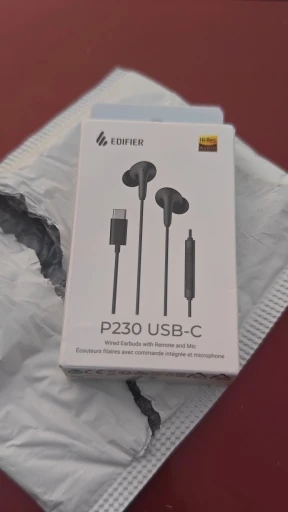
2. Ear Tip Selection and Fitting
For optimal sound quality and comfort, choose the ear tips that best fit your ears. The package includes S, M, and L sizes.
- Gently insert the earbuds into your ear canals.
- Adjust the angle until they feel secure and comfortable.
- Ensure a snug fit to maximize sound isolation and bass response.

Operating Instructions
1. In-Line Remote Controls
The earbuds feature an intuitive in-line remote for easy control of audio playback and calls. The remote is located on the right cable.

| Action | Button Press |
|---|---|
| Volume Up | Press '+' button x1 |
| Volume Down | Press '-' button x1 |
| Answer/End a Call | Press Multifunction Button (MFB) x1 |
| Play/Pause | Press MFB x1 |
| Next Track | Double-press MFB x2 |
| Previous Track | Triple-press MFB x3 |
| Activate Voice Assistant | Press and hold MFB |
Note: Button functions may vary depending on the source device, and control methods may differ by system or model.
2. EQ Settings (via EDIFIER ConneX App)
Customize your listening experience using the EDIFIER ConneX app. This feature is currently supported on Android devices only.
- Download the EDIFIER ConneX app from your device's app store.
- Connect your P230 earbuds to your Android device.
- Open the app to switch between various EQ modes:
- EDIFIER (Standard)
- Bass Boost (Default)
- Vocal
- Treble Boost
- Customized (allows for personalized EQ adjustments)

Maintenance
- Cleaning: Regularly clean the ear tips with a soft, dry cloth. For deeper cleaning, remove the silicone ear tips and wash them with mild soap and water, ensuring they are completely dry before reattaching.
- Cable Care: Avoid sharp bends or excessive pulling on the cable to prevent damage. Store the earbuds neatly to prevent tangling.
- Storage: When not in use, store the earbuds in a clean, dry place away from extreme temperatures and direct sunlight.
- Water and Dust Resistance: The earbuds are IP54 rated, meaning they are protected against limited dust ingress and splashes of water from any direction. They are not waterproof and should not be submerged in water. Avoid exposing them to heavy rain or prolonged moisture.
Troubleshooting
| Problem | Possible Solution |
|---|---|
| No sound from earbuds. |
|
| Microphone not working. |
|
| In-line controls not responding. |
|
| Poor sound quality / distorted audio. |
|
Specifications
| Feature | Detail |
|---|---|
| Model | P230 USB-C (EDF200216) |
| Driver Unit | 12.4mm Dynamic Driver |
| Frequency Response | 20Hz - 40kHz |
| Output Level | 94 ± 3 dB (A) |
| IP Rating | IP54 (Dust & Splash Resistant) |
| Cable Length | 1.2m (120 ± 3 cm) |
| Port Type | USB-C |
| Communication | Wired |
| Material | Metal, Plastic |
| Headphone Pads Material | Silicone |
| Microphone | Yes (High-Sensitivity Omnidirectional) |
| Volume Control | Yes |
| Control Button | Yes |
| App Support | Yes (EDIFIER ConneX, Android only) |
| Audio Certification | Hi-Res Audio |

User Tips
Based on user feedback, here are some tips to enhance your experience with the Edifier P230 USB-C earbuds:
- Hi-Fi Audio: For the best sound quality, especially with high-fidelity audio streams, wired earbuds like the P230 often outperform Bluetooth alternatives.
- No Charging Needed: Enjoy uninterrupted listening as these wired earbuds draw power directly from your device, eliminating the need for separate charging.
- Built-in DAC: The integrated USB-C DAC (Digital-to-Analog Converter) helps improve audio quality, particularly noticeable on Android devices.
- Bass Response: The 12.4mm dynamic drivers deliver deep and strong bass. If you prefer a more balanced sound, consider adjusting the EQ settings in the EDIFIER ConneX app.
- Comfort and Fit: Experiment with the included S/M/L ear tips to find the most comfortable and secure fit for your ears. This also optimizes sound isolation and bass.
- In-line Remote: The remote's button can be somewhat subtle to locate by touch. Familiarize yourself with its position and functions for easier control. Note that some advanced controls, like triple-press for previous track, might not work on all Android devices.
- Compatibility: These earbuds are generally compatible with most USB-C enabled smartphones, tablets, and laptops, and have been reported to work seamlessly with devices like Google Pixel.
Warranty and Support
For detailed warranty information, technical support, or service inquiries, please refer to the official Edifier website or the comprehensive user manual PDF.
You can access the full user manual PDF for additional information and support:
Contact Edifier Official Store for further assistance.