
1. Introduction
The Tecsun PL-520 is an advanced all-band DSP (Digital Signal Processing) radio receiver, offering reception across FM, Longwave (LW), Mediumwave (MW), Shortwave (SW), and Single Sideband (SSB) frequencies. It features modern DSP digital demodulation technology for enhanced sensitivity, selectivity, signal-to-noise ratio, and anti-interference capabilities. This manual provides detailed instructions for setting up, operating, and maintaining your PL-520 radio.

Figure 1: Tecsun PL-520 Radio with key features highlighted.
2. Package Contents
Please check the package for the following items:
- 1 x Tecsun PL-520 Radio
- 1 x BL-5C Lithium Battery
- 1 x USB Type-C Charging Cable
- 1 x Stereo Earphones
- 1 x Protective Case
- 1 x User Manual (Chinese)
3. Setup
3.1 Battery Installation
- Locate the battery compartment on the rear of the radio.
- Open the battery compartment cover.
- Insert the provided BL-5C lithium battery, ensuring correct polarity.
- Close the battery compartment cover securely.
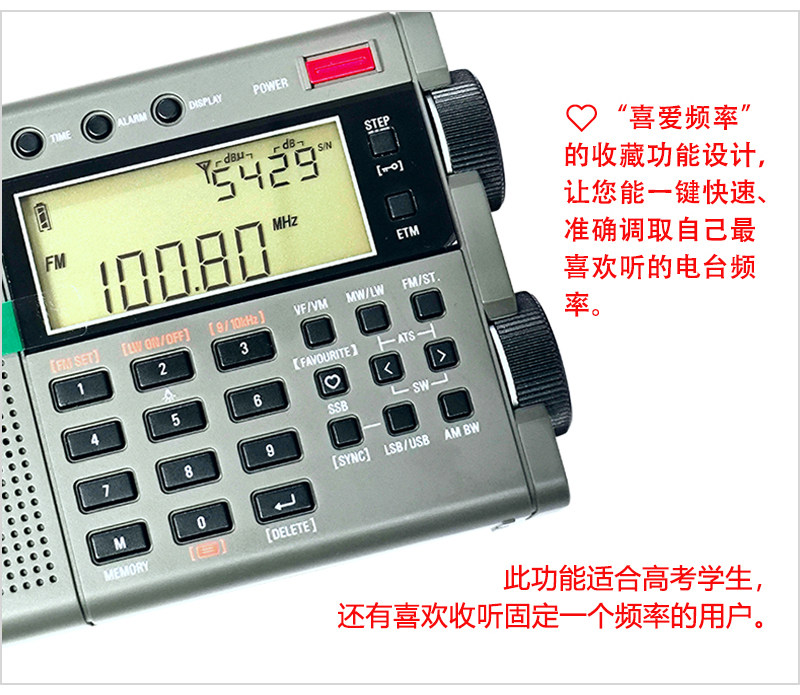
Figure 2: Battery compartment for BL-5C lithium battery.
3.2 Powering the Radio
The PL-520 can be powered by the installed BL-5C lithium battery or via USB. To charge the battery or power the radio directly, connect the supplied USB Type-C cable to the DC-IN 5V port on the side of the radio and to a USB power source (e.g., computer, USB wall adapter).
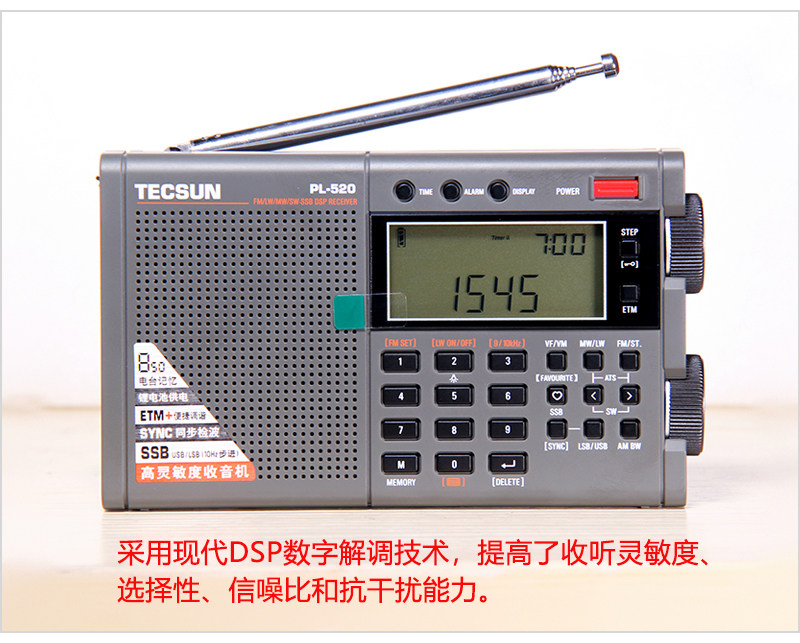
Figure 3: Side view showing external ports including Type-C power input.
3.3 Antenna Connection
- Built-in Telescopic Antenna: For FM and Shortwave (SW) reception, extend the telescopic antenna fully.
- External Antenna: For improved FM and SW reception, connect an external antenna to the dedicated FM & SW ANTENNA jack on the side of the radio.
4. Operating Instructions
4.1 Power On/Off
Press the POWER button located on the top right of the radio to turn it on or off.
4.2 Volume Control
Adjust the VOLUME knob on the right side of the radio to control the audio output level.
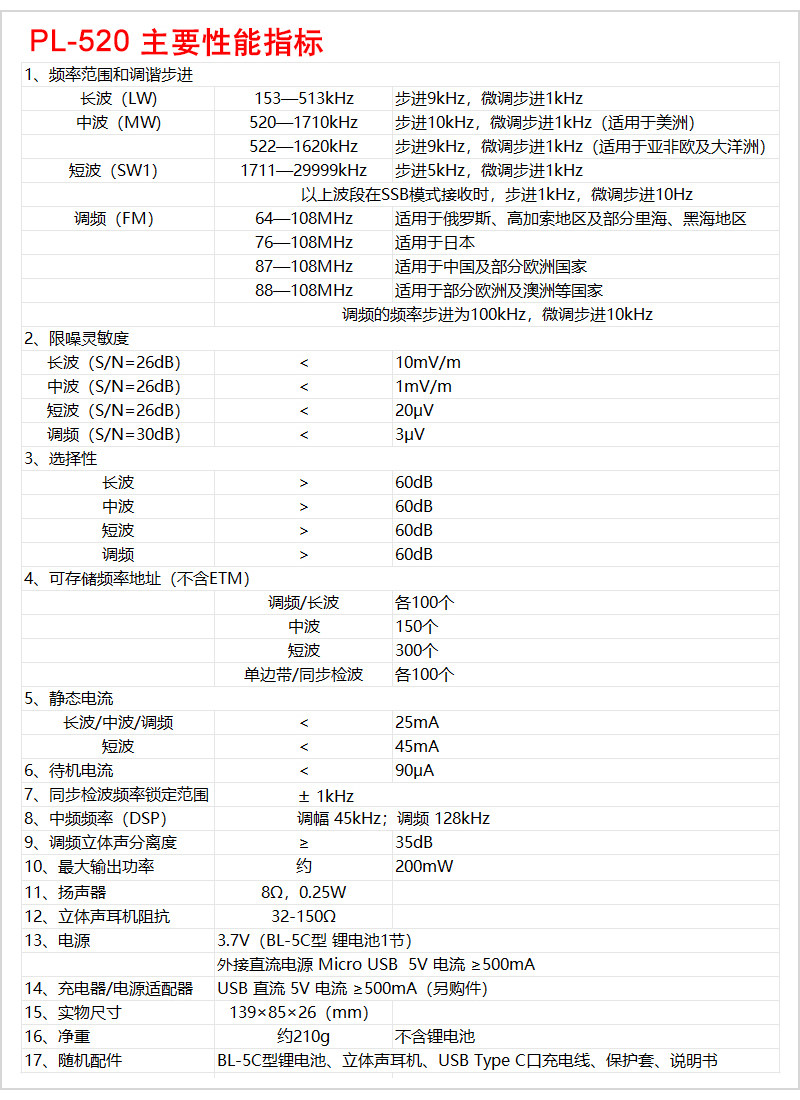
Figure 4: Volume and Tuning knobs on the side of the radio.
4.3 Band Selection
Press the corresponding band buttons (FM, MW/LW, SW) to switch between frequency bands. For SSB, press the SSB button.
4.4 Tuning Methods
The PL-520 offers multiple ways to tune into stations:
- Manual Tuning: Use the TUNING knob on the right side for continuous frequency adjustment. Use the STEP buttons for fine-tuning.
- Direct Frequency Input: Enter the desired frequency directly using the numeric keypad (0-9) and then press the appropriate band button or Enter.
- ETM+ (Easy Tuning Mode Plus): This feature allows for convenient scanning and storage of stations based on time segments (shortwave by hour, medium wave by 6 segments). Press the ETM button to activate.
- ATS (Auto Tuning Storage): Automatically scans and stores available stations within the current band.
- VF/VM (View Frequency/View Memory): Browse frequencies or stored stations.
- Favorite Frequency: Store a frequently listened-to station using the FAVOURITE button for one-key access.

Figure 5: Display showing favorite frequency function.
4.5 SSB (Single Sideband) Operation
When in SW band, press the SSB button to activate SSB mode. Use the LSB/USB button to switch between Lower Sideband and Upper Sideband. The tuning step in SSB mode is 1kHz, with a fine-tuning step of 10Hz.
4.6 Display Information
The multi-function display shows various operating statuses, including:
- Current frequency
- Signal strength
- Signal-to-noise ratio (S/N)
- Battery level
- Time (if set)
4.7 Timer Functions
- Timed Power On: Set a specific time for the radio to turn on and tune to a pre-stored frequency.
- Smart Sleep Shutdown: You can set the radio to automatically turn off after 1 to 120 minutes. This function can also be canceled.
4.8 Lock Function
Press the LOCK button to prevent accidental changes to settings or frequency.
4.9 MW Step Selection
The radio supports 9KHz and 10KHz tuning steps for Mediumwave (MW), suitable for different regions (e.g., 9KHz for Asia/Europe/Africa/Oceania, 10KHz for Americas).
5. Maintenance
- Cleaning: Use a soft, dry cloth to clean the radio's exterior. Do not use abrasive cleaners or solvents.
- Battery Care: If the radio will not be used for an extended period, remove the BL-5C battery. Recharge the battery regularly to maintain its lifespan.
- Storage: Store the radio in a cool, dry place away from direct sunlight and extreme temperatures.
- Accessories: Keep the stereo earphones, USB Type-C charging cable, and protective case in good condition.
6. Troubleshooting
- No Power: Ensure the BL-5C battery is correctly installed and charged. Try powering the radio via the USB Type-C cable.
- Poor Reception: Extend the telescopic antenna fully. Try connecting an external antenna. Adjust the radio's position. For MW, try switching between 9KHz and 10KHz steps if applicable to your region. For SW, try synchronous detection or narrow bandwidth.
- No Sound: Check the volume level. Ensure earphones are properly connected if in use.
- Interference: Utilize the synchronous detection feature to suppress adjacent channel interference. Try adjusting the bandwidth setting (Wide/Narrow).
- Buttons Unresponsive: Check if the lock function is activated. Deactivate it if necessary.
7. Specifications
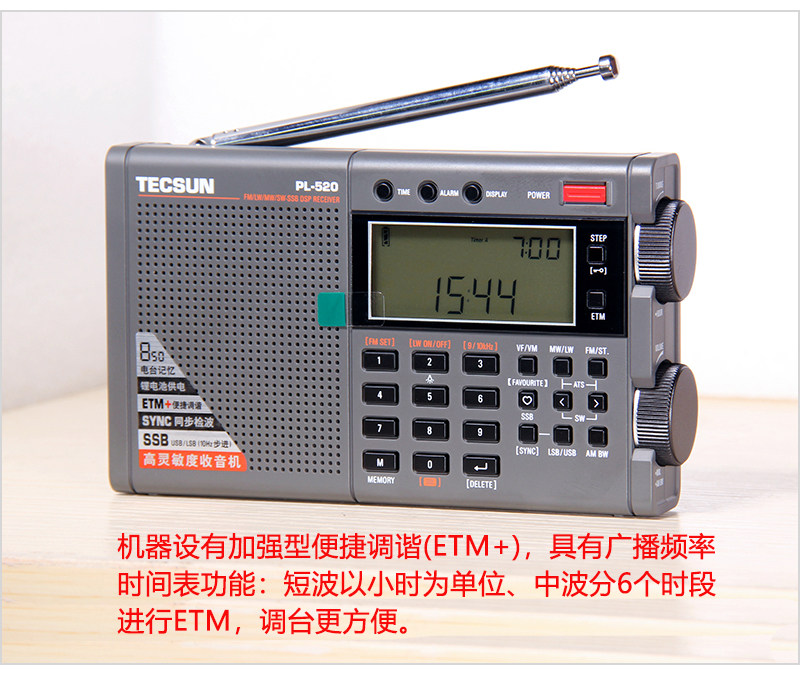
Figure 6: Detailed Specifications Table.
| Feature | Specification |
|---|---|
| Frequency Range | |
| FM | 64-108MHz (Russia/Caucasus), 76-108MHz (Japan), 87-108MHz (China/Europe), 88-108MHz (Europe/Australia) |
| LW | 153-513 kHz |
| MW | 520-1710 kHz (Americas/Oceania), 522-1620 kHz (Asia/Africa/Europe/Oceania) |
| SW | 1711-29999 kHz |
| SSB Tuning Step | 1kHz (step), 10Hz (fine-tune) |
| Sensitivity | |
| FM (S/N=30dB) | < 3 μV |
| MW (S/N=26dB) | < 1 mV/m |
| LW (S/N=26dB) | < 10 mV/m |
| SW (S/N=26dB) | < 20 μV |
| Selectivity | |
| FM | > 60dB (±150KHz) |
| MW/LW/SW | > 60dB (BW=3kHz, ±9KHz/±5KHz) |
| FM Stereo Separation | > 35 dB |
| Max Output Power | 200mW |
| Speaker | 8Ω, 0.25W |
| Stereo Headphone Impedance | 32-150Ω |
| Power Supply | 3.7V (1x BL-5C type lithium battery) |
| External DC Power | Micro USB 5V, current ≥500mA |
| Dimensions (W×H×D) | 139 × 85 × 26 mm |
| Net Weight | Approx. 210g (without lithium battery) |
8. User Tips
- Explore Different Bands: Don't limit yourself to just FM. Experiment with LW, MW, and especially SW to discover a wide range of international broadcasts, amateur radio, and utility signals.
- Fine-Tune SSB: When listening to SSB, slight adjustments with the fine-tuning knob or 10Hz step buttons can significantly improve clarity.
- External Antenna for SW: For serious shortwave listening, consider investing in a good external antenna connected to the radio's dedicated jack. This can dramatically improve reception quality.
- Battery Life: To maximize battery life, use the smart sleep shutdown function when you plan to fall asleep while listening.
9. Warranty and Support
For warranty information, technical support, or service inquiries, please refer to the documentation provided at the time of purchase or contact your retailer. Keep your purchase receipt as proof of purchase.