1. Introduction
The iKF V11 Pro is a versatile gaming headset designed for an immersive audio experience across multiple platforms. Featuring innovative four-mode connectivity, professional-grade 7.1 virtual surround sound, and advanced microphone technology, it delivers clear communication and precise audio positioning for competitive gaming and everyday use. This manual provides detailed instructions for setup, operation, maintenance, and troubleshooting to ensure optimal performance of your headset.

2. Package Contents
Please check the box for the following items:
- iKF V11 Pro Gaming Headset
- 2.4GHz USB-C Wireless Dongle
- USB-A Adapter for 2.4GHz Dongle
- 3.5mm Audio Cable
- Type-C Charging Cable
- User Manual (this document)
3. Product Overview
The iKF V11 Pro headset features an ergonomic design for comfort during extended use. Key components and features include:
- 53mm Drivers: For powerful and clear audio.
- Detachable Microphone: With AI intelligent noise reduction and 360° omnidirectional pickup.
- Control Buttons: For volume adjustment and other functions.
- Adjustable Headband: For a comfortable fit.
- Multiple Connection Modes: 2.4GHz wireless, Bluetooth V6.0, and wired 3.5mm audio.
- NTC Smart Temperature Control: Advanced technology for stable performance.


4. Setup Instructions
The iKF V11 Pro offers flexible connectivity options to suit various devices and preferences.
4.1. 2.4GHz Wireless Connection (Low Latency)
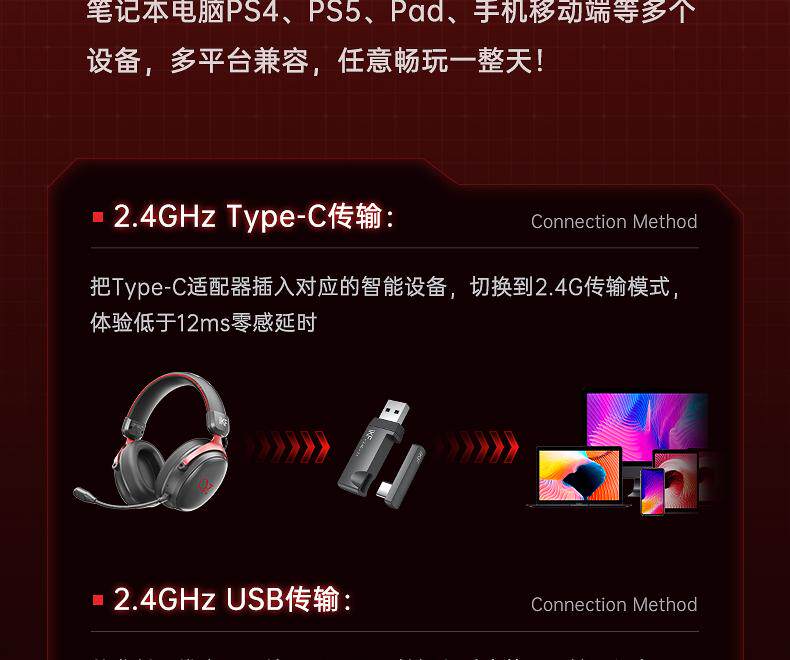
This mode provides ultra-low latency (under 12ms) for a seamless gaming experience, ideal for PCs, PS4, PS5, and other compatible devices.
- For USB-C Devices: Insert the 2.4GHz USB-C wireless dongle directly into your device's Type-C port.
- For USB-A Devices: Attach the USB-A adapter to the 2.4GHz USB-C wireless dongle, then insert the combined unit into your device's USB-A port.
- The headset will automatically connect to the dongle. Ensure the headset is powered on.

4.2. Bluetooth V6.0 Connection
Connect your headset wirelessly to Bluetooth-enabled devices such as smartphones, tablets, and laptops.
- Power on the headset.
- Activate Bluetooth pairing mode on the headset (refer to the headset's control button section for specific instructions, usually a long press of the power button or a dedicated Bluetooth button).
- On your device, go to Bluetooth settings and search for available devices.
- Select "iKF V11 Pro" from the list to pair.

4.3. Wired Connection
For devices without wireless capabilities or when you prefer a wired connection, use the included 3.5mm audio cable.
- Plug one end of the 3.5mm audio cable into the headset's audio jack.
- Plug the other end into the 3.5mm audio output port of your device (e.g., PC, iPad, laptop).
- The headset will function as a wired audio device.
5. Operating Instructions
5.1. Power On/Off
- Power On: Press and hold the Power button for approximately 3 seconds until the indicator light turns on.
- Power Off: Press and hold the Power button for approximately 5 seconds until the indicator light turns off.
5.2. Volume Control
- Increase Volume: Press the Volume Up button.
- Decrease Volume: Press the Volume Down button.
5.3. Microphone Usage
The detachable microphone features AI intelligent noise reduction and a 360° omnidirectional pickup pattern for clear voice communication.
- Attach/Detach: Insert the microphone into the designated port on the headset or remove it as needed.
- Mute/Unmute: Use the dedicated microphone mute button on the headset (if available) or your device's settings.
- AI Noise Reduction: The microphone automatically employs AI noise reduction to filter out background noise, enhancing voice clarity.
5.4. Gaming Audio Features
The iKF V11 Pro is optimized for gaming with professional-grade audio features:
- 7.1 Virtual Surround Sound: Provides a panoramic soundstage and precise sound positioning, crucial for competitive gaming.
- Footstep Enhancement: Low-frequency boost to clearly identify enemy footsteps.
- Gunshot Enhancement: Accurate positioning of gunshots to anticipate and react quickly.

5.5. Battery and Charging
The headset is equipped with a 1000mAh battery, offering up to 125 hours of battery life.
- Charging: Connect the Type-C charging cable to the headset's Type-C port and a power source.
- Charging Indicator: The indicator light will show charging status (e.g., red for charging, blue/off for fully charged).
6. Maintenance
- Cleaning: Use a soft, dry cloth to clean the headset. Do not use abrasive cleaners or solvents.
- Storage: Store the headset in a cool, dry place away from direct sunlight and extreme temperatures.
- Water Resistance: The headset has an IPX5 waterproof rating, meaning it can resist a sustained, low-pressure water jet spray. Do not immerse it in water.
- Dust Resistance: The headset has an IP5X dustproof rating, offering protection against dust ingress.
7. Troubleshooting
- No Sound:
- Check volume levels on both the headset and your device.
- Ensure the correct audio output device is selected in your system settings.
- For wireless connections, ensure the headset is paired/connected and within range.
- For wired connections, ensure the 3.5mm cable is fully inserted.
- Microphone Not Working:
- Ensure the microphone is securely attached and not muted.
- Check microphone input settings on your device.
- Test the microphone on another device if possible.
- Connection Issues (2.4GHz/Bluetooth):
- Ensure the headset is in pairing mode (for Bluetooth) or the dongle is properly inserted (for 2.4GHz).
- Move closer to your device to ensure you are within the wireless range (10-20m).
- Restart both the headset and your device.
- Clear previous Bluetooth pairings on your device and re-pair.
- Battery Not Charging:
- Ensure the Type-C charging cable is properly connected to both the headset and the power source.
- Try a different charging cable or power adapter.
- Ensure the power source is active.
8. Specifications
| Feature | Specification |
|---|---|
| Brand Name | iKF |
| Model | V11 Pro |
| Material | Metal, Plastic |
| Battery Capacity | 1000mAh |
| Max Wireless Range | 10m-20m |
| Category | Earphones & Headphones |
| Features | With microphone, Dual Connection, Active Noise Cancelling (for mic), Waterproof |
| With Microphone | Yes |
| Is wireless | Yes |
| Waterproof Rating | IPX5 |
| Dustproof Rating | IP5X |
| Volume Control | Yes |
| Control Button | Yes |
| Vocalism Principle | Dynamic |
| Wireless Type | Bluetooth (V6.0) |
| Connectors | Type-C (for charging/2.4G dongle) |
| Communication | Wireless+Wired |
| Certification | CE |
| Support Memory Card | No |
| Impedance | 16Ω |
| Voice Prompts | Supported |
| Compatible Platforms | AliOS, ANDROID, Windows, Windows Phone, iOS |
| Sensitivity | 94dB/mW |
| Frequency Response Range | 20-20000Hz |
| Power Supply Method | Battery |
| Charging Method | Wired charging (Type-C) |
| Single or Double Ear | Supports both ears |
| Voice Assistant Built-in | No |
9. User Tips
- For the best gaming experience, especially in competitive titles, utilize the 2.4GHz wireless connection for its ultra-low latency.
- Experiment with the 7.1 virtual surround sound settings in your game or system audio panel to find the optimal spatial audio for your preferences.
- Keep the headset charged to maximize the benefit of its long battery life. A quick charge before a long session can prevent interruptions.
- When using the microphone, ensure it is positioned correctly near your mouth for the clearest voice pickup and most effective AI noise reduction.
10. Warranty and Support
The iKF V11 Pro Gaming Headset comes with a standard manufacturer's warranty. Please refer to your purchase documentation for specific warranty terms and duration. For technical support, troubleshooting assistance, or warranty claims, please contact the retailer or manufacturer's customer service.