
1. Introduction
Thank you for choosing the Loefme MD603D Dehumidifier. This device is designed to effectively remove excess moisture from your indoor environment, helping to prevent dampness, mold growth, and musty odors. With its quiet operation, intelligent features, and portable design, it creates a healthier and more comfortable living space. Please read this manual thoroughly before operating the unit and retain it for future reference.

2. Safety Instructions
- Always place the dehumidifier on a stable, level surface.
- Ensure the power cord is not damaged or pinched. Do not operate with a damaged cord or plug.
- Keep the unit away from water sources and do not immerse it in water.
- Do not block the air inlet or outlet vents. Maintain at least 20 cm clearance around the unit for proper airflow.
- Unplug the unit before cleaning or performing any maintenance.
- Do not allow children to operate the dehumidifier unsupervised.
- Operate the unit within the specified temperature range of 10-35℃.
- Empty the water tank regularly to prevent overflow and ensure efficient operation.
3. Product Overview
Components
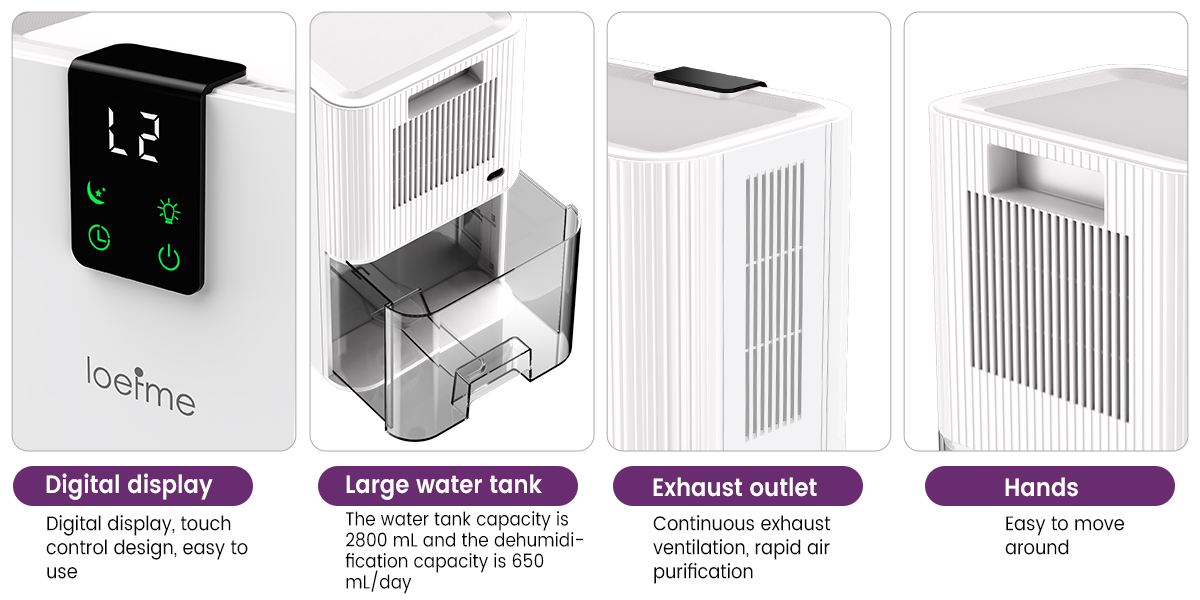
- Digital Display
- Control Panel (Touch Controls)
- Air Inlet/Outlet Vents
- 2.8L Water Tank (Removable)
- Water Level Indicator
- Power Port
Features
- High Dehumidification Capacity: Removes up to 650ml of moisture per day.
- Large Water Tank: 2.8-liter capacity reduces frequency of emptying.
- Quiet Operation: Operates at less than 35dB, ideal for bedrooms and quiet spaces.
- Automatic Defrosting: Ensures efficient operation even in cooler conditions.
- Timing Function: Set the unit to turn off automatically after 6, 8, or 10 hours.
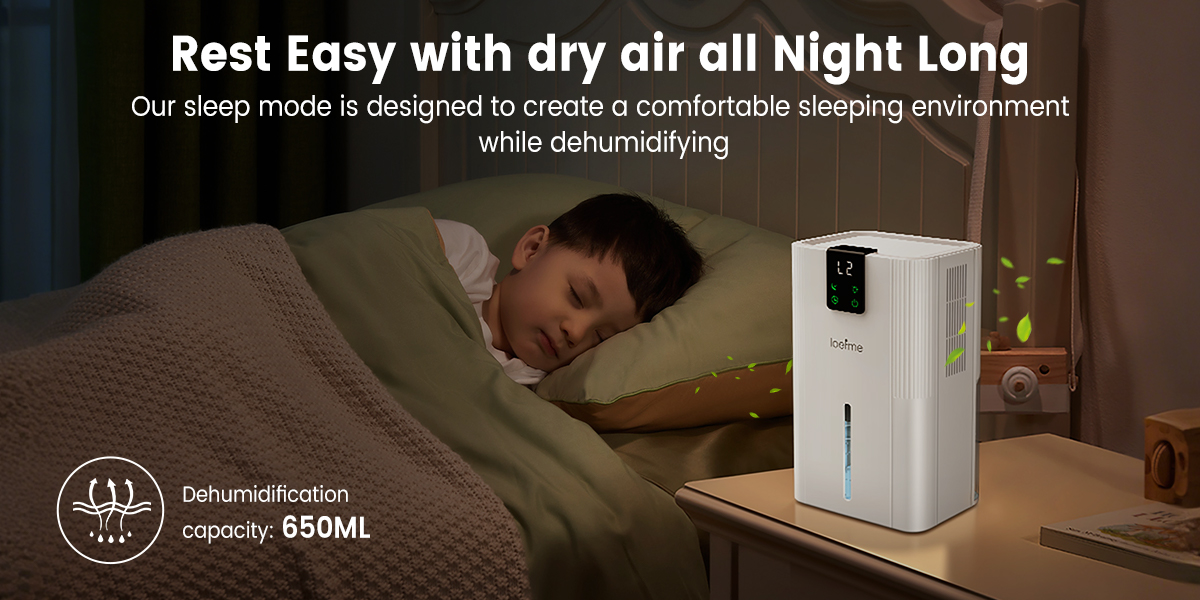
- Night Sleep Mode: Ultra-quiet operation with atmosphere lights off for undisturbed sleep.
- Colorful RGB Lights: Water tank features customizable RGB lighting, controllable separately.
- Automatic Shut-Off: Unit automatically turns off when the water tank is full, with an LED indicator.
- LED Display: Clear digital display for easy monitoring and control.
- Portable Design: Lightweight with a handle for easy relocation between rooms.
4. Setup
Unpacking
- Carefully remove the dehumidifier from its packaging.
- Check for any signs of damage. If damaged, do not operate and contact customer support.
- Remove all packaging materials and dispose of them responsibly.
Placement
- Place the dehumidifier on a firm, level surface in the desired room (e.g., bedroom, bathroom, kitchen, cloakroom, study).
- Ensure there is at least 20 cm (8 inches) of space around all sides of the unit to allow for proper air circulation.
- Avoid placing the unit near heat sources, in direct sunlight, or in areas with excessive dust.
- Do not place the unit directly on carpet or rugs that might obstruct the airflow.

Power Connection
- Ensure the water tank is correctly inserted into the unit.
- Plug the power cord into a suitable electrical outlet (220V).
5. Operating Instructions
Control Panel
The dehumidifier features an intuitive touch control panel with a digital display. The main controls include:
- Power Button (Switch): Turns the unit On/Off.
- Timing Function Button: Sets the automatic shut-off timer.
- Night Sleep Mode Button: Activates quiet operation and turns off atmosphere lights.
- RGB Light Button: Controls the colorful lights in the water tank.

Basic Operation
- Power On: Press the Power Button to turn on the dehumidifier. The digital display will illuminate.
- Automatic Operation: The unit will begin to dehumidify automatically. It is designed to regulate humidity to an ideal level.
- Setting the Timer: Press the Timing Function Button repeatedly to cycle through the available timer settings (e.g., 6 hours, 8 hours, 10 hours). The unit will operate for the selected duration and then automatically shut off.
- Night Sleep Mode: Press the Night Sleep Mode Button to activate this function. The unit will operate at its lowest noise level (<35dB), and the atmosphere lights will turn off to ensure a peaceful sleeping environment.
- Controlling RGB Lights: Press the RGB Light Button to turn on or change the colorful lights in the water tank. These lights can be controlled separately from the dehumidification function.
- Water Tank Full: When the 2.8L water tank is full, the dehumidifier will automatically shut down, and an LED indicator light will turn on to alert you to empty the tank.
- Power Off: Press the Power Button again to turn off the dehumidifier.
6. Maintenance
Regular maintenance ensures optimal performance and extends the lifespan of your dehumidifier.
Emptying the Water Tank
- When the water tank is full, the unit will stop operating, and the 'Water Full' indicator will light up.
- Carefully pull out the water tank from the unit.
- Pour out the collected water.
- Rinse the water tank with clean water and dry it thoroughly before reinserting it into the dehumidifier. Ensure it is securely in place.

Cleaning the Unit
- Exterior: Wipe the exterior of the dehumidifier with a soft, damp cloth. Do not use abrasive cleaners or solvents.
- Air Filter (if applicable): While not explicitly mentioned, most dehumidifiers have an air filter. If your model includes one, gently remove it and clean it with a vacuum cleaner or wash it with warm, soapy water. Ensure it is completely dry before reinserting.
- Storage: If storing the unit for an extended period, ensure the water tank is empty and clean, and the unit is dry. Store it in a cool, dry place.
7. Troubleshooting
Before contacting customer support, please refer to the following troubleshooting guide:
| Problem | Possible Cause | Solution |
|---|---|---|
| Dehumidifier does not turn on. | No power supply. Water tank is full or incorrectly inserted. | Check if the unit is properly plugged in. Empty the water tank and ensure it is correctly reinserted. |
| No water is collected. | Room temperature is too low. Humidity level is already low. Air vents are blocked. | Ensure room temperature is within 10-35℃. The unit may not collect water if humidity is below optimal levels. Check and clear any obstructions from air inlet/outlet. |
| Unit is too noisy. | Unit is not on a level surface. Air vents are blocked. Foreign object inside. | Place the unit on a stable, level surface. Ensure vents are clear. Turn off and unplug the unit, then check for any foreign objects. If noise persists, use Night Sleep Mode for quieter operation. |
| Water tank full indicator is on, but tank is not full. | Water tank sensor malfunction. Water tank not properly seated. | Remove and reinsert the water tank firmly. If the issue persists, contact customer support. |
8. Specifications
| Attribute | Specification |
|---|---|
| Brand Name | Loefme |
| Model Number | MD603D |
| Type | Desiccant Dehumidifier |
| Dehumidification Capacity (pints / 24h) | 650ml |
| Water Tank Capacity (l) | 2.8L |
| Power (W) | 60W |
| Voltage | 220 V |
| Working Temperature Range | 10-35℃ |
| Dimensions (L x W x H) | 186mm x 142mm x 340mm |
| Application Area | 11 - 20 M² |
| Dehumidification Volume | <1.1L/h |
| Noise Level | <35dB (in Sleep Mode) |
| Functions | Automatic Bucket Full Shut-Off, Automatic Defrost, Bucket Full Indicator Light, LED Display, Timing, Night Sleep Mode, RGB Lights |
| Certification | CE, RoHS |
| Origin | Mainland China |
9. User Tips
- For optimal performance, close windows and doors in the room where the dehumidifier is operating.
- Utilize the Night Sleep Mode in bedrooms to ensure a quiet environment while still effectively removing moisture.
- Empty the water tank regularly, especially if the unit is running continuously, to prevent interruptions in operation.
- Consider using the timing function to run the dehumidifier during off-peak electricity hours or when you are away from home.
- The colorful RGB lights can serve as a subtle night light or simply add ambiance to your room.
10. Warranty and Support
For warranty information or technical support, please refer to the seller's policy or contact the retailer where you purchased the product. Keep your purchase receipt as proof of purchase.