
Introduction
The WITRN Ripple & Cable Resistance Measurement Kit is a versatile tool designed for precise measurement of data cable internal resistance, ripple, voltage, and current. It functions as a multi-function adapter board and an electronic load, compatible with WITRN K2 and other Type-A USB testers. This manual provides instructions for the UZ004-Kit and the CRM-Kit (comprising GL001 and CT003 modules).

Components Overview
- CRM-Kit (GL001 + CT003): This kit includes the GL001 multi-interface adapter and the CT003 electronic load module. It is designed for comprehensive cable resistance and ripple measurements.
- UZ004-Kit: A simplified edition for cable resistance measurement, featuring D+ D- isolation.


Setup and Connection
Proper connection is crucial for accurate measurements and safe operation. Refer to the detailed diagram below for connection instructions.
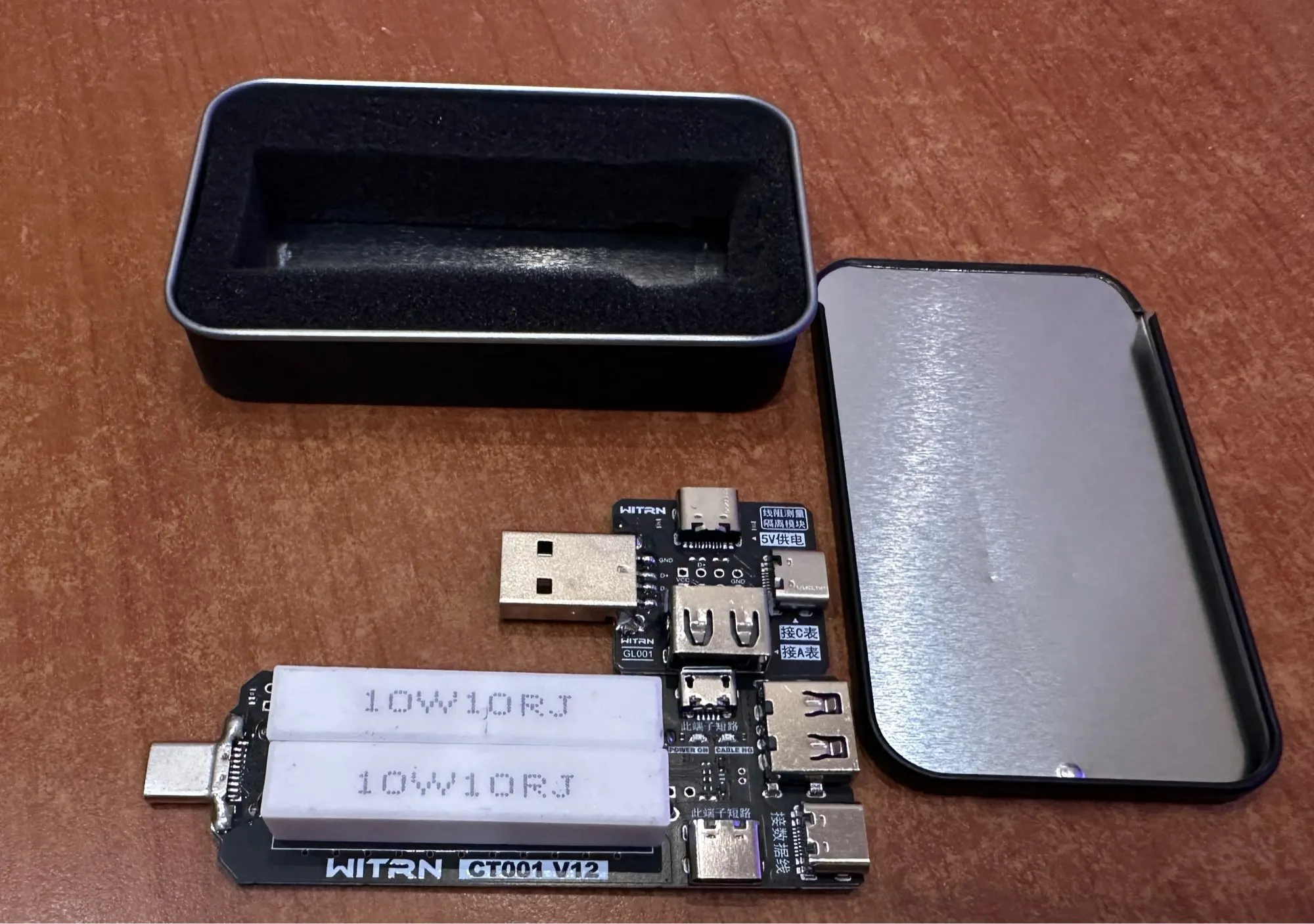
CRM-Kit (GL001 + CT003) Setup:
- GL001 Module:
- Connect the USB-A male end of the GL001 to a 5V power source (e.g., a USB charger).
- Connect the USB-C female port of the GL001 to your WITRN K2 or compatible USB tester.
- Ensure the switch on the GL001 is set to the '数据线' (data cable) position for cable resistance measurement.
- CT003 Module:
- Connect the USB-C male end of the CT003 to your WITRN K2 or compatible USB tester (the other end of the tester from GL001).
- Connect the data cable you wish to test to the USB-C female port of the CT003.
- Warning: The CT003 V10 module can reach high temperatures during operation. Ensure adequate ventilation and use a 5V power supply with at least 2A output. D+ D- isolation is mandatory for certain measurements.
UZ004-Kit Setup:
- Connect the USB-A male end of the UZ004 to a power source.
- Connect your USB tester (e.g., WITRN K2) to one of the output ports (USB-A female, USB-C female, or Micro USB female) on the UZ004.
- Connect the cable under test to the appropriate port on the UZ004.
- Ensure the 'D+ D- Isolation' switch is engaged as required for your measurement. D+ D- isolation is mandatory during measurement to prevent interference.
Operating Instructions
- Power On: Once connected as per the setup instructions, power on your USB tester (e.g., WITRN K2). The kit draws power from the connected source.
- Cable Resistance Measurement:
- For CRM-Kit (GL001+CT003): Ensure GL001 switch is on '数据线' (data cable). Connect the cable to be tested between the CT003 and your device/load. The WITRN K2 will display the cable resistance.
- For UZ004-Kit: Connect the cable to be tested to the UZ004. Activate D+ D- isolation if necessary. The tester will show the resistance.
- Electronic Load Function: The kit can act as an electronic load. The CT003 module, in particular, can load up to 1A. Use the integrated button or switch on the module to apply a constant load for testing power supplies or cables under load.
- Voltage/Current Measurement: When connected to a USB tester, the kit allows for pass-through voltage and current measurement of the connected device or power source.
- Ripple Measurement: The kit facilitates ripple measurement when used with a compatible USB tester that supports this function.
Maintenance
- Keep the modules clean and free from dust and debris. Use a soft, dry cloth for cleaning.
- Avoid exposing the modules to extreme temperatures or humidity.
- Do not attempt to disassemble the modules, as this may void the warranty and cause damage.
- Store the kit in a safe place when not in use to prevent physical damage.
Troubleshooting
- No Reading on Tester:
- Check all connections to ensure they are secure.
- Verify that the power source is active and providing sufficient power (e.g., 5V/2A for CT003).
- Ensure switches (e.g., '数据线' on GL001, 'D+ D- Isolation' on UZ004) are in the correct position for the desired measurement.
- High Temperature Warning (CT003): The CT003 module can get hot during use, especially under load. This is normal. Ensure adequate ventilation and avoid touching the resistors directly. If temperatures are excessively high, reduce the load or disconnect for a cool-down period.
- Inaccurate Readings:
- Ensure all connections are clean and free of corrosion.
- If using adapters for different cable types (e.g., Micro USB, Lightning), be aware that these can introduce additional resistance and affect accuracy. Direct Type-C connections are recommended for best results.
- Recalibrate your USB tester if it supports this function.
Specifications
| Feature | Detail |
|---|---|
| Type | Module (Cable Resistance Measurement Kit) |
| Origin | Mainland China |
| Compatibility | WITRN K2, Type-A USB testers |
| Load Capacity (CT003) | Up to 1A (constant load via button/switch) |
| Dimensions (Package) | 10 cm (L) x 7 cm (W) x 5 cm (H) |
| Weight (Package) | 0.1 kg |
| Connectors | USB-A (Male/Female), USB-C (Male/Female), Micro USB (Female) |
| Special Features | Ripple Measurement, Cable Resistance Measurement, Electronic Load, D+ D- Isolation |
User Tips
- The kit primarily supports Type-C connections for direct cable testing. For Lightning or Micro USB cables, adapters can be used, but be aware that they might introduce additional resistance and affect measurement accuracy.
- Utilize the dedicated button or switch on the electronic load module (CT003) to apply a constant load, which is useful for testing power supplies or cables under specific current draw conditions.
- When using the CT003 module, especially under load, it is normal for the resistors to generate heat. Ensure good ventilation and avoid prolonged direct contact with the hot components.
Warranty and Support
This product comes with a 1-year warranty from the date of receipt. In case of defective merchandise within the warranty period, a full refund or replacement will be provided.
For warranty claims or technical support, please contact your sales representative to obtain a Return Merchandise Authorization (RMA) number before returning any products.
Please note that charges incurred due to customer error during the return process will not be covered.