
Introduction
This manual provides detailed instructions for the installation, operation, and maintenance of your Srnubi 9.7 inch Android Car Radio. Please read this manual thoroughly before using the product to ensure proper functionality and safety. This multimedia system is designed for Opel Astra J, Vauxhall, and Buick Verano models from 2009-2015.

Figure 1: Srnubi 9.7 inch Android Car Radio
Vehicle Compatibility Check
Before installation, please verify your vehicle's compatibility with the Srnubi 9.7 inch Android Car Radio. This unit is specifically designed for Opel Astra J, Vauxhall, and Buick Verano models from 2009-2015.
- ECO Button: If your original car has an ECO button, this product is NOT compatible.
- Air Conditioning Outlet: If your air conditioning outlet matches the design shown in Figure 2, this product is NOT compatible.
- Sport/Tour Buttons: If your original radio includes both "Sport" and "Tour" buttons, the provided frame can accommodate the "Sport" button but not the "Tour" button.

Figure 2: Compatibility check for ECO button and AC outlet design.

Figure 3: Installation model for Buick Hideo 2010-2017, showing before and after installation.
Setup and Installation
Package Contents
Verify that all components are present in your package:
- Machine (Head Unit)
- Frame
- Power Cable
- RCA Cable
- USB Cable * 2
- GPS Antenna
- 4G RCA Cable (Only for 4G Function models)
- Installation Tool (Gift)
- Camera Input Cable
- Manual

Figure 4: Included components in the package.
Wiring and Canbus Configuration
The power cable for this radio includes a Canbus box, which helps integrate with your car's existing systems, such as steering wheel controls and air conditioning. Ensure the correct Canbus protocol is set after installation.
- Power Connection: The power cable is plug-and-play. Note that not all original plugs may need to be connected.
- Canbus Protocol Settings:
- For S3/S4 models: Password 1617 or 000000. Select protocol: Hiword Buick-opel, Hiword Buick-Verano, or Hiword GM-15verano.
- For S10 models: Password 8888 or 123456. Select protocol: Hiword-GM-15-17verano. Do not change the protocol name for S10 series arbitrarily, as it may affect compatibility with original car functions.
- Airbag Cable: Follow the diagram for connecting the airbag cable.

Figure 5: Airbag cable connection diagram.
Rear View Camera Connection
The multimedia system supports aftermarket rear view cameras in AHD 1080P, AHD720P, CVBS, PAL, and NTSC formats. Note that the T3L version does not support AHD1080P. If you prefer to use your original car's reversing camera, you may need to purchase a camera adapter cable.

Figure 6: Reverse camera conversion cable for original car radios.
Operating Instructions
General Interface and Features
The Srnubi Android Car Radio features a 9.7-inch vertical screen with a multimedia system layout. It supports various functions including 4G Internet, 8-core CPU (2.0 GHz), Android 12 (API=31), Wireless Carplay, Built-in Android Auto, Split Screen, DSP (48EQ), Reverse Image, and optional ADAS DVR/TPMS.

Figure 7: Multimedia Vertical System Screen Layout.

Figure 8: Key features of the Srnubi Car Radio.
Carplay & Android Auto
The unit supports both Wireless Carplay for iOS devices and Built-in Android Auto for Android devices, allowing seamless integration of your smartphone's features.

Figure 9: Carplay and Android Auto interfaces for iOS and Android systems.
Navigation
The system supports full-screen navigation mode and allows installation and use of various navigation apps like Google Maps, iGO, Navitel, and Sygic.

Figure 10: Full Screen Navigation Mode supporting multiple navigation applications.
Split Screen Function
Utilize the split-screen feature to run two applications simultaneously, such as navigation and media playback.

Figure 11: Split Screen Function for using multiple apps concurrently.
Radio Function
The unit includes a built-in RDS radio function for global high coverage and good sound quality. For AM+RDS functionality, choose the T10 version.

Figure 12: Radio interface with RDS display.
Audio Settings
The system features a powerful audio system with 48-band equalizer and TDA power amplifier output chip for an immersive experience. You can adjust various audio settings:
- 48-Equalizer & 7 Audio Effects: Adjust frequency of subwoofer, bass, mid-treble, treble, and super-treble for clear vocals and powerful bass.
- Powerful Bass Support Subwoofer: Front and rear subwoofers can independently amplify output and block high frequencies, supporting subwoofer output.
- Adjust Time for Sound: Adjust time delays for sound reception from each speaker for better surround sound.

Figure 13: T10 Digital Signal Processing with 48-Equalizer and 7 Audio Effects.

Figure 14: Powerful Bass Support Subwoofer settings.

Figure 15: Adjusting time delays for sound from each speaker.
Steering Wheel Control
The radio supports control using your car's original steering wheel keys. Learn your steering wheel buttons to switch radio functions without distraction while driving.

Figure 16: Steering Wheel Control for safe operation.
Air Conditioning Function
The unit supports displaying and controlling the original car's air conditioner, specifically for automatic air conditioning systems.

Figure 17: Air Conditioning Function display with various settings.

Figure 18: Support for original car air conditioner display and control.
ADAS DVR Support
Connect a USB ADAS DVR for advanced driving assistance features, including Lane Departure Warning System (LDWS), Forward Collision Warning System (FCWS), and floating window function.

Figure 19: ADAS DVR features including LDWS, FCWS, and DVR.

Figure 20: ADAS DVR device for connection.
TPMS Function Support
The system supports Tire Pressure Monitoring System (TPMS) functionality, displaying tire pressure and temperature for enhanced safety.

Figure 21: TPMS function display showing tire pressure and temperature.
Reverse Image
The unit supports high-definition reversing images, allowing users to set whether to play music when reversing and adjust the volume.

Figure 22: Reverse image display with parking lines.

Figure 23: AHD Camera comparison, highlighting excellent night vision.
4G Network
The device supports 4G network connectivity. It supports the following bands:
- 2G: GSM900 (Band 8); DCS1800 (Band 3); CDMA (BandC0)
- 3G: DT-SCDMA (Band 34); WCDMA (Band 1); CDMA2000 (BandC0)
- 4G: DT-LTE (Band 39/40/41); FDD-LTE (Band 3); FDD-LTE (Band 3); TD-LTE (Band 40/41)

Figure 24: 4G Network connectivity details.
Product Demo Video
Watch this video for a demonstration of the Srnubi T10 Android Car Radio's features, including theme customization, 3D GPS navigation, split screen functionality, Bluetooth music and call-up, Carplay, and various applications like Spotify, YouTube, and TikTok.
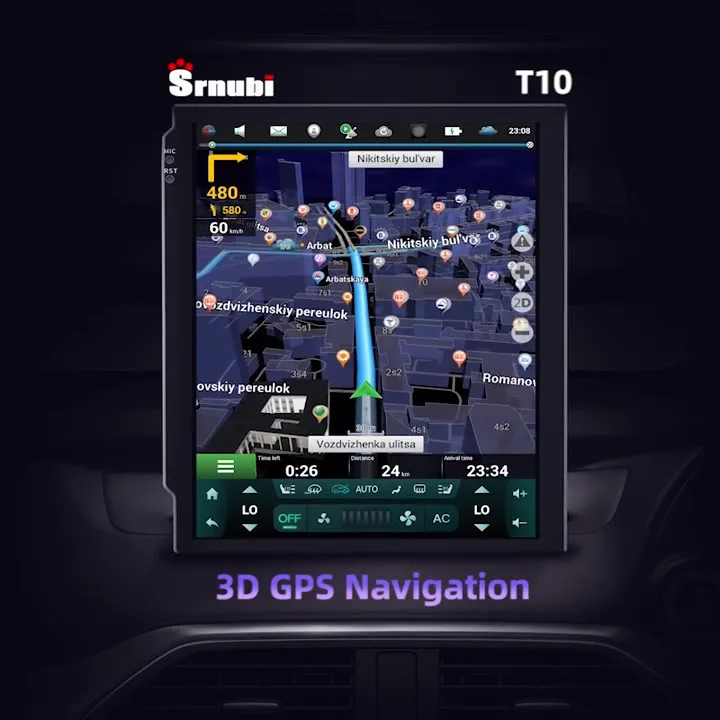
Video 1: Srnubi T10 Android Car Radio Features Demo.
Maintenance
To ensure the longevity and optimal performance of your Srnubi Android Car Radio, follow these general maintenance guidelines:
- Cleaning: Use a soft, dry cloth to clean the screen and exterior. Avoid abrasive cleaners or solvents that could damage the surface.
- Software Updates: Regularly check for and install firmware updates. New firmware is typically released annually, including system version upgrades, optimizations, function additions, and motherboard graphics upgrades.
- Environmental Conditions: Avoid exposing the unit to extreme temperatures, direct sunlight for prolonged periods, or excessive moisture.
- Cable Connections: Periodically check all cable connections to ensure they are secure and free from damage.
Troubleshooting
| Problem | Solution |
|---|---|
| Car radio won't turn on |
|
| "No Signal" when reversing |
|
| "Can't watch video while driving" with USB videos |
|
| Cannot search FM radio |
|
| Cannot connect Bluetooth |
|
| Weak Bluetooth/WiFi signal |
|
| Navigation map not working |
|
| Screen display abnormal |
|
| Abnormal sound |
|
Radio Setting Interface Passwords
- S3/S4/S10/K3/T10/T3(T3L)/T4(T3L plus)/T8(T3L Max): 123456, 8888, 7890, 000000, 22558800, 1234
- Programmer interface password: 7890 plus current time (e.g., at 11 o'clock, it's 789011; at 12 o'clock, it's 789012).
Specifications
| Feature | Specification |
|---|---|
| Brand Name | srnubi |
| Operating System | Android 12 |
| Display Size | 9.7" |
| Resolution | 1024*600/1280*720P |
| RAM | USB (Varies by model, e.g., S3: 1G, S4: 2G, S10: 2G/4G/6G/8G) |
| ROM | 128G (Varies by model, e.g., S3: 32G, S4: 32G, S10: 32G/64G/128G/256G) |
| Max External Memory | 128G |
| Processor Type | S10: Octa-UIS7862 (8 core 2*A75+6*A55) |
| Processor Speed | S10: 2.0GHZ |
| Chipset | S10: 8 core 2*A75+6*A55 |
| Tuner Type | T10/S10/X10: FM/AM |
| Preset Station | FM 87.50 |
| Out Power | 12V |
| Voltage | 12 V |
| Item Weight | 24cm*20cm*12cm |
| Item Size | 9.7inch |
| Material | 1.7 |
| Interface | USB |
| Digital Media Format | Mp3, MP4, WMA, JPEG |
| OSD Language | Multi-language support including English, Chinese, Arabic, German, French, Japanese, Spanish, etc. |
| Special Features | WiFi function, Support 3G Network, Support 4G Network, Support Can-Bus, Built-in GPS, Mobile Phone, MP3 players, Support steering wheel control |
| Built-in DVD Player | No |
| Built-in CD player | No |
| Is touch screen | Yes |
| Built-in Screen | Yes |
| Accessory Type | Machine/Connector/Frame/RCA cable/USB cable * 2/GPS |
| Certification | CE |
Model Parameter Table
The following table provides a comparison of key parameters across different Srnubi radio models (S3, S4, S10-1, S10-2, S10-3, S10-4/S10-5):

Figure 25: Srnubi Radio Model Parameter Table.
Warranty and Support
Warranty
The product comes with a 365-day warranty.
Customer Support
For any questions or issues after receiving your order, please contact Srnubi Europe Store after-sales service via email. Include your order number for faster assistance.
Email: 473752258@qq.com
User Tips
- Always ensure the correct Canbus protocol is set for your specific model to ensure full compatibility with original car functions like steering wheel controls and air conditioning.
- When connecting a rear view camera, ensure it is plugged into the "CAMIN" port on the car radio.
- If experiencing weak Bluetooth or WiFi signals, check the yellow rear camera input connector, as it contains extension cords for these antennas. Extending them can improve signal strength.
- For optimal navigation performance, ensure your GPS has a strong signal. If issues persist, try reinstalling the map or using a mobile WiFi hotspot.
- Keep your device updated with the latest firmware to benefit from system optimizations, new features, and improved performance.