Introduction
Thank you for choosing the J53 Wireless Earbuds. These earbuds are designed to provide a high-quality audio experience with advanced features such as Bluetooth 5.3 connectivity, clear call technology, and an extended battery life. This manual will guide you through the setup, operation, and maintenance of your new earbuds.

Package Contents
Please check the box for the following items:
- 2 x J53 Wireless Earbuds (Left and Right)
- 1 x Portable Charging Case with LED Power Display
- 1 x USB-C Fast Charging Cable
- 1 x User Manual
Setup Guide
1. Initial Charging
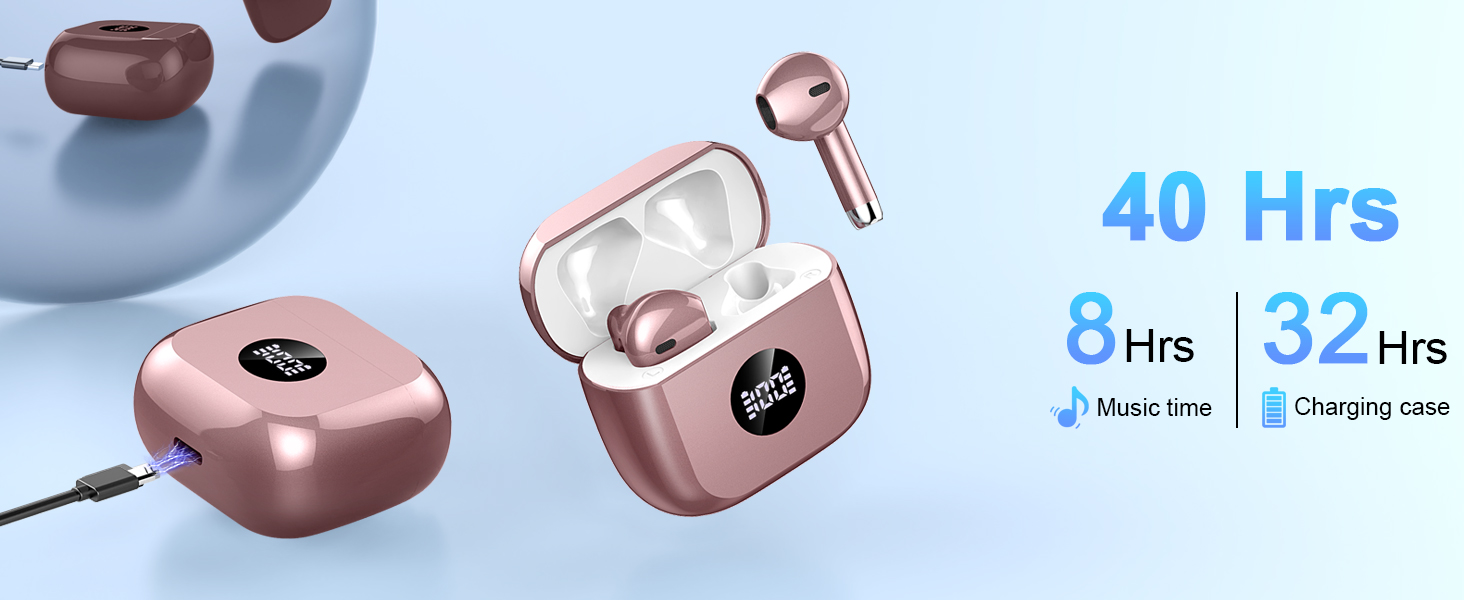
Before first use, fully charge the earbuds and charging case. Connect the provided USB-C cable to the charging port on the case and a power source. The LED display on the case will show the charging status. A full charge for the case takes approximately 1 hour.

2. Power On & Pairing
- Power On: Open the charging case lid. The earbuds will automatically power on and enter pairing mode.
- Bluetooth Activation: On your device (smartphone, tablet, laptop), enable Bluetooth.
- Select Device: Look for "J53" in the list of available Bluetooth devices and select it to connect.
- Confirmation: Once connected, you will hear an audible prompt from the earbuds, and they will be ready for use.
The earbuds support auto-pairing and will automatically reconnect to the last paired device when taken out of the case.
3. Wearing the Earbuds
The J53 earbuds feature an ergonomic semi-in-ear design for a comfortable and secure fit. Insert each earbud gently into your ear canal, ensuring a snug fit. Adjust as needed for optimal sound quality and comfort.
Operating Instructions
1. Touch Controls
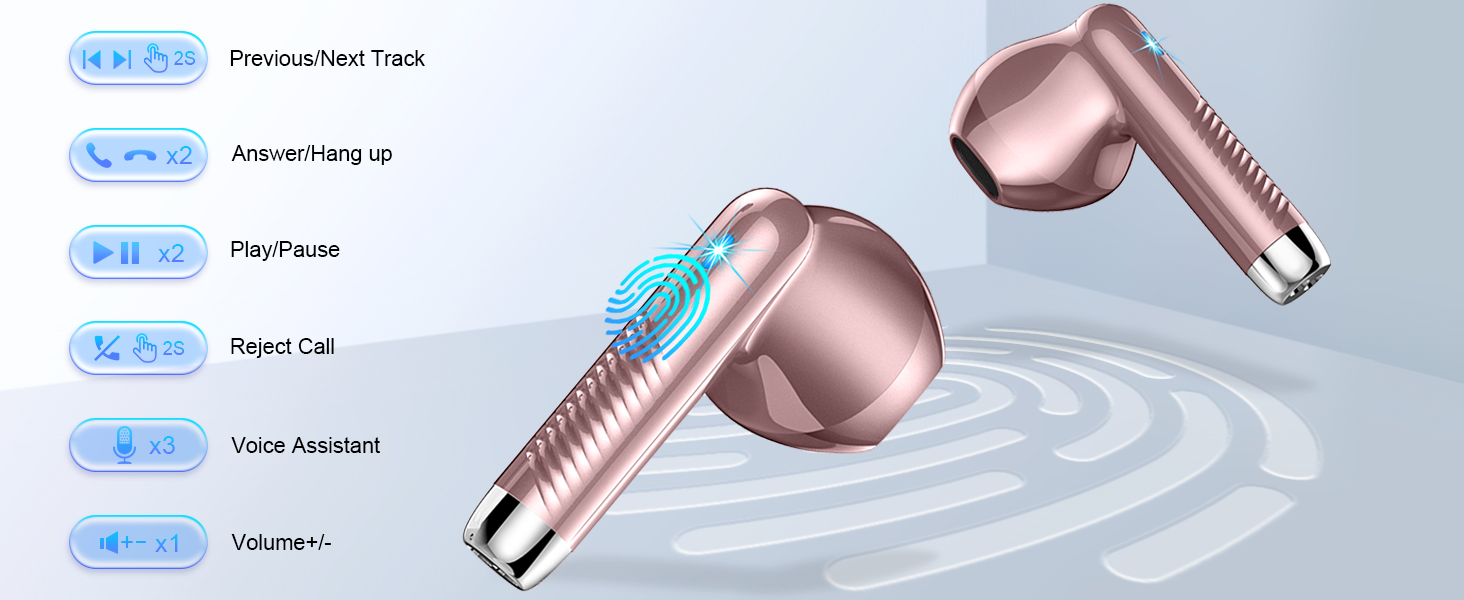
The J53 earbuds feature smart touch controls on each earbud for easy management of music, calls, and voice assistant. Refer to the diagram below for specific functions:
- Play/Pause: Single tap on either earbud.
- Next Track: Hold right earbud for 2 seconds.
- Previous Track: Hold left earbud for 2 seconds.
- Answer/End Call: Double tap on either earbud.
- Reject Call: Hold either earbud for 2 seconds.
- Activate Voice Assistant: Triple tap on either earbud.
- Volume Up/Down: Single tap on either earbud (specific earbud for up/down might vary, test to confirm).
2. Single/Dual Earbud Mode
You can use both earbuds together for a stereo audio experience or use a single earbud independently. This is useful for sharing audio with a friend or for maintaining situational awareness while driving or walking.
3. Power Off
To power off the earbuds, simply place them back into the charging case and close the lid. They will automatically disconnect from your device and begin charging.
Maintenance
1. Cleaning
Regularly clean your earbuds and charging case to ensure optimal performance and hygiene. Use a soft, dry, lint-free cloth. Do not use harsh chemicals or abrasive materials. For stubborn dirt, a slightly damp cloth can be used, followed by immediate drying.
2. Water Resistance
The J53 earbuds are IP7 waterproof, meaning they are protected against sweat and light rain. They are suitable for sports and outdoor activities. However, they are not designed for swimming or submersion in water. Ensure the charging port is dry before charging.
3. Storage
When not in use, store the earbuds in their charging case to protect them from dust, damage, and to keep them charged. Store in a cool, dry place away from extreme temperatures.
Troubleshooting
- Earbuds not pairing with device:
Ensure Bluetooth is enabled on your device. Make sure the earbuds are charged and out of the case. If they were previously paired, try forgetting the device in your Bluetooth settings and re-pairing. - Only one earbud working:
Place both earbuds back into the charging case, close the lid, wait a few seconds, then open the lid again. This often resets the connection between the two earbuds. Ensure both earbuds are charged. - Earbuds not charging:
Check that the charging cable is securely connected to both the case and the power source. Ensure the charging contacts on the earbuds and inside the case are clean and free of debris. The LED display should indicate charging. - Poor sound quality or disconnections:
Ensure the earbuds are within the maximum wireless range (10m-20m) of your device. Avoid obstacles between the earbuds and your device. Try disconnecting and reconnecting the earbuds. - Touch controls not responding:
Ensure your fingers are clean and dry. Sometimes a simple restart (placing back in case and taking out) can resolve this.
Specifications
| Feature | Specification |
|---|---|
| Brand Name | Kuizil |
| Model | J53 |
| Bluetooth Version | 5.3 |
| Communication | Wireless |
| Wireless Type | Bluetooth |
| Maximum Wireless Range | 10m-20m |
| Vocalism Principle | Dynamic |
| Material | Plastic |
| Battery Capacity (Earbuds) | 400 mAh (Charging Case) |
| Battery Life (Earbuds) | Up to 8 hours |
| Total Playtime (with Case) | Up to 40 hours |
| Charging Method | Charging case (Type-C) |
| Connectors | Type-C |
| Features | With microphone, Control Button, Volume Control, Noise Cancelling |
| Waterproof Rating | IP7 |
| Resistance | 32 Ω |
| Certification | CE, FCC, RoHS |
| Charging Case Dimensions (L x W x H) | 5cm x 3cm x 4.8cm (approx. 1.97in x 1.18in x 1.89in) |
| Product Weight | 0.096 kg (approx. 3.38 oz) |

User Tips
- Optimal Sound: Ensure a proper seal in your ear canal for the best bass response and noise isolation.
- Battery Management: Keep the charging case topped up to maximize your total listening time. The LED display is a convenient way to monitor battery levels.
- Call Clarity: For the clearest calls, ensure the microphone is not obstructed and you are in a relatively quiet environment, despite the ENC feature.
- Connectivity: If experiencing intermittent connection, try moving closer to your paired device or restarting the earbuds and device.
Warranty and Support
For any issues, questions, or support needs regarding your J53 Wireless Earbuds, please refer to the seller's contact information or the platform where the product was purchased. Keep your proof of purchase for warranty claims.


