
1. Introduction
This manual provides detailed instructions for the installation, operation, and maintenance of your YOOSEE 8MP Dual-Lens Smart WiFi IP Camera. This camera is designed for indoor use, offering advanced surveillance features including dual lenses for multiple views, 8MP Ultra HD resolution, two-way audio, motion detection with auto-tracking, and various night vision modes. Please read this manual thoroughly before using the product to ensure proper functionality and safety.

Figure 1: YOOSEE 8MP Dual-Lens Smart WiFi IP Camera Overview
2. Safety Information
- This product is primarily designed for indoor use.
- Ensure the power supply is within the specified range (110-220V).
- Do not expose the camera to extreme temperatures outside its operating range (-10°C to 60°C).
- Avoid placing the camera in direct sunlight or near heat sources.
- Keep the camera away from water and moisture, despite its IP66 rating, as it is optimized for indoor environments.
- Do not attempt to disassemble or modify the camera.
- Use only approved power adapters.
3. Package Contents
Please check the package for the following items:
- YOOSEE 8MP Dual-Lens Smart WiFi IP Camera
- Power Adapter (Wall Plug)
- Mounting Accessories (screws, wall plugs)
- User Manual (this document)
- (Optional, if purchased) TF Memory Card (32GB, 64GB, or 128GB)
4. Product Overview
The YOOSEE Smart WiFi IP Camera features a unique dual-lens design, allowing for comprehensive monitoring of different areas simultaneously. It integrates advanced AI functions for enhanced security.
Key Features:
- Dual Lens: Provides two distinct views simultaneously.
- 8MP Ultra HD Resolution: Delivers clear and detailed images.
- Pan/Tilt Functionality: Horizontal 300°, Vertical 60° rotation for wide coverage.
- Two-Way Audio: Built-in microphone and speaker for communication.
- Motion Detection & Auto Tracking: Detects human movement and tracks it automatically.
- Smart Colorful Night Vision: Offers both full-color and infrared night vision modes.
- TF Card & Cloud Storage: Multiple options for video recording and backup.
- ONVIF Standard: Compatible with ONVIF protocol hard disk recorders.
- Wi-Fi Connectivity: Easy wireless connection to your home network (2.4GHz).
- YOOSEE App: Remote control and monitoring via the dedicated mobile application.
Components:

Figure 2: Camera Dimensions (Approx. 76mm width x 123mm height)
5. Setup
5.1 Installation
The camera can be installed on a ceiling, wall, or placed on a flat surface. Choose a location that provides the desired viewing angle and is within range of your Wi-Fi network and a power outlet.
- Mounting (Optional): If mounting, use the provided screws and wall plugs to secure the camera to the desired surface. Ensure it is securely fastened.
- Power Connection: Connect the camera to a power outlet using the provided power adapter. The camera will power on and initiate its startup sequence.
5.2 App Download & Connection
The camera operates with the YOOSEE application. You can download the app by scanning the QR code provided in the instruction manual included in your package or by searching for "YOOSEE" in the App Store (iOS) or Google Play Store (Android).
- Download & Register: Download the YOOSEE app and register for an account if you don't already have one.
- Add Device: Follow the in-app instructions to add your new camera. This typically involves selecting the camera type, connecting to your Wi-Fi network, and scanning a QR code displayed on your phone with the camera lens.
- Configuration: Once connected, you can configure camera settings such as Wi-Fi, time zone, and notification preferences.
6. Operating Instructions
6.1 Live View
Once connected to the YOOSEE app, you can access the live video feed from your camera. The dual-lens design allows you to view different areas simultaneously within the app interface.

Figure 3: Dual-Lens Live View
6.2 Pan/Tilt/Zoom (PTZ) Control
The camera supports Pan (horizontal) and Tilt (vertical) movements, allowing you to adjust the viewing angle remotely through the app.
- Pan: Rotate the camera horizontally up to 300°.
- Tilt: Adjust the camera vertically up to 60°.
- Digital Zoom: The camera features digital zoom for closer inspection of details.

Figure 4: Pan and Tilt Functionality
6.3 Two-Way Audio
The camera is equipped with a built-in microphone and speaker, enabling two-way voice communication. This feature can only be initiated via the YOOSEE App.

Figure 5: Two-Way Voice Intercom
6.4 Motion Detection & Alarms
The camera can detect human movement within its monitoring area. Upon detection, it will automatically track the movement and send push notifications to your phone. It can also function as a lighting device with 6 bright LED lamp beads when motion is detected.

Figure 6: Motion Detection Notification
6.5 Night Vision
The camera provides clear night vision with high-performance infrared light-emitting diodes. It supports both full-color night vision and infrared night vision modes, which can be switched via the app.

Figure 7: Night Vision Modes
6.6 Storage (TF Card & Cloud)
The camera supports both TF (MicroSD) card storage and cloud storage for recording audio and video. This ensures safe backup and prevents loss of important information.
- TF Card: Insert a TF card (up to 128GB, recommended to use a camera-dedicated memory card) into the designated slot for local storage.
- Cloud Storage: Subscribe to cloud storage services via the YOOSEE app for remote and secure video backup.

Figure 8: TF Card Storage Options

Figure 9: Cloud Storage and Remote Playback
6.7 Resolution Switching
You can freely switch between HD (High Definition) and SD (Standard Definition) resolution within the app for optimal viewing based on your network conditions or storage preferences.

Figure 10: HD/SD Resolution Comparison
6.8 Video Sharing & Multi-Scene Viewing
The YOOSEE app allows you to share video access with family members. You can also watch up to 4 scenes simultaneously from different cameras or different views of the same camera, providing a more comprehensive overview.

Figure 11: Quick-Access Collected Sites
6.9 ONVIF Standard Compatibility
The camera conforms to the ONVIF standard, allowing it to be connected to compatible Network Video Recorders (NVRs) or hard disk recorders for extended video storage, independent of the internal TF card capacity.

Figure 12: ONVIF Standard Integration
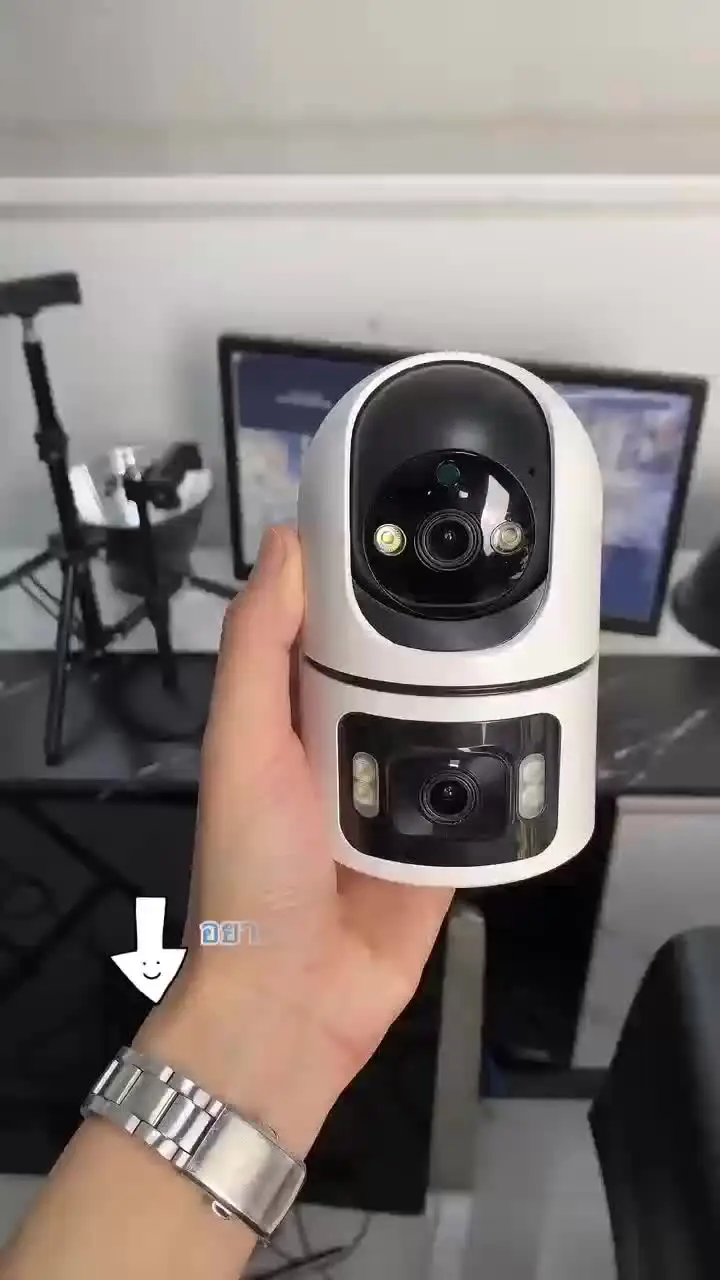
Video 1: Product demonstration showcasing dual-lens functionality, PTZ control, and night vision.
7. Maintenance
- Cleaning: Gently wipe the camera lens and body with a soft, dry cloth. Do not use harsh chemicals or abrasive cleaners.
- Firmware Updates: Regularly check the YOOSEE app for available firmware updates to ensure optimal performance and security. Follow the in-app instructions for updating.
- Power Cycle: If the camera experiences issues, try unplugging it from the power source for 10 seconds and then plugging it back in.
- Storage Management: Periodically review recorded footage and manage storage space on your TF card or cloud account to prevent it from filling up.
8. Troubleshooting
- Camera not connecting to Wi-Fi: Ensure your Wi-Fi network is 2.4GHz. Check that the Wi-Fi password is correct and the camera is within range of the router. Try restarting your router and the camera.
- No video feed: Verify the camera is powered on and connected to Wi-Fi. Check your internet connection. Restart the YOOSEE app.
- Motion detection not working: Ensure motion detection is enabled in the app settings. Adjust sensitivity levels if necessary. Check the camera's field of view for obstructions.
- Two-way audio issues: Check microphone and speaker permissions for the YOOSEE app on your phone. Ensure volume levels are adequate.
- Night vision unclear: Ensure the camera lens is clean. Check for any obstructions blocking the infrared lights.
- Camera is not truly wireless: Please note that while the camera connects via Wi-Fi, it requires a constant power supply via a wall plug and is not battery-powered.
9. Specifications
| Feature | Specification |
|---|---|
| Brand Name | YOOSEE / Cugo |
| Model | 8MP Dual-Lens Smart WiFi IP Camera |
| Megapixels | 8MP |
| High Definition | 4.0 Megapixels |
| Lens (mm) | 3.6mm |
| Zoom Type | Digital zoom |
| Zoom | 10X Digital Zoom, 8x Optical Zoom |
| Lens Quantity | Dual Lens |
| Style | PT Camera |
| Connectivity | WIFI (2.4GHz) |
| Installation | Ceiling, Normal, Pendant Mount |
| Scene | Indoor |
| Operating Temperature | -10°C to 60°C |
| IP Rating | IP66 |
| Power Mode | Mains Electricity (Wall Plug) |
| Power Supply | 110-220V |
| Audio Output | Two Way Audio |
| Video Compression Format | H.265 |
| IR Distance (m) | 15M |
| Sensor | CMOS |
| TF Card Support | Up to 128GB |
| Internal Storage | 128G (Max TF Card) |
| AI Functions | Human Detection, Auto Tracking |
| Color Night Vision | Yes |
| Alarm Type | Telefon Alarm, Local Alarm, FTP Photo, Email Alert |
| Supported Operating Systems | Windows 98, Vista, 7, 8, 10, 2000, 2008, 2003 |
| APP | YOOSEE |
| Rotation Angle | Horizontal: 360°; Vertical: 90° |
| Working Range | 8 Meters |
| Recording Modes | All Day and Event Recording |
10. User Tips
- For optimal performance, ensure your camera is placed in a central location within your Wi-Fi network's range.
- Consider purchasing a dedicated TF memory card for reliable local video storage, especially if you do not plan to use cloud storage.
- Utilize the 'Quick-access Collected Sites' feature in the YOOSEE app to set preset positions for frequently monitored areas, allowing for faster navigation between views.
- While the camera has an IP66 rating, it is explicitly stated to be more suitable for indoor use. Avoid prolonged outdoor exposure, especially in harsh winter conditions.
- Regularly check the YOOSEE app for software updates to benefit from new features and security enhancements.
11. Warranty and Support
For warranty information and technical support, please refer to the seller's policy or contact their customer service directly. Keep your purchase receipt as proof of purchase.