
1. Introduction
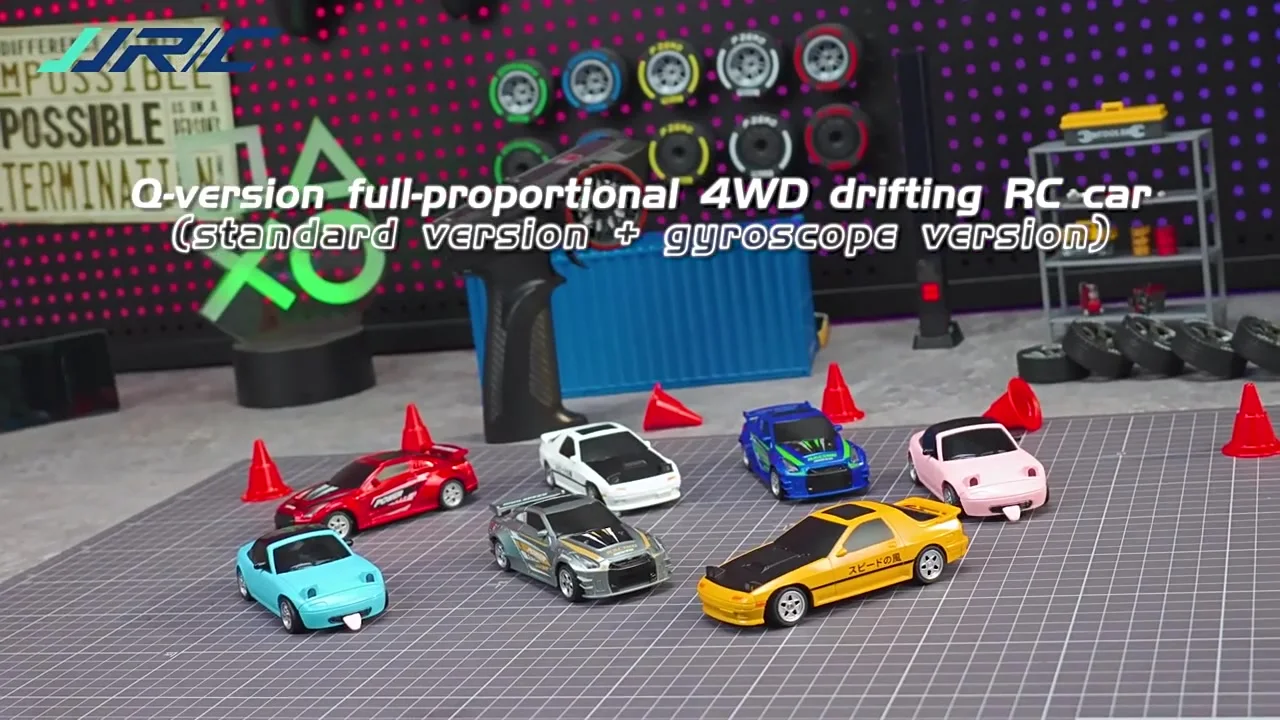
The JJRC C8827 is a 1:43 scale full-proportional 4WD drifting RC car designed for an exhilarating remote control experience. Available in standard and gyroscope versions, this model features realistic simulation, high-speed capabilities, and precise control for drifting enthusiasts. It comes with cool lighting effects and interchangeable tires for various driving styles.

2. Safety Information
- Warning: Not suitable for children under 36 months. Contains small parts which may pose a choking hazard.
- Always operate the RC car in a safe environment, away from people, pets, and obstacles.
- Do not operate near water or in wet conditions to prevent damage to electronic components.
- Ensure the battery is charged under adult supervision.
- Do not attempt to modify or disassemble the product, as this may cause damage or injury.
3. Package Contents
The package for the JJRC C8827 RC Car (Mode C Standard Version) typically includes the following items:
- Remote Control Car x 1
- Remote Controller x 1
- Type-C Charging Cable x 1
- Instruction Manual x 1
- Scene Obstacle Cones x 6
- Racing Soft Tires x 4
- Drifting Hard Tires x 4

4. Specifications
| Feature | Specification |
|---|---|
| Brand Name | LKCOMO (JJRC) |
| Type | Car (RC Drifting Car) |
| Scale | 1:43 (Full Proportional) |
| Control Channels | 4 Channels |
| Remote Control | Yes (2.4GHz Long-Range) |
| Remote Distance | 40m |
| Controller Mode | MODE1 |
| Flight Time (Battery Life) | 60 minutes |
| Charging Voltage | 3.7V |
| Battery Type | Lithium Battery |
| Charging Method | Type-C |
| Is Batteries Included | No (for remote controller) |
| Material | Metal, Plastic, Rubber |
| Certification | CE |
| State of Assembly | Ready-to-Go |
| Recommend Age | 14+y |
| High-concerned chemical | None |
| Product Weight (Model A) | 47.4g |
| Product Weight (Model B) | 48.2g |
| Product Weight (Model C) | 46.4g |
| Box Dimensions | 20.4CM * 16.3CM * 8.6CM |
| Dimensions (Model A) | 10.8cm * 4.55cm * 3.1cm |
| Dimensions (Model B) | 10.75cm * 4.35cm * 3.1cm |
| Dimensions (Model C) | 11.07cm * 4.5cm * 3.1cm |


5. Setup
5.1 Charging the Car Battery
- Locate the Type-C charging port on the RC car.
- Connect the provided Type-C charging cable to the car and a suitable USB power source (e.g., computer, USB wall adapter).
- The charging indicator light will show the charging status. Ensure the car is switched OFF during charging.
5.2 Remote Controller Battery Installation
The remote controller requires batteries (not included). Open the battery compartment on the back of the remote controller and insert the required batteries, observing correct polarity.
5.3 Tire Installation and Replacement
The RC car comes with two types of tires: Racing Soft Tires for stronger grip and Drifting Hard Tires with a smooth tread for easier drifting. You can switch between them based on your desired driving experience.
- To remove a tire, gently pull it off the wheel hub.
- To install a new tire, align it properly with the wheel hub.
- Friendly Reminder for Drifting Tires: When changing to drifting tires, ensure the thin edge faces inward and the thick edge faces outward for optimal performance.


6. Operating Instructions
6.1 Powering On/Off
- Switch on the RC car using the power switch located on the underside.
- Switch on the remote controller. The indicator light should illuminate.
- The car and remote controller should automatically pair. If not, refer to the remote controller's specific pairing instructions.
6.2 Basic Controls
The remote controller provides full-proportional control, meaning the car's speed and steering angle respond directly to your input.
- Throttle: Use the trigger on the remote controller to control forward and backward movement. Pull for forward, push for reverse.
- Steering: Use the steering wheel on the remote controller to turn left and right.
6.3 Speed Adjustment
The remote controller features a speed adjustment dial (ACCELERATOR) to fine-tune the car's maximum speed, allowing for different driving styles and skill levels.
6.4 Drifting Techniques
The 4WD system and specialized tires enable dynamic drifting. Practice with the included obstacle cones to master various drifting maneuvers:
- High-Speed Cruising: Utilize the 4WD power for speed and excitement. Torque adjusts instantly during sharp turns.
- Drifting Around Cones: Practice precise turns and arcs using the drifting tires.
- High-Speed Drifting Through Corners: Experience controlled slides and tail-sliding.
- 360° Omnidirectional Drifting: Perform full rotations with ease.
- Reverse Drifting: Master drifting while moving backward.

6.5 ESP Gyroscope (Gyroscope Version Only)
For gyroscope versions, the built-in ESP gyroscope provides precise control, allowing for sharp turns without skidding, silky-smooth drifting arcs, and automatic straightening after exiting corners. This feature enhances stability and control during complex maneuvers.


6.6 Lighting Effects
The RC car features cool lighting with high-brightness LEDs for both front and rear lights. These lights enhance the visual experience, especially during drifting and tail-sliding, creating a dynamic glow style.

7. Maintenance
7.1 Cleaning
To maintain the car's performance and appearance, wipe it with a soft, dry cloth after each use. Avoid using water or chemical cleaners, as these can damage the electronic components or paint finish.
7.2 Tire Care
Regularly inspect the tires for wear and tear. Replace worn tires with new ones from the provided set to ensure optimal performance and grip for both racing and drifting. Ensure correct orientation when installing drifting tires (thin edge inward, thick edge outward).
8. Troubleshooting
- Car not responding: Ensure both the car and remote controller are switched on and fully charged. Check if they are properly paired.
- Poor performance/drifting: Check the tires. Ensure you are using the appropriate tires for the surface and desired driving style (racing for grip, drifting for slides). Verify tire orientation for drifting.
- Lights not working: Check battery levels. If the issue persists, contact customer support.
9. User Tips
- Experiment with both racing and drifting tires to find your preferred driving style.
- Utilize the included obstacle cones to create custom tracks and practice advanced drifting techniques.
- Adjust the speed setting on the remote controller to match your skill level and the driving environment.
- For gyroscope versions, leverage the ESP feature for enhanced stability and smoother drifts.
10. Warranty and Support
For warranty information, technical support, or replacement parts, please refer to the contact information provided by your retailer or visit the official JJRC website. Keep your proof of purchase for warranty claims.