
1. Introduction
The AINYSZIN V320 OBD2 Code Reader is a comprehensive automotive diagnostic tool designed for gasoline vehicles. It supports nine standard OBD II/EOBD protocols, allowing for quick reading of fault information and vehicle parameters. This device assists in diagnosing engine issues, performing performance tests, and monitoring various vehicle systems.
2. Safety Information
Always operate the device in a well-ventilated area. Ensure the vehicle's ignition is off before connecting or disconnecting the device. Do not attempt to disassemble or modify the device. Keep the device away from water, extreme temperatures, and direct sunlight. Use only as intended for vehicle diagnostics.
3. Package Contents
- 1x V320 Car OBD2 Scanner
- 1x English Manual
4. Product Overview
The V320 features a 2.8-inch color display, intuitive navigation buttons (DAT, DTC, ESC, OK, and directional keys), and an integrated OBD interface cable. Indicators show power status and vehicle detection.

Figure 1: V320 OBD2 Code Reader with labeled components.
Watch this video for a quick introduction to the V320 OBD2 Diagnostic Tool, demonstrating its interface and basic operation.
Video 1: V320 Product Introduction.
5. Setup
- Locate your vehicle's OBD interface. This is typically found under the dashboard on the driver's side, but can also be in other locations (refer to your vehicle's manual if unsure).
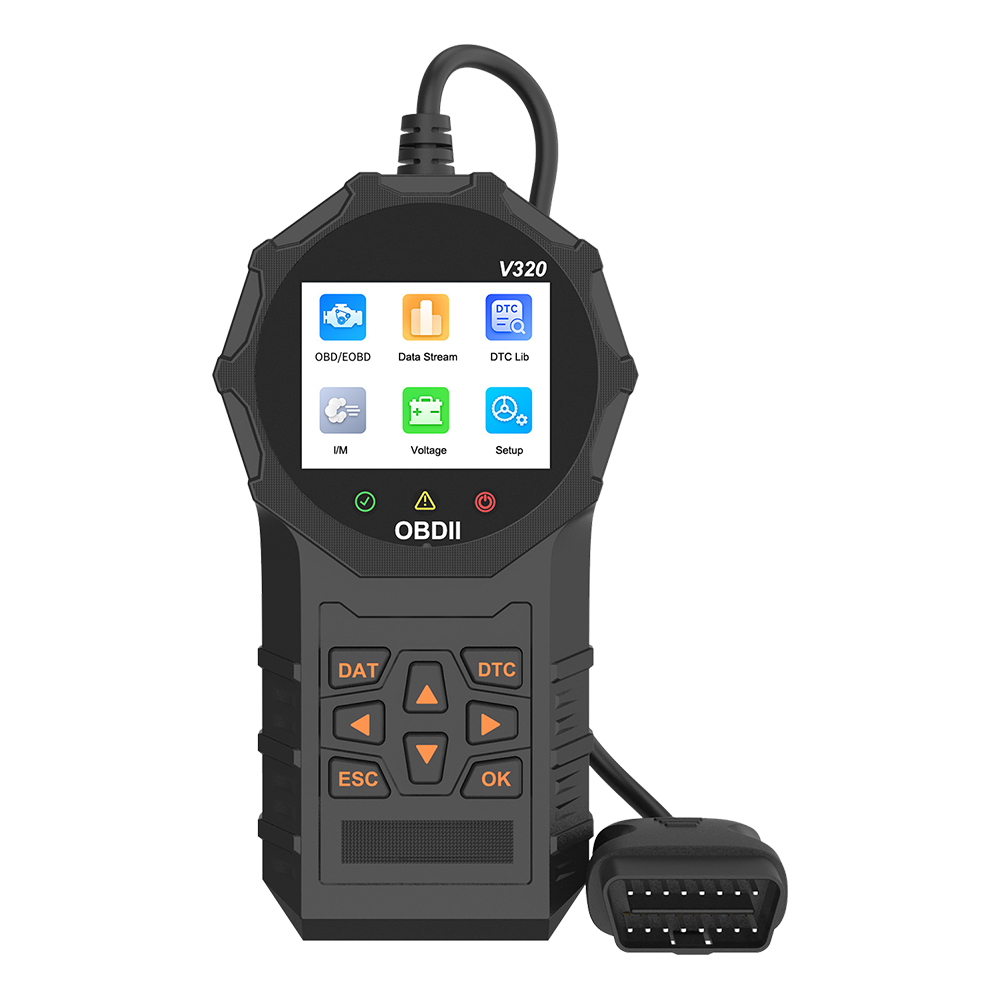
Figure 2: Common OBD Interface Locations.
- Ensure the vehicle's ignition is off.
- Insert the V320's 16-pin connector firmly into the vehicle's OBD interface.
- Turn the vehicle's ignition to the 'ON' position (engine can be off or running, depending on the test).
- The V320 will power on automatically. The green light on the device indicates normal power and successful connection.
6. Operating Instructions
6.1 General Navigation
Use the directional keys (up, down, left, right) to navigate through menus and options on the 2.8-inch color screen. Press the 'OK' button to confirm a selection. Press the 'ESC' button to return to the previous menu or exit a function.
Figure 3: V320 Button Layout.
6.2 Engine Fault Diagnosis (Read/Clear DTC)
From the main menu, select 'OBD/EOBD' or 'Read DTC' to access diagnostic functions.
- Read Codes: This function reads current, pending, and permanent Diagnostic Trouble Codes (DTCs) stored in the vehicle's Engine Control Unit (ECU). These codes indicate specific issues detected by the vehicle's onboard diagnostic system.
- Clear DTC: After addressing a vehicle fault, use this function to clear the DTCs and turn off the Malfunction Indicator Lamp (MIL) or 'Check Engine' light. Ensure the underlying issue is resolved before clearing codes to prevent recurrence.
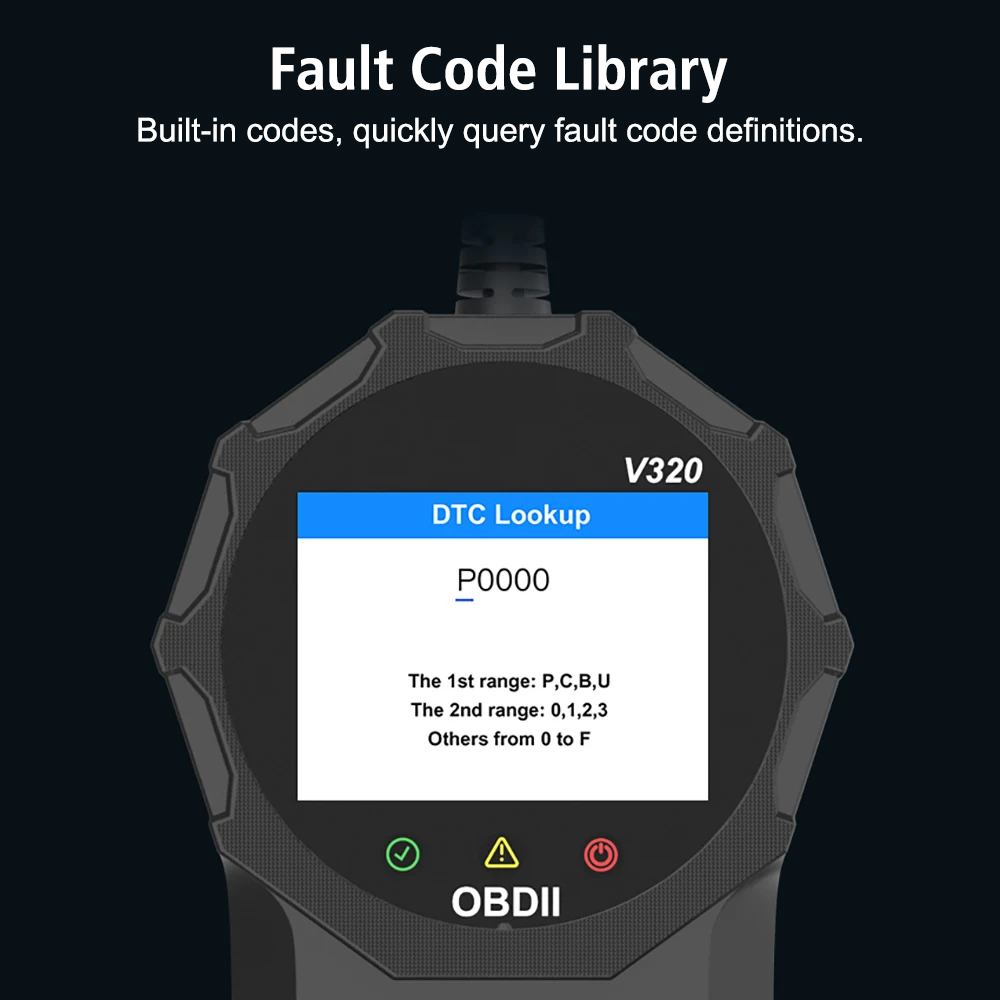
Figure 4: Quick Clear Fault Code Function.
6.3 Performance Test Function
Select 'Performance' from the main menu to access vehicle performance tests. This function allows you to test acceleration, braking, and distance, providing meter data such as total time, max speed, max acceleration, and max RPM.

Figure 5: Performance Test Screen.
6.4 I/M Ready Status
Select 'I/M' from the main menu. This function checks the readiness of various emissions-related monitors (e.g., O2 Sensor, EVAP System, Catalyst) to determine if they are functioning correctly and if the vehicle is ready for an emissions test.

Figure 6: I/M Ready Status Display.
6.5 Real Time Curve (Live Data)
Select 'Data Stream' or 'RT Curve' to view live sensor data. This feature displays real-time data such as car speed, engine load value, coolant temperature, and engine speed in graphical curve format, aiding in diagnosing intermittent issues.

Figure 7: Real Time Curve Display.
6.6 Comprehensive Car Inspection
The V320 offers a comprehensive inspection by displaying various data points:
- Data Stream: View live sensor data in numerical format.
- Vehicle Info: Access vehicle identification number (VIN), calibration ID, and calibration verification number.
- O2 Sensor: Monitor oxygen sensor readings.
- EVAP: Check Evaporative Emission Control System data.
- Voltage: Display current battery voltage.

Figure 8: Comprehensive Car Inspection Data.
6.7 Fault Code Library (DTC Lookup)
Select 'DTC Lib' from the main menu. This built-in library allows you to quickly query definitions for Diagnostic Trouble Codes (DTCs) by entering the code.

Figure 9: Fault Code Library (DTC Lookup).
7. Compatibility
7.1 Supported OBD2 Protocols
- SAE J1850 PWM (41.6Kbaud)
- SAE J1850 VPW (10.4Kbaud)
- ISO9141-2 (5 baud init, 10.4Kbaud)
- ISO14230-4 KWP (5 baud init, 10.4 Kbaud)
- ISO14230-4 KWP (fast init, 10.4 Kbaud)
- ISO15765-4 CAN (11bit ID, 500 Kbaud)
- ISO15765-4 CAN (29bit ID, 500 Kbaud)
- ISO15765-4 CAN (11bit ID, 250 Kbaud)
- ISO15765-4 CAN (29bit ID, 250 Kbaud)
7.2 Supported Car Models
- American (USA) cars: Compatible with Standard OBD2 Cars from 1996 to Now: for Chrysler, for Ford, for GM, for Jeep.
- European cars: Compatible with Standard OBD2 Cars from 2003 to Now: for Alfa Romeo, for SAAB, for Acura, for Opel, for Audi, for Seat, for Bentley, for Skoda, for Daewoo, for Benz, for Daihatsu, for Land Rover, for BMW, for Vauxhall, for Volvo, for VW, for Ford, for Jaguar.
- France cars after 2006: for Citroen, for Fiat, for Renault, for Peugeot.
- Asian cars: Compatible with Standard OBD2 Cars from 2007 to Now: for KIA, for Isuzu, for Honda, for Mitsubishi, for Hyundai, for Dacia, for Lexus, for Mazda, for Nissan, for Subaru, for Suzuki, for Toyota.
- Chinese cars: Compatible with Standard OBD2 Cars from 2009 to Now: for BYD, for Chery, for Geely, for Great Wall, for Karry.
7.3 Not Available Vehicles
Even though it is compatible with most cars, different regions support the vehicle OBD2 protocol at different times, or some cars have a special design, so it may not be compatible with some cars which do not support the OBD2 protocol. This device only has OBD2 Functions and does not include Special Functions like ABS Reset or Airbag Reset.
- Not Support Electric car and Hybrid car and 24V trucks (e.g., Nissan Leaf).
- Not Support Russian Cars (VAZ, UAZ, LADA).
- Not works with trucks For Ssangyong Actyon (from 2009 to 2017 years).
- Not works with trucks For Ssangyong Korando (2.0 TD Diesel, from 2013 to 2017 years).
- Not For Ssangyong Kyron (2.0 Diesel, from 2010 to 2017 years).
- Not For Ssangyong Rexton (2011 to 2017 years).
- Not Support Opel Corsa c 2004 1.3 CDTI.
- Not support Citroen C4/C5.
- Not support Chevrolet cars.
- Not support Renault Logon, Megane, Clio 2.
8. Specifications
| Feature | Specification |
|---|---|
| Working Voltage | DC 9~16V |
| Working Current | About 46~69mA |
| Operating Environment | -20~60℃ |
| Storage Temperature | -20~60℃ |
| Language Support | English, German, Italian, Dutch, French, Spanish, Chinese, Russian |
| Compatibility | OBD2 vehicles only |
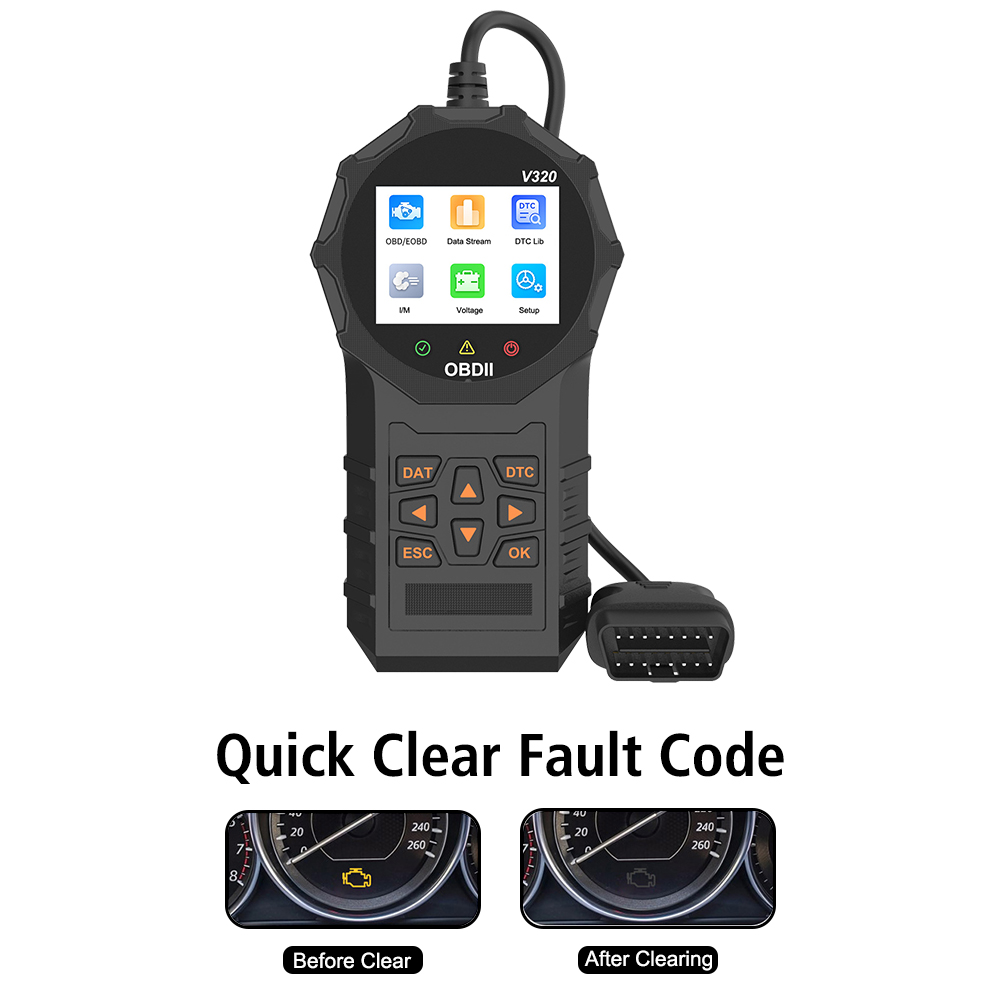
Figure 10: V320 Product Dimensions.
9. Troubleshooting
- Device not powering on: Ensure the OBD connector is securely plugged into the vehicle's OBD port and the vehicle's ignition is in the 'ON' position. Check the vehicle's battery voltage.
- Connection failed: Verify that your vehicle is OBD2 compliant and manufactured within the supported years. Try selecting 'OBD/EOBD Automatic Connection' again. Ensure the green indicator light on the device is on.
- No fault codes found: If the 'Check Engine' light is not on, there may be no active fault codes. The device can still read live data and perform other diagnostic functions.
- Inaccurate readings: Ensure the device is properly connected and the vehicle's engine is running (if required for specific tests). Consult your vehicle's service manual for expected sensor values.
10. Maintenance
- Cleaning: Wipe the device with a soft, dry cloth. Do not use abrasive cleaners or solvents.
- Storage: Store the device in a cool, dry place, away from direct sunlight and extreme temperatures. Keep the OBD connector protected from dust and damage.
11. User Tips
- For best results when checking I/M readiness, ensure your vehicle has completed a full drive cycle after any repairs or battery disconnections.
- When clearing fault codes, it's crucial to address the underlying issue first. Clearing codes without repair will likely result in the fault reappearing.
- Utilize the 'Real Time Curve' function to observe sensor behavior during driving, which can help diagnose intermittent problems that don't always trigger a fault code.
12. Warranty and Support
For technical assistance, warranty claims, or further information, please contact the manufacturer or your point of purchase. Keep your purchase receipt as proof of purchase.