
1. Introduction
This manual guides you through the process of activating and utilizing the AI Voice Assistant on your compatible Topway Car Android Multimedia Radio. The intelligent voice assistant is designed for hands-free control, enhancing your driving experience by allowing voice commands for navigation, music, calls, and other car functions.
2. Compatibility
This AI Voice Assistant activation code is compatible with the following Topway Car Android Multimedia Radio models:
- TS7
- TS18
- TS10
- T8
- T100
- T5
- Ts6
- T3
3. Setup and Activation
Follow these steps to download, install, and activate the AI Voice Assistant on your device:
- Access the App Store: On your car multimedia system, locate and open the 'DoFun Play' app store.
- Download the Voice App: Search for 'Voice' or 'AI Voice Assistant' within the 'DoFun Play' store. Download and install the application.
- Open the Voice App: Once installed, open the 'Voice' application. You will be prompted with a screen indicating that "Software requires authorization to use."
- Enter Activation Code: In the authorization screen, locate the input field for the activation code. Enter the unique activation code provided to you. Ensure your device is connected to the internet (Wi-Fi) during this step for successful authorization.
- Confirm Activation: Click 'Click to Authorize' to complete the activation.
For a visual guide, please refer to the demonstration video below:
Video: Step-by-step guide for AI Voice Assistant installation and activation.
Visual aids for the activation process:

Figure 1: Locating the 'DoFun Play' app store.

Figure 2: Downloading the 'Voice' (AI Voice Assistant) app.

Figure 3: Software authorization screen for entering the activation code.
4. Operating the AI Voice Assistant
The AI Voice Assistant provides hands-free control over various functions of your car multimedia system. After successful activation, you can use voice commands for:
- System Control: Turn screen on/off.
- Media Control: Open music, play music.
- Navigation Control: Turn on/off navigation.
- Car Control: Open/close air-conditioning (if supported by your vehicle).
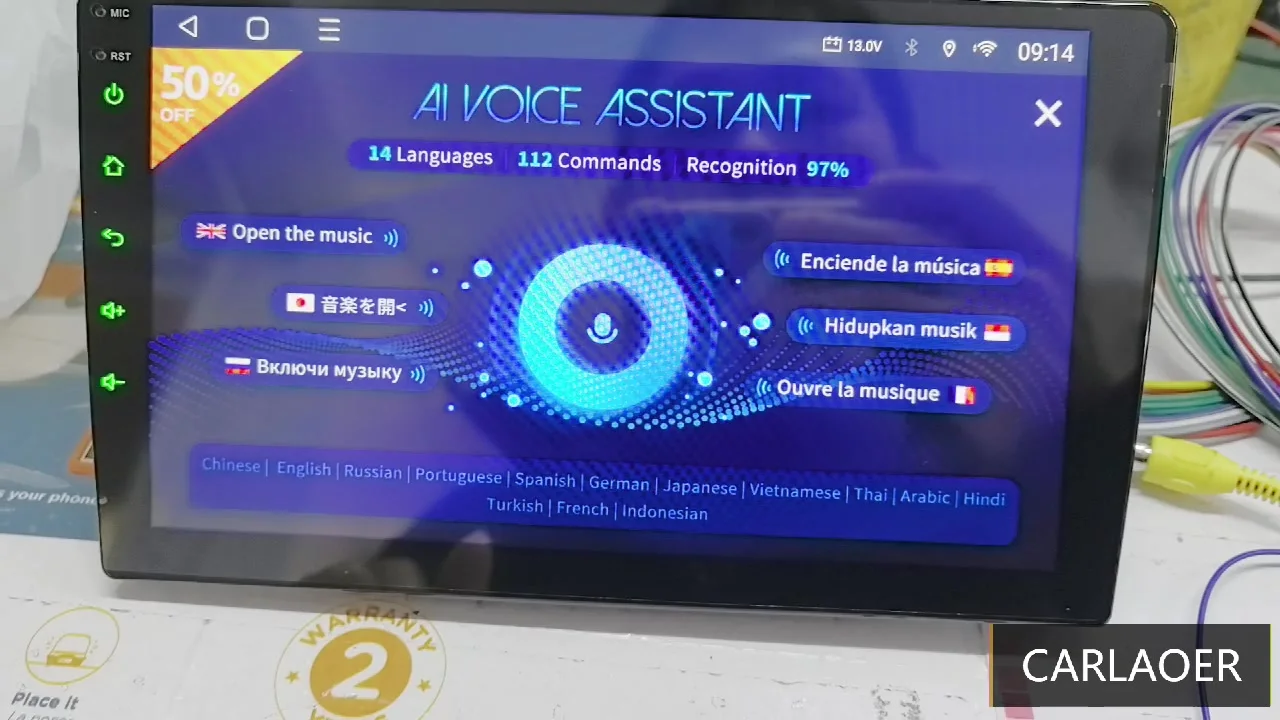
The assistant supports multiple languages and a wide range of commands. You can customize settings within the 'AI Speech Lyra Settings' menu.

Figure 4: AI Voice Assistant main interface with language and command information.

Figure 5: AI Speech Lyra Settings - Voice Settings, including Wakeup and Floating switch options.

Figure 6: AI Speech Lyra Settings - Voice Commands, categorized for ease of use.

Figure 7: AI Speech Lyra Settings - About section, displaying system version.
5. Specifications
| Feature | Description |
|---|---|
| Display Size Compatibility | 10.25", 12.3'', 7", 8", 9", 10", 11", 15.4", 10.4", 12", 9.7", 13.3inch |
| Din Type | Double Din |
| Digital Media Format | CD |
| Origin | Mainland China |
6. Maintenance
To ensure optimal performance of your AI Voice Assistant:
- Keep your car multimedia system's operating system and the Voice App updated to the latest versions.
- Ensure a stable internet connection when performing initial authorization or any updates.
- Regularly check for and install any available software updates for the AI Speech Lyra Intelligent Voice Driving System.
7. Troubleshooting
If you encounter issues with your AI Voice Assistant, consider the following:
- Activation Issues: The AI code is for one-time use and is bound to your device's unique number. Ensure you have entered the correct code and that your device has an active internet connection during authorization.
- Persistent Authorization: As long as your device number does not change, the voice assistant will remain authorized and available, with Wi-Fi network authorization handled automatically.
- Pre-order Check: Before purchasing an activation code, it is recommended to download and install the Voice App on your Android device and verify that you can access the activation code input page. This confirms compatibility and readiness for activation.
8. User Tips
- Verify Compatibility First: Always ensure the Voice App can be installed and opened on your specific car multimedia system model before purchasing an activation code.
- Timely Code Delivery: Activation codes are typically sent within 12-24 hours after placing an order and payment. Weekends may experience slightly longer delivery times.
- Stable Internet Connection: A reliable internet connection is crucial for the initial activation process.
9. Support
If you have any questions, require further assistance, or encounter issues that cannot be resolved using this manual, please contact the seller directly for support. Provide them with your order details and a clear description of the problem.