
1. Introduction
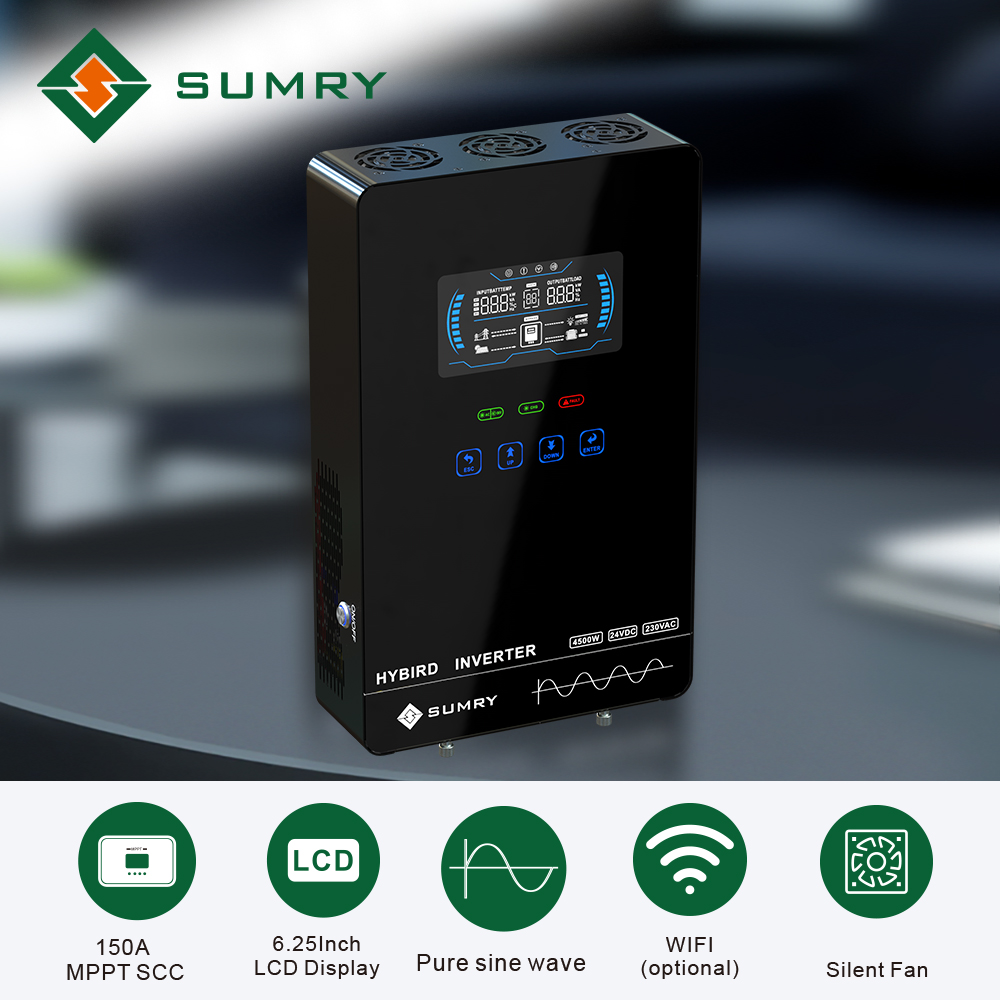
The Sumry HGX 4KW Hybrid Solar Inverter is an advanced off-grid power solution designed to provide reliable electricity for various applications. It integrates the functions of a solar inverter, MPPT solar charger, and battery charger into a compact unit. Featuring a pure sine wave output, a 6.25-inch LCD display with touchable buttons, and a 140A MPPT solar charge controller, this inverter is compatible with a wide range of 24V batteries and offers flexible power management options. It is suitable for powering most household and office appliances.
Product Overview: A brief introduction to the Sumry HGX Hybrid Solar Inverter's features and design.
2. Setup and Installation
2.1 General Installation Steps
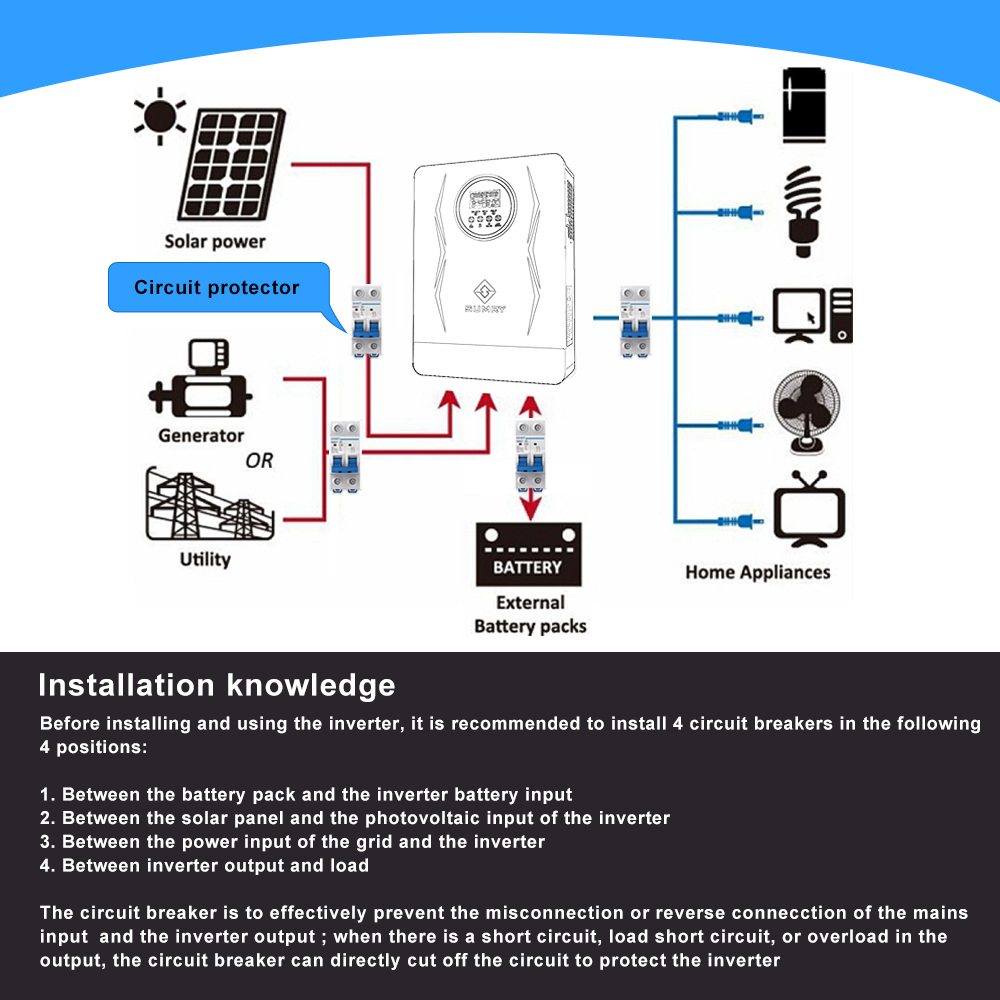
- Battery Connection: Install a circuit breaker between the battery and the inverter. After successful installation, open the breaker. Connect the 24V battery, then close the circuit breaker. Measure the voltage on the battery side of the inverter to ensure it is normal.
- PV Input Connection: Install a circuit breaker between the PV input and the inverter. Turn on this circuit breaker after successful installation, ensuring the battery voltage is normal. Connect the solar panels to the inverter. Close the circuit breaker between the PV input and the inverter. The inverter display will automatically light up and begin charging.
- Inverter Start-up: Press the button on the bottom right corner of the inverter to start the machine. Verify that there is 110V or 120V AC voltage output from the inverter.
- AC Input and Output Connection: Install a circuit breaker between the AC input (utility grid) and the inverter. Also, install a circuit breaker between the inverter's output and your home appliances. After successful installation, turn on both AC input and output circuit breakers. Connect the machine to the mains. After 2 minutes, turn off the mains input circuit breaker, and then turn off the circuit breaker of the inverter's output. This completes the installation procedure.
2.2 Circuit Breaker Specifications
For the Sumry HGX 4KW inverter, specific circuit breaker ratings are required for safety and optimal performance:
- Battery to Inverter: 2P200A circuit breaker.
- Photovoltaic (PV) Input to Inverter: 2P20A circuit breaker.
- Utility (AC) Input to Inverter: 2P63A circuit breaker.
- Inverter Output: 2P40A circuit breaker.
2.3 Solar Panel Connection
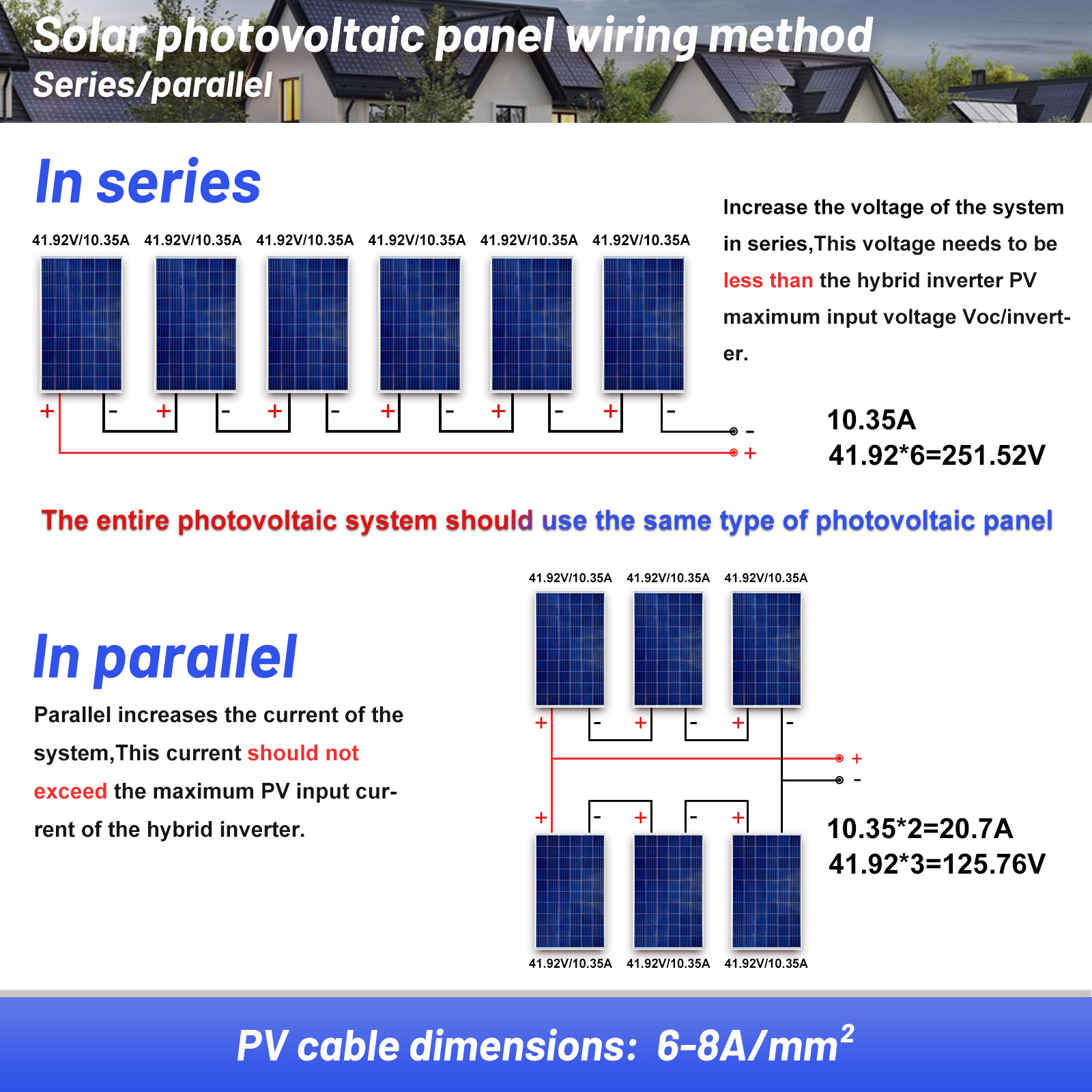
The Sumry HGX series machine has a maximum PV charging power of 5600W and a PV charging voltage range of 55-350V. When connecting solar panels, consider the voltage and power of individual panels to ensure they fall within the inverter's specifications. The entire photovoltaic system should use the same type of photovoltaic panel.
- Series Connection: Increases the system voltage. The total voltage must be less than the hybrid inverter's maximum input voltage (Voc/inverter).
- Parallel Connection: Increases the system current. The total current should not exceed the maximum PV input current of the hybrid inverter.
PV cable dimensions: 6-8A/mm².
2.4 Battery Compatibility
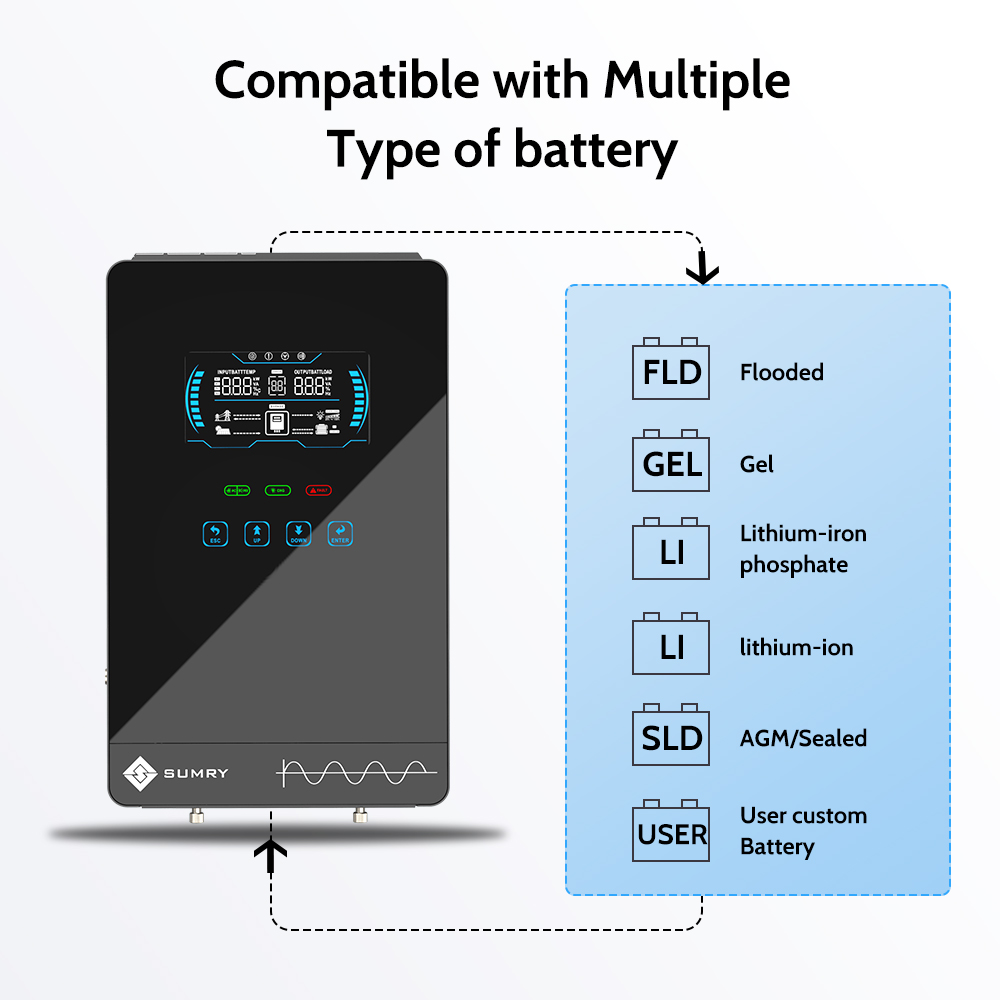
The inverter supports a wide range of 24V batteries, including:
- Flooded (FLD)
- Gel
- Lithium-iron phosphate (LiFePO4)
- Lithium-ion (Li-ion)
- AGM/Sealed (SLD)
- User-defined custom battery settings
3. Operating Instructions
3.1 LCD Display and Touchable Buttons
The inverter features a unique glass top cover design with a 6.25-inch LCD display and touchable buttons for user-configurable settings and easy operation. This allows you to adjust parameters such as battery charging current, AC/solar charger priority, and acceptable input voltage.
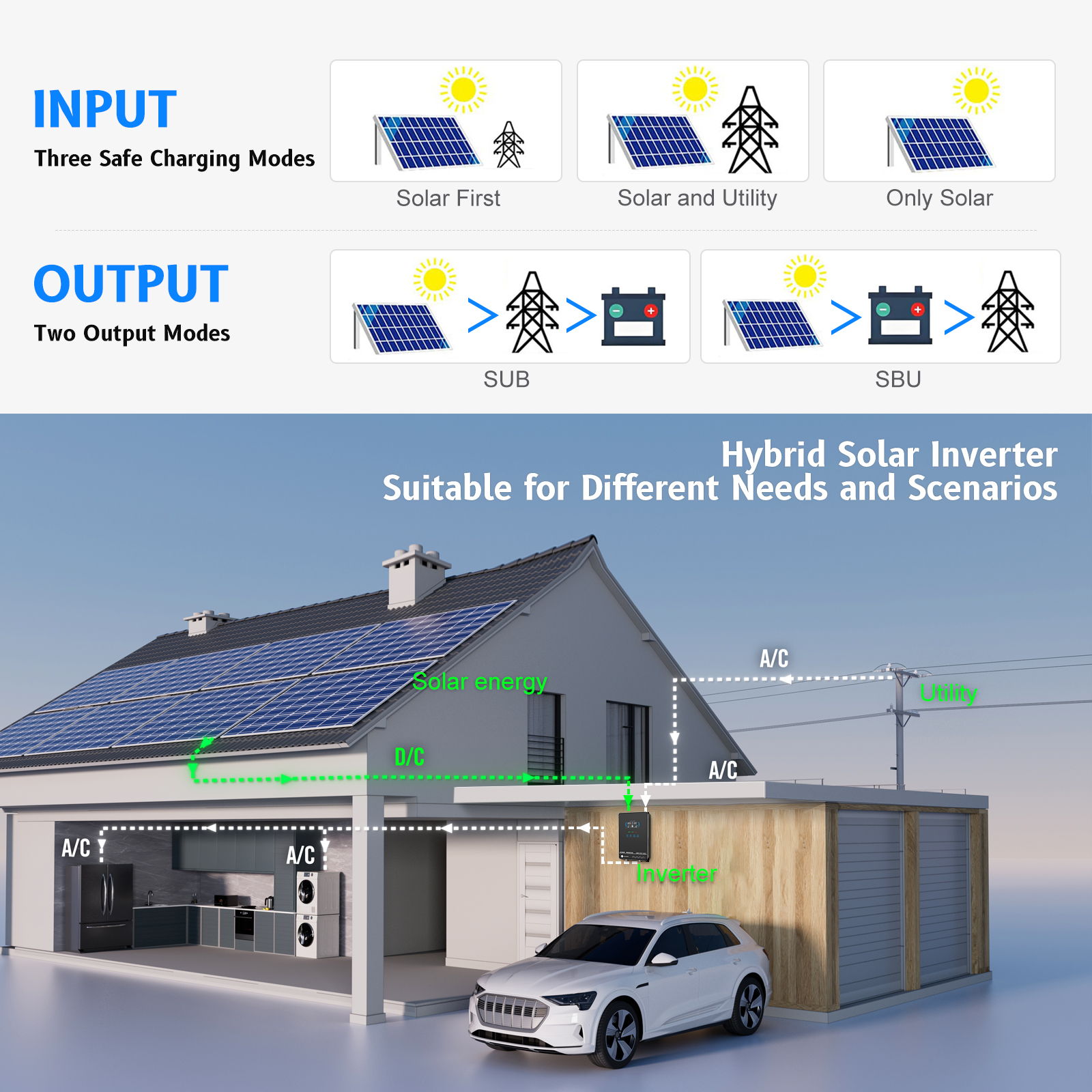
3.2 Versatile Working Modes
The inverter offers flexible power management with configurable input and output priorities:
- Charging Modes (3 options):
- Only Solar
- Solar First
- Mains & Solar
- Output Modes (2 options):
- SBU (Solar-Battery-Utility)
- SUB (Solar-Utility-Battery)
3.3 Pure Sine Wave Output
The Sumry HGX inverter produces a pure sine wave AC output, which is commercial-grade and high-quality. This ensures compatibility with over 98% of electrical appliances, providing stable and efficient power, making it safe for sensitive electronics.

3.4 Monitoring and Control
The inverter supports WiFi monitoring (optional) via a smart app, allowing you to monitor and control your system remotely. This feature provides real-time data and management capabilities for optimized energy usage.

4. Maintenance
4.1 General Care
To ensure the longevity and optimal performance of your Sumry HGX inverter, perform regular checks:
- Keep the inverter clean and free from dust. An optional anti-dust kit is available for harsh environments.
- Periodically inspect all electrical connections to ensure they are secure and free from corrosion.
- Ensure adequate ventilation around the inverter to prevent overheating. The intelligent fans help reduce heat and increase system longevity.
4.2 Intelligent Protection Systems
The inverter is equipped with comprehensive 360° protection systems to safeguard against various issues:
- Overload Protection
- Overheating Protection
- High/Low Voltage Protection
- Battery Protection
- Short Circuit Protection
- Overcurrent Protection
- Anti-Reverse Protection
- Power Failure Protection

5. Troubleshooting
This section provides guidance on common issues you might encounter with your Sumry HGX inverter.
- No Power Output: Check all circuit breakers (battery, PV, AC input, AC output) to ensure they are closed. Verify battery voltage is within the operating range. Ensure solar panels are receiving sufficient sunlight if operating in solar-priority modes.
- Inverter Not Starting: Confirm the 24V battery is correctly connected and charged. Perform a cold restart if necessary. The inverter also features an auto-restart function if PV power recovers after an interruption.
- Charging Issues: Check PV input voltage and current to ensure they are within specifications. Verify battery type settings on the LCD display match your connected battery.
- Overload/Over-temperature Warnings: Reduce the connected load. Ensure the inverter has adequate ventilation and is not obstructed.
- Communication Problems (WiFi/BMS): Ensure the optional WiFi module is correctly installed and configured. If using BMS communication, confirm the battery supports PACE or PYLONTECH protocols and is connected to the COMM port.
If issues persist, refer to the detailed troubleshooting section in the full product manual (if available) or contact customer support.
6. Specifications
The following table outlines the key technical specifications for the Sumry HGX (110V) 4KW Hybrid Solar Inverter:
| Category | Parameter | Value |
|---|---|---|
| Model | Rated Model | HGX (110V) 4KW |
| Output Type | SINGLE | |
| Is Smart Device | Yes | |
| Input | Voltage | 100/110/120VAC |
| Selectable Voltage Range | 90-140VAC | |
| Frequency Range | 50Hz/60Hz (Autosensing) | |
| Output | AC Voltage Regulation | 120VAC ±5% |
| Surgepower | 2* rated power for 5 seconds | |
| Efficiency (Peak) BAT to INV | 94% | |
| Transfer Time | 10ms (for personal computers), 20ms (for home appliances) | |
| Wave form | Pure Sine Wave | |
| Battery & AC Charger | Battery Voltage | 24VDC |
| Bulk Charging Voltage (Flooded Battery) | 29.2VDC | |
| Bulk Charging Voltage (AGM/GEL Battery) | 28.2VDC | |
| Floating Charge Voltage | 27.6VDC | |
| Overcharge Protection | 32VDC | |
| Maximum Charge Current | 110A | |
| Solar Charger | PV Input (DC) | 55-350VDC |
| Nominal DC Voltage/Maximum DC Voltage | 280VDC/350VDC | |
| Start-up Voltage/Initial Feeding Voltage | 55VDC | |
| MPPT Voltage Range | 55VDC-280VDC | |
| Maximum PV Power | 5600W | |
| Grid Output (AC) | Nominal Output Voltage | 120Vac |
| Output Voltage Range | 95V-135V | |
| Nominal Output Current | 33A | |
| Efficiency | Maximum Conversion Efficiency (DC/AC) | 98% |
| MPPT Efficiency | 99.90% | |
| Physical | Dimensions (L*W*H) | 40*25*8.9cm |
| Weight | 9kg | |
| Communication Interface | COM port (Standard), LCD remote/WiFi (Optional) | |
| Certification | CE |

7. Warranty and Support
7.1 Warranty Information
The Sumry HGX 4KW Hybrid Solar Inverter comes with a 1-year warranty. It is certified with CE, RoHS, and FC standards, ensuring compliance with relevant safety and environmental regulations.
7.2 Communication Options
The inverter features a single communication port (COMM port) located at the bottom of the machine. You can choose to communicate via either a WiFi module or a battery BMS, but only one method can be used at a time.
- WiFi Module: An optional WiFi module is available for remote monitoring and control via a smart app.
- Battery BMS Communication: If you opt for battery BMS communication, ensure your battery supports PACE or PYLONTECH communication protocols.

8. User Tips
- Correct Breaker Sizing: Always use the specified circuit breaker sizes for each connection point (battery, PV, AC input, AC output) to prevent damage and ensure safety.
- Battery Type Verification: Double-check that the battery type selected in the inverter's settings matches your physical battery (e.g., Gel, Lithium, Flooded) for optimized charging and discharge cycles.
- Solar Panel Configuration: Carefully calculate the series and parallel connections for your solar panels to ensure the total voltage and current remain within the inverter's acceptable PV input range (55-350VDC, Max 5600W).
- Ventilation is Key: Ensure the inverter is installed in a location with ample airflow to prevent overheating, which can impact performance and lifespan.
- Remote Monitoring: If remote monitoring is desired, consider purchasing the optional WiFi module to utilize the smart app for convenient system management.