
1. Introduction
Thank you for choosing the Carrier 20L Four Seasons Quick Dry Dehumidifier, model CDHC-200AXMWOYH. This appliance is designed to effectively reduce humidity in your indoor environment, helping to prevent mold growth, condensation, and creating a more comfortable living space. With a dehumidification capacity of 20 liters per day and coverage for areas up to 84m², it is suitable for various rooms and conditions throughout the year.
2. Safety Information
Please read all safety instructions carefully before using the appliance to prevent injury to yourself and others, and to avoid damage to the appliance. Keep this manual for future reference.
- Always ensure the dehumidifier is placed on a stable, level surface.
- Do not block the air inlet or outlet. Maintain adequate space around the unit for proper air circulation.
- Do not operate the unit with a damaged power cord or plug.
- Unplug the appliance from the power outlet before cleaning, performing maintenance, or when not in use for extended periods.
- Do not immerse the appliance, power cord, or plug in water or other liquids.
- This dehumidifier operates by absorbing humid air and discharging warm, dry air. The discharge of warm air is a normal operating characteristic and not a defect.

3. Product Overview
The Carrier CDHC-200AXMWOYH dehumidifier features a sleek, premium design that blends seamlessly into various home environments. It is equipped with user-friendly controls and convenient mobility features.
Components and Features:
- Control Panel: Intuitive interface for setting modes, humidity levels, and timers.
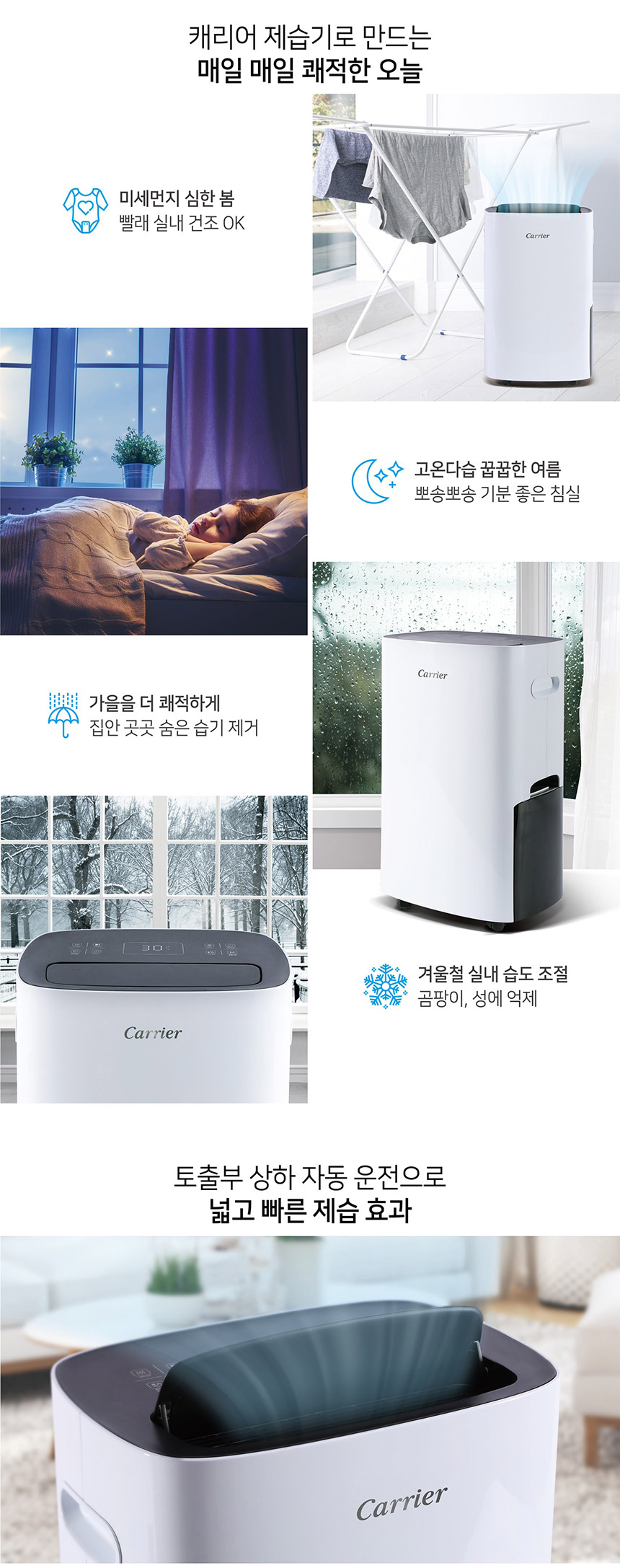
- Air Outlet: Located at the top, with auto-swing function for wide and fast dehumidification.
- Air Inlet: Located at the rear, where humid air is drawn in.
- Water Tank: Removable 4-liter capacity tank for collected water.
- Side Handle: Integrated for easy lifting and portability.
- Moving Wheels: 360-degree rotating wheels for effortless relocation.
- Power Cord: For connecting to a 220V, 60Hz power supply.


4. Setup
- Unpacking: Carefully remove the dehumidifier from its packaging. Retain packaging materials for future transport or storage.
- Placement: Place the dehumidifier on a firm, level surface in the area where dehumidification is desired. Ensure there is at least 20-30 cm of space around the air inlet and outlet for optimal airflow. Avoid placing it directly against walls or furniture.
- Power Connection: Plug the power cord into a grounded 220V, 60Hz electrical outlet.
- Water Tank: Ensure the water tank is correctly inserted into the unit. For continuous drainage, connect a suitable hose (not included) to the continuous drainage port as shown in the diagram below.

5. Operating Instructions
The control panel allows you to manage various functions of your dehumidifier.
Control Panel Functions:
- Power Button: Press to turn the unit ON or OFF.
- Mode Selection: Cycle through available operating modes:
- Dehumidification Mode: Standard operation to reduce ambient humidity.
- Continuous Dehumidification: Operates continuously regardless of humidity level.
- Laundry Drying Mode: Optimized for drying clothes indoors.
- Humidity Setting: Adjust the desired humidity level (e.g., 40%, 50%, 60%). The unit will operate until the set humidity is reached.
- Timer Function: Set a timer for automatic ON/OFF operation (up to 24 hours).
- Child Lock: Activates to prevent accidental changes to settings.
- Auto Swing: Controls the oscillation of the air outlet for wider air distribution.
Key Operating Features:
- Automatic Operation: The unit can automatically adjust its operation based on the set humidity level.
- Water Full Stop: The dehumidifier will automatically stop operating when the water tank is full, and an indicator light will illuminate.
- Auto Defrost: Automatically defrosts the coils when frost builds up, ensuring efficient operation in cooler temperatures.
6. Maintenance
Regular maintenance ensures optimal performance and longevity of your dehumidifier.
6.1. Emptying and Cleaning the Water Tank
- Turn off the dehumidifier and unplug it from the power outlet.
- Carefully pull out the water tank from the unit.
- Empty the collected water.
- Clean the water tank with mild detergent and warm water. Rinse thoroughly to prevent mold or bacterial growth.
- Reinsert the clean water tank firmly into the unit.
6.2. Cleaning the Air Filter
The air filter should be cleaned regularly (e.g., every two weeks or as needed, depending on usage and air quality).
- Turn off the dehumidifier and unplug it.
- Locate and remove the air filter (typically found at the air inlet).
- Gently clean the filter using a vacuum cleaner to remove dust and debris. For heavier dirt, wash it with warm, soapy water.
- Allow the filter to air dry completely before reinserting it into the unit. Do not operate the dehumidifier without the filter or with a wet filter.
6.3. Cleaning the Exterior
Wipe the exterior of the dehumidifier with a soft, damp cloth. Do not use harsh chemicals, abrasives, or solvents, as these can damage the surface.
7. Troubleshooting
If you encounter issues with your dehumidifier, refer to the following common problems and solutions:
| Problem | Possible Cause | Solution |
|---|---|---|
| Dehumidifier does not turn on | No power supply Water tank full or incorrectly inserted | Check power cord and outlet Empty and correctly reinsert water tank |
| No dehumidification or weak effect | Air filter clogged Room temperature too low Humidity setting too high Air inlet/outlet blocked | Clean air filter Dehumidifiers are less effective below 5°C Lower the desired humidity setting Ensure proper clearance around the unit |
| Unusual noise | Unit not on a level surface Loose parts | Place on a flat, stable surface Contact customer service if noise persists |
| Water leakage | Water tank not properly seated Continuous drainage hose blocked or loose | Reinsert water tank correctly Check hose connection and ensure it's not kinked |
If the problem persists after trying these solutions, please contact Carrier customer service.
8. Specifications
| Feature | Specification |
|---|---|
| Product Code | CDHC-200AXMWOYH |
| Product Type | Dehumidifier |
| Dehumidification Area | 84m² |
| Water Tank Capacity | 4L (Continuous drainage possible) |
| Dimensions (W x D x H) | 350 x 305 x 590mm |
| Weight | 15kg |
| Power Consumption | 410W |
| Rated Voltage | 220V x 60Hz |
| Energy Efficiency Rating | 2nd Grade (Note: Changes to 3rd Grade from July 2024) |
| Electrical Safety Certification No. | YU07104-20002 |
| Release Date (Same Model) | 2024.03 |
| Country of Manufacture | China |
| Additional Functions | Side handle, Desired humidity control, Automatic operation/continuous dehumidification, Reservation time/humidity display, Water full stop, 24-hour reservation, Laundry drying/humidity control, Child lock/auto swing |

9. User Tips
- Understand Warm Air Discharge: It is normal for the dehumidifier to discharge warm, dry air. This is part of its operating principle and indicates it is working correctly.
- Optimal Placement: For best results, place the dehumidifier in the center of the room or an open area to allow for maximum air circulation.
- Seasonal Use: This dehumidifier is designed for 'Four Seasons' use. Utilize it to:
- Spring/Summer: Combat high humidity, prevent mold, and improve sleep comfort.
- Autumn: Remove hidden moisture from damp areas.
- Winter: Control indoor humidity, prevent mold and frost.
- Laundry Drying: Use the dedicated Laundry Drying Mode to efficiently dry clothes indoors, especially during humid weather.
- Mobility: Take advantage of the side handle and 360-degree rotating wheels to easily move the unit between rooms as needed.

10. Warranty and Support
For product inquiries, technical assistance, or warranty claims, please contact Carrier Customer Service.
Carrier Customer Service: 1588-8866
Please have your product model (CDHC-200AXMWOYH) and purchase information ready when contacting support.