1. Introduction
The BEBIRD EarSight Plus E33R is an innovative smart visual ear cleaning kit designed for safe and effective ear wax removal and general ear, nose, and throat inspection. Featuring a high-definition camera and flexible tips, it provides a clear view of the ear canal directly on your smartphone, making personal hygiene easier and safer for the whole family.

Figure 1: BEBIRD EarSight Plus E33R in hand, showcasing its compact design.
2. Package Contents
Before starting, please ensure all items listed below are present in your package:
- Accessory Case
- Main Device (EarSight Plus E33R)
- Accessory Tray
- Tip of the tweezers
- Handle of the tweezers
- Lens Brush
- Type-C Charging Cable
- Ear Canal Protective Plug
- Ear Canal Speculum
- Nasal Speculum
- Tongue Depressor
- Various Ear Spoon Tips (Metal & Silicone wrapped, Double-color Annular, Sponge)

Figure 2: All components of the BEBIRD EarSight Plus E33R kit.
3. Setup Guide
-
Charge the Device
Before first use, fully charge the BEBIRD EarSight Plus E33R using the provided Type-C charging cable. Connect the cable to the device and a suitable USB power source.
-
Download the Bebird App
Scan the QR code provided in the quick start guide or search for "Bebird App" in your device's app store (iOS App Store or Google Play Store) and install it.
-
Power On the Device
Press and hold the power button on the main device for 2-3 seconds to turn it on. The indicator light will illuminate.
-
Connect to the App
- Open the Bebird App on your smartphone.
- Click "Connect Devices" or "Add New Device".
- Go to your phone's Wi-Fi settings and connect to the Wi-Fi network named "bebird-wifi" (or similar, check device for exact name).
- Return to the Bebird App. The device should now be connected.
- Click "Go" to start viewing the camera feed.
-
Attach the Desired Tip/Speculum
Select the appropriate tip (ear spoon, tweezers, or speculum) for your intended use. Twist the tip onto the device in a clockwise direction until it is securely fastened. For ear cleaning, consider using the ear canal protective plug to prevent over-insertion.

Figure 3: Overview of the device and its various attachments.
4. Operating Instructions
4.1 Ear Cleaning
- Ensure the device is connected to the app and you can see a clear image on your phone.
- Gently insert the device into the ear canal. The flexible lens can be adjusted to navigate the curves of your ear canal.
- Use the live camera feed on your phone to guide the tip and carefully remove earwax.
- Different tips are available for various types of earwax:
- Scooper: For removing regular earwax.
- Scraper: For extracting wet earwax.
- Sponge: For removing debris.
- Tweezers: For removing stubborn earwax. Ensure the tweezers tip is tightened clockwise before use. Gently press the plastic handle to control opening and closing.
- Always move slowly and carefully. If you feel any discomfort, stop immediately.
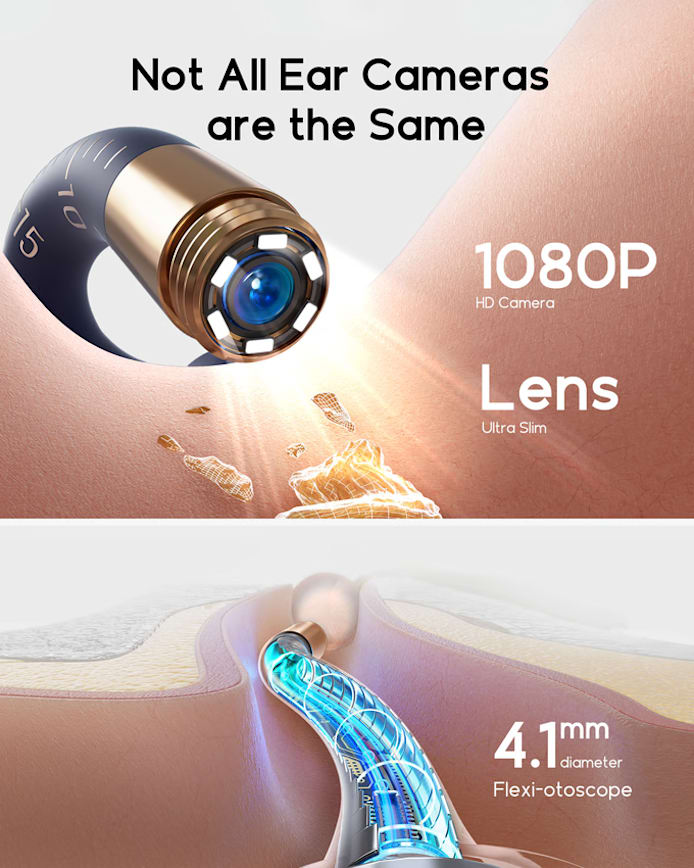
Figure 4: Illustration of various ear cleaning methods using different tips.

Figure 5: Safe ear cleaning for children with visual guidance.
4.2 Multi-Purpose Inspection
The BEBIRD EarSight Plus E33R can also be used for inspecting other areas:
- Ear Canal Speculum: For general ear canal inspection.
- Nasal Speculum: For inspecting nasal passages.
- Tongue Depressor: For oral and throat examinations.
Attach the relevant speculum or depressor tightly to the device. Insert slowly and carefully. If uncomfortable, do not continue.

Figure 6: The device can be used for ear, nasal, and oral examinations.
5. Maintenance
-
Cleaning the Camera Lens and Tips
After each use, clean the camera lens with water, an alcohol swab, or the provided lens brush. Ensure all tips are cleaned thoroughly before storage.
-
Charging and Storage
If the device is not used for a long time, please charge it at least every 3 months to maintain battery life. Store the device and all accessories in the provided hygiene storage case to keep them dust-proof and organized.
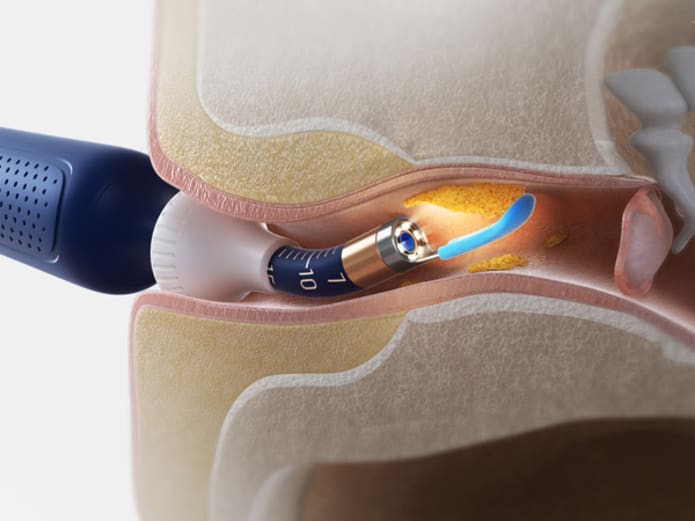
Figure 7: Features of the hygiene storage case for easy organization and portability.
6. Troubleshooting
- Device not turning on: Ensure the device is fully charged. Press and hold the power button for 2-3 seconds.
- Cannot connect to Wi-Fi: Make sure the device is powered on. Check your phone's Wi-Fi settings to ensure you are connected to the "bebird-wifi" network. Restart both the device and the app if necessary.
- Blurry image: Clean the camera lens thoroughly with the provided lens brush or an alcohol swab. Ensure there is no debris on the lens.
- Tips falling off: Ensure the tips are twisted on tightly in a clockwise direction.
- Discomfort during use: Stop immediately. Ensure you are using the correct tip for the area and inserting it gently. Do not force the device.
7. Specifications
| Feature | Description |
|---|---|
| Model Number | E33R |
| Camera Resolution | 1080P HD, 10 Megapixel |
| Magnification | 3x |
| Lens Diameter | 4.1mm (Flexi-otoscope) |
| Lens Type | 3-layer anti-distortion optical lens, Bendable |
| Connectivity | Wi-Fi Auto Connection |
| Waterproof Rating | IP67 |
| Material | ABS, Silicone tips |
| Features | Liquid delivery, Scoop, Tweezers, Flexible & Ultra HD Otoscope & Camera, 6-axis Gravity Sensor, Long Battery Life |
| Number of Pieces | One Unit (with 13-piece tips) |
| Suitable For | Families or individuals requiring advanced ear hygiene |
| Package Dimensions | Length: 21cm, Width: 14cm, Height: 4cm |
| Package Weight | 0.35 kg |

Figure 8: Key features of the BEBIRD EarSight Plus E33R.
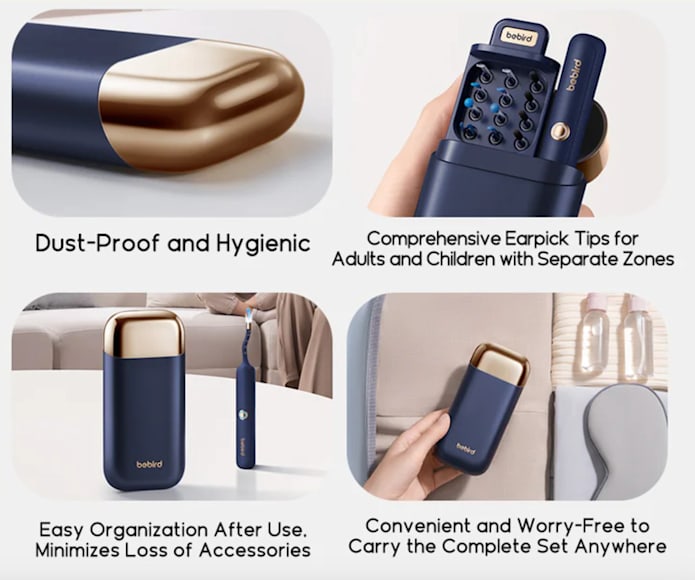
Figure 9: Comparison of EarSight Plus features with other models.
8. User Tips
- Always ensure the device is fully charged for optimal performance during use.
- When cleaning children's ears, ensure they remain still and are supervised by an adult to prevent accidental injury.
- Familiarize yourself with the app interface and practice using the device in an open area (not inside the ear) to get a feel for its movement and camera view before actual use.
- The device may gently warm up during use to match skin temperature, which is normal.
- For stubborn earwax, consider using ear drops to soften it before attempting removal with the device.
- Regularly clean all tips and the camera lens to maintain hygiene and clear image quality.
9. Safety Information
- Do not use the device if you experience ear pain, discharge, or any other ear condition. Consult a medical professional.
- Avoid excessive force when inserting or manipulating the device in the ear canal.
- The spiral structure design ensures secure attachment of accessories. Always ensure tips are tightly fastened to prevent them from falling off inside the ear.
- The device's Wi-Fi connects only to your phone and does not support internet access, ensuring privacy and preventing online data transmission.
- Use the ear canal protective plug and observe the precise scale on the device to prevent over-insertion and potential damage to the eardrum.
10. Instructional Video
For a visual guide on how to set up and use your BEBIRD EarSight Plus E33R, please watch the official instruction video:
Video 1: Official BEBIRD EarSight Plus E33R Instruction Video.
11. Warranty and Support
For warranty information, technical support, or any product-related inquiries, please refer to the contact information provided with your purchase or visit the official BEBIRD website. Keep your proof of purchase for warranty claims.


