
1. Introduction
This manual provides detailed instructions for the safe and efficient operation, maintenance, and troubleshooting of your VEVOR EURO Coin Sorter, Model KSW550-1. This device is designed to accurately count, sort, and wrap 8 types of Euro coins, offering a streamlined solution for coin management in various environments.

Figure 1: VEVOR EURO Coin Sorter KSW550-1
2. Safety Instructions
Please read and understand all safety instructions before operating the coin sorter. Keep this manual for future reference.
- Ensure the power supply matches the specifications indicated on the device label.
- Do not operate the machine with wet hands or in damp conditions.
- Keep fingers, hair, and loose clothing away from moving parts during operation.
- Unplug the device from the power outlet before cleaning or performing any maintenance.
- Do not attempt to disassemble or repair the machine yourself. Contact qualified service personnel for assistance.
- Keep the machine away from direct sunlight, high temperatures, and corrosive substances.
- Use only genuine accessories and spare parts provided or recommended by the manufacturer.
3. Package Contents
Carefully unpack the box and ensure all items are present and in good condition. If any items are missing or damaged, please contact your seller.
- 1 x Main Unit (Coin Sorter)
- 8 x Coin Trays
- 1 x User Manual
4. Product Overview
The VEVOR KSW550-1 Coin Sorter is designed for efficient coin handling. Familiarize yourself with its main components:

Figure 2: Control Panel and Display
- Coin Hopper: Where coins are loaded for sorting.
- LCD Display: Shows total amount, number of coins, and batch settings.
- Control Buttons:
- REPORT: Displays counting results for each coin denomination.
- BAT: Used for setting batch numbers.
- + / -: Adjusts batch numbers or other settings.
- SET: Selects the channel/denomination for batch setting.
- START/STOP: Initiates or pauses the counting process.
- Coin Trays: Eight individual trays for collecting sorted Euro coins.
- Coin Jamming Device: A small lever or door for clearing coin jams.
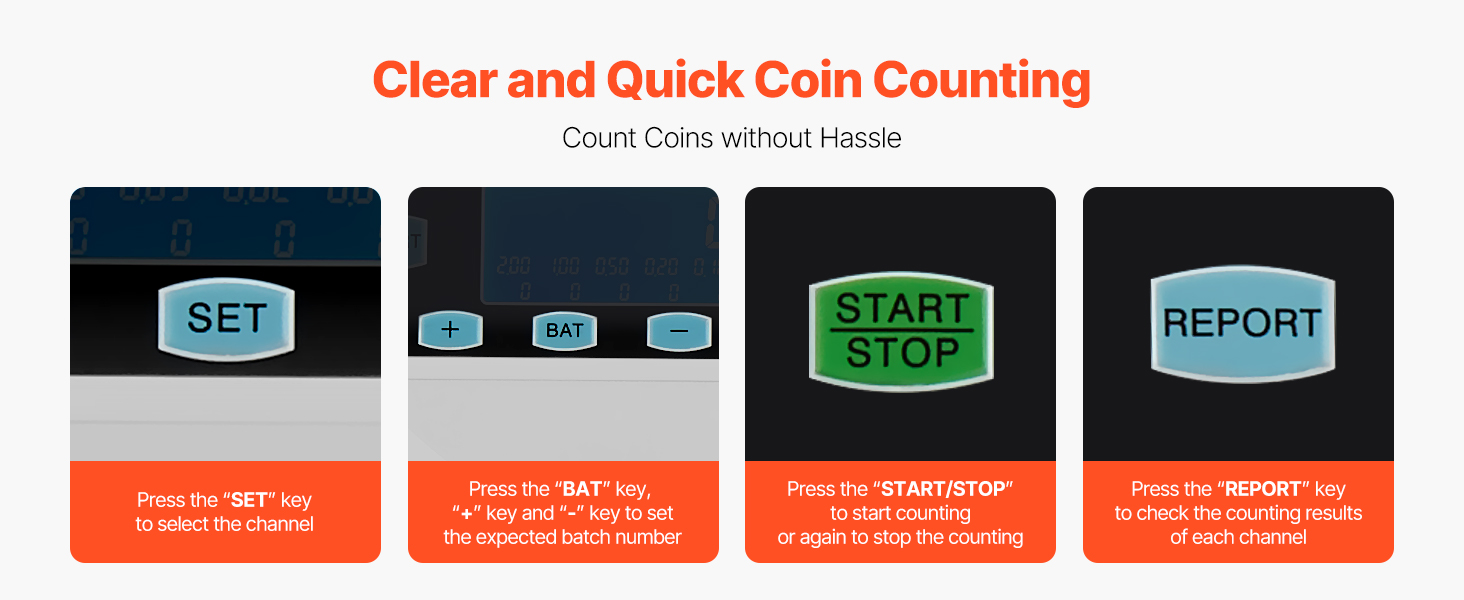
Figure 3: LCD Screen and Coin Jamming Device
5. Setup
- Placement: Place the coin sorter on a stable, flat surface. Ensure there is enough space around the machine for operation and coin tray access.
- Install Coin Trays: Attach the eight coin trays to their respective slots around the base of the main unit. Ensure they are securely fitted to prevent coins from spilling.
- Power Connection: Connect the power cord to the machine and then plug it into a suitable electrical outlet.
- Initial Check: Turn on the machine using the power switch (if present, otherwise it powers on when plugged in). The LCD display should light up.
6. Operating Instructions
6.1 Basic Coin Counting and Sorting
- Ensure the machine is powered on and all coin trays are correctly installed.
- Place the Euro coins you wish to count and sort into the coin hopper. Do not overload the hopper.
- Press the START/STOP button to begin the counting and sorting process.
- The machine will automatically sort the coins into their respective denomination trays. The LCD display will show the total count and value.
- Once counting is complete, or if you need to pause, press the START/STOP button again.
- To view a detailed report of each denomination's count, press the REPORT button.

Figure 4: Clear and Quick Coin Counting Button Functions
6.2 Batch Counting (Pre-set Batch Processing)
This feature allows you to count coins into specific batch quantities (0-999 pieces).
- Press the SET key to select the desired coin denomination channel for batch setting.
- Press the BAT key. The display will show the current batch number.
- Use the + and - keys to adjust the expected batch number (e.g., 50 for a roll of 50 coins).
- Once the batch number is set, press START/STOP to begin counting. The machine will pause once the set batch quantity is reached for that denomination.
- Remove the batched coins and press START/STOP again to continue counting.
6.3 Coin Wrapping
The machine supports intelligent coin wrapping for convenient storage.
- For the denomination you wish to wrap, place an empty coin roll wrapper into the designated tube or slot above its respective coin tray.
- Initiate batch counting as described in Section 6.2, setting the batch number to the capacity of your coin wrapper.
- The machine will automatically fill the wrapper with the specified number of coins.
- Once filled, remove the wrapped coin roll.

Figure 5: Intelligent Coin Wrapping
7. Maintenance
Regular maintenance ensures the longevity and optimal performance of your coin sorter.
- Cleaning:
- Before cleaning, always unplug the machine from the power outlet.
- Use a soft, dry cloth to wipe the exterior of the machine.
- For stubborn dirt, a slightly damp cloth can be used, but ensure no liquid enters the machine.
- Periodically clean the coin hopper and sorting mechanisms to remove dust, lint, and coin residue that may accumulate. A small brush or compressed air can be helpful.
- Clearing Coin Jams:
- If coins jam during operation, the machine may stop. Unplug the machine immediately.
- Locate the coin jamming device (refer to Figure 3). Open or manipulate it carefully to dislodge any stuck coins.
- Remove all coins from the hopper and trays, clear the jam, and then restart the machine.
- Ensure coins are not bent or excessively dirty, as this can cause frequent jams.
- Storage: When not in use for extended periods, store the coin sorter in a clean, dry place, away from extreme temperatures.
8. Troubleshooting
If you encounter issues with your coin sorter, refer to the following common problems and solutions:
| Problem | Possible Cause | Solution |
|---|---|---|
| Machine does not power on. | No power supply or loose connection. | Check if the power cord is securely plugged into both the machine and the outlet. Ensure the outlet has power. |
| Coins are not sorting correctly or getting stuck. | Coin jam, foreign objects, or dirty/damaged coins. | Unplug the machine and clear any coin jams (refer to Section 7). Ensure coins are clean and undamaged. Do not overload the hopper. |
| Inaccurate counting. | Sensor obstruction or dirty coins. | Clean the internal sensors and coin pathways. Ensure coins are free of debris. |
| Coin trays overflow quickly. | Trays not emptied regularly. | Monitor coin trays and empty them before they become full. |
If the problem persists after attempting these solutions, please contact customer support.
9. Specifications
Technical specifications for the VEVOR KSW550-1 EURO Coin Sorter:
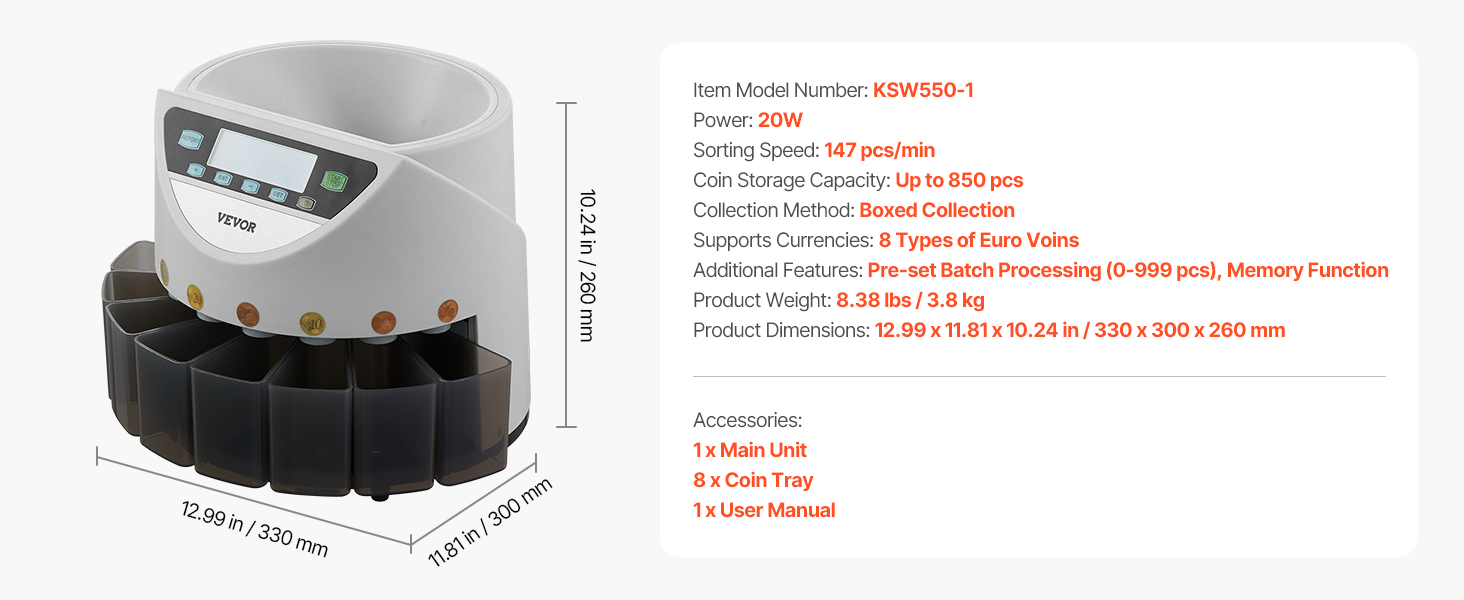
Figure 6: Product Specifications and Dimensions
| Feature | Detail |
|---|---|
| Model Number | KSW550-1 |
| Power | 20W |
| Sorting Speed | 147 pcs/min |
| Coin Storage Capacity | Up to 850 pcs |
| Collection Method | Boxed Collection |
| Supported Currencies | 8 Types of Euro Coins |
| Additional Features | Pre-set Batch Processing (0-999 pcs), Memory Function |
| Product Weight | 8.38 lbs / 3.8 kg |
| Product Dimensions (L x W x H) | 12.99 x 11.81 x 10.24 in / 330 x 300 x 260 mm |
| Brand Name | VEVOR |
| Origin | Mainland China |
| Display | LCD |
| Certification | CE |
| Counting Function | Yes |
| Checkout Function | No |
| Into Mode | Front Loading |
10. User Tips
- For best results, ensure coins are clean and free of excessive dirt or foreign objects before placing them in the hopper.
- Avoid overfilling the coin hopper; feed coins gradually for smoother operation and to prevent jams.
- Regularly check and empty the coin trays to prevent overflow and ensure continuous sorting.
- When using the batch function for wrapping, ensure the coin wrappers are correctly positioned and of the appropriate size for the denomination.
11. Warranty and Support
For warranty information, technical support, or service inquiries, please refer to the contact information provided by your retailer or visit the official VEVOR website. Please have your model number (KSW550-1) and purchase details ready when contacting support.