
1. Introduction and Disclaimer
Thank you for purchasing this TILTA product. This manual provides essential information for the correct setup and use of your TILTA BMPCC 4K 6K Camera Cage. Please read it carefully before use.
TILTA reserves the right to modify any information in this manual at any time without prior notice and without assuming any responsibility. By using this product, you are deemed to have carefully read the disclaimer and warnings, understood, agreed, and accepted all the terms and content of this statement. You promise to take full responsibility for the use of this product and any consequences that may arise. You commit to using this product only for legitimate purposes and agree to these terms as well as any related regulations, policies, and guidelines set by TILTA. TILTA is not responsible for any damages, injuries, or legal liabilities caused directly or indirectly by the use of this product. Users should follow all safety guidelines mentioned in this document, including but not limited to those mentioned.
2. Product Overview
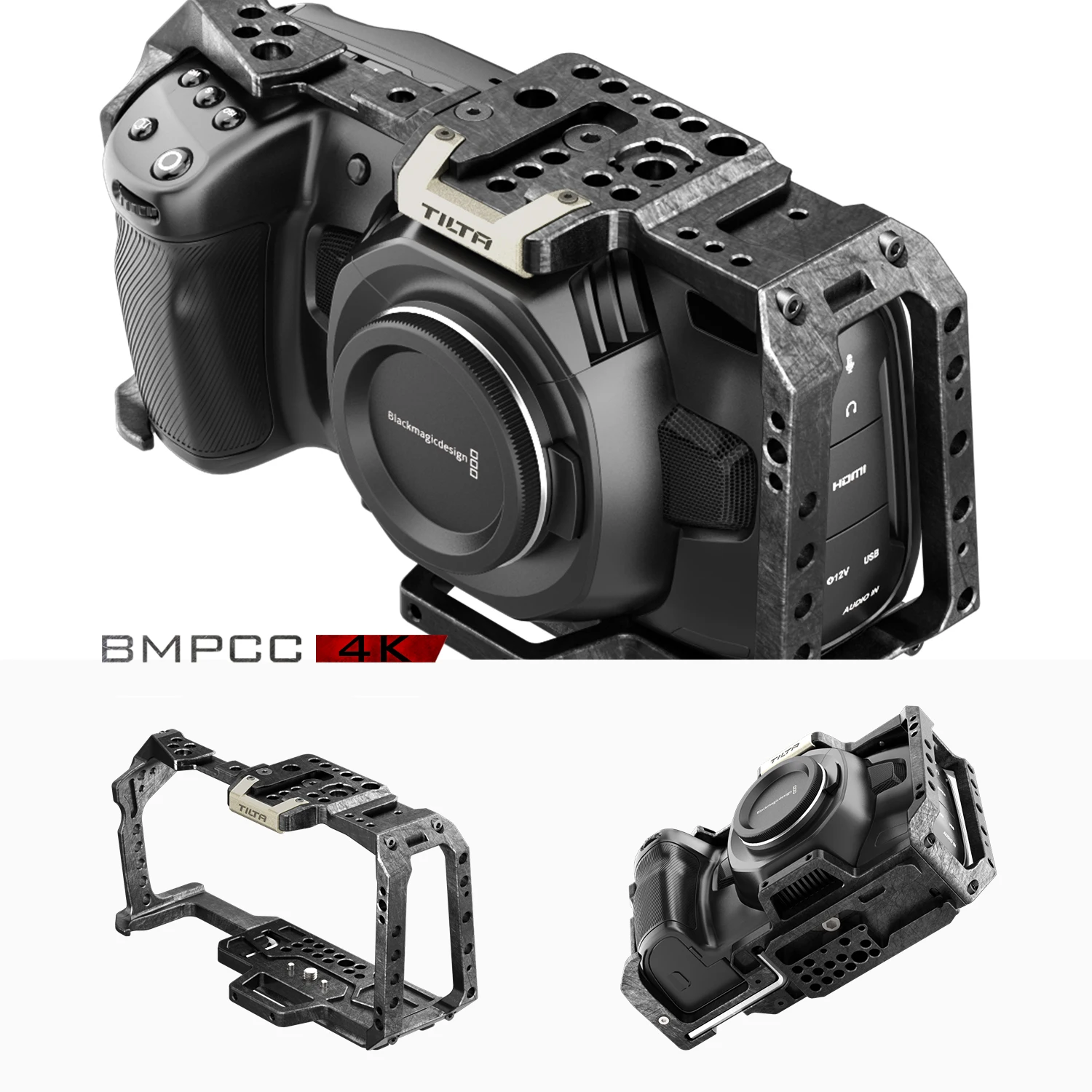
The TILTA BMPCC 4K 6K Camera Cage provides complete protective armor for your Blackmagic Pocket Cinema Camera 4K or 6K. It offers multiple 1/4"-20 and 3/8"-16 mounting points, along with three cold shoe mounting points for attaching various accessories. The cage's design also aids in fine-tuning balance when mounted on gimbals.

Front view of the TILTA BMPCC 4K 6K Camera Cage in Tilta Gray.

Rear view of the TILTA BMPCC 4K 6K Camera Cage, showing access to the camera screen.

Official product video demonstrating the TILTA camera cage features and assembly.
Package Contents:
- (1) Cage Part – Top
- (1) Cage Part – Left Side
- (1) Cage Part – Bottom
- (1) Top Screw
- (1) Bottom Screw
- (1) Locking Pin for Bottom
- (4) Hex Screws for Left Side
- (1) Cage Part – Top Right Side
- (1) Cage Part – Right Side
- (1) Cage Part – Bottom Right Side
- (2) Bottom Right Side Screws
- (1) Top Right Side Screw
- (1) Top Right Cage Part Screw
3. Assembly Instructions
Follow these steps to correctly assemble the TILTA Camera Cage onto your Blackmagic Pocket Cinema Camera 4K or 6K.

Exploded view of the TILTA Camera Cage components.
- Attach the Bottom Part: Secure the camera to the (3) Cage Part – Bottom using the (5) Bottom Screw. Ensure the (6) Locking Pin for Bottom aligns with the camera body to prevent twisting.
- Install the Left Side: Attach the (2) Cage Part – Left Side to the camera and the bottom plate using the (7) Hex Screws.
- Mount the Top Part: Position the (1) Cage Part – Top onto the camera and secure it to the left side part. Use the (4) Top Screw to fasten it to the camera's top mounting point.
- Assemble the Right Side:
- First, attach the (8) Cage Part – Top Right Side. Use the (12) Top Right Side Screw and (13) Top Right Cage Part Screw to secure it.
- Then, attach the (9) Cage Part – Right Side.
- Finally, attach the (10) Cage Part – Bottom Right Side using the (11) Bottom Right Side Screws.
- Verify Security: Double-check all screws and connections to ensure the cage is securely mounted and the camera is stable.
Close-up view of the cage assembly process.
4. Usage
Once assembled, the TILTA Camera Cage enhances your camera's functionality and protection.
Attaching Accessories:
- Mounting Points: Utilize the numerous 1/4"-20 and 3/8"-16 threaded holes on all sides of the cage to attach monitors, microphones, lights, and other camera accessories.
- Cold Shoe Mounts: The three cold shoe mounting points are ideal for quick attachment of small accessories like external microphones or LED lights.
- Handles: Optional quick-release top handles and various side handles can be attached to the cage for improved ergonomics and different shooting styles.
Example of the cage with a top handle and side handle for enhanced grip.
Gimbal Balancing:
The base of the cage features multiple mounting holes, which can be used to fine-tune the balance of your camera setup when mounting it on a gimbal. This allows for precise adjustments to achieve optimal stability and smooth footage.
5. Maintenance
- Cleaning: Wipe the cage with a soft, dry cloth to remove dust and fingerprints. For stubborn dirt, a slightly damp cloth can be used, followed by immediate drying. Avoid abrasive cleaners or solvents.
- Storage: Store the cage in a cool, dry place away from direct sunlight and extreme temperatures.
- Inspection: Periodically check all screws and mounting points for tightness. Re-tighten any loose screws to ensure the camera remains secure.
- Avoid Impact: While the cage provides protection, avoid unnecessary drops or impacts that could damage the cage or the camera.
6. Troubleshooting
- Loose Fit: If the camera feels loose within the cage, ensure all screws are properly tightened, especially the main bottom screw and the locking pin.
- Accessory Mounting Issues: If an accessory doesn't fit, verify it uses standard 1/4"-20 or 3/8"-16 threads or a cold shoe mount. Do not force accessories onto mounting points.
- Gimbal Balancing Difficulty: If balancing on a gimbal is challenging, ensure the camera and all attached accessories are centered as much as possible. Utilize the multiple mounting points on the cage's base for micro-adjustments.
- Damaged Parts: If any part of the cage is damaged, do not attempt to repair it yourself. Contact TILTA customer support for assistance.
7. Specifications
| Feature | Detail |
|---|---|
| Brand Name | TILTA |
| Model Number | TA-T01-FCC-G |
| Cage Type | Camera Cage (Full Cage) |
| Configured For | Blackmagic Pocket Cinema Camera 4K / 6K |
| Material | Aluminum alloy |
| Color Options | Tilta Gray, Black |
| Package Length | 30 cm |
| Package Width | 20 cm |
| Package Height | 10 cm |
| Package Weight | 0.44 kg |
8. User Tips
- Compatibility Check: Users confirm the cage fits well with Blackmagic Pocket Cinema Camera 6K G1 models. Ensure your camera model is compatible before assembly.
- Quality Assurance: The cage is noted for its robust and well-made construction, providing reliable protection for your camera.
- Color Options: The cage is available in both Tilta Gray and Black.
9. Frequently Asked Questions (FAQ)
- Q: Is the cage available in different colors?
- A: Yes, the TILTA BMPCC 4K 6K Camera Cage is available in Tilta Gray and Black.
- Q: Is this cage compatible with the Blackmagic Pocket Cinema Camera 4K?
- A: Yes, this full cage is designed for both the Blackmagic Pocket Cinema Camera 4K and 6K models.
10. Warranty and Support
For warranty information, technical support, or service inquiries, please visit the official TILTA website at www.tilta.com or contact their customer service directly. Please retain your proof of purchase for warranty claims.
11. Additional Resources
A user manual for the TILTA Portable Charging Station for NP-FZ100 (Model TBC-FZ100) is available in PDF format. This document provides detailed instructions for the charging station, which is a separate product from the camera cage.
You can view the PDF here: TILTA Portable Charging Station User Manual (PDF)