
1. Introduction
The MILESEEY PF3S Laser Rangefinder is a versatile and user-friendly device designed to enhance your golf, hunting, and match experiences. Combining essential golf features with speed and height measurement, the PF3S is a perfect companion for improving your game and mastering your distance with precision.

2. Product Overview
2.1 Key Features
- Golf Ballistic Compensation: Utilizes TOF (Optical Time of Flight) technology for accurate measurements.
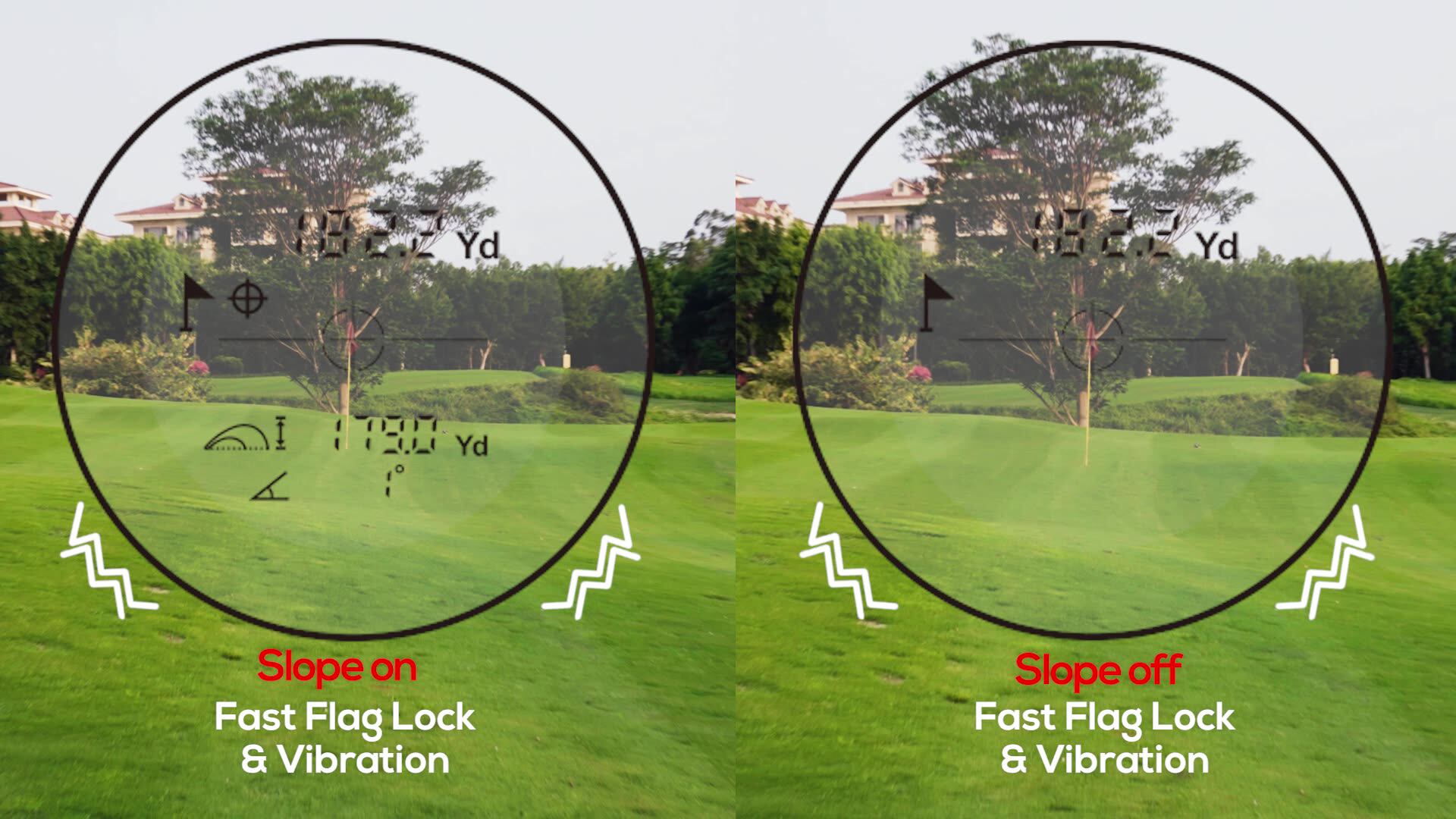
- Slope On/Off Switch: Allows for legal tournament play when slope compensation is disabled.
- Vibration Support: Provides tactile feedback upon flag-lock.
- Vertical Height Measurement: Capable of measuring height between two points.
- Flag-Lock: Quickly and accurately locks onto the flagstick.
- Speed Measuring: Measures the speed of moving objects.
- External 2-Inch LCD Display: Real-time display of dual-screen data for easy viewing.
- 1/4-20 Threaded Mount: For stable mounting on a tripod.
- Compact and Lightweight: Weighs approximately 0.49 pounds, designed for comfortable handling and portability.

2.2 Components Diagram

- Power/Measurement button
- Mode / Unit switch button
- Eyepiece knob
- Eyepiece
- External display
- External display switch button
- Angle switch
- Strap eyelet
- Battery compartment
- Objective Lens/Laser Emitter
- Laser receiving lens
- 1/4"-20 Tripod Mount
3. Setup
3.1 Battery Installation
The PF3S rangefinder is battery-powered (batteries not included). To install or replace batteries:
- Locate the battery compartment (9) on the device.
- Open the battery compartment cover.
- Insert the required batteries, ensuring correct polarity (+/-).
- Close the battery compartment cover securely.
3.2 Power On/Off
To power on the device, press the Power/Measurement button (1). To power off, press and hold the Power/Measurement button (1) for a few seconds, or the device will automatically power off after a period of inactivity to conserve battery.
3.3 Tripod Mounting
For enhanced stability during long-distance measurements or when precise aiming is required, the PF3S features a 1/4"-20 Tripod Mount (12) at its base.
- Locate the tripod screw hole on the bottom of the rangefinder.
- Align the rangefinder with a compatible tripod's mounting screw.
- Securely fasten the rangefinder to the tripod by turning the tripod's screw.

4. Operating Instructions
4.1 Basic Measurement
To measure distance:
- Look through the eyepiece (4) and aim the reticle at your target.
- Press the Power/Measurement button (1) once to activate the laser and display the distance.
- The measured distance will appear in the internal display and on the external LCD display (5).

4.2 Mode Selection
The PF3S offers multiple measurement modes. To cycle through modes, press the Mode / Unit switch button (2) briefly after powering on the device. The active mode will be indicated on the display.
4.3 Slope Compensation (Golf Ballistic Compensation)
This feature provides an adjusted distance taking into account the incline or decline to the target, crucial for golf. The PF3S has a physical switch to enable or disable this feature.
- Slope ON: Slide the Angle switch (7) to the 'ON' position. The display will show both the actual distance and the slope-adjusted distance.
- Slope OFF: Slide the Angle switch (7) to the 'OFF' position. This mode is legal for tournament play as it provides only the actual line-of-sight distance.


4.4 Flag-Lock with Vibration
This mode is designed for easily acquiring the flagstick on a golf course, even with background objects. When the flag is successfully locked, the device will vibrate.
- Select the Flag-Lock mode (usually indicated by a flag icon).
- Aim at the flagstick and press the Power/Measurement button (1).
- Scan slowly across the flag. The device will lock onto the closest object (the flag) and vibrate to confirm.

4.5 Vertical Height Measurement
This mode allows you to measure the vertical height between two points.
- Select the Vertical Height Measurement mode (indicated by a height icon, often 'H' or two vertical arrows).
- Aim at the base of the object and take a measurement.
- Then, aim at the top of the object and take a second measurement.
- The device will calculate and display the vertical height.

4.6 Speed Measurement
The PF3S can measure the speed of a moving object.
- Select the Speed Measurement mode (indicated by a speed icon, often 'Km/h' or 'M/s').
- Aim at the moving object and press the Power/Measurement button (1).
- Follow the object with the reticle. The device will calculate and display its speed.

4.7 Unit Switching
To switch between measurement units (e.g., meters and yards), press and hold the Mode / Unit switch button (2) for a few seconds. The unit will change on the display.
5. Maintenance
5.1 Cleaning
- Lenses: Gently wipe the objective lens (10) and eyepiece (4) with a soft, clean, lint-free cloth. For stubborn smudges, use a lens cleaning solution specifically designed for optics.
- Body: Wipe the body of the rangefinder with a soft, damp cloth. Do not use abrasive cleaners or solvents.
5.2 Battery Care
- Remove batteries if the device will not be used for an extended period to prevent leakage.
- Use only the recommended battery type.
5.3 Storage
- Store the rangefinder in its protective pouch in a cool, dry place, away from direct sunlight and extreme temperatures.
- Avoid dropping or subjecting the device to severe impacts.
6. Troubleshooting
6.1 No Display / Device Not Turning On
- Check if the batteries are correctly installed and have sufficient charge. Replace if necessary.
- Ensure the Power/Measurement button (1) is pressed firmly.
6.2 Inaccurate Readings
- Ensure the target is within the specified measurement range (up to 800m).
- Check for obstructions between the rangefinder and the target.
- Clean the objective lens (10) and laser receiving lens (11) for any dirt or smudges.
- Ensure you are holding the device steady. Use a tripod for maximum stability.
6.3 Flag-Lock Not Working
- Ensure you are in Flag-Lock mode.
- Scan slowly across the flagstick.
- Make sure there are no highly reflective objects directly behind the flag that might interfere.
7. Specifications
| Attribute | Value |
|---|---|
| Brand Name | MiLESEEY |
| Model Number | PF3S |
| Name | Mileseey laser rangefinder |
| Measurement Accuracy | ±0.5yd |
| Golf Range | 800m |
| Power Type/Source | Battery-Powered |
| Battery Included | No |
| Certification | CE, FCC, RoHS |
| Origin | Mainland China |
| Manual Language | English, German, French, Italian, Spanish, Japanese |
| Features | Golf ballistic compensation, Slope on/off switch, Vibration support, Flag-lock, Vertical Height (between two points) Measuring |
| Package Weight | 0.5 kg |
| Package Dimensions | 20cm x 20cm x 18cm |
8. User Tips
- Practice Makes Perfect: Familiarize yourself with all modes and features before using the rangefinder in a critical situation (e.g., during a golf tournament or hunting trip).
- Steady Hand: For the most accurate readings, hold the rangefinder as steady as possible. Utilize the tripod mount when feasible.
- Environmental Factors: Extreme weather conditions (heavy rain, fog) can affect laser performance and accuracy.
- Battery Life: Always carry spare batteries, especially for extended use, as the device does not include them.
- External Display: Use the external LCD display for quick glances at measurements without needing to look through the eyepiece, especially useful for a caddy or companion.
9. Warranty & Support
For warranty information, technical support, or service inquiries, please refer to the documentation provided with your purchase or contact the MiLESEEY Official Store directly. Keep your proof of purchase for warranty claims.