
1. Introduction
This manual provides essential information for the safe and efficient operation of your Sumry 3.6kw Hybrid Solar Inverter, Model ECO LV 3.6KW. This device is a pure sine wave solar inverter designed for both on-grid and off-grid applications, featuring a built-in 120A MPPT solar charge controller and dual output capabilities. It integrates functions of an inverter, solar charger, and battery charger to provide uninterruptible power support.
Please read this manual thoroughly before installation and use, and keep it for future reference.

Figure 1: Sumry 3.6kw Hybrid Solar Inverter (Model ECO LV 3.6KW)
2. Key Features
- Pure sine wave solar inverter (on/off Grid capability).
- Output power factor of 1.0.
- Integrated 120A MPPT Solar charge controller, supporting up to 4200W solar input (for 3.6kW model).
- High PV input voltage range (60-450VDC).
- AC output voltage: 120VAC.
- Frequency range: 50/60Hz.
- 24V nominal DC voltage.
- Dual output functionality.
- Can operate without a battery.
- One-key restoration to factory settings.
- Built-in Lithium battery automatic activation.
- Built-in anti-dust kit for harsh environments.
- Smart battery charge design to optimize battery life.
- WIFI & GPRS available for iOS and Android monitoring (optional module required).
3. Installation and Setup
3.1 Safety Precautions
- Ensure all power sources are disconnected before installation.
- Installation should be performed by qualified personnel.
- Wear appropriate personal protective equipment.
- Verify correct polarity for all DC connections.
- Do not attempt to repair the inverter yourself. Contact qualified service personnel.
3.2 Circuit Breaker Specifications
For the Sumry ECO LV 3.6KW inverter, specific circuit breakers are required for safety and proper operation:
- Battery to Inverter: 2P100A circuit breaker.
- Photovoltaic (PV) Input to Inverter: 2P20A circuit breaker.
- Utility (AC) Input to Inverter: 2P50A circuit breaker.
- Inverter Output: 2P30A circuit breaker.

Figure 2: Recommended Circuit Breaker Specifications
3.3 Installation Steps
Before installing and using the inverter, it is recommended to install circuit breakers in the following positions:
- Battery Connection: Install a circuit breaker between the battery and the inverter's battery input. After successful installation, open the breaker. Connect the 24V battery, then close the circuit breaker. Measure the voltage on the inverter's battery side to ensure it is normal.
- PV Input Connection: Install a circuit breaker between the PV input and the inverter. Turn on this circuit breaker after successful installation. Ensure the battery voltage is normal. Connect the solar panels. Close the circuit breaker between the PV input and the inverter. The inverter display should automatically light up and begin charging.
- Inverter Start-up: Press the power button (usually located on the bottom right corner of the inverter) to start the machine. Verify that there is 110V or 120V AC voltage output from the inverter.
- AC Input and Output Connections: Install a circuit breaker between the AC input (utility/generator) and the inverter. Also, install a circuit breaker between the inverter's output and the load (home appliances). After successful installation, turn on the AC input and output circuit breakers. Connect the machine to the mains. After approximately 2 minutes, turn off the mains input circuit breaker, and then turn off the inverter's output circuit breaker. This completes the installation procedure.
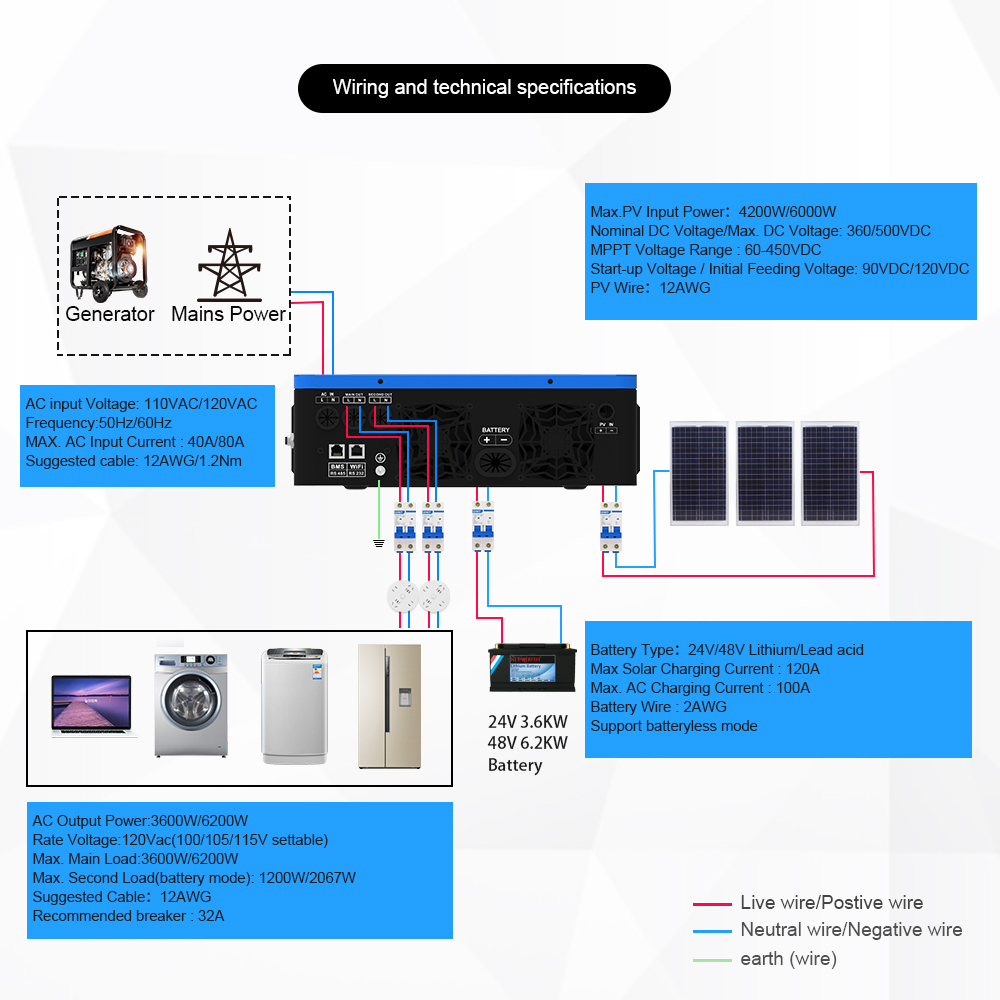
Figure 3: General Installation Diagram

Figure 4: Detailed Wiring and Technical Specifications
4. Operation
4.1 LCD Display and Controls
The inverter features a comprehensive LCD display and user-friendly buttons for configuration and monitoring. You can adjust settings such as battery charging current, AC/solar charger priority, and acceptable input voltage.

Figure 5: Inverter LCD Display and Controls
4.2 Working Modes
The inverter offers versatile working modes to optimize power management:
Charging Modes (4 options):
- Only Solar: Charges batteries exclusively from solar power.
- Mains First: Prioritizes charging from the utility grid.
- Solar First: Prioritizes charging from solar power, supplementing with mains if needed.
- Mains & Solar (Hybrid Charge): Charges from both mains and solar simultaneously.
Output Modes (3 options):
- Solar First: Prioritizes power to loads from solar, then battery, then utility.
- Utility First: Prioritizes power to loads from utility, then solar, then battery.
- SBU First (Solar-Battery-Utility): Prioritizes power to loads from solar, then battery, then utility.

Figure 6: Charging and Output Source Priority Modes
4.3 Battery Compatibility
The Sumry inverter is compatible with a wide range of battery types, including:
- Lithium batteries
- Gel batteries
- LiFePO4 batteries
- Lead-acid batteries
- AGM batteries
- User-defined battery types
It also supports a battery-less mode, allowing it to power loads directly from the PV array without a connected battery.

Figure 7: Compatible Battery Types
4.4 Remote Monitoring and Communication
The inverter supports remote monitoring and control via the 'smartess' App (iOS and Android) using an optional WiFi/GPRS module. This module connects to the RS232 communication port. For lithium battery BMS communication, the RS485 port is used, requiring compatibility with PACE or PYLONTECH communication protocols.

Figure 8: Remote Monitoring via Smartess App (Optional WiFi/GPRS Module)
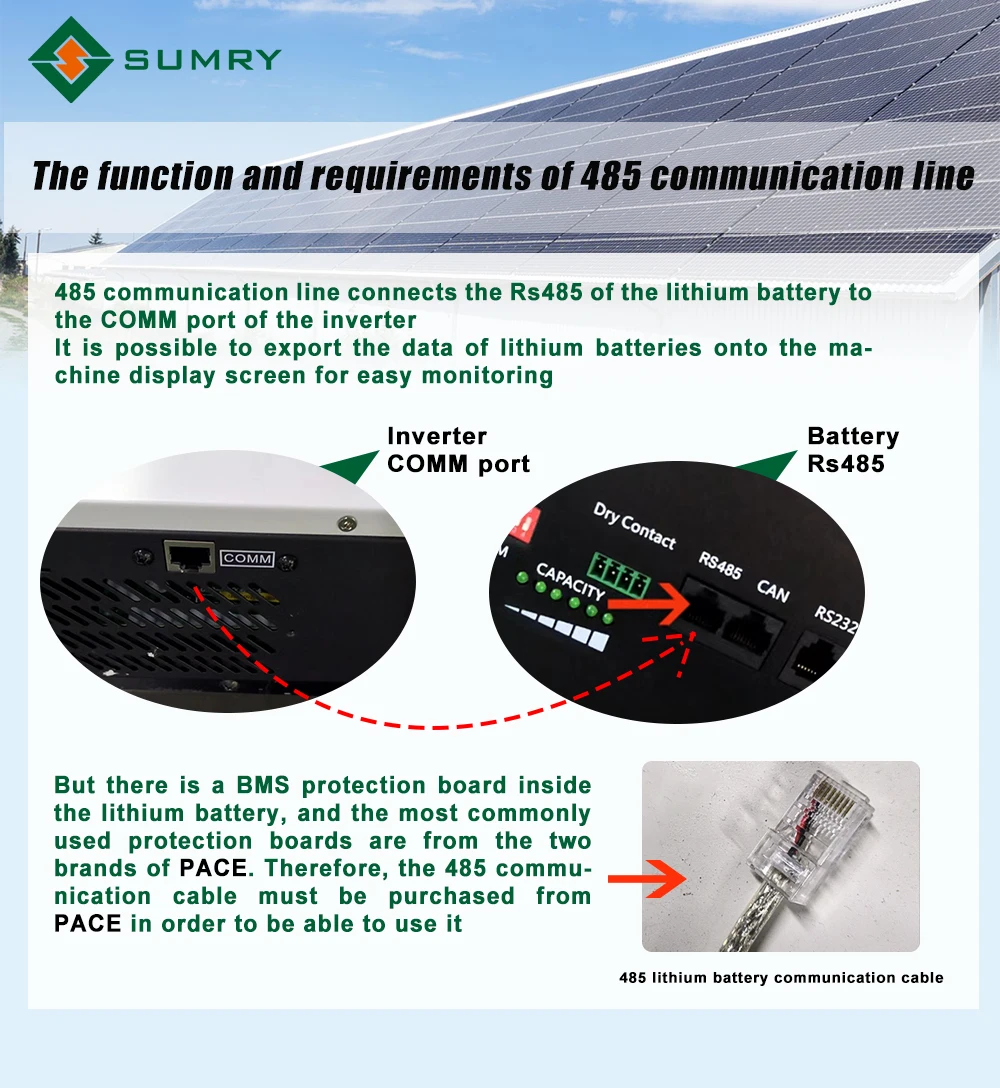
Figure 9: RS485 Communication for Lithium Battery BMS
5. Maintenance
- Cleaning: Periodically clean the exterior of the inverter with a dry cloth. Ensure ventilation openings are free from dust and debris.
- Anti-Dust Kit: The inverter includes a built-in anti-dust kit, which helps protect internal components in harsh environments. Regular inspection of the kit's condition is recommended.
- Cooling Fans: The inverter features intelligent cooling fans that adjust rotation speed based on ambient temperature. Ensure the fan vents are not obstructed to maintain optimal cooling.

Figure 10: Intelligent Cooling Fan System
- Battery Care: The smart battery charge design optimizes battery life. Follow battery manufacturer guidelines for maintenance and replacement.
- Connections: Periodically check all electrical connections for tightness and signs of corrosion.
6. Troubleshooting and Protection Features
The Sumry inverter is equipped with multi-functional safety protections to ensure reliable and stable operation:
- Overload Protection: Automatically shuts down or reduces output to prevent damage from excessive load.
- Short Circuit Protection: Protects against short circuits in the output.
- Battery Protection: Safeguards the battery from overcharge, over-discharge, and reverse polarity.
- Overheating Protection: Monitors internal temperature and reduces output or shuts down if temperatures exceed safe limits.
- Overcurrent Protection: Prevents damage from excessive current draw.
- High/Low Voltage Protection: Protects connected devices and the inverter from abnormal voltage levels.
- Automatic Restart: The inverter can automatically restart after certain fault conditions are cleared.
- Cold Start Function: Allows the inverter to start directly from batteries without AC input.

Figure 11: All-Round Protection Features
If the inverter displays an error code or behaves unexpectedly, refer to the detailed troubleshooting section in the full product manual (PDF, if available) or contact customer support.
7. Technical Specifications
Below are the key technical specifications for the Sumry ECO LV 3.6KW Hybrid Solar Inverter:
| Feature | Specification (ECO LV 3.6KW) |
|---|---|
| Brand Name | SUMRY |
| Model Number | ECO LV 3.6KW |
| Rated Power | 3600W |
| Peak Power | 7200W |
| Nominal DC Voltage | 24V |
| Output Voltage | 120VAC (100/105/115V settable) |
| Output Frequency | 50/60Hz (Auto sensing) |
| Output Type | Single Phase, Pure Sine Wave |
| Max. PV Input Power | 4200W |
| MPPT PV Voltage Range | 60-450VDC |
| Max. Solar Charging Current | 120A |
| Max. AC Charging Current | 100A |
| Max. AC Input Current | 40A |
| Efficiency (DC/AC) | >95% |
| Dimensions (H*W*D) | 500*415*180 mm |
| Net Weight | 8.8 KG |
| Operating Temperature | -10°C to 50°C |
| Humidity | 5% to 95% Relative Humidity (Non-condensing) |
| Certification | CE |
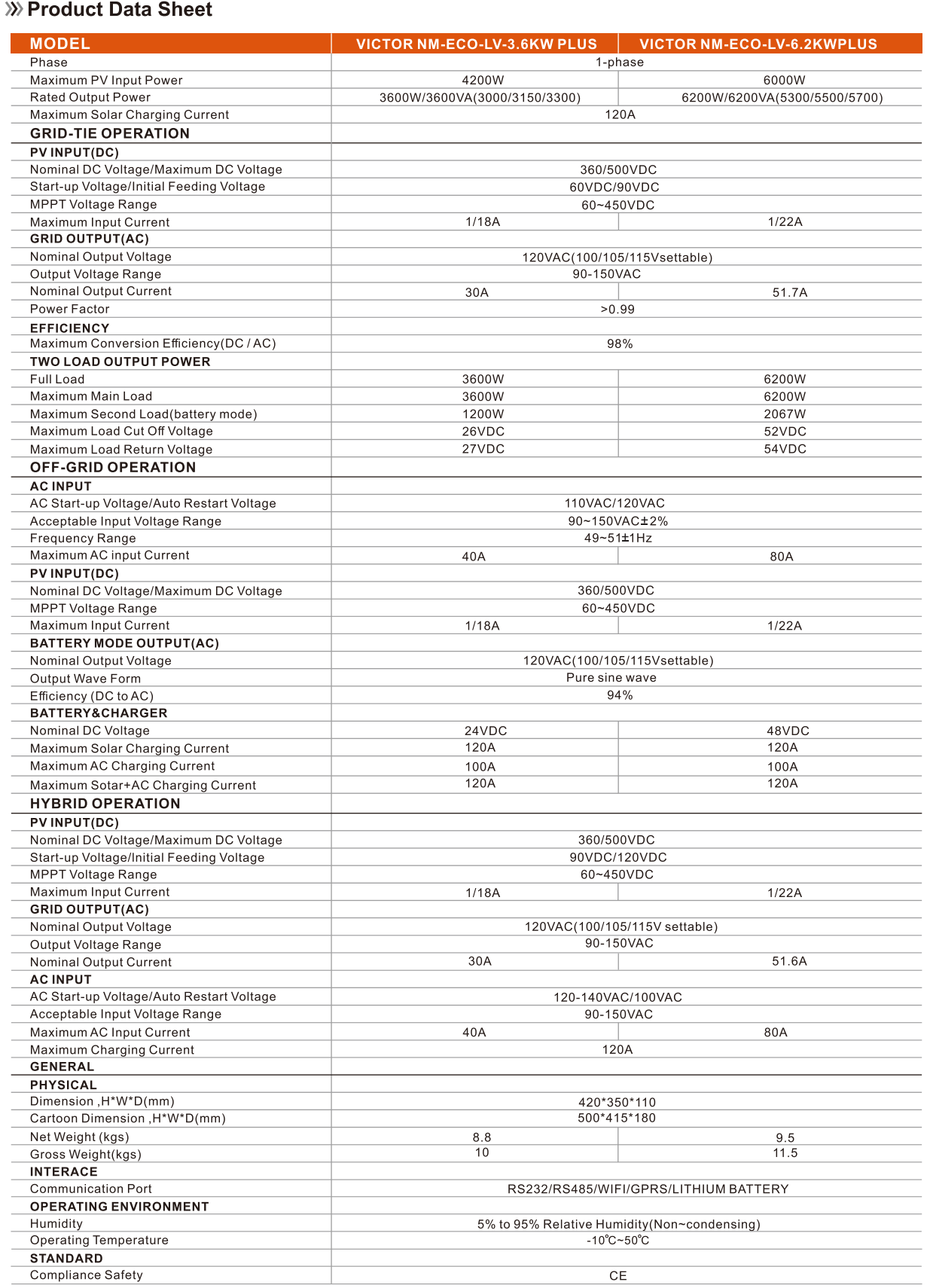
Figure 12: Product Data Sheet (Partial view, refer to full document for 6.2KW model)
8. User Tips
- Optimal Performance: For best results, ensure your solar panel array voltage stays within the MPPT range (60-450VDC) during operation.
- Battery Management: Utilize the smart battery charge design by selecting the appropriate battery type in the inverter settings for optimized performance and longevity.
- Load Balancing: While the inverter has a peak power of 7200W, try to keep continuous loads within the rated 3600W to ensure stable operation and prevent frequent overload events.
- Monitoring: Consider purchasing the optional WiFi module for convenient remote monitoring of your system's performance and status via the 'smartess' app.
- Ventilation: Always ensure adequate airflow around the inverter to allow the intelligent cooling fans to operate effectively and prevent overheating.
9. Warranty and Support
The Sumry 3.6kw Hybrid Solar Inverter comes with a 1-year warranty. It is certified with CE and RoHS standards, indicating compliance with European safety, health, and environmental protection requirements.
For technical support, troubleshooting assistance, or warranty claims, please contact your authorized dealer or Sumry customer service. When contacting support, please have your model number (ECO LV 3.6KW) and serial number ready.
For advanced communication features like WiFi monitoring or BMS integration, ensure you have the correct optional modules and compatible protocols (PACE or PYLONTECH for RS485 BMS communication).