
1. Introduction
Thank you for choosing the Shinco SDZ1-30D Electric Dehumidifier. This appliance is designed to effectively remove excess moisture from your indoor environment, improving air quality and comfort. It features a powerful compressor, smart controls, and eco-friendly operation. Please read this manual thoroughly before use to ensure safe and efficient operation.
2. Product Features
- High Capacity Moisture Removal: Removes up to 30 liters of moisture per day, suitable for rooms up to 35 m² (105 m³).
- Electronic Hygrostat & Energy Saving: Automatically maintains optimal humidity levels, turning the compressor on/off as needed to conserve energy.
- Dual Drainage Options: Offers continuous drainage via an included hose or manual drainage using the removable 5-liter water tank.
- Multiple Operating Modes: Includes automatic humidity control (adjustable from 30% to 80% RH in 5% increments), a dedicated laundry/drywear mode, and an automatic defrost function for low-temperature operation.
- 24-Hour Timer: Program the dehumidifier to operate for specific durations.
- Smart App & Wi-Fi Control: Remotely control the dehumidifier using a dedicated smartphone app via Wi-Fi.
- Eco-Friendly Design: Equipped with an activated carbon filter for air purification and uses R290, a natural, freon-free refrigerant.


3. Specifications
| Attribute | Value |
|---|---|
| Model Number | SDZ1-30D |
| Brand Name | Shinco |
| Type | Electric Dehumidifier (Compressor-based) |
| Voltage | 220 V |
| Power (W) | 600W (501-1000W range) |
| Dehumidification Volume | 30 Liters / 24h (>3.1L/h) |
| Coverage Area | 35 m² (376 sq. ft.) |
| Water Tank Capacity | 5 Liters (4.1-6L range) |
| Working Temperature Range | 30%-80% RH |
| Fan Speed | 2 settings |
| Dimensions (L x W x H) | 13.5 x 9.4 x 20.2 inches (343 x 240 x 512 mm) |
| Refrigerant | R290 |
| Certification | CE |
| Functions | Adjustable Humidistat, Auto Restart, Automatic Bucket Full Shut-Off, Automatic Defrost, Automatic Humidistat Control, Bucket Full Indicator Light, External Drain Connect, LED Display, Removable Water Tank, Washable Air Filter |

4. Setup
- Unpacking: Carefully remove the dehumidifier from its packaging. Retain all packaging materials for future storage or transport.
- Placement: Place the dehumidifier on a flat, stable surface in the desired room. Ensure there is at least 20 cm (8 inches) of space around the unit for proper airflow. Do not block the air inlet or outlet.
- Power Connection: Plug the power cord into a suitable 220V electrical outlet.
- Drainage Setup:
- Manual Drainage (Water Tank): Ensure the 5-liter water tank is correctly inserted into the unit. The unit will automatically shut off when the tank is full.
- Continuous Drainage: For continuous operation without emptying the tank, connect the included drainage hose to the continuous drainage port on the back of the unit. Route the hose to a floor drain or a larger container, ensuring a downward slope for gravity drainage.

5. Operating Instructions
The control panel is located on the top of the unit. You can also control the dehumidifier via the Smart Home app.

- Power On/Off: Press the power button (1) to turn the unit on or off.
- Mode Selection: Press the 'M' button (2) to cycle through available modes: Auto and Laundry (Drywear).
- Auto Mode: The unit will automatically adjust operation to maintain the set humidity level.
- Laundry Mode: Designed for faster drying of clothes, operating continuously at a high fan speed.
- Humidity Setting: In Auto mode, use the humidity adjustment buttons (3) to set your desired relative humidity (RH) between 30% and 80% in 5% increments. The unit will operate until this level is reached.
- Fan Speed: Press the fan speed button (4) to select between 'High' and 'Low' fan speeds.
- Cleaning Function: Press the 'Clean' button (5) to activate the internal drying function, which helps prevent mold and odors inside the unit.
- Timer: Press the timer button (6) to set the operating duration from 1 to 24 hours.
- Wi-Fi & App Control:
- Download the 'Smart Home' app from your device's app store.
- Follow the in-app instructions to connect your dehumidifier to your home Wi-Fi network.
- Once connected, you can remotely control all functions of the dehumidifier from your smartphone.

6. Maintenance
Regular maintenance ensures optimal performance and longevity of your dehumidifier.
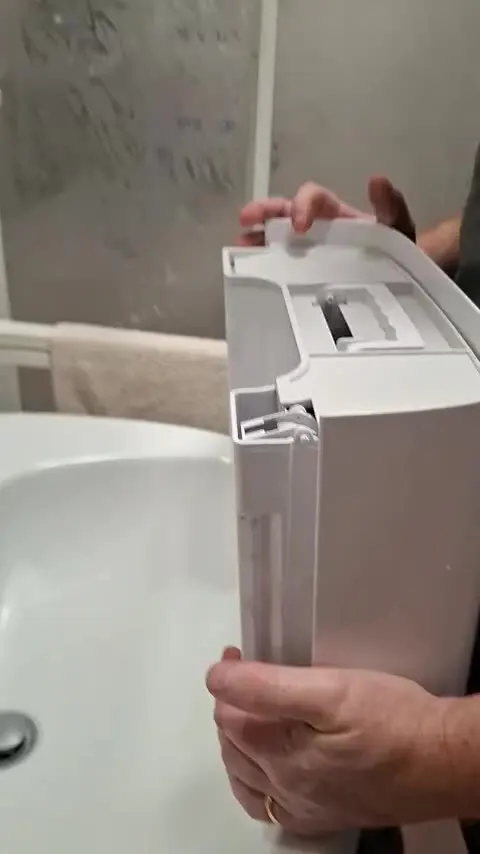
- Emptying the Water Tank: When the water tank is full, the unit will beep and automatically shut off. Carefully remove the tank, empty the collected water, and reinsert it securely. The unit will resume operation.
Video: Demonstrating how to empty the water tank. - Cleaning the Air Filter: The washable air filter should be cleaned at regular intervals (e.g., every 2-4 weeks, depending on usage).
- Turn off and unplug the unit.
- Remove the filter from its housing (refer to the product diagram for location).
- Wash the filter with warm, soapy water. Rinse thoroughly and allow it to air dry completely before reinserting.
- General Cleaning: Wipe the exterior of the unit with a soft, damp cloth. Do not use harsh chemicals or abrasive cleaners.
- Storage: Before storing the unit for an extended period, ensure the water tank is empty and the filter is clean and dry. Run the internal cleaning function to dry the interior components. Store in a cool, dry place.
7. Troubleshooting
- Unit does not turn on: Check if the power cord is securely plugged in and if there is power to the outlet. Ensure the water tank is not full and is correctly inserted.
- Dehumidifier is not collecting water: Verify that the humidity setting is lower than the current room humidity. Check if the air filter is clean and not blocked. Ensure the room temperature is within the operating range (above 5°C).
- Unit is noisy: Ensure the unit is placed on a flat, stable surface. Check for any obstructions in the air inlet/outlet.
- Wi-Fi connection issues: Ensure your Wi-Fi network is 2.4GHz (the unit may not support 5GHz). Restart your router and the dehumidifier. Follow the app's pairing instructions carefully.
8. User Tips
- Temperature Impact: Dehumidifiers, especially compressor-based models, generate some heat as a byproduct of their operation. This means the room temperature might slightly increase. This is normal and indicates the compressor is working to remove moisture.
- Optimal Placement: For best results, place the dehumidifier in the center of the room or area where humidity is highest. Keep doors and windows closed during operation to maximize efficiency.
- Energy Efficiency: Utilize the electronic hygrostat and automatic mode to let the unit run only when necessary, saving energy.
- Laundry Drying: When using the laundry mode, ensure the room is well-sealed to concentrate the drying effect.
9. Warranty and Support
Your Shinco SDZ1-30D Dehumidifier comes with a manufacturer's warranty. Please refer to the warranty card included in your product packaging for specific terms and conditions. For technical support, troubleshooting assistance, or warranty claims, please contact Shinco customer service through the retailer where you purchased the product or visit the official Shinco website for contact information.