
Introduction
Thank you for choosing the VEVOR Safe Box. This manual provides essential information for the safe and effective use of your digital security cabinet. Designed for optimal protection, this safe box is ideal for securing valuables such as cash, jewelry, documents, firearms, and passports in both home and hotel environments. Please read these instructions carefully before installation and operation.

Important Safety Information
- Always keep emergency keys in a secure location away from the safe. Do not store them inside the safe.
- Ensure the safe is securely mounted to prevent unauthorized removal.
- Regularly check battery levels to ensure proper function of the digital lock.
- Do not attempt to force the safe open if you encounter issues; refer to the troubleshooting section.
Package Contents
Please verify that all items are present in your package:
- 1 x VEVOR Safe Box (Single or Double Door variant)
- 4 x Iron Expansion Bolts
- 1 x External Battery Box
- 1 x Fireproof Bag
- 2 or 4 x Keys (2 for SS-630Dz, 4 for SS-590SM)
- 1 x Instruction Manual (this document)
Setup and Installation
The VEVOR Safe Box features an anti-movement design with pre-drilled holes for secure mounting. It can be mounted to a wall, floor, or shelf.
Wall Mounted Installation

- Step 1: Drill Holes on the Wall. Choose a suitable location on a solid wall. Mark the positions for the 4 reserved installation holes (2 on the bottom plate, 2 on the back panel). Drill holes according to the markings.
- Step 2: Tighten the Screws from inside the Safe to Install the Safe. Align the safe's holes with the drilled holes. Insert the iron expansion bolts through the safe's interior and into the wall/floor. Tighten the screws securely.
- Step 3: Installation is Completed. Ensure the safe is firmly attached and does not wobble.
Operating Instructions
Unlocking Methods
Your VEVOR Safe Box offers multiple secure unlocking options:

- Using Password (Battery Working): Enter your 3-12 digit password on the digital keypad. The safe will unlock.
- Using Emergency Key: Insert the emergency key into the keyhole and turn to unlock. This method bypasses the digital keypad.
- Using External Battery Box + Password (Battery Out of Power): If the internal batteries are depleted, connect the external battery box to the designated port. Then, enter your 3-12 digit password on the keypad to unlock the safe.
After unlocking, turn the knob (Step 2 in the diagram) to fully open the door.
Setting Your Password
Refer to the detailed instructions included in the physical instruction manual for initial password setup and changing your password. It typically involves pressing a reset button inside the safe (with the door open) and then entering your new code.
Dual Alarm System
The safe box is equipped with a dual alarm system for enhanced security:

- Incorrect Password Entries: If an incorrect password is entered three times consecutively, the safe will trigger an audible alarm.
- Severe Impact: If the safe experiences a strong impact or violent attempt to open, the alarm will also activate.
The alarm is designed to deter unauthorized access and alert you to potential threats.
Internal Organization
The safe features height-adjustable and removable dividers to help organize your items. A built-in LED light enhances visibility inside the safe, making it easier to access valuables in low-light conditions.

Maintenance
- Battery Replacement: Replace the internal batteries when the low battery indicator appears or if the digital keypad becomes unresponsive. Use high-quality alkaline batteries for best performance.
- Cleaning: Wipe the exterior of the safe with a soft, damp cloth. Avoid using abrasive cleaners or solvents that could damage the finish.
- Lock Mechanism: Do not lubricate the lock mechanism with oil or grease, as this can attract dust and cause malfunctions.
- Emergency Keys: Periodically check the condition of your emergency keys and ensure they are stored safely.
Troubleshooting
- Safe does not open with password:
- Check if the batteries are depleted. Use the external battery box to power the keypad and try again.
- Ensure you are entering the correct 3-12 digit password.
- If the alarm has triggered due to incorrect entries, wait for it to reset before trying again.
- Alarm sounds unexpectedly:
- Verify that no one has attempted to enter an incorrect password three times.
- Check for any impacts or vibrations that might have triggered the impact sensor.
- Forgotten password:
- Use the emergency key to open the safe. Once open, you can reset the password according to the instructions in the physical manual.
- Emergency key is lost:
- If both the password is forgotten and the emergency key is lost, please contact VEVOR customer support for assistance.
Specifications
The VEVOR Safe Box is constructed from high-quality alloy steel with a 3mm thick door plate and features 5 solid locking bolts for superior protection.
General Features:
- Material: Cold-rolled Carbon Steel, Thickened Alloy Steel
- Door Thickness: 3mm
- Lock Bolts: 5 (Diameter: 0.87 x 1.18 in / 22 x 30 mm)
- Certification: CE
- Origin: Mainland China
Model SS-630Dz (Single Door)
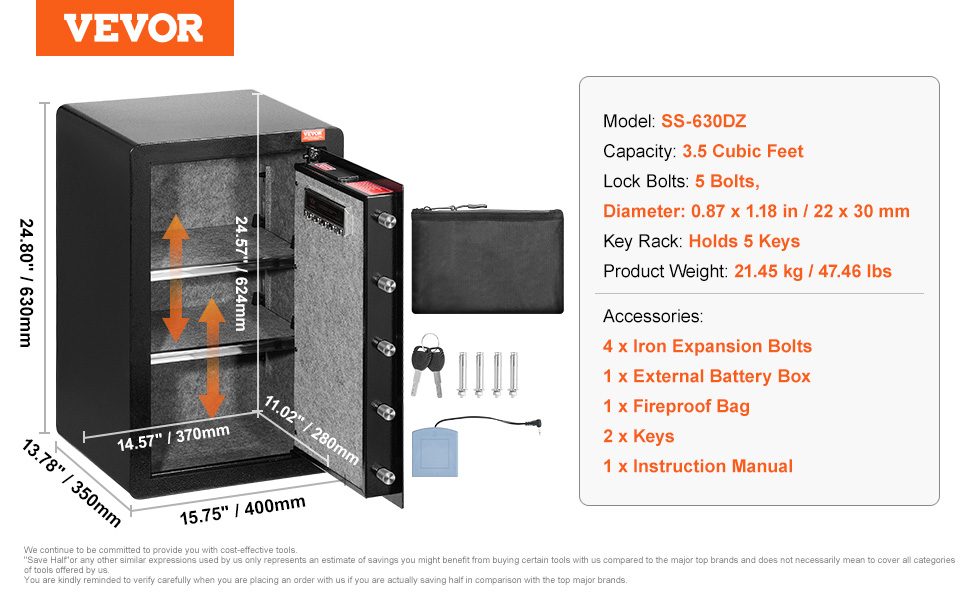
| Specification | Value |
|---|---|
| Model | SS-630Dz |
| Capacity | 3.5 Cubic Feet |
| Key Rack | Holds 5 Keys |
| Product Weight | 21.45 kg / 47.46 lbs |
| Dimensions (H x W x D) | 24.80" x 15.75" x 13.78" / 630mm x 400mm x 350mm |
| Adjustable Shelf Interval | 11.02" / 280mm (from top to bottom) |
Model SS-590SM (Double Door)
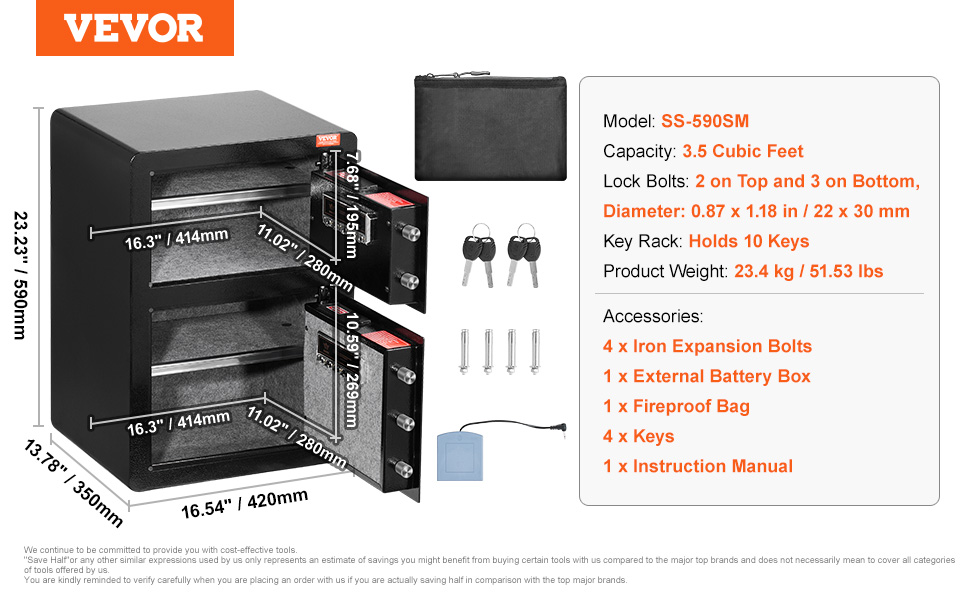
| Specification | Value |
|---|---|
| Model | SS-590SM |
| Capacity | 3.5 Cubic Feet |
| Lock Bolts | 2 on Top and 3 on Bottom |
| Key Rack | Holds 10 Keys |
| Product Weight | 23.4 kg / 51.53 lbs |
| Dimensions (H x W x D) | 23.23" x 16.54" x 13.78" / 590mm x 420mm x 350mm |
| Adjustable Shelf Interval | 7.68" / 195mm (top), 10.59" / 269mm (bottom) |
User Tips
- Consider mounting the safe in a discreet location to enhance security.
- Test the alarm system periodically to ensure it is functioning correctly.
- Keep a record of your password in a very secure, separate location, not inside the safe.
- Utilize the fireproof bag for extra protection of highly sensitive documents or small valuables.
Warranty and Support
For any product-related inquiries, technical support, or warranty claims, please contact VEVOR customer service. Refer to your purchase documentation for specific contact details. VEVOR is committed to providing quality equipment and tools.