
1. Introduction
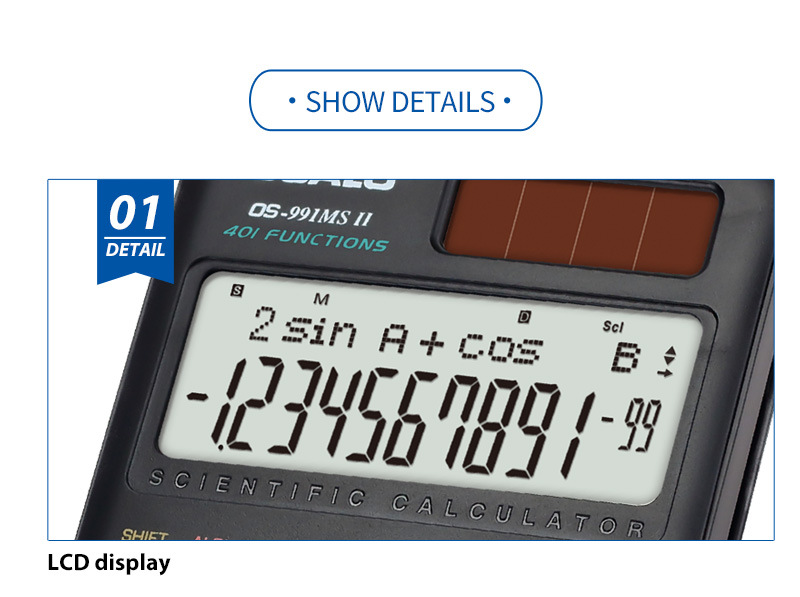
The OSALO OS-991MS II is a versatile scientific calculator designed for students and professionals, offering 417 functions to handle a wide range of mathematical and scientific calculations. It features a large 10+2 digit display, dual power supply (solar and battery), and comfortable plastic keys for ease of use. This manual provides detailed instructions for setting up, operating, maintaining, and troubleshooting your calculator.

2. Setup
2.1 Power Supply
The OS-991MS II calculator operates on a dual power supply system: solar energy and an internal battery. The solar panel provides power in well-lit environments, while the battery ensures continuous operation in low-light conditions. The calculator comes with a battery included.
2.2 Initial Power On
To turn on the calculator, press the ON button located on the upper right side of the keypad. The display will show '0' or the last calculated value.
2.3 Adjusting Display Contrast
If the display appears too light or too dark, you can adjust its contrast:
- Press SHIFT then MODE CLR.
- Navigate to the 'DISP' menu option.
- Select 'CONT' (Contrast).
- Use the left and right cursor keys to adjust the contrast to your preference (LIGHT/DARK).
- Press AC to exit the settings.
3. Operating Instructions
3.1 Basic Operations
- Enter numbers using the numeric keypad (0-9).
- Perform basic arithmetic operations (+, -, ×, ÷) using the respective keys.
- Press = to get the result.
- Use the DEL key to delete the last entered digit.
- Use the AC key to clear all entries and calculations.
3.2 Scientific Functions (417 Functions)
The OS-991MS II offers a comprehensive set of scientific functions. Many functions are accessed by pressing the SHIFT key (yellow) or ALPHA key (red) before the desired function key.

Key Function Overview:
- Solar Panel: Provides power in well-lit conditions.
- Extra Large Display: Shows 10+2 digits for clear readability.
- SHIFT Key: Activates secondary functions (printed in yellow above keys).
- ALPHA Key: Activates alpha functions (printed in red above keys).
- Cursor Control Keys: Navigate through expressions and menus.
- MODE Key: Changes calculation modes (e.g., COMP, STAT, EQN).
- ON Key: Powers on the calculator.
- DEL Key: Deletes the last character or digit.
- AC Key: Clears all calculations and resets the display.
- Ans Key: Recalls the last answer.
Advanced Functions Include:
- Fraction Calculations: Use the a b/c key.
- Integration Calculations: Use the ∫dx function.
- Combination and Permutation: Use nCr and nPr functions.
- Base-n Calculations/Conversions: Access through MODE settings.
- Logical Operations: Available in specific modes.
- Complex Number Calculations: Access through MODE settings.
- CALC Memory: Store and recall values.
- Engineering Symbol Calculations: Use ENG key.
- 40 Scientific Constants: Pre-programmed values for common constants.
- 40 Metric Conversions: Pre-programmed unit conversions.
3.3 Mode Selection
Press the MODE key to select different calculation modes:
- COMP (Compute): For general arithmetic and function calculations.
- STAT (Statistics): For statistical calculations.
- EQN (Equation): For solving linear and quadratic equations.
- Other modes for specific calculations like Base-N, Complex, etc.
4. Maintenance
4.1 Cleaning
Wipe the calculator with a soft, dry cloth. Do not use abrasive cleaners or solvents, as they may damage the casing or display.
4.2 Storage
When not in use, store the calculator in a cool, dry place. The OS-991MS II comes with a protective slide cover to prevent damage to the keys and display. Always use this cover when transporting or storing the calculator.

4.3 Battery Replacement
The calculator uses a dual power supply. While it primarily uses solar power, an internal battery is present. If the display becomes dim or unresponsive in low light, the battery may need replacement. Refer to the external battery compartment image for location. Consult a qualified technician for battery replacement to avoid damaging the device.
5. Troubleshooting
- Calculator does not turn on: Ensure there is sufficient light for the solar panel or that the battery is not depleted. Try pressing the ON button firmly.
- Display is dim or blank: Adjust the display contrast as described in Section 2.3. If the issue persists, the battery may need replacement.
- Incorrect calculation results: Check the current calculation mode (e.g., ensure you are in COMP mode for general calculations). Verify that the correct angle unit (Deg, Rad, Gra) is selected if performing trigonometric functions. Clear all memory and reset the calculator if necessary (consult the full manual for reset procedures).
- Keys are unresponsive: Ensure no debris is lodged under the keys. Clean the calculator as described in Section 4.1.
6. Specifications
| Attribute | Value |
|---|---|
| Brand Name | OSALO |
| Model Number | OS-991MS II |
| Style | Scientific |
| Max. Digits | 12 (10+2 digit display) |
| Power Source | Solar |
| Applicable Battery Type | Dual Power Supply |
| Battery Included | Yes |
| Material | Plastic |
| Use | World Time Clock (Note: This attribute might be a misclassification, as scientific calculators are primarily for mathematical computations.) |
| Certification | CE |
| Origin | Mainland China |
| Dimensions (Approx.) | 164mm (Length) x 80mm (Width) x 20mm (Height) |

7. User Tips
- Always use the protective slide cover when carrying the calculator to prevent accidental key presses or screen damage.
- For optimal solar charging, ensure the calculator's solar panel is exposed to light.
- Familiarize yourself with the SHIFT and ALPHA functions to unlock the full potential of the 417 available operations.
- When performing complex calculations, break them down into smaller steps and use the memory functions (STO, RCL) to store intermediate results.
8. Warranty and Support
For warranty information and technical support, please refer to the documentation provided with your purchase or contact the retailer. Keep your proof of purchase for any warranty claims.