
1. Introduction
Thank you for choosing the OSALO OS-6M Desktop Calculator. This manual provides essential information for the safe and efficient use of your new calculator. The OS-6M is a versatile 12-digit calculator designed for various environments, including office, home, and school. It features a large, clear display, comfortable keys, and a dual power supply system for extended use.

Figure 1: OSALO OS-6M Desktop Calculator
2. Safety Information
- Keep the calculator away from water and high humidity to prevent damage.
- Avoid exposing the calculator to direct sunlight or extreme temperatures for prolonged periods.
- Do not attempt to disassemble or repair the calculator yourself. Contact qualified personnel for service.
- Keep batteries out of reach of small children.
- Dispose of used batteries according to local regulations.
3. Package Contents
Please check the package for the following items:
- 1 x OSALO OS-6M Desktop Calculator
- 1 x User Manual (Chinese / English)

Figure 2: Product Packaging
4. Product Overview
The OSALO OS-6M calculator is designed for ease of use and durability. Familiarize yourself with its components:
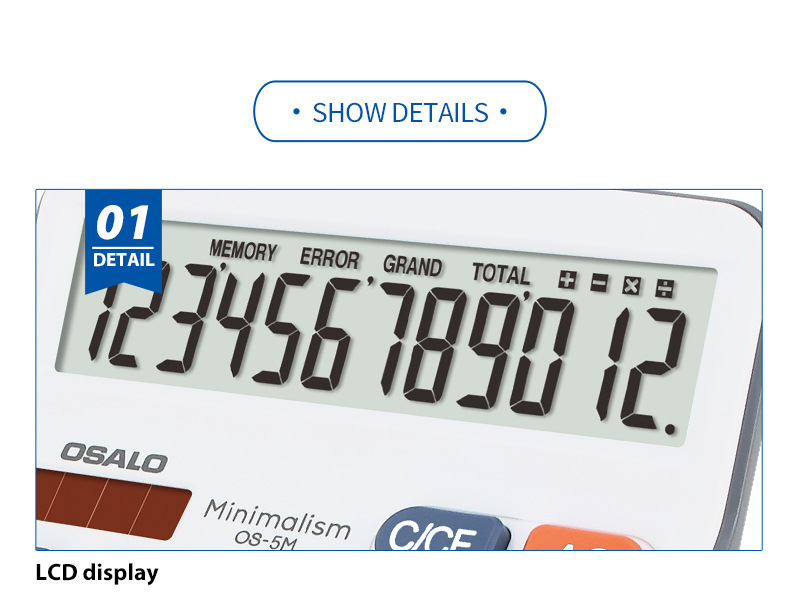
Figure 3: Key Features and Button Layout
- Extra Large Display: A 12-digit LCD for clear readability.
- Solar Panel: Provides power in well-lit conditions.
- Comfort Buttons: Durable plastic keys designed for comfortable and accurate input.
- Power On/All Clear (AC): Clears all entries and resets the calculator.
- Clear Entry (C/CE): Clears the last entry.
- Memory Plus (M+): Adds the displayed value to memory.
- Memory Minus (M-): Subtracts the displayed value from memory.
- Memory Recall/Clear (MRC): Recalls the memory value; press twice to clear memory.
- Grand Total (GT): Displays the grand total of all calculations.
- Percent (%): Used for percentage calculations.
- Mark-up/Mark-down (MU): Used for profit margin calculations.
- Double Zero (00): Quickly enters two zeros.
5. Setup
5.1 Power Supply
The OSALO OS-6M calculator operates on a dual power system: solar energy and one AA battery. The solar panel provides power in sufficient light, while the battery acts as a backup or primary power source in low-light conditions.
5.2 Battery Installation
To install or replace the AA battery:
- Turn the calculator over to access the battery compartment on the back.
- Slide the battery compartment cover downwards to open it.
- Insert one AA battery, ensuring the correct polarity (+/-) as indicated inside the compartment.
- Replace the battery compartment cover by sliding it back into place until it clicks.
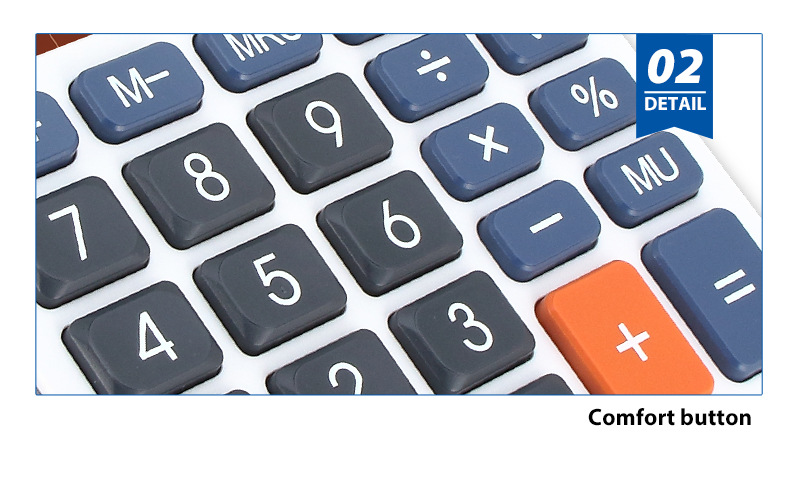
Figure 4: Battery Compartment Location
Note: The battery is not included in the package.
6. Operating Instructions
This section details the basic operations and functions of your OSALO OS-6M calculator.
6.1 Basic Arithmetic
- Enter the first number.
- Press the desired arithmetic operator (+, -, ×, ÷).
- Enter the second number.
- Press = to display the result.
6.2 Memory Functions
- M+: Adds the currently displayed number to the memory.
- M-: Subtracts the currently displayed number from the memory.
- MRC: Press once to recall the value stored in memory. Press twice to clear the memory.
6.3 Grand Total (GT)
The GT key is used to calculate the grand total of all results obtained after pressing the = key. After a series of calculations, press GT to see the sum of all intermediate results.
6.4 Percentage (%) and Mark-up/Mark-down (MU)
- %: For percentage calculations. E.g., to calculate 10% of 200, enter 200 × 10 %.
- MU: For profit margin calculations. Consult advanced calculator guides for specific usage.
6.5 Clearing Entries
- C/CE: Clears the last entered number or calculation.
- AC: Clears all entries and resets the calculator to its initial state.
6.6 Product Demonstration Video
Video 1: OSALO OS-6M Calculator Features and Operation
This video provides a visual demonstration of the calculator's design, key features, and basic functionality, including button presses and display output.
7. Maintenance and Care
- Clean the calculator regularly with a soft, dry cloth. Do not use liquid cleaners or abrasive materials.
- If the calculator will not be used for an extended period, remove the battery to prevent leakage.
- Store the calculator in a cool, dry place, away from direct sunlight and extreme temperatures.
- Avoid dropping the calculator or subjecting it to strong impacts.
8. Troubleshooting
| Problem | Possible Cause | Solution |
|---|---|---|
| Display is blank or dim. | Insufficient light for solar power, or low/dead battery. | Move to a brighter area or replace the AA battery. |
| Incorrect calculation results. | Incorrect key input or function usage. | Double-check your input and refer to the "Operating Instructions" section for correct function usage. Press AC to clear and restart. |
| Keys are unresponsive. | Calculator might be frozen or battery is completely drained. | Press AC. If problem persists, replace the battery. |
9. Specifications
| Feature | Detail |
|---|---|
| Brand Name | OSALO |
| Model Number | OS-6M |
| Max. Digits | 12 |
| Power Source | Dual Power Supply (Solar & Battery) |
| Battery Included | No (Requires 1 x AA Battery) |
| Material | Environmentally friendly ABS plastic |
| Style | Office Commercial Type |
| Certification | CE |
| Origin | Mainland China |
| Product Dimensions (Approx.) | Length: 16 cm, Width: 13 cm, Height: 5 cm |
| Product Weight (Approx.) | 0.2 kg |
10. User Tips
- For optimal solar performance, ensure the calculator's solar panel is exposed to adequate light.
- When performing long calculations, periodically check the display for the "ERROR" indicator, which may suggest an overflow or invalid operation.
- Utilize the memory functions (M+, M-, MRC) for multi-step calculations to avoid re-entering numbers.
- The large, tilted display is designed for comfortable viewing from a desk; position it appropriately to reduce neck strain.
11. Warranty and Support
For any questions, technical support, or warranty inquiries regarding your OSALO OS-6M calculator, please contact the seller or manufacturer directly. Keep your purchase receipt as proof of purchase.