
1. Introduction
Thank you for purchasing the MECHEN T161 Portable Bluetooth Walkman MP3/MP4 Player. This device is designed to provide a versatile multimedia experience, combining music playback, video viewing, photo browsing, voice recording, e-book reading, and gaming in a compact form factor. Please read this manual carefully to ensure proper use and to maximize your enjoyment of the product.
2. Package Contents
Upon unpacking, please ensure all the following items are present:
- MECHEN T161 MP3/MP4 Player
- Metal Headphones
- Data Cable (USB-C)
- OTG Type-C Adapter
- Card Reader
- User Manual (this document)

3. Specifications
| Feature | Description |
|---|---|
| Product Name | MC-T161 |
| Product Dimensions | 92 x 67 x 12.5 mm |
| Display Screen | 2.8" IPS HD Display Screen |
| External Memory | Supports 8GB-256GB memory cards |
| Audio Format Support | MP3, WMA, APE, FLAC, AAC, OGG, M4A, WAV |
| Video Format Support | AVI (720P/30fps for rear camera) |
| Recording Format | WAV (via MIC recording) |
| Image Format Support | BMP, JPEG |
| Bluetooth Mode | Bluetooth 5.4 dual-mode protocol |
| E-book Format Support | TXT (max capacity 20MB+) |
| Dictionary Format Support | English-Chinese dictionaries |
| Sharing Mode | File sharing between Bluetooth-enabled devices |
| Language | Chinese/English |
| Games | Puzzle games (supports 7 TP operations), FC classic games |
| Earphone Interface | 3.5mm |
| USB Transfer | USB2.0 |
| Weight | Approx. 85.2g |
| Operating Temperature | 0 to 60 degrees Celsius |
| Power Supply | Built-in 500mAh lithium battery |
| WIFI | No |
| Balanced Out | No |
| Compatible Devices | Android (for file transfer/compatibility, not running Android apps) |
4. Device Overview
The MECHEN T161 features a cyberpunk-inspired design with a vibrant IPS HD display. Familiarize yourself with the device's physical components and interface.


The device runs on a custom 'Cyber OS' with a global touch-and-slide experience, offering a range of built-in functions accessible via a quick pull-down menu.

5. Setup
5.1. Charging the Device
Before first use, fully charge the device. Connect the provided USB-C data cable to the player's USB-C port and the other end to a compatible USB power adapter (not included) or a computer's USB port. The device supports 'Super Fast Charging'.
5.2. Inserting a Memory Card
The MECHEN T161 supports external memory cards from 8GB up to 256GB. Locate the memory card slot on the device and gently insert a compatible TF/MicroSD card until it clicks into place. Ensure the card is inserted correctly to avoid damage.
5.3. Initial Power On
Press and hold the power button (usually on the side) until the screen lights up. The device will boot into its custom 'Cyber OS' interface.
6. Operating Instructions
6.1. Navigating the Interface
The device features an IPS HD display with a touch interface. Swipe and tap to navigate through menus and applications. A quick pull-down menu provides access to common settings and functions like music control, Bluetooth toggle, volume adjustment, and more.

6.2. Music Playback
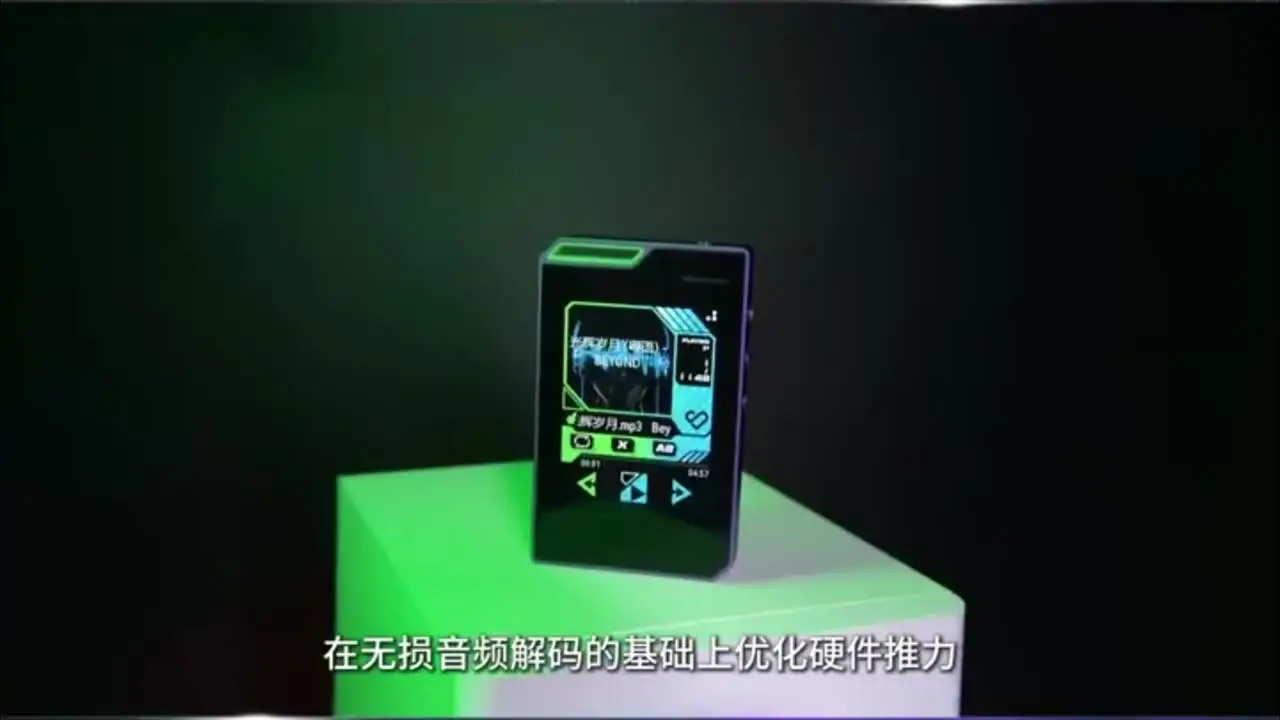
Tap the 'Music' icon on the main screen. You can browse your music library by artist, album, genre, or folder. The device supports various audio formats including MP3, WMA, APE, FLAC, AAC, OGG, M4A, and WAV. The player features a new generation music engine with lossless audio decoding and optimized hardware for enhanced sound quality. It also comes with HiFi-tuned earphones for an immersive listening experience.
6.3. Video Playback
Select the 'Video' icon to access your video files. The device supports AVI video format. The IPS display provides a clear and vibrant viewing experience. You can easily control video playback progress with touch gestures.
6.4. Digital Camera & Photo Viewer
The T161 includes a rear camera capable of recording 720P/30fps video in AVI format and capturing images in BMP and JPEG formats. Tap the 'Camera' icon to activate the camera function. You can also view your photos through the 'Pictures' application.
6.5. Voice Recorder
Use the built-in microphone to record audio. The device records in WAV format. Access the voice recorder function from the main menu or quick settings.
6.6. E-book Reading
The device supports TXT e-books, with support for files up to 20MB+. You can select chapters and pages directly, offering a reading experience similar to a smartphone.

6.7. Dictionary and Listening Training
The T161 includes an English-Chinese dictionary and listening training features to aid in language learning. This allows for pronunciation practice and vocabulary building.
6.8. Games
Enjoy puzzle games that support 7 TP operations and classic FC games during your leisure time.
6.9. Bluetooth Connectivity
The device features Bluetooth 5.4 dual-mode protocol, allowing you to connect to Bluetooth headphones or other compatible devices for audio playback without disturbing others. You can also share files between two Bluetooth-enabled devices.

6.10. Other Built-in Applications
The custom operating system includes various useful applications such as a calendar, alarm clock, stopwatch, and calculator.
7. Maintenance
- Cleaning: Use a soft, dry cloth to clean the device. Avoid using liquid cleaners or aerosols.
- Storage: Store the device in a cool, dry place away from direct sunlight and extreme temperatures.
- Battery Care: To prolong battery life, avoid fully discharging the battery frequently. Charge the device regularly.
- Avoid Impact: Do not drop or subject the device to strong impacts, as this may damage internal components or the screen.
- Water Resistance: The device is not waterproof. Avoid exposure to water or high humidity.
8. Troubleshooting
- Device does not power on:
- Ensure the device is fully charged. If the battery is completely drained, it may take a few minutes of charging before it can power on.
- Cannot connect to Bluetooth headphones:
- Make sure Bluetooth is enabled on both the T161 and your headphones. Ensure your headphones are in pairing mode. Try restarting both devices.
- Files not appearing on the device:
- Check if the memory card is inserted correctly and is not corrupted. Ensure the files are in supported formats (e.g., MP3 for music, AVI for video, TXT for e-books).
- Screen is unresponsive:
- Try restarting the device. If the issue persists, ensure the screen is clean and free of debris.
9. User Tips
- Android Apps: The MECHEN T161 runs a custom 'Cyber OS' and does not support installing or running standard Android applications. It is designed for its built-in multimedia and learning functions.
- Device Material: The device has a compact and lightweight design (approx. 85.2g). While the exact material is not specified, its robust appearance suggests a durable construction, possibly a metallic finish over a lightweight frame.
- Language Support: The device supports both Chinese and English languages for its interface and dictionary functions.
10. Warranty and Support
For any issues not covered in this manual, please contact the retailer or manufacturer's customer support. Keep your purchase receipt as proof of purchase for warranty claims.