
Introduction
Welcome to the user manual for your new SucceBuy 88 Key Digital Piano Keyboard, Model BD-881D. This semi-weighted, full-size electric portable keyboard is designed to provide an authentic piano feel, ideal for beginners and experienced musicians alike. It offers a rich auditory experience with 1000 tones, 1000 rhythms, and 150 demo songs, complemented by built-in dual speakers. This manual will guide you through the setup, operation, maintenance, and troubleshooting of your digital piano.

Package Contents
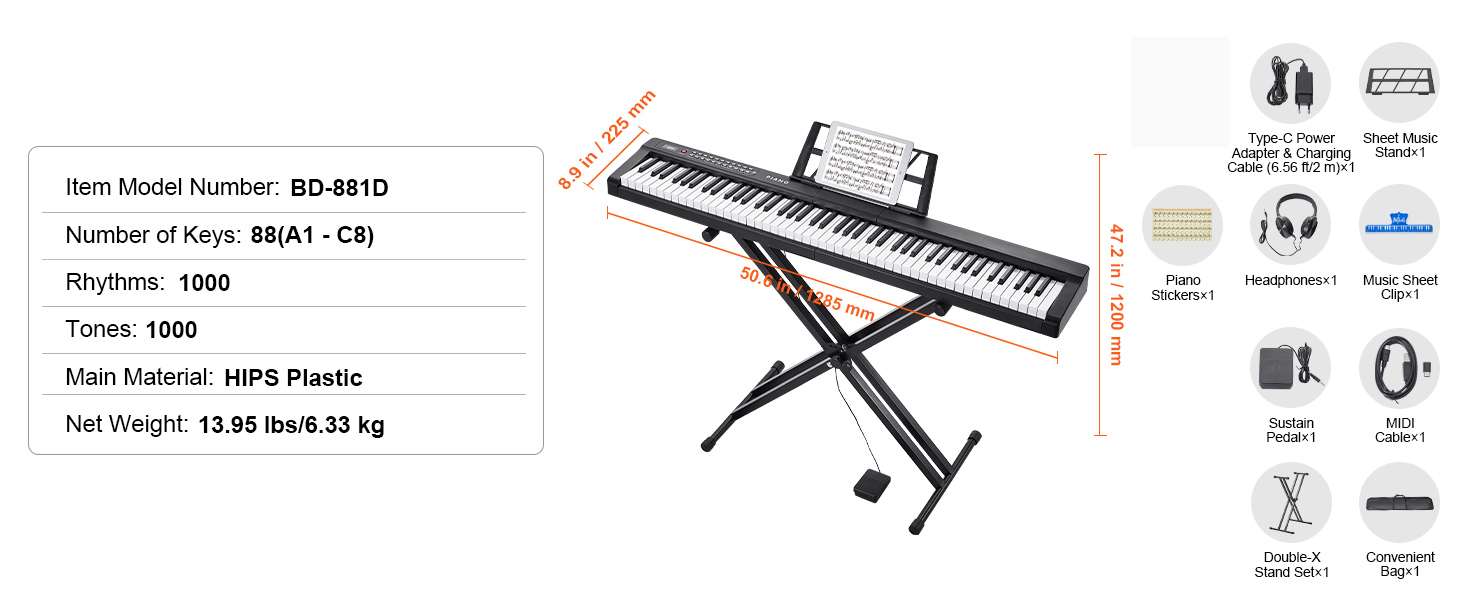
Please check the box for the following items:
- 88-Key Digital Piano Keyboard
- Type-C Power Adapter & Charging Cable (6.56 ft / 2 m)
- Sheet Music Stand
- Headphones
- Music Sheet Clip
- Sustain Pedal
- MIDI Cable
- Convenient Bag
- Double-X Stand Set (included with 'With Stand' variants)
- Piano Stickers
Specifications
| Feature | Detail |
|---|---|
| Item Model Number | BD-881D |
| Number of Keys | 88 (A1 - C8) |
| Key Type | Semi-weighted with pressure feedback and lighting effects |
| Tones | 1000 |
| Rhythms | 1000 |
| Demo Songs | 150 |
| Main Material | HIPS Plastic |
| Net Weight | 13.95 lbs / 6.33 kg |
| Dimensions (approx.) | Length: 50.8 in / 1290 mm, Width: 8.9 in / 225 mm, Height (with stand): 47.2 in / 1200 mm |
| Connectivity | Bluetooth 5.0, USB, MIDI, Audio Input, Headphone Jack, Microphone Input, Sustain Pedal Input |
| Power Options | Type-C Power Adapter (included), 4 AA batteries (not included) |
| Display | Three-digit LED display |
Setup Instructions
- Unpacking: Carefully remove all components from the packaging. Retain packaging for future transport or storage.
- Stand Assembly (if applicable): If your model includes a Double-X Stand, assemble it according to the separate instructions provided with the stand. Adjust the stand to a comfortable height (adjustable from 11.8 to 38 inches / 30 to 96.5 cm).
- Positioning the Piano: Place the digital piano securely on the assembled stand or a stable, flat surface.
- Power Connection:
- AC Power: Connect the Type-C Power Adapter to the piano's power input port and plug the adapter into a standard electrical outlet.
- Battery Power: For portable use, insert 4 AA batteries (not included) into the battery compartment located on the underside of the piano. Ensure correct polarity.
- Connecting Accessories:
- Sustain Pedal: Plug the sustain pedal into the designated 'Sustain Pedal' port.
- Headphones: For private practice, plug your headphones into the 'Headphone' jack.
- Microphone: If using, connect your microphone to the 'Microphone' input.
- MIDI/USB: For connecting to computers or other MIDI devices, use the 'MIDI' or 'USB' ports with the appropriate cables.
- Audio Input: Use the 'Audio Input' jack to connect external audio sources.
- Music Stand: Attach the sheet music stand to the designated slot on the piano.


Operating Instructions
Power On/Off
- Press the POWER button to turn the piano on.
- Press and hold the POWER button to turn the piano off.
LED Display
The three-digit LED display provides real-time information on your selected tones, metronome settings, recording and playback status, and volume levels. This ensures you stay informed and makes operating your piano straightforward.

Selecting Tones and Rhythms
- Use the TONE button to cycle through the 1000 available instrument sounds.
- Use the RHYTHM button to select from the 1000 available rhythms.
- The LED display will show the selected tone or rhythm number.
Playing Demo Songs
- Press the DEMO button to play one of the 150 pre-loaded demo songs.
- Press again to stop or select another demo.
Volume Control
- Adjust the master volume using the VOLUME controls.
Recording and Playback
- The piano is equipped with recording capabilities. Refer to the specific buttons labeled RECORD and PLAY (or similar) on the control panel to utilize this feature.
Connectivity
- Bluetooth 5.0: Pair your piano with compatible devices (e.g., tablets, smartphones) to effortlessly transfer recordings or use learning apps.
- USB & MIDI: Connect to computers for advanced music production software or other MIDI instruments.


Maintenance
- Cleaning: Use a soft, dry cloth to wipe down the piano's surface. For stubborn dirt, a slightly damp cloth with mild soap can be used, followed by a dry cloth. Avoid abrasive cleaners or solvents.
- Key Cleaning: Gently wipe the keys with a soft, slightly damp cloth. Do not use excessive moisture.
- Storage: When not in use for extended periods, store the piano in a cool, dry place, away from direct sunlight and extreme temperatures. If using the convenient bag, ensure the piano is clean and dry before placing it inside.
- Battery Care: If using batteries, remove them if the piano will not be used for a long time to prevent leakage.
- Avoid Liquids: Keep liquids away from the piano to prevent damage to internal electronics.
Troubleshooting
- No Sound:
- Ensure the piano is powered on and the volume is turned up.
- If headphones are connected, sound will only come through the headphones. Disconnect them to use the built-in speakers.
- Check all cable connections (power, sustain pedal, etc.) are secure.
- Keys Not Responding:
- Ensure the piano is powered on.
- If only certain keys are not responding, contact customer support.
- Connectivity Issues (Bluetooth/MIDI/USB):
- Ensure the external device is compatible and properly configured.
- For Bluetooth, ensure the piano is in pairing mode and within range.
- Check all cables for MIDI and USB connections.
- LED Display Not Working:
- Ensure the piano is powered on.
- If the issue persists, try turning the piano off and on again.
- Keys have sensitivity? / Do the keys have velocity sensors?
- Yes, the keys are semi-weighted and provide pressure feedback, which means they have velocity sensitivity. This allows for dynamic expression in your playing.
- Is it just piano or also organ? / Does it also have an organ function?
- The piano offers 1000 different tones, which include a wide variety of instrument sounds. It is highly likely that organ sounds are among these 1000 tones, allowing you to play various organ styles.
User Tips
- Dynamic Playing: Take advantage of the semi-weighted keys with velocity sensitivity to add expression and dynamics to your music. Playing softer or harder will produce different volumes, just like an acoustic piano.
- Quiet Practice: Utilize the headphone jack for focused practice sessions without disturbing others. This is especially useful for late-night practice or in shared living spaces.

Practice with headphones for focused, quiet sessions. - Explore Tones: Don't limit yourself to just piano sounds. Experiment with the 1000 available tones to discover new musical possibilities and inspire creativity. Many users enjoy finding unique instrument sounds.
- Adjustable Comfort: If using the stand, adjust its height to ensure a comfortable and ergonomic playing posture, whether sitting or standing. This can prevent fatigue during long practice sessions.
- Learning Aid: The included piano stickers can be a great visual aid for beginners to quickly learn key identification and finger placement.
Warranty and Support
For warranty information, technical support, or service inquiries, please refer to the contact information provided with your purchase documentation or visit the official SucceBuy website. Keep your proof of purchase for warranty claims.