
1. Overview
The AISET temperature controller, developed and produced by Shanghai Yatai Instrument Co., Ltd., is a series of intelligent digital temperature control products designed for reliability, practicability, and cost-effectiveness. This series covers multiple core models (NE, NGG, YLE) to meet diverse industrial and commercial temperature control needs, ranging from basic entry-level control to high-precision, intelligent remote control.
Key product advantages include:
- High Control Precision: Achieves ±0.3~±1°C accuracy.
- Multiple Output Modes: Supports relay, 4~20mA, 0~10V, and SSR drive.
- Standard Installation Sizes: Available in 48×48mm, 48×96mm, 72×72mm, and 96×96mm.
- Advanced Features: Includes temperature correction, power-off memory, child lock, and timing setting.
- Robust Design: Features a flame-retardant ABS shell and anti-interference design.
- EU Compliance: Fully compliant with EU safety and environmental protection standards (EMC 2014/30/EU, LVD 2014/35/EU, RoHS 2011/65/EU, WEEE 2012/19/EC directives).

2. Safety Information and Warnings
Read all safety warnings carefully before use to prevent injury, equipment damage, or non-compliance with regulations. Installation and maintenance must be performed by trained professionals.
- Intended Use: This product is for industrial and commercial use only, not for household use. Keep out of reach of children and untrained personnel.
- Electrical Safety: Always turn off power before wiring, maintenance, disassembly, or cleaning. Confirm the power supply voltage (AC 187~244V, 50/60Hz) matches the rated voltage, with a deviation of ≤±10% to prevent component burnout.
- Parameter Limits: Do not exceed rated parameters for voltage, load, or temperature. Rated output load is up to 10A/250V AC (resistive load).
- Temperature Control Ranges: 0~200°C (universal models), 0~400°C (intelligent models), -50~300°C (precision/high-end models).
- Installation Environment: Install in a dry, ventilated environment, away from flammable, explosive, humid, or corrosive areas. Ambient temperature: -10~55°C (universal/intelligent), -30~80°C (precision/high-end). Humidity: ≤90% (non-condensing). Keep sensors away from power cables to avoid interference.
- Grounding: Mandatory grounding (IEC 60417-5019 symbol) is required to comply with EU standards, prevent electric shock, and reduce interference.
- Unauthorized Modification: Do not modify, disassemble, or repair the device without authorization. This voids the warranty and may violate EU regulations.
- Abnormal Operation: Stop use and cut power immediately if abnormal conditions occur (e.g., display failure, temperature deviation, sensor error). Sensor faults are indicated by "00", "98", "OPE" (open), or "SHr" (short). Other faults show alarm code "Axx".
- Disposal: Dispose of the product according to EU WEEE 2012/19/EC directives (not household waste) and comply with RoHS 2011/65/EU regarding harmful substances.
- Radio Interference: This is a Class A product and may cause radio interference in domestic environments. Take measures to reduce interference if necessary.
3. Key Specifications
| Item | Parameter |
|---|---|
| Operating Voltage | AC 187~244V, 50/60Hz (universal for all models) |
| Weight | Approx. 0.1~0.13kg |
| Control Accuracy | ±0.3~±1°C; Temperature correction range -9~9°C |
| Control Range | 0~200°C (universal); 0~400°C (intelligent); -50~300°C (precision/high-end) |
| Input Signal | NTC sensor (universal/intelligent); Pt100/RTD optional (precision/high-end); internal/external sensor optional |
| Output Load | Up to 10A/250V AC (resistive load); output modes: relay, DC 4~20mA, 0~10V, SSR drive |
| Installation Type & Size | Panel installation (most models) or DIN rail installation (high-end models); sizes: 48×48mm, 48×96mm, 72×72mm, 96×96mm |
| Ambient Temperature | -10~55°C (universal/intelligent); -30~80°C (precision/high-end) |
| Ambient Humidity | ≤90% (non-condensing) |
| Special Features | PID self-tuning, high-brightness digital display, temperature correction, power-off memory, child lock, timing setting; dual-mode (precision/high-end); RS-485 communication (high-end); anti-interference design, flame-retardant shell |

4. Setup: Wiring Instructions
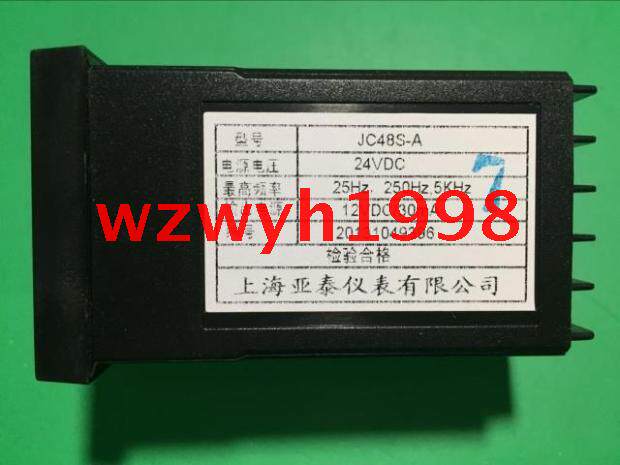
Always turn off the power before performing any wiring to avoid electric shock. Refer to the product label for specific model details and ensure compliance with IEC 60335-1:2020 standards.
- Power Terminal (L/N): Connect to AC 187~244V. Ensure a stable power supply. Terminals are marked with voltage parameters.
- Input Terminal (IN): Connect to an NTC/Pt100/RTD sensor. Keep sensor wires away from power cables to prevent interference.
- Output Terminal (OUT1/OUT2): Connect to the load (heater, cooler, SSR). Ensure the load type matches the output mode. Terminals are clearly marked.
- Ground Terminal (PE): Mandatory grounding is required (IEC 60417-5019 symbol) to comply with EU standards and prevent electric shock.
- Communication Terminal (High-End Models): For high-end models, connect the RS-485 cable (A/B) to the upper computer. Ensure correct wiring.
WARNING: Incorrect wiring (e.g., no grounding, wrong voltage, or improper sensor connection) can cause electric shock, fire, or damage, and may violate EU regulations. Double-check all wiring before powering on. Use standard materials and ensure firm connections to avoid overheating. For full-load operation, ensure installation is below 2500m altitude; if above 2500m, the load should be ≤80% of the rated capacity.
5. Basic Operation
5.1 Power On
After connecting power according to the wiring diagram and confirming proper grounding, turn on the power switch. The controller will automatically enter its working state. The digital display will show the measured temperature (PV) and the target temperature (SV). LED indicators will illuminate to show heating, cooling, alarm, or communication status.
5.2 Temperature Setting & Key Functions
- Basic Temperature Setting: Press and hold the "S" (SET) button for 2 seconds until the display flashes. Adjust the target temperature using the "△" (up) or "▽" (down) buttons. Hold for 1 second for quick adjustment. Press "S" to confirm the setting, or "M" (MODE) to cancel.
- Temperature Correction: Long press the "M" button for 5 seconds (enter password if set). Navigate to the correction parameter (H1/F19) and adjust the value (-9~9°C) using the "△"/"▽" buttons. Press "S" to confirm.
- Child Lock: Long press the power key for 6 seconds to lock or unlock the device, preventing accidental operation.
- Mode Switching: For precision/high-end models, enter advanced settings to switch between heating (HEAT) and cooling (COOL) modes. High-end models can switch between local and remote control via the "REM" key.
- Time Setting: In manual mode, press "S" to switch to the time display. Long press "S" again to adjust the hour/minute using "△"/"▽". Press "S" to confirm.
- Communication Setting (High-End Models): Connect the RS-485 cable to the A/B terminals. Set the baud rate (9600/19200 bps) and address (1~247) to match the upper computer for remote control.
5.3 Display & Alarm Introduction
- Normal Mode: PV (measured temperature) and SV (target temperature) are displayed. LED indicators clearly show the working status.
- Setting Mode: A flashing display indicates a parameter being set (e.g., temperature, correction, timing), with clear prompts.
- Alarm Mode: The alarm indicator lights up for over-temperature, sensor fault, or load abnormality. Sensor faults are indicated by "00", "98", "OPE" (open), or "SHr" (short). Other faults show alarm code "Axx". Communication failure (for high-end models) shows "Err".
6. Maintenance
- Installation Environment: Ensure the device is installed in a dry, ventilated place, away from high temperatures, humidity, interference, and flammable materials. Install firmly, preferably at a height of 1.4m, and avoid cold/heat sources or direct sunlight.
- Regular Checks: Regularly inspect wiring, sensor connections, and overall status.
- Cleaning: Clean the display and panel with a dry, soft cloth. Do not use corrosive cleaners. Ensure CE/RoHS marks remain clear.
- Calibration: Calibrate the device as needed using the temperature correction function.
- Protection: Prevent water or metal particles from entering the controller.
7. Troubleshooting
If the device exhibits abnormal behavior, refer to the following common issues and their indicators:
- Sensor Faults: The display will show "00", "98", "OPE" (indicating an open circuit), or "SHr" (indicating a short circuit).
- Other Faults: The display may show an alarm code such as "Axx".
- Communication Failure (High-End Models): The display will show "Err".
- General Abnormalities: This includes display failure or significant temperature deviation.
Action: In case of any abnormal operation, immediately stop using the device and cut off the power supply. Contact professional maintenance personnel for diagnosis and repair. Do not attempt to repair the device yourself.
8. User Tips
No specific user tips were available from reviews or Q&A for this product. Always ensure to follow the safety and operation guidelines provided in this manual for optimal performance and longevity of your AISET JC48 Series Industrial Intelligent Counter.
9. Warranty and Support
9.1 Warranty Information
The AISET JC48 Series Industrial Intelligent Counter comes with a 12-month warranty from the delivery date. This warranty covers free repair or replacement for material and workmanship defects under normal use, provided the product complies with this manual and relevant EU regulations.
The warranty does not cover damage resulting from:
- Improper operation
- Incorrect wiring
- Unauthorized disassembly or repair
- Non-compliance with instructions
- External factors
- Normal wear and tear
Please note that sensors and communication modules are considered vulnerable parts and are not covered under this warranty.
9.2 EU Compliance
This product meets the following EU directives:
- EMC 2014/30/EU
- LVD 2014/35/EU
- RoHS 2011/65/EU
- WEEE 2012/19/EC
It fully complies with AliExpress and Amazon EU sales requirements and holds CE certification.
9.3 Additional Resources
This document is a simplified EU compliance manual. For detailed model-specific operations and advanced settings, please refer to the full-version manual. You may also consult the official user manual PDF for more comprehensive information: View User Manual (PDF).
For specific compliance details or if you have any questions, it is recommended to consult a legal advisor or contact AISET customer support.