
1. Introduction
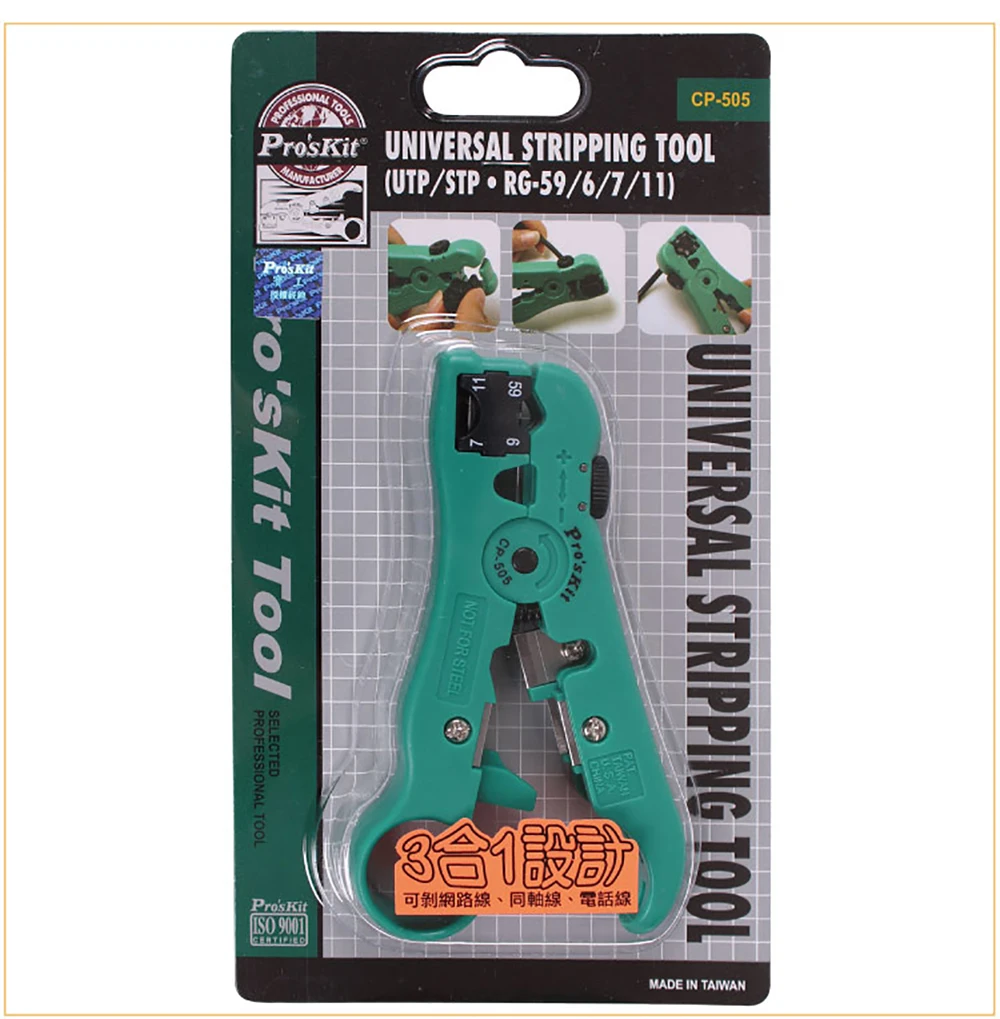
The Pro'sKit CP-505 is a versatile 3-in-1 universal tool designed for efficient cable preparation. It combines stripping, cutting, and crimping functionalities into a single compact device. This tool is ideal for working with various cable types, including UTP/STP twisted pair cables, flat telephone lines, and a range of coaxial cables (RG-59, RG-6, RG-7, RG-11). Its ergonomic design and adjustable features ensure precise and reliable results for both professional and DIY applications.


2. Setup and Adjustment
The Pro'sKit CP-505 is designed for immediate use with minimal setup. Before operation, ensure you understand the different stripping sections and adjustment mechanisms.
2.1 Blade Adjustment for Coaxial Cables
The tool features an adjustable blade for coaxial cables to accommodate different cable diameters and insulation thicknesses. Use the black rotary knob to adjust the blade depth.

2.2 Coaxial Cable Type Selection
The coaxial stripping section has pre-marked settings for common RG cable types. Rotate the black selector to align the desired cable type (59, 6, 11, or 7) with the stripping slot.

2.3 UTP/STP and Flat Cable Stripping
The tool includes dedicated slots for UTP/STP twisted pair cables and flat telephone lines. These sections typically do not require adjustment.
3. Operating Instructions
Always exercise caution when using the tool. The blades are sharp. Do not use this tool for steel cables.
3.1 Stripping Coaxial Cables (RG-59/6/7/11)
- Select the appropriate RG cable type (59, 6, 7, or 11) by rotating the selector on the tool.
- Adjust the blade depth if necessary using the black knob to match your cable's specifications.
- Insert the coaxial cable into the selected stripping slot until it reaches the stop.
- Squeeze the handles firmly and rotate the tool around the cable 1-3 times.
- Release the handles and remove the stripped cable. The tool will create a clean, multi-level strip for connector installation.

3.2 Stripping UTP/STP Twisted Pair Cables
- Open the tool and locate the UTP/STP stripping slot.
- Insert the UTP/STP cable into the slot, ensuring it is seated properly.
- Squeeze the handles firmly and rotate the tool around the cable 1-2 times.
- Release the handles and carefully remove the cable to reveal the stripped wires.

3.3 Stripping Flat Telephone Lines
- Open the tool and locate the flat telephone line stripping slot.
- Insert the flat cable into the slot.
- Squeeze the handles firmly and pull the cable through the slot.
- The tool will cleanly strip the outer jacket.

3.4 Cable Cutting
The tool includes a built-in cutter for various cable types.
- Place the cable into the cutting slot.
- Squeeze the handles firmly to cut the cable.

3.5 Crimping Function
The Pro'sKit CP-505 also features a crimping function, typically used for modular plugs (e.g., RJ45, RJ11/12).
- After stripping the cable and arranging the wires, insert the modular plug with the wires into the appropriate crimping slot.
- Squeeze the handles completely until the crimp is secure.
4. Maintenance
Proper maintenance will extend the life of your Pro'sKit CP-505 tool.
- Cleaning: After each use, wipe the tool clean with a dry cloth to remove any cable debris or dust.
- Lubrication: Periodically apply a small amount of light machine oil to the pivot points and blade mechanisms to ensure smooth operation.
- Blade Inspection: Regularly inspect the blades for wear or damage. While specific replacement instructions are not provided, worn blades can affect stripping quality.
- Storage: Store the tool in a dry, clean environment away from direct sunlight and extreme temperatures.
5. Troubleshooting
- Poor Stripping Quality:
- Coaxial Cables: Ensure the correct RG type is selected and the blade depth is properly adjusted. The blade might be dull if consistent poor strips occur.
- UTP/STP & Flat Cables: Ensure the cable is fully seated in the correct slot.
- Cable Damage During Stripping:
- Coaxial Cables: The blade depth might be set too deep. Adjust the black knob to a shallower setting.
- General: Ensure you are not applying excessive force or rotating the tool too many times.
- Tool Jams: Ensure no cable debris is lodged in the stripping mechanisms. Clean the tool thoroughly.
6. Specifications
| Feature | Specification |
|---|---|
| Model Number | CP-505 |
| Brand Name | Pro'sKit (also listed as eqcomnet) |
| Material | ABS |
| Stripping Range | UTP/STP twisted pair, flat telephone line, RG-59/6/7/11 coaxial cable |
| Full Length | 125mm |
| Origin | Mainland China |
| Functions | Stripping, Cutting, Crimping |
7. Warranty and Support
This Pro'sKit CP-505 tool is manufactured to high-quality standards. For any issues or support, please contact your retailer or the manufacturer directly.
AliExpress Buyer Protection:
- Free Returns: Enjoy free returns within 90 days of purchase.
- Fast Delivery Guarantee: If delivery is delayed, you may be eligible for a C$1.41 coupon.
- Refunds: Refunds are available if the package is lost or items are damaged during transit, or if no delivery occurs within 30 days.
For detailed information on these policies, please refer to the AliExpress platform's official terms and conditions.