
1. Introduction
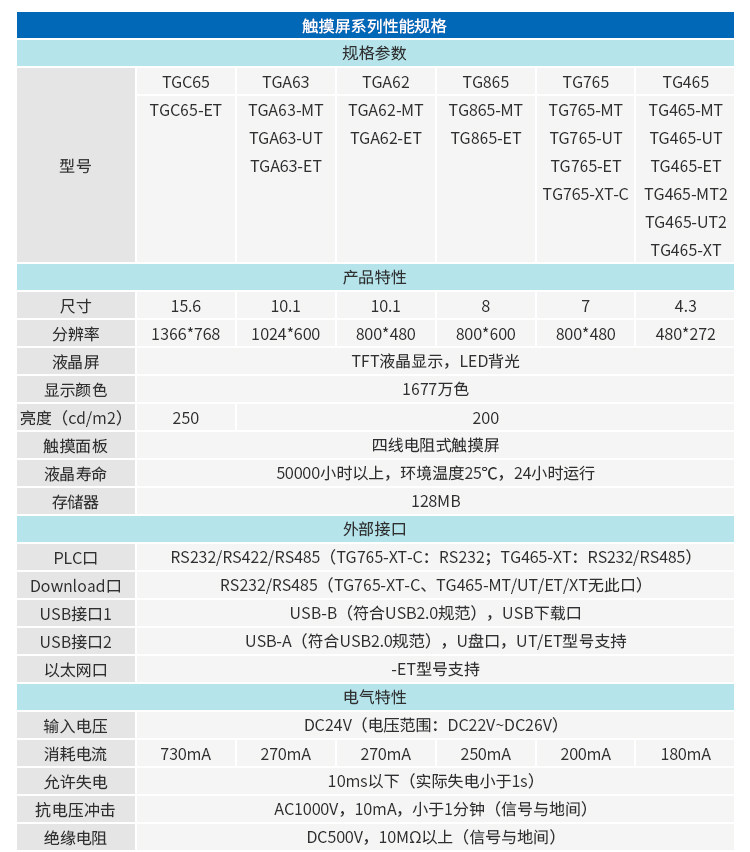
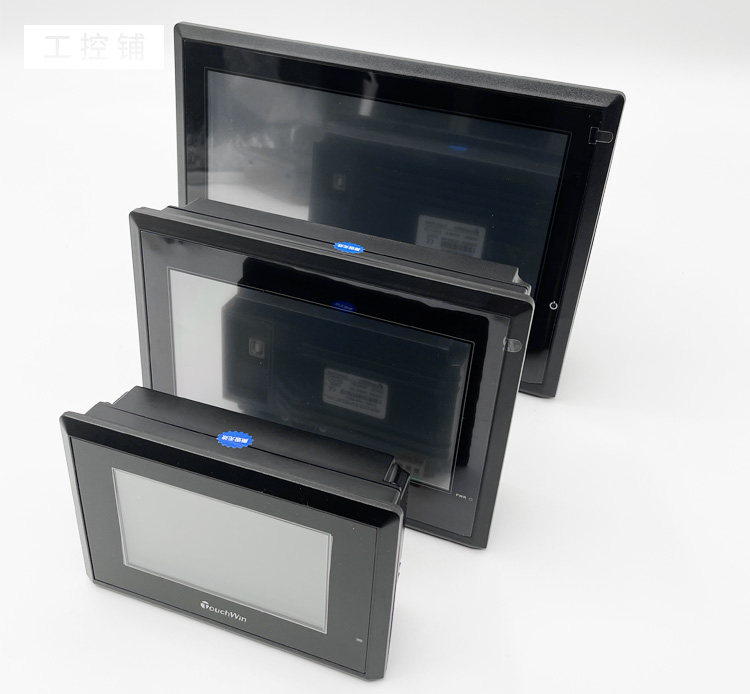
This manual provides essential information for the installation, operation, and maintenance of your XINJE TouchWin HMI Touch Screen. This 7-inch human-machine interface features an 800x480 resolution and Ethernet connectivity (on specific models). It is powered by an ARM9 CPU with a 400MHz main frequency and includes 128MB of storage capacity. Designed for industrial applications, it offers reliable and efficient control for systems such as Lathe and Turning Centers.

2. Product Features
- Processor: ARM9 CPU, 400MHZ main frequency.
- Memory: 128MB storage capacity.
- Display: 7.0-inch TFT LCD with LED backlight, 16 million colors, 800x480 resolution.
- Communication Ports: Two independent COM ports supporting RS232/RS485/RS422 for multi-screen to one machine functionality.
- USB Interface: USB-B interface for data transfer. USB-A interface supported on UT/ET models for U disk connectivity.
- Ethernet: Supports multiple Ethernet communication protocols, including MODBUS TCP and Siemens S7-1200 PLC (available on ET models).
- Protection Level: IP65 (front panel).
3. Setup and Installation
Carefully follow these steps to set up and install your HMI Touch Screen.
3.1 Unpacking
Upon receiving your HMI, inspect the packaging for any signs of damage. Open the box and ensure all components are present.

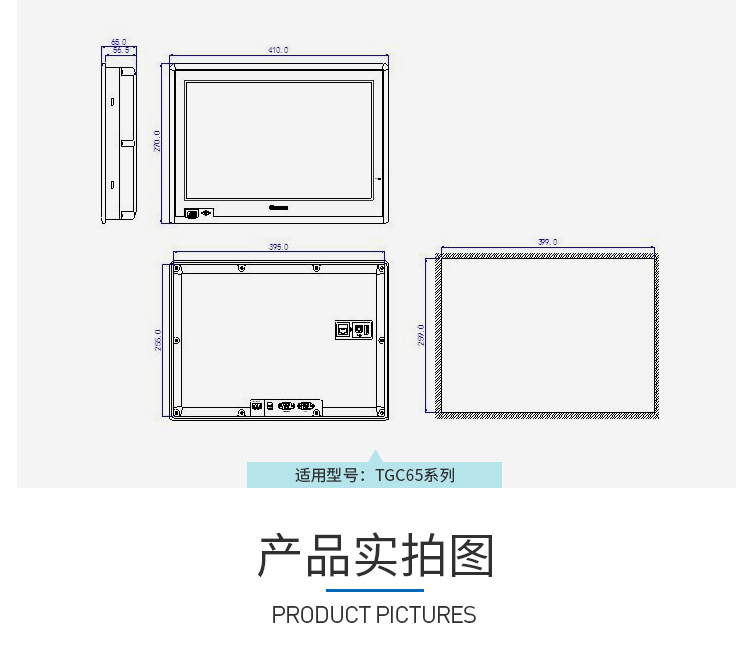
3.2 Mounting Dimensions
Ensure adequate space for installation and proper ventilation. Refer to the dimensional drawings for precise cutout and overall dimensions for the TG765 series.
3.3 Electrical Connection
The HMI requires a DC24V power supply. Connect the power cable to the designated terminal block on the rear of the unit. Ensure the power supply is within the specified range of DC22V-DC26V.

3.4 Communication Port Configuration
The HMI features two COM ports (COM1, COM2) and USB ports for various communication needs. Ethernet connectivity is available on ET models.
- COM1: RS-232/RS-485
- COM2: RS-232/RS-422/RS-485
- USB-B: For program download and data transfer.
- USB-A (on UT/ET models): For U disk connectivity.
- Ethernet (on ET models): Supports MODBUS TCP and Siemens S7-1200 PLC.
4. Operating Instructions
The TouchWin HMI is designed for intuitive operation. Once powered on, the display will show the configured interface. Use the 4-wire resistance touch panel for interaction.
4.1 Initial Power-Up
After connecting power, the HMI will boot up. The screen will display the initial application. If no application is loaded, it may show a default screen or prompt for program download.
4.2 Program Download
Use the USB-B port to connect the HMI to a computer for program download. Refer to the TouchWin software documentation for detailed instructions on creating and uploading HMI projects.
4.3 Touch Screen Interaction
The HMI features a 4-wire resistance touch panel. Use a finger or a stylus for accurate input. Calibration may be required upon initial setup or if touch accuracy issues arise.
5. Maintenance
Proper maintenance ensures the longevity and optimal performance of your HMI Touch Screen.
- Cleaning: Use a soft, dry cloth to clean the screen and casing. Avoid abrasive cleaners or solvents that could damage the display or plastic.
- Environment: Operate the HMI within the specified temperature range of 0-50°C and humidity of 10-90% (non-condensing). Avoid environments with corrosive gases or excessive vibration.
- Cooling: The unit uses natural air cooling. Ensure that the ventilation holes on the rear of the unit are not obstructed.
6. Troubleshooting
This section addresses common issues you might encounter with your HMI.
6.1 No Power/Display
- Verify the DC24V power supply is correctly connected and providing power within the DC22V-DC26V range.
- Check the power cable for damage.
- Ensure the HMI is securely mounted and connections are firm.
6.2 Touch Screen Unresponsive/Inaccurate
- Perform a touch screen calibration if available in the HMI's system settings.
- Ensure the screen surface is clean and free from debris.
- Restart the HMI unit.
6.3 Communication Issues
- Verify cable connections for COM ports, USB, or Ethernet.
- Check communication settings in the HMI project and connected devices (e.g., PLC).
- Ensure the correct communication protocol is selected (e.g., MODBUS TCP for Ethernet).
7. Specifications
Detailed technical specifications for the TG765 series HMI Touch Screen.
| Feature | Specification (TG765 Series) |
|---|---|
| Model Numbers | TG765-MT, TG765-UT, TG765-ET, TG765-XT-C, TG765S-MT, TG765S-XT |
| Size | 7 inch |
| Resolution | 800x480 |
| LCD Type | TFT LCD, LED backlight |
| Display Colors | 16.77 million colors |
| Brightness | 200 cd/m² |
| Touch Panel | 4-wire resistance |
| LCD Life | >50,000 hours (at 25°C, 24h operation) |
| Storage | 128MB |
| CPU | ARM9, 400MHz |
| Input Voltage | DC24V (DC22V-DC26V) |
| Current Consumption | 200mA |
| Operating Temperature | 0°C to 50°C |
| Storage Temperature | -20°C to 60°C |
| Humidity | 10%RH to 90%RH (non-condensing) |
| Protection Level | IP65 (front panel) |
| Communication Ports | COM1 (RS232/RS485), COM2 (RS232/RS422/RS485) |
| USB Ports | USB-B (download), USB-A (U disk, UT/ET models) |
| Ethernet | Supported on ET models (MODBUS TCP, Siemens S7-1200 PLC) |
8. User Tips
- For optimal performance, ensure the HMI is installed in a location with stable power and minimal electromagnetic interference.
- Regularly back up your HMI project files to prevent data loss.
- When connecting to a PLC, double-check the communication protocol and wiring to avoid connection errors.
- Always refer to the specific model's documentation for detailed wiring diagrams and software configuration.
9. Warranty and Support
XINJE TouchWin products are designed for reliability and performance. For detailed warranty information, technical support, and service inquiries, please refer to the official XINJE documentation provided with your product or contact your authorized dealer. Please retain your purchase receipt as proof of purchase for any warranty claims.