
1. Introduction
This manual provides essential information for the safe and efficient operation of your Sumry 3600W Hybrid Solar Inverter. Please read this manual thoroughly before installation and use, and keep it for future reference. The Sumry Hybrid Solar Inverter is designed to provide reliable power for various applications, integrating solar power, utility grid, and battery power sources.

Figure 1: Sumry 3600W Hybrid Solar Inverter highlighting 120VAC output, 120A max charging, 60-450VDC MPPT, and 50Hz/60Hz auto recognition.
2. Key Features
- Pure sine wave solar inverter (on/off Grid)
- Output power factor 1.0
- WIFI & GPRS available for iOS and Android monitoring (optional module required)
- Can operate without a battery
- One-key restoration to factory settings
- Built-in Lithium battery automatic activation
- AC output voltage 120VAC
- Built-in 120A MPPT Solar charge controller: max 4200W (for 3.6kW model)
- High PV input voltage range (60~500VDC)
- Built-in anti-dust kit for harsh environments
- Smart battery charge design to optimize battery life
- Dual output capability

Figure 2: The inverter provides a pure sine wave output for sensitive appliances.
3. Setup and Installation
3.1 Unpacking and Inspection
Carefully unpack the inverter and inspect it for any damage. Ensure all components listed in the packing list are present.
Video 1: Product unboxing and overview of the inverter's ports and connections.
3.2 Basic System Architecture
The Sumry Hybrid Solar Inverter integrates various power sources to supply electricity to your home loads. The basic system includes solar panels, a utility grid connection, an optional generator, and a battery bank. The inverter manages the power flow between these components and your appliances.
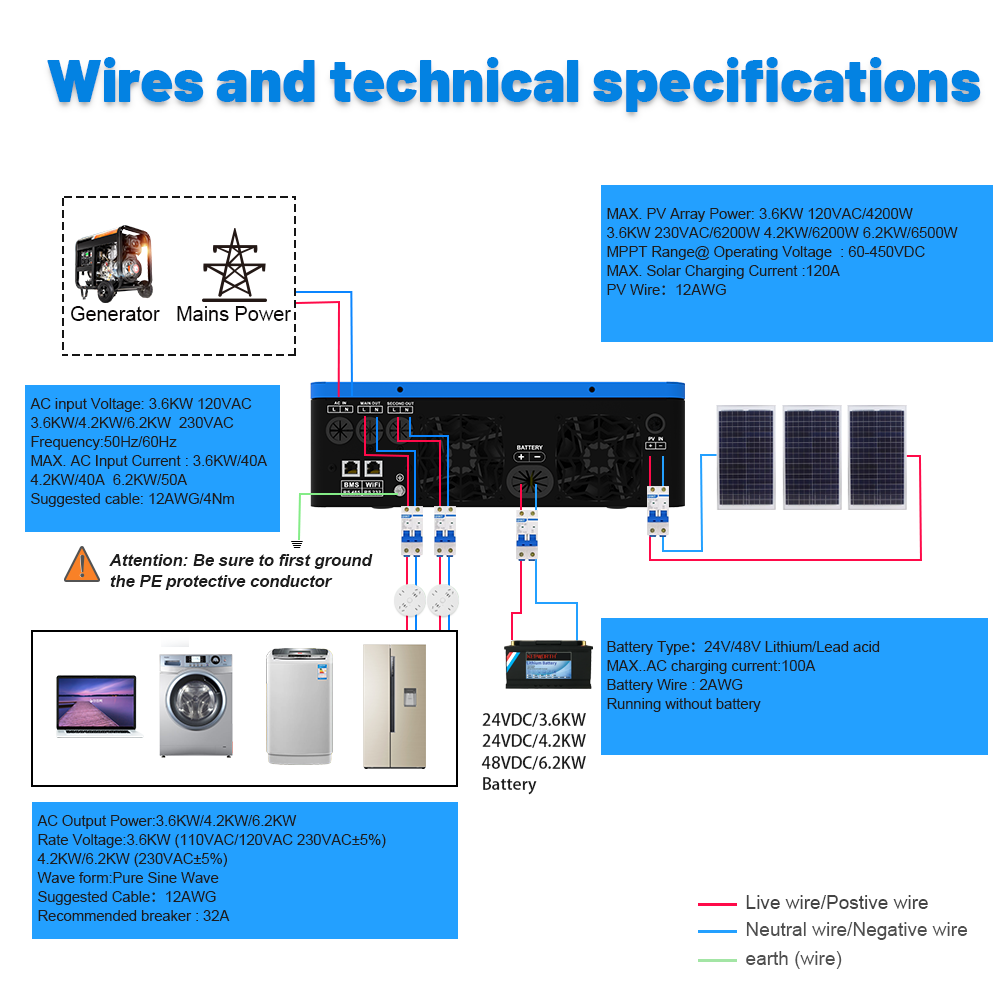
Figure 3: Diagram illustrating the interconnection of solar panels, utility grid, generator, battery, inverter, and home loads.
3.3 Wiring and Connections
Before installing and using the inverter, it is recommended to install 4 circuit breakers in the following positions:
- Between the battery pack and the inverter battery input.
- Between the solar panel and the photovoltaic input of the inverter.
- Between the power input of the grid and the inverter.
- Between inverter output and load.
The circuit breaker is to effectively prevent misconnection or reverse connection of the mains input and the inverter output. When there is a short circuit, load short circuit, or overload in the output, the circuit breaker can directly cut off the circuit to protect the inverter.
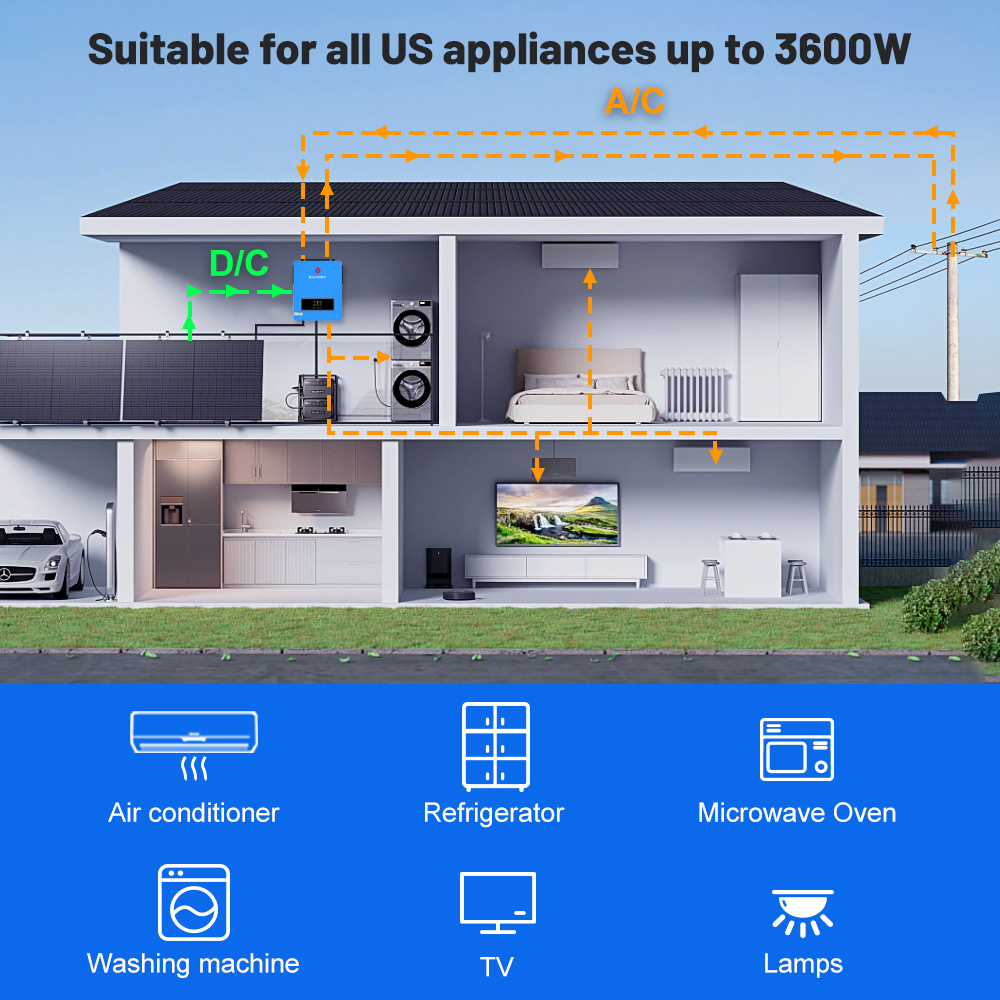
Figure 4: Detailed wiring diagram showing connections for AC input, main output, second output, battery, and PV input. Includes a warning to ground the PE protective conductor.
Attention: Be sure to first ground the PE protective conductor.
3.4 Battery Compatibility
The inverter is compatible with most common battery types, including GEL, LI (Lithium), AGM, and FLD (Flooded). It also supports user-defined battery settings. The inverter features built-in Lithium battery automatic activation.

Figure 5: Inverter compatible with GEL, LI, AGM, USER, and FLD battery types. Also indicates battery-less operation is supported.
3.5 485 Communication Line
The 485 communication line connects the RS485 port of the lithium battery to the COMM port of the inverter. This allows for exporting lithium battery data to the machine display screen for easy monitoring. Note that if your lithium battery has a BMS protection board, and the protection boards are from PACE, you must purchase a 485 communication cable from PACE to ensure compatibility.

Figure 6: Illustration of the 485 communication line connecting the inverter's COMM port to the battery's RS485 port.
4. Operating Instructions
4.1 Powering On/Off
Refer to the display panel on the inverter for power status and control options. Ensure all connections are secure before powering on.
4.2 Charging Mode Priority
The inverter offers four charging modes to prioritize power sources for battery charging:
- Solar First: Prioritizes solar power for charging.
- Mains First: Prioritizes utility grid power for charging.
- Hybrid Charge: Uses a combination of solar and utility power.
- Only Solar: Charges exclusively from solar power.
4.3 Output Mode Priority
The inverter offers four output modes to prioritize power sources for supplying connected loads:
- Solar First: Prioritizes solar power to supply loads.
- Mains First: Prioritizes utility grid power to supply loads.
- Inverter First: Prioritizes power from the inverter (battery or solar) to supply loads.
- Hybrid Output: Uses a combination of available power sources.
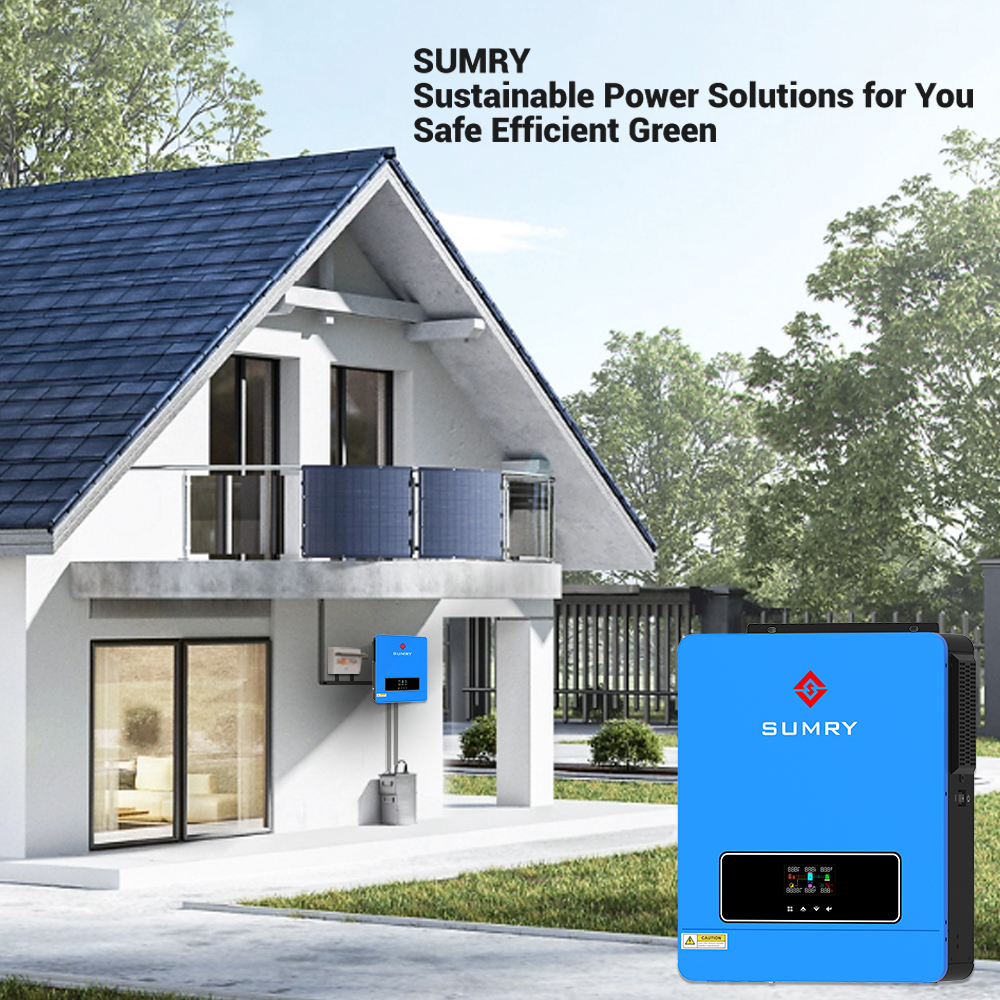
Figure 7: Visual representation of the four charging and four output priority modes.
4.4 Frequency Setting (for US Customers)
The default frequency of the machine is 50HZ. If you require 60 HZ, you can change this setting. Refer to the inverter's display menu and adjust item '09' to 60 HZ.
4.5 Monitoring via Smartess App
The inverter supports monitoring and control via the Smartess App, available for both iOS and Android devices. An optional WIFI/GPRS module is required for this functionality.
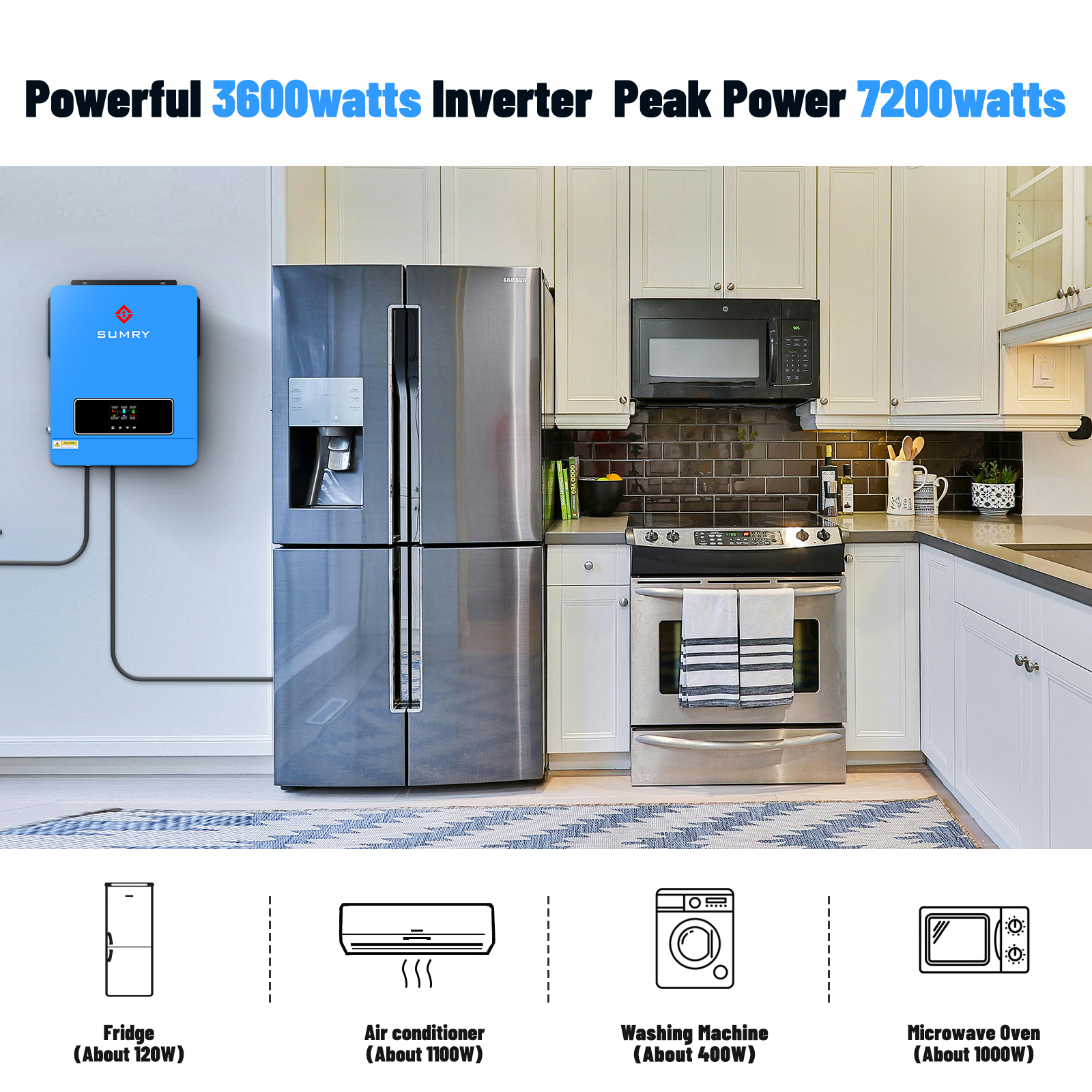
Figure 8: Screenshot of the Smartess App interface showing solar energy and DC load monitoring.
5. Maintenance
5.1 General Maintenance
- Regularly inspect all wiring and connections for tightness and signs of wear or damage.
- Keep the inverter's ventilation openings clear of dust and debris to ensure proper cooling. The inverter has a built-in intelligent cooling fan that adjusts speed based on ambient temperature.
- Ensure the anti-dust kit is properly installed, especially in harsh environments.
- Periodically check the battery connections and ensure they are clean and free of corrosion.

Figure 9: The inverter features an intelligent cooling fan system to maintain optimal operating temperature.
6. Troubleshooting
The inverter is equipped with an intelligent protection system that includes 15 different protection modes to ensure safe operation. If an issue occurs, the inverter's display may show an error code or indicator.

Figure 10: Icons representing the 15 intelligent protection modes, including Overload, Overheating, High/Low Voltage, Battery, Short Circuit, Supercurrent, Anti-Reverse, and Energy Fallout Protection.
6.1 Common Issues and Solutions
- No Power Output: Check all circuit breakers (battery, solar, grid, load) to ensure they are not tripped. Verify battery connections and charge level.
- Inverter Not Charging Battery: Check solar panel connections and PV input voltage range (60-500VDC). Ensure the selected charging mode is appropriate.
- Overload Protection Triggered: Reduce the connected load. The inverter has a rated output power of 3600W.
- Overheating: Ensure proper ventilation around the inverter. Clean any dust from the fans and vents.
- Frequency Mismatch (US Customers): If appliances are not working correctly, verify the inverter's output frequency is set to 60 HZ (menu item '09').
For detailed error codes and advanced troubleshooting, please refer to the complete user manual (PDF) or contact Sumry customer support.
7. Specifications
The following table outlines the technical specifications for the Sumry NM-ECO-LV-3.6KWPLUS Hybrid Solar Inverter:
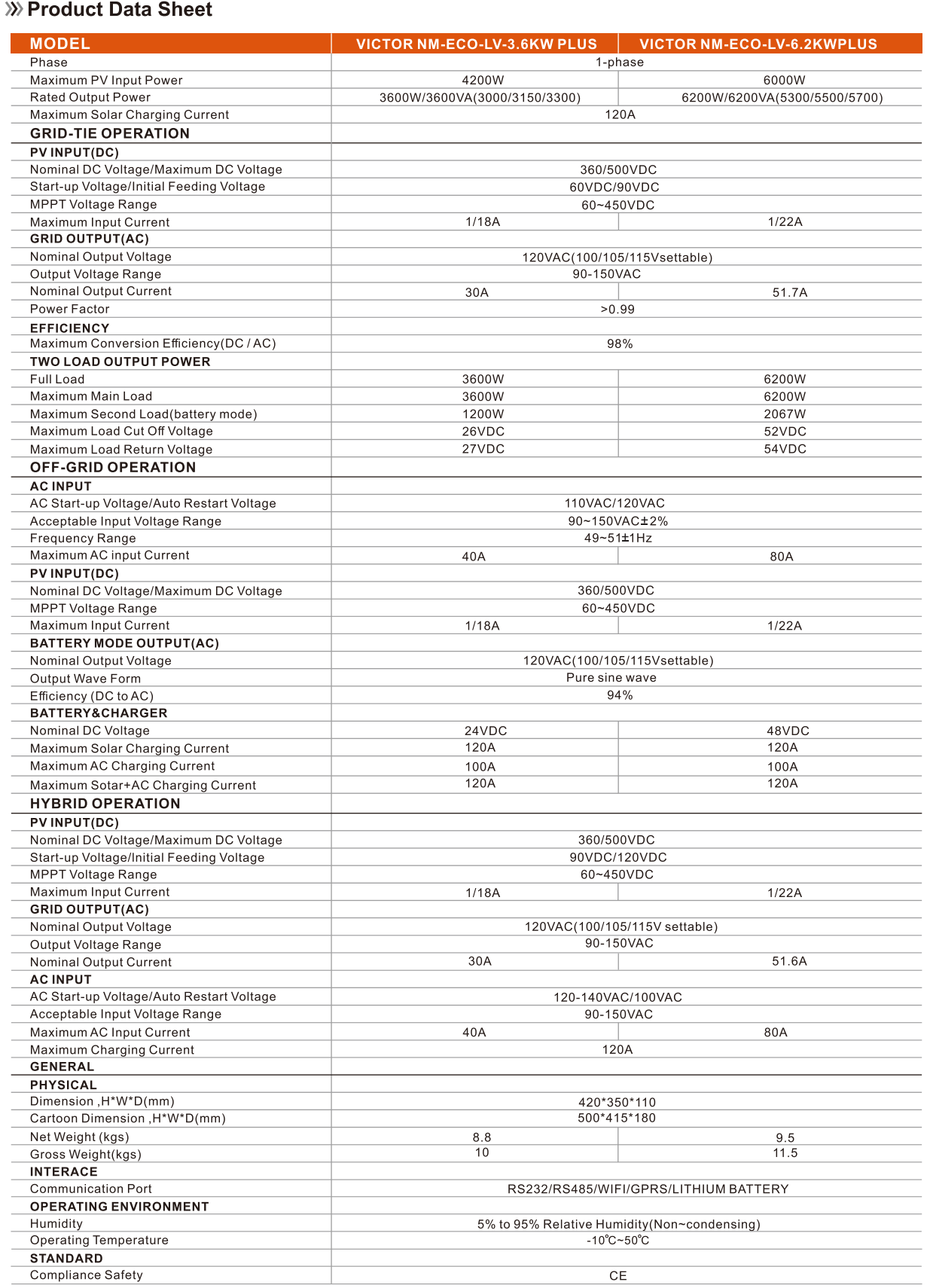
Figure 11: Product Data Sheet detailing specifications for the NM-ECO-LV-3.6KWPLUS and 6.2KWPLUS models.
| Attribute | Value |
|---|---|
| Model Number | 3600W 24V (NM-ECO-LV-3.6KWPLUS) |
| Rated Output Power | 3600W/3600VA |
| Maximum PV Input Power | 4200W |
| Maximum Solar Charging Current | 120A |
| Nominal DC Voltage/Maximum DC Voltage | 360/500VDC |
| MPPT Voltage Range | 60~450VDC |
| Nominal Output Voltage | 120VAC (100/105/115V settable) |
| Output Voltage Range | 90-150VAC |
| Nominal Output Current | 30A |
| Maximum Conversion Efficiency (DC/AC) | 98% |
| Full Load | 3600W |
| Maximum AC Input Current | 40A |
| Output Wave Form | Pure sine wave |
| Battery Voltage | 24V |
| Output Type | SINGLE |
| Output Frequency | 50/60HZ (Auto Recognition) |
| Size (L*W*H) | 500*415*180MM |
| Net Weight | 8.8KG |
| Operating Temperature | -15°C ~ 50°C |
| Humidity | 5% to 95% Relative Humidity (Non-condensing) |
| Certification | CE |
8. User Tips
- For US customers, remember to check and adjust the frequency setting to 60 HZ if needed, as the default is 50 HZ. This can be done via menu item '09' on the inverter's display.
- The inverter can function without a battery, providing flexibility for direct solar-to-load applications.
- If you encounter any issues, especially during setup, contact Sumry customer support for professional guidance.
9. Frequently Asked Questions (FAQ)
- Q: Can the inverter be used without connecting to the public electricity grid?
- A: Yes, this is an on/off grid inverter and can operate without being connected to the public electricity grid. It can also run without a battery.
10. Warranty and Support
Sumry provides professional technical support for its products. If you encounter any problems during installation, operation, or maintenance, please contact Sumry customer support for assistance. Keep your purchase records for warranty claims.

Figure 12: The inverter is suitable for powering various US appliances up to 3600W.
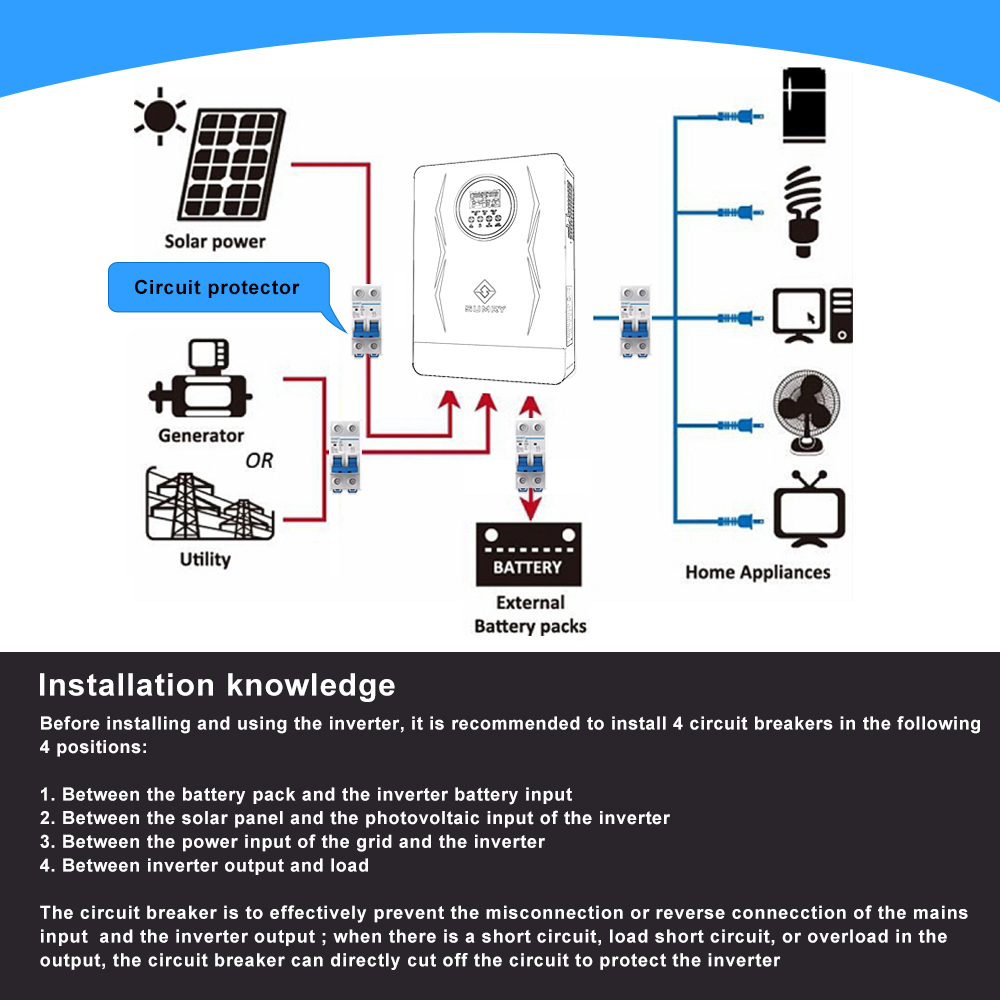
Figure 13: The inverter is suitable for a wide range of applications including Outdoors, Household, Photovoltaic Rooftop, RV, Yacht, Commercial Electricity, Camping, Emergency Electricity, Solar Light, and Agricultural Electricity.