
1. Introduction
Thank you for choosing the MINISO M98 Wireless Headphones. This manual provides detailed instructions for the proper use, maintenance, and troubleshooting of your device. Please read it carefully before use and keep it in a safe place for future reference.
The MINISO M98 headphones are OWS (Open-Wearable Stereo) sports Bluetooth earphones featuring AI translation capabilities, a full-color LCD touch screen on the charging case, and IPX5 water resistance. They are designed for a comfortable listening experience, real-time communication, and smart control.
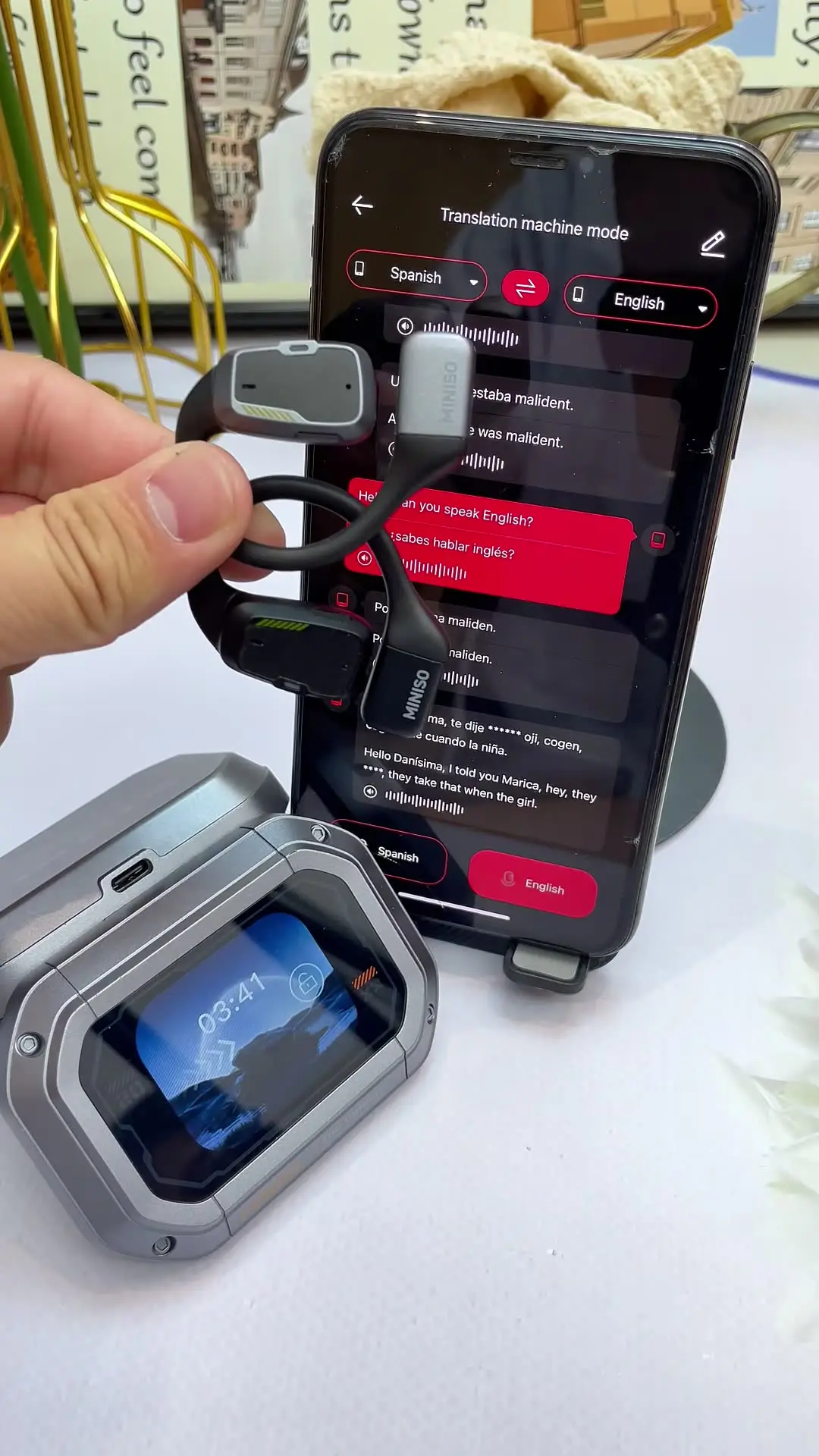
Video: Overview of MINISO M98 Wireless Headphones features, including real-time translation and smart screen functions.
2. Package Contents
Ensure all items are present in the package:
- Headphones *1
- Charging case *1
- User Manual *1
- Carrying Bag *1
- Charging Cable *1

Image: MINISO M98 Wireless Earbud M98 box contents showing headphones and charging case.
3. Setup and Initial Use
3.1. How to Wear Headphones Correctly
For optimal sound and comfort, follow these steps:
- Identify the Left (L) and Right (R) earphones.
- Gently place the ear hook over your ear, ensuring the earbud sits comfortably in your ear canal.
- Adjust the earphone until it feels secure and comfortable.
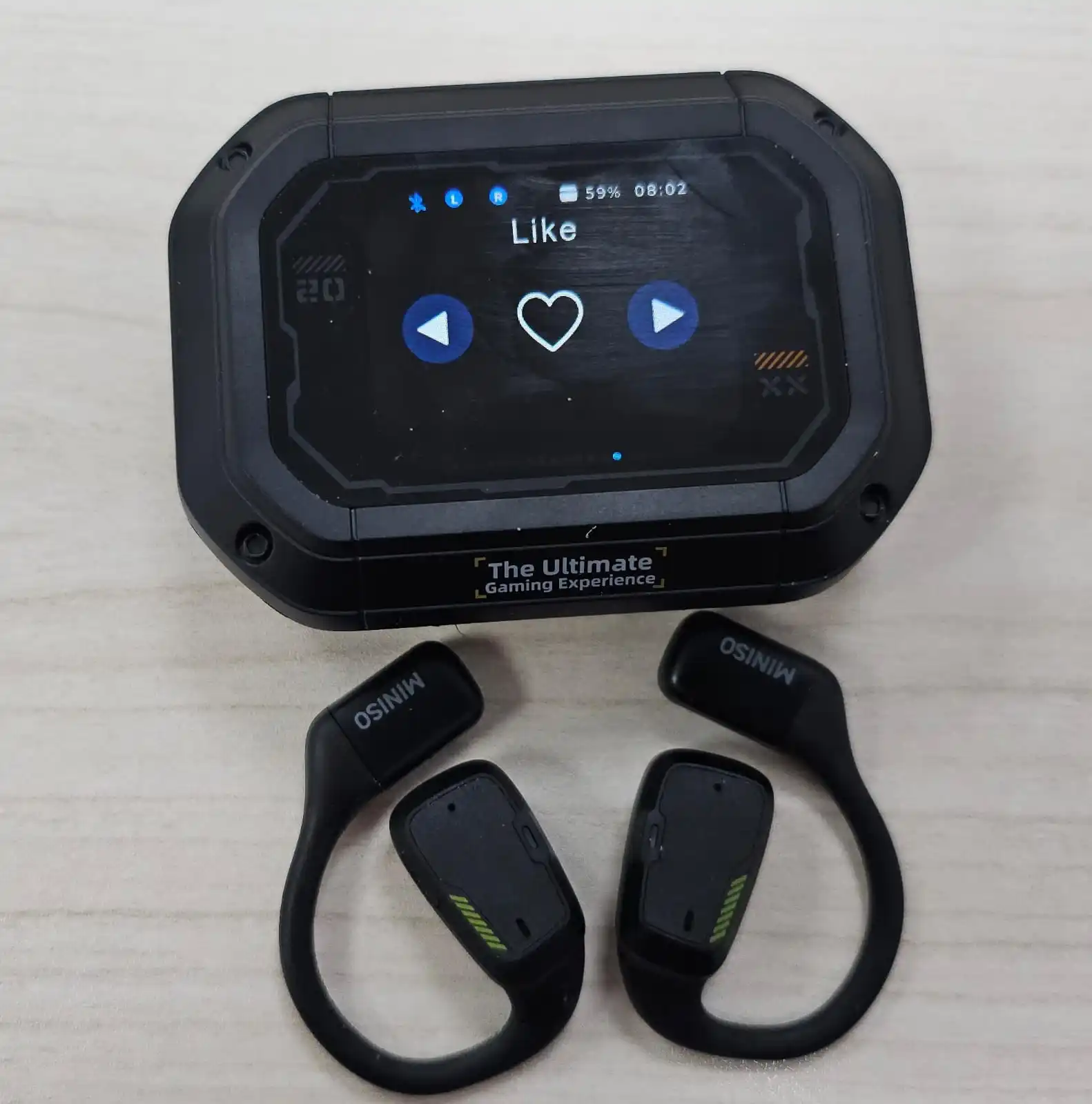
Image: Step-by-step guide on wearing the headphones.
3.2. Power On/Off
- Automatic Power On: When the earphones are in the charging case, open the charging case cover. The earphones will power on with a "Du" prompt sound.
- Manual Power On: Long press the multi-function button on the earphone for 3 seconds. The earphone will power on with a "Du" prompt sound.
- Automatic Power Off: Place the earphones in the charging case and close the cover. The earphones will power off with a "Du" prompt sound.
- Manual Power Off: Long press the multi-function button on the earphone for 5 seconds. The earphone will power off with a "Du" prompt sound.
Note: If the earphones are not paired with a Bluetooth device within 3 minutes after powering on, they will automatically shut down. If they are not connected to a Bluetooth device after 3 minutes, they will automatically power off with a "Du" prompt sound.
3.3. Initial Pairing and Bluetooth Connection
When using for the first time, take out both the left and right earphones from the charging case simultaneously. When the white light and ice blue light of the earphones flash alternately, they will enter automatic pairing mode.
- Open the Bluetooth settings on your device (e.g., smartphone).
- Search for "MINISO-M98" in the list of available devices.
- Click on "MINISO-M98" to pair. A successful connection will be indicated by no light on the earphones.
3.4. Clearing Bluetooth Pairing History
If both earphones cannot be paired, you may need to clear the pairing history:
- Ensure the earphones are powered on.
- Click the multi-function button on both the left and right earphones 5 times simultaneously. This will clear all connected devices.
- The earphones will then enter wireless pairing mode. If there is no pairing record, they will automatically pair after being turned on, with two beeps after successful pairing. If there are existing pairing records, they will automatically reconnect when turned on, and a "beep" prompt will sound.
4. Operating Instructions
4.1. Touch Operations
The earphones feature multi-function touch controls:
- Once Press:
- Music Mode: Play/Pause
- Phone Mode: Call Answer/End
- Double Press:
- Music Mode: Double press right ear for Volume Up; Double press left ear for Volume Down.
- Long Press (2 seconds):
- Wake up voice assistant (When using both ears, press and hold the left ear multi-function button for 2 seconds. When using one earphone, press and hold the left or right earphone for 2 seconds.)
- Phone Mode: Call rejection (Press and hold the left or right ear multi-function button for two seconds.)
- Triple Press:
- Music Mode: Triple press left ear for Previous song; Triple press right ear for Next song.
4.2. Switching Between Game Mode and Music Mode
To switch between modes:
- Press and hold the multi-function button on the right ear for 2 seconds to enter Game Mode.
- Press and hold again for 2 seconds to return to Music Mode.
Note 1: When using only one earphone, you cannot switch between game mode and music mode.
Note 2: The factory setting defaults to music mode.
4.3. Intelligent Display Screen Operations (Charging Case)
The charging case features an LCD full-color smart screen with various functions:

Image: LCD Full-Color Smart Screen displaying various functions.
4.3.1. Lighting Up and Turning Off the Display Screen
- Lighting Up:
- Open the charging compartment cover.
- If the screen is off, click on the display screen.
- Press the multi-functional button of the charging case once.
- Turning Off:
- Automatic Shutdown: After 30 seconds of inactivity.
- Manual Closing: Press the multi-functional button of the charging case once.
4.3.2. Lock Screen Interface
Slide to the right on the screen to unlock. You can switch between different lock screen wallpapers by clicking the screen.
4.3.3. Music Interface
Control music playback directly from the charging case screen: Previous Song, Play/Pause, Next Song.
4.3.4. Volume Adjustment Interface
Adjust the volume from 0 (minimum) to 16 (maximum) using the on-screen controls.
4.3.5. Equalizer Interface
Switch between different EQ sound effects: Normal, Rock, Pop, Classic, Jazz.
4.3.6. Space Sound Interface
Select between Music Mode, Movie Mode, and Game Mode for optimized audio.
4.3.7. Alarm Clock Interface
Set an alarm for 5, 10, 30, or 60 minutes.
4.3.8. Light Level Interface
Adjust the screen brightness using the left (decrease) and right (increase) buttons on the screen.
4.3.9. Language Switch Interface
Click to switch between different languages for the charging case interface.
4.3.10. Time Setting Interface
- Automatic Update: When the charging case, headphones, and phone are connected, the time on the phone will automatically update to the charging case.
- Manual Update: Click the button to enter manual settings.
4.3.11. Find My Earphone Interface
If you misplace an earphone, use this function:
- Click the L/R button on the screen.
- Select 'Start' to make the earphone emit sound, or 'Cancel' to exit.
- Click the stop button to stop the sound.
4.3.12. TikTok Page Flipping and Like Function
This function requires connection to a Bluetooth device (e.g., smartphone) and is primarily for TikTok software. It may have compatibility issues with other apps or phones.
- Click the heart icon to 'like' the current short video.
- Click the left arrow to switch to the previous short video.
- Click the right arrow to switch to the next short video.
4.3.13. Photography Function
This function requires connection to a Bluetooth device and uses the phone's built-in camera. It may not be compatible with all shooting software or phones.
- Open your phone's camera app.
- Click the camera icon on the charging case screen to take photos.
Note: When not in shooting mode, clicking this photo button will increase the volume.
4.3.14. Flash Light Interface
Click the 'OPEN' button on the screen to turn on the flashlight. The entire screen will turn white, and the brightness will increase.
4.4. AI Translator Functions
The MINISO M98 headphones feature real-time translation across 135-144 languages. This function requires downloading a dedicated app on your mobile phone.

Image: Steps to download and log in to the app for AI translation.

Image: AI translation feature with headphones and charging case, displaying various languages.

Image: AI Dialogue Mode for real-time communication and voice consultation.

Image: Face-to-Face Translation for two-way voice translation in global negotiations or travel.

Image: Comprehensive list of 135 languages supported by the AI translation feature.
5. Maintenance
5.1. Charging
The charging case and earphones have separate charging indicators:
- Earphone Charging: The white light on the earphones is always on during charging. After being fully charged, the white light goes off.
- Charging Case Charging: The charging case display screen shows the battery level. When fully charged, it shows 100%.
Note: After the charging status is displayed on the charging case screen, it will automatically turn off after about 30 seconds of inactivity. Sliding the screen can re-enter the display.
First-time use: Please activate power on by charging the case via the Type-C interface or long-pressing the multi-functional button on the charging case for 8 seconds.
5.2. Waterproof Rating
The headphones have an IPX5 waterproof rating, making them resistant to sweat and rain splash. They are not designed for submersion.

Image: Life-grade waterproof feature, showing resistance to sweat and rain splash.
5.3. Cleaning
Regularly clean the earphones and charging case with a soft, dry cloth. Avoid using harsh chemicals or abrasive materials.
6. Troubleshooting
- Earphones not pairing: Clear the Bluetooth pairing history as described in section 3.4 and try pairing again.
- Automatic shutdown: If earphones shut down automatically, ensure they are paired and connected to a device within 3 minutes of powering on.
- TikTok/Photography function issues: These functions may have compatibility issues with certain phones or apps. Ensure your phone's camera is built-in for photography. If issues persist, you may need to ignore these features.
- System crashes/unresponsive: If the system crashes and cannot be operated, long press the multi-function button on the charging case for 10 seconds to restart the system (this will display the startup screen).
- Translation delay: A slight delay of a few seconds in translation is normal. Ensure a stable connection and clear speech for best results.
7. Specifications
| Attribute | Value |
|---|---|
| Model of Product | M98 |
| Bluetooth Version | V5.4 |
| Effective Distance | Approx. 10m |
| Speaker Diameter | 13mm |
| Impedance | 16Ω |
| Frequency Response | 20Hz-20KHz |
| Microphone Sensitivity | -42dB±3dB |
| Earphone Input | 5V ⎓ 40mA |
| Charging Case Input | 5V ⎓ 600mA |
| Charging Case Output | 5V ⎓ 80mA |
| Earphone Battery Capacity | 40mAh |
| Charging Case Battery Capacity | 600mAh |
| Earphone Duration | Approx. 4.5 H (single listening) |
| Total Battery Life (with charging case) | Up to 54 hours |
| Earphone Charging Time | Approx. 1.5 H |
| Charging Time of the Charging Case | Approx. 2 H |
| Material | Metal, Plastic |
| Weight | 5.5g |
| Waterproof Rating | IPX5 |
| Codecs | AAC, SBC |
| Connectors | Type C |
| Style | OWS ear hook headphones |
| Certification | CE |

Image: Battery life details, showing 54 hours total with charging case and 4.5 hours single listening.
8. User Tips
- App for Translation: To utilize the AI translation features, ensure you download the official MINISO app on your smartphone. The app is crucial for accessing the full range of translation functionalities.
- Language Support: The headphones support a wide array of languages (135-144), including various dialects. Check the app for specific language availability, such as Polish, Thai, Turkish, Hebrew, Arabic, German, Vietnamese, and Farsi.
- Translation Accuracy: While generally good, translation accuracy can be affected by speaking too quickly or unclear pronunciation. Speak clearly and at a moderate pace for best results.
- Sound Quality: Users report good sound quality with clear audio. The open-ear design allows you to remain aware of your surroundings while enjoying music or calls.
- Charging Case Display: The LCD screen on the charging case provides useful information like battery charge percentage, time, and music controls. Utilize it to monitor your device's status.
- "Find My Earphone" Feature: This function is highly recommended if you frequently misplace your earbuds. It can save time and frustration by making a lost earphone emit a sound.
- Equalizer Customization: Experiment with the equalizer settings (Normal, Rock, Pop, Classic, Jazz) via the charging case screen to tailor the audio output to your preference.
- Comfort: The OWS ear hook design is noted for its comfort, even during extended wear.
9. Frequently Asked Questions (FAQ)
- Q: What languages does the translator support?
- A: The MINISO M98 supports real-time translation across 135-144 languages, including various dialects. A full list is available within the companion app.
- Q: Do I need an app for the translation function?
- A: Yes, the AI translation function requires downloading and logging into the dedicated MINISO app on your mobile phone.
- Q: Can I use the TikTok or Photography functions with any phone?
- A: These functions require connection to a Bluetooth device and may have compatibility issues with certain phones or third-party applications. The photography function specifically uses your phone's built-in camera.
- Q: How do I know the charging status of the headphones and case?
- A: The earphones show a white light when charging, which turns off when fully charged. The charging case's LCD screen displays the battery percentage.
- Q: Is there a delay in translation?
- A: There might be a slight delay of a few seconds in real-time translation, which is normal for such technology.
10. Warranty and Support
For detailed warranty information, please refer to the Warranty Statement included in your product package (typically on page 36 of the physical manual). For further assistance or to view the full user manual in PDF format, please refer to the official documentation provided by the seller. A PDF user manual is available at MINISO M98 User Manual (PDF).