
Introduction
The XG88 PRO AI Intelligent Translation Glasses combine the functionality of sports sunglasses with advanced wireless Bluetooth audio and real-time AI translation capabilities. Designed for convenience and versatility, these glasses allow for hands-free communication, music playback, and seamless language interpretation, making them ideal for travel, business conferences, and daily use.

Figure 1: XG88 PRO Glasses highlighting translation features.
Safety Information
- Do not expose the device to extreme temperatures or direct sunlight for prolonged periods.
- Avoid dropping or subjecting the glasses to strong impacts.
- Keep the device away from water and moisture, unless specified as waterproof.
- Use only the provided charging cable and a compatible power adapter.
- Do not attempt to disassemble or repair the device yourself. Contact customer support for assistance.
- Ensure the volume is at a safe level to prevent hearing damage.
Package Contents
Please check the package for the following items:
- XG88 PRO AI Intelligent Translation Glasses
- USB Type-C Charging Cable
- User Manual
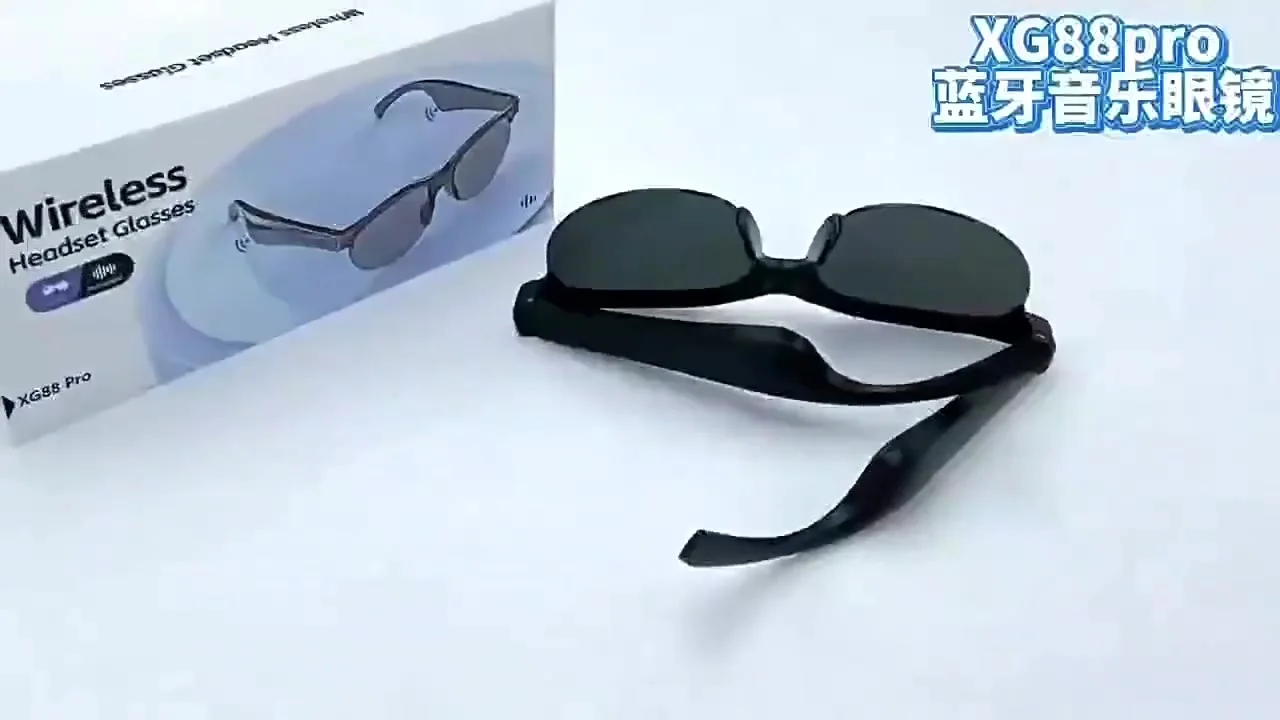
Video 1: Unboxing and overview of the XG88 PRO glasses and accessories.
Product Overview
Familiarize yourself with the components of your XG88 PRO glasses:

Figure 2: Front view of the XG88 PRO Glasses.

Figure 3: Side view with Type-C charging port and control buttons.

Figure 4: Smart Touch Operation Details and Button Functions.
- Control Buttons: Located on the temple arms for power, play/pause, volume, and voice assistant.
- Microphone: Integrated for calls and voice commands.
- Speakers: Directional sound transmission for audio.
- Type-C Charging Port: For charging the device.
Setup
1. Charging the Glasses
Before first use, fully charge your XG88 PRO glasses.
- Connect the provided USB Type-C charging cable to the charging port on the glasses.
- Connect the other end of the cable to a compatible USB power source (e.g., computer, wall adapter).
- The charging indicator light will illuminate. Once fully charged, the light may change color or turn off.

Figure 5: Type-C Charging.
2. Power On/Off
- Power On: Long press the side Play/Pause button for 3 seconds until you hear a power-on prompt.
- Power Off: Long press the side Play/Pause button for 3 seconds until you hear a power-off prompt.
3. Bluetooth Pairing
To connect your XG88 PRO glasses to your smartphone or other Bluetooth-enabled device:
- Ensure the glasses are powered off.
- Long press the Play/Pause button for approximately 5 seconds until the indicator light flashes, indicating pairing mode.
- On your smartphone, enable Bluetooth and search for available devices.
- Select "XG88 Pro" from the list of devices.
- Once connected, you will hear a confirmation prompt, and the indicator light will stop flashing.

Figure 6: Bluetooth Automatic Pairing.
4. App Installation (for Translation Features)
For full access to AI translation features and language settings, download the dedicated companion app from your smartphone's app store (compatible with Android & iOS).
Operating Instructions
1. Music Playback
- Play/Pause: Click the Play/Pause button once.
- Next Track: Double click the right ear temple button.
- Previous Track: Double click the left ear temple button.
- Volume Up: Three strikes on the right ear temple.
- Volume Down: Three strikes on the left ear temple.
2. Call Management
- Answer/Hang Up: Click the Play/Pause button once.
- Reject Call: Long press the Play/Pause button for 2 seconds.
3. Voice Assistant
Long press the side Play/Pause button for 1.5 seconds to activate your smartphone's voice assistant (e.g., Siri, Google Assistant). You can then issue commands verbally.

Figure 7: Activating Voice Assistant.
4. Translation Function
The XG88 PRO glasses support real-time simultaneous interpretation for 138 languages and 56 accents, with up to 98% translation accuracy. This feature requires the companion app and an active internet connection.
- Ensure the glasses are connected to your smartphone via Bluetooth and the companion app is running.
- Select the desired source and target languages within the app.
- When someone speaks a foreign language, the glasses will interpret and provide the translation.

Figure 8: Real-time Simultaneous Interpretation.

Figure 9: Multi-language support for 138 languages.
5. Directional Sound Transmission
The glasses utilize PULSE DT3.0 Adaptive Directional Sound Transmission technology to ensure clear audio projection into your ear canal while minimizing sound leakage to others.

Figure 10: Directional Sound Transmission.
Maintenance
- Cleaning: Use a soft, dry cloth to clean the lenses and frame. Do not use abrasive cleaners or solvents.
- Storage: Store the glasses in their protective case when not in use to prevent scratches and damage.
- Water Resistance: The highly sealed body resists sweat and rain, making them suitable for outdoor activities. However, avoid submerging them in water.

Figure 11: Waterproof and Sweat Resistant Design.
Troubleshooting
| Problem | Possible Cause | Solution |
|---|---|---|
| Cannot power on | Low battery | Charge the glasses fully. |
| Cannot pair via Bluetooth | Glasses not in pairing mode; Bluetooth off on phone; device too far. | Ensure glasses are in pairing mode (flashing light). Turn on phone's Bluetooth. Keep devices within range (10-15m). |
| No sound | Volume too low; not connected; audio source paused. | Increase volume. Reconnect Bluetooth. Check audio source. |
| Translation not working | App not running; no internet connection; incorrect language settings. | Open the companion app. Ensure stable internet. Verify language selections. |
| Voice assistant not responding | Incorrect button press; phone's voice assistant disabled. | Long press Play/Pause button for 1.5 seconds. Check phone settings. |
Specifications

Figure 12: Product Parameters and Dimensions.
| Feature | Detail |
|---|---|
| Model | XG88 Pro |
| Bluetooth Version | 5.3 |
| Connection | Bluetooth-Compatible |
| Operation System | Android & IOS |
| Language Support | 138 languages, 56 accents (9 offline) |
| Translation Accuracy | Up to 98% |
| Battery Capacity | 50mAh (Earphone capacity: 80mAh, likely referring to the glasses' internal battery) |
| Earphone Charging Time | 0.8 hours |
| Full Charge Time | 1.5 - 2 hours |
| Listening Time | 5 hours |
| Talk Time | 4 hours |
| Standby Time | 30 hours |
| Overall Weight | 35g |
| Dimensions (Approx.) | Length: 165mm (6.49in), Width: 150mm (5.90in), Lens Height: 43mm (1.89in), Temple Arm Height: 45mm (1.77in) |
| RAM/ROM | 128MB / 128MB |
| Certification | CE |
| Origin | Mainland China |
User Tips
- The XG88 PRO glasses are compatible with both Android and iOS smartphones, ensuring broad usability.
- The translation feature supports a wide array of languages, including Spanish, English, Russian, French, German, Japanese, and many more, making it versatile for international communication.
- For optimal translation performance, ensure your smartphone has a stable internet connection and the companion app is running in the background.
Warranty and Support
For warranty information, technical support, or any product-related inquiries, please contact the seller or refer to the official product page. Keep your purchase receipt as proof of purchase.