
1. Product Overview
The MINISO M98 Wireless Headphones are open-ear sports Bluetooth earphones designed for a comfortable and immersive audio experience. They feature advanced AI translation capabilities, low-latency gaming mode, powerful bass, and IPX5 waterproofing. The included charging case boasts an LCD full-color smart screen for intuitive control and information display.


2. Package Contents
Ensure all items are present in the package:
- MINISO M98 Wireless Headphones (Left and Right Earbuds)
- Charging Case with LCD Smart Screen
- User Manual (this document)
- Carrying Bag
- Charging Cable (Type-C)
3. Setup and First Use
3.1 Charging the Device
- Place both earbuds into the charging case.
- Connect the provided Type-C charging cable to the charging port on the case and a suitable USB power source.
- The LCD screen on the charging case will indicate the charging status. Ensure the earbuds and case are fully charged before first use.
3.2 Bluetooth Pairing
- Open the charging case. The earbuds will automatically enter pairing mode.
- On your mobile device, enable Bluetooth and search for available devices.
- Select "MINISO-M98" from the list of found devices to connect.
- A voice prompt will confirm successful pairing.
3.3 App Installation and AI Translation Setup
The AI translation function requires the dedicated mobile application. Follow these steps to set up the app:

- Download the APP: Scan the QR code provided in the product packaging or search for the official MINISO M98 app on your mobile device's app store.
- Login in the APP: Open the app and create an account or log in if you already have one.
- Take out the earphones to connect your mobile phone: Ensure your earbuds are paired via Bluetooth as described in section 3.2.
- Enter the app: Once connected, open the app to access the AI translation and other smart features.
4. Operating Instructions
4.1 Basic Controls via Smart Screen
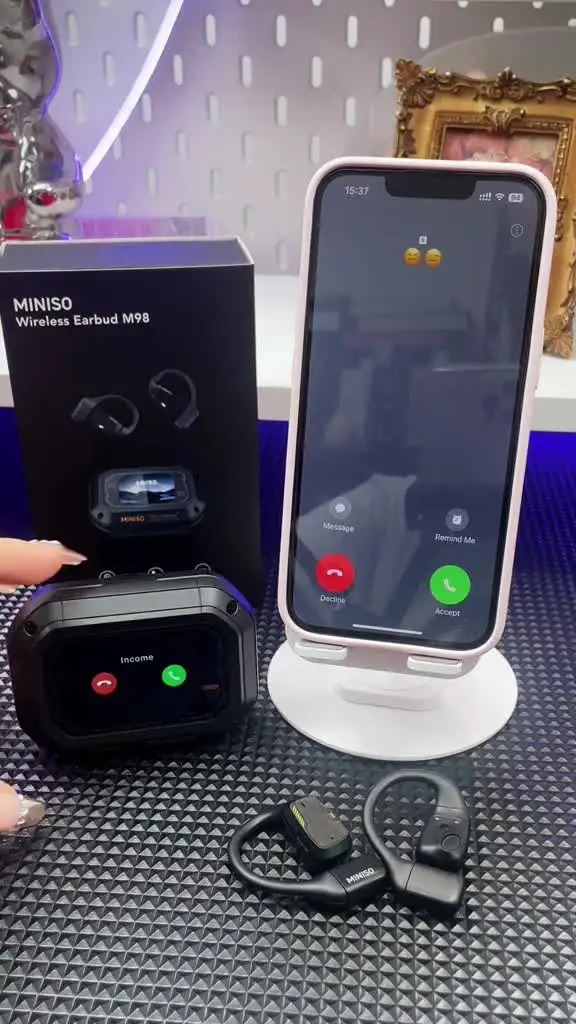
The charging case features an LCD full-color smart screen for various functions. Navigate through the menus using touch gestures on the screen.

- Phone Music: Control playback (play/pause, next/previous track).
- Volume Adjustment: Adjust the audio volume.
- Equalizer: Select different sound profiles (e.g., normal).
- Alarm Clock: Set alarms.
- Light Level: Adjust screen brightness.
- Language Switch: Change the display language of the smart screen.
- Find My Earphone: Locate misplaced earbuds (L for left, R for right).
- Like: Interact with content (e.g., on social media apps).
- Photograph: Trigger your phone's camera shutter remotely.
- Flash Light: Activate a flashlight function (if available on the case).
- Date/Time Setup: Configure the current date and time.
4.2 Call Management
When a call comes in, the smart screen on the charging case will display an incoming call notification. You can answer or decline directly from the screen.
4.3 Game Mode and Music Mode
The headphones support switching between Game Mode for low-latency audio and Music Mode for standard listening.

- Music Mode: Press and hold the multifunction button on the earbud for 2 seconds.
- Game Mode: Press and hold the multifunction button on the right earbud for 2 seconds.
Note: When using only one earphone, you cannot switch between game mode and music mode. The factory setting defaults to music mode.
4.4 AI Translation Features
The MINISO M98 headphones offer advanced AI translation for various communication scenarios, supporting 153 languages.

- AI Dialogue Mode: Communicate with AI in real-time through the app for inspiration, answers, and voice consultation.
- Face-to-Face Translation: Engage in two-way voice translation for global negotiations or travel. Wear one earbud and give the other to the person you are conversing with.
- Translation Machine Mode: Use for meetings or daily conversations to easily break down language barriers.


4.5 Sleep Mode
The headphones feature a Sleep Mode with various soundscapes (ASMR, Natural, Sleep) to help you relax and sleep.

5. Maintenance
5.1 Cleaning
- Gently wipe the earbuds and charging case with a soft, dry, lint-free cloth.
- Avoid using harsh chemicals, cleaning solvents, or strong detergents.
- Do not immerse the charging case in water.
5.2 Water Resistance
The MINISO M98 headphones are IPX5 waterproof, meaning they are resistant to a sustained, low-pressure water jet spray. This makes them suitable for sports and outdoor activities where they might be exposed to sweat or light rain.
- Do not submerge the earbuds in water.
- Ensure the charging port is dry before charging.
- The charging case is not waterproof.
6. Troubleshooting
6.1 Common Issues and Solutions
- Earbuds not pairing:
- Ensure both earbuds are charged.
- Place earbuds back in the case, close, then reopen to re-enter pairing mode.
- Turn off and on Bluetooth on your device.
- Forget the device in your phone's Bluetooth settings and re-pair.
- No sound from one earbud:
- Check battery level of both earbuds.
- Ensure both earbuds are properly seated in the charging case for connection.
- Try resetting the earbuds (refer to app or manufacturer support for specific reset instructions).
- AI Translation not working:
- Ensure the MINISO M98 app is installed and you are logged in.
- Verify the earbuds are connected to your phone via Bluetooth and within the app.
- Check your internet connection, as translation features often require online access.
- Ensure the correct languages are selected in the app.
- Smart screen unresponsive:
- Ensure the charging case is charged.
- Try restarting the charging case by closing and reopening it.
7. Specifications
| Feature | Specification |
|---|---|
| Product Number | MINISO M98 |
| Material | Metal, Plastic |
| Weight | 5.5g (per earbud) |
| Bluetooth Version | Bluetooth v5.4 |
| Bluetooth Protocols | HFP, HSP, A2DP, AVRCP |
| Bluetooth Effective Distance | ≥10 meters |
| Driver Diameter | 13mm |
| Frequency Response Range | 20 - 20000Hz |
| Sensitivity | 28dB |
| Impedance Range | up to 32 Ω |
| Resistance | 16Ω |
| Max Output | 10mW |
| Total Harmonic Distortion | 1% |
| Earbud Battery Capacity | 50mAh |
| Charging Case Battery Capacity | 600mAh |
| Single Listening Battery Life | Up to 4.5 hours |
| Total Battery Life (with case) | Up to 54 hours |
| Charging Method | Charging case (Type-C) |
| Waterproof Rating | IPX5 |
| Features | Waterproof, With microphone, Active Noise Cancelling (ANC), Volume Control, AI Translation, Gaming Low Latency, Powerful Bass, ASMR APP Translation, Sleep Mode |
| Codecs | AAC, SBC |
| Certification | CE |


8. Warranty and Support
MINISO M98 Wireless Headphones come with a 90-day free return policy. Additionally, the product is covered by a fast delivery guarantee, offering a $1.00 coupon code if delivery is delayed, and refunds if the package is lost or items are damaged.
For further assistance, please contact MINISO customer support through the official website or your purchase platform.
9. User Tips
- Translation Function: The AI translation feature requires the dedicated mobile app and an active internet connection to function correctly. It supports 153 languages, so check the app for specific language availability.
- Independent Use: While the earbuds can be used for basic audio playback without the app, the advanced smart screen controls and AI translation features are integrated with the app and require a connected smartphone.
- Single Earbud Mode: Be aware that certain features, like switching between Game and Music modes, may be limited when using only one earbud.