1. Introduction
Thank you for choosing the Vention 22.5W Power Bank 20000mAh. This portable charger is designed to provide fast and efficient power to your devices on the go. Featuring a high-capacity battery, multiple fast-charging protocols, and a smart digital display, it ensures your devices stay powered throughout the day. Please read this manual carefully to ensure proper use and maintenance of your power bank.
2. Package Contents
Please check the box for the following items:
- 1 x Vention 20000mAh Power Bank
- 1 x USB to USB-C Cable (0.25m)
- 1 x Color Box (Packaging)

3. Key Features
- High Capacity: 20000mAh battery to keep your devices charged multiple times.
- Fast Charging: Supports 22.5W high-power quick charge and PD3.0+QC3.0 two-way fast charging.
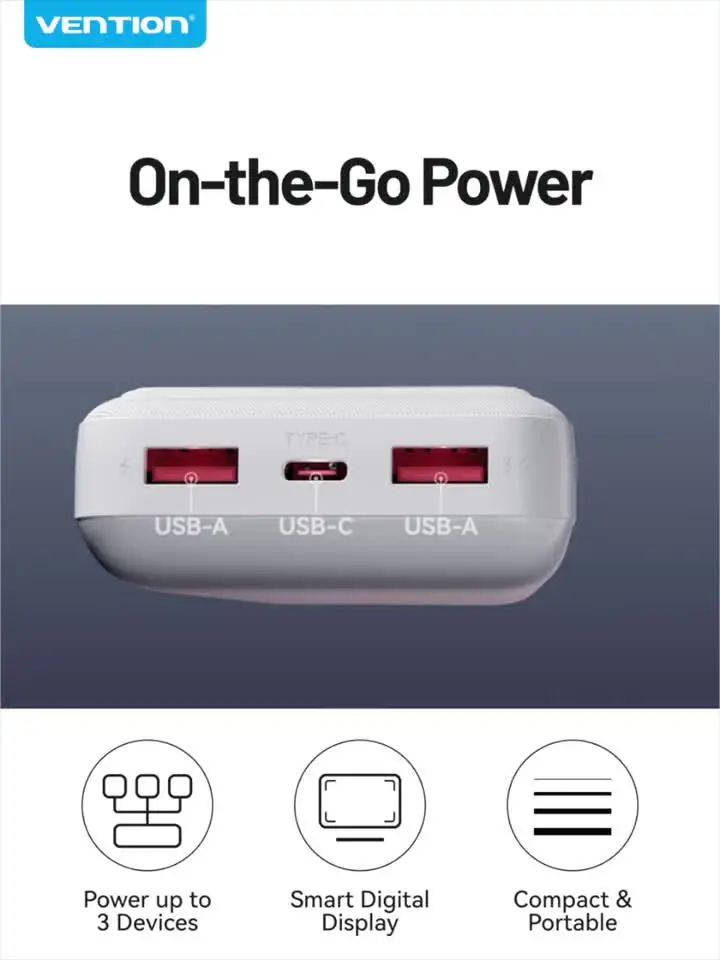
- Multi-Device Charging: Equipped with USB-A and USB-C ports to charge up to three devices simultaneously.
- Smart Digital Display: An LED indicator shows the precise remaining battery percentage.
- Compact & Portable: Slim and lightweight design, making it ideal for travel and air travel friendly.
- Universal Compatibility: Compatible with a wide range of smartphones, tablets, and low-current devices.
- Multiple Safety Protections: Built-in safeguards against overvoltage, overcurrent, overcharge, over-discharge, high-temperature, short circuit, reverse polarity, and over power.


4. Setup
4.1 Initial Charging
Before first use, it is recommended to fully charge your Vention Power Bank. Connect the provided USB to USB-C cable to the power bank's USB-C input port and the other end to a compatible power adapter (preferably an 18W or higher fast charger). The digital display will show the charging progress. A full charge typically takes approximately 6 hours with an 18W charger.

4.2 Connecting Devices
To charge your devices, use a compatible charging cable. Connect one end of the cable to your device and the other end to one of the power bank's output ports (USB-A or USB-C). The power bank will automatically detect the connected device and begin charging.
5. Operation
5.1 Charging Your Devices
Once your device is connected to the power bank, charging will commence automatically. The power bank supports various fast charging protocols, including PD 20W for iPhone series and SCP 22.5W for Huawei devices, ensuring efficient power delivery.


5.2 Checking Battery Level
The smart digital display on the power bank shows the remaining battery percentage, allowing you to easily monitor its charge status.

6. Safety Precautions
Your Vention Power Bank is equipped with multiple safety features to protect both the device and your connected electronics. However, please observe the following precautions:
- Do not disassemble, modify, or attempt to repair the power bank.
- Avoid exposing the power bank to extreme temperatures (hot or cold), direct sunlight, or high humidity.
- Do not immerse the power bank in water or any other liquids.
- Keep the power bank away from fire, flammable materials, and corrosive substances.
- Avoid dropping or subjecting the power bank to strong impacts.
- Keep out of reach of children.
- Dispose of the power bank responsibly according to local regulations.
6.1 Built-in Protections
The power bank includes:
- Short Circuit Protection
- Overvoltage Protection
- Overcurrent Protection
- Over-discharge Protection
- Reverse Polarity Protection
- Over Power Protection
- Overcharge Protection
- High-temperature Protection

7. Maintenance
- Clean the power bank with a soft, dry cloth. Do not use liquid cleaners or aerosols.
- Store the power bank in a cool, dry place when not in use.
- Avoid prolonged exposure to direct sunlight or extreme temperatures.
- If the power bank will not be used for an extended period, charge it to about 50-70% every three months to preserve battery health.
8. Troubleshooting
8.1 Power Bank Not Charging
- Ensure the charging cable is securely connected to both the power bank's input port and the power adapter.
- Verify that the power adapter is functioning correctly and connected to a live power outlet.
- Try using a different charging cable or power adapter.
8.2 Device Not Charging from Power Bank
- Check if the power bank has sufficient charge. The digital display should show a percentage above 0%.
- Ensure the charging cable connecting your device to the power bank is not damaged and is securely connected.
- Try using a different charging cable or a different output port on the power bank.
- Some devices may require a specific charging protocol; ensure compatibility.
8.3 Slow Charging
- Ensure both the power bank and your device support fast charging protocols (PD, QC, SCP).
- Use a high-quality cable that supports fast charging.
- Charging multiple devices simultaneously may reduce the charging speed for individual devices.
9. User Tips
- For optimal performance and fastest charging, always use high-quality charging cables that are compatible with the power bank's fast charging protocols (PD, QC, SCP).
- To maximize the overall lifespan of the power bank's battery, avoid frequently draining it completely to 0%. It's generally better to recharge it when it reaches around 20-30%.
- The Vention Power Bank is designed to be air travel friendly, complying with most airline regulations for portable electronic devices.
10. Specifications
| Attribute | Value |
|---|---|
| Brand Name | Vention |
| Product Name | 20000mAh 22.5W Power Bank |
| Model | FHM |
| Color Options | Black, White |
| Interface | Micro USB, USB Type C, Double USB |
| Battery Type | Lithium Polymer Battery |
| Battery Capacity | 20000mAh (74Wh) |
| Rated Capacity | 12000mAh |
| Product Size | 140.2mm x 68.2mm x 28mm |
| Weight | Approx. 460g |
| Micro USB Input | 5V/2A, 9V/2A MAX |
| Type C Input | 5V/3A, 9V/2A MAX (PD3.0/PD2.0/AFC/FCP) |
| USB 1/2 Output | 5V/3A, 5V/4.5A, 9V/2A, 12V/1.5A MAX (22.5W Max) (QC3.0/QC2.0/AFC/FCP/SCP) |
| Type C Output | 5V/3A, 9V/2.22A, 12V/1.67A MAX (20W/18W Max) (PD3.0/PD2.0/QC3.0/QC2.0/AFC/FCP/SCP /iPhone12 PD20W) |
| Total Output (Type C+USB 1 + USB 2) | 5V=3A |
| Shell Material | Plastic (PC+ABS) |
| Certification | RoHS, CE, FCC |


11. Warranty and Support
For warranty information, technical support, or any inquiries regarding your Vention Power Bank, please refer to the official Vention website or contact Vention customer service directly. Keep your purchase receipt as proof of purchase for warranty claims.