
1. Introduction
Thank you for choosing the Eweadn V97 Wireless Silent Keyboard. This keyboard combines a compact 97-key layout with versatile dual-mode connectivity (2.4G wireless and Bluetooth 5.3), vibrant RGB backlighting, and an ergonomic design for a comfortable and efficient typing experience. This manual provides detailed instructions for setup, operation, and maintenance to help you get the most out of your new keyboard.
Note: While the product title may include 'Mechanical', this keyboard features a membrane operation style with high elastic silicone for a sensitive and silent typing experience, as indicated in the product specifications.
2. Key Features
- Dual-Mode Connectivity: Seamlessly switch between 2.4G wireless and Bluetooth 5.3 for versatile use across multiple devices.
- Compact 97-Key Layout: Optimizes desktop space while retaining essential keys.
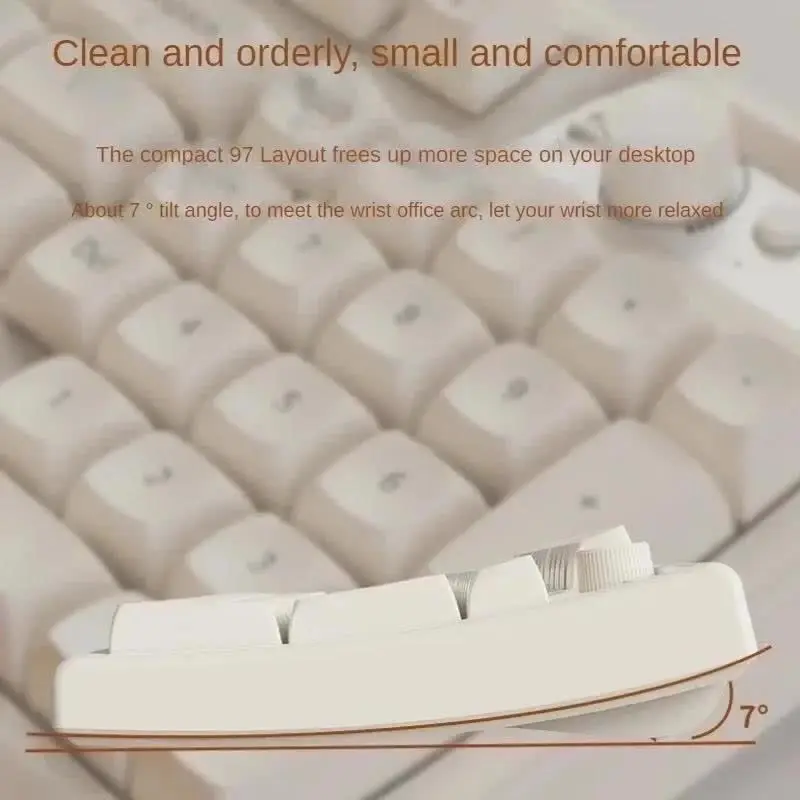
- Ergonomic Design: Features a 7-degree tilt angle for a comfortable wrist position during extended use.
- Multimedia Knob: A multi-function knob allows quick adjustment of backlight effects and brightness.
- RGB Backlighting: Enjoy 16 million colors with various customizable lighting effects.
- Low Noise Typing: Designed for a quiet typing experience, ideal for office or home environments.
- Rechargeable Battery: Built-in 2000mAh lithium battery provides long endurance, rechargeable via Type-C.
- PBT Keycaps: Durable, wear-resistant, non-greasy PBT retro ball keycaps with rounded corners.
- Multi-System Compatibility: Compatible with Windows, macOS, iOS, and Android operating systems.
- Macro Driver Settings: Customize key functions and RGB lighting effects through dedicated software.

Overview of Eweadn V97 Key Features
3. Specifications
| Attribute | Detail |
|---|---|
| Brand | Eweadn |
| Model | V97 |
| Connection Method | Dual mode (2.4G Wireless + Bluetooth 5.3) |
| Number of Keys | 97 keys |
| Shell Material | ABS Plastic |
| Keycap Material | PBT |
| Backlight | 16 million color RGB |
| Battery Capacity | 2000mAh Lithium Battery |
| Keyboard Size | 407mm x 146mm x 31.5mm |
| Keyboard Weight | 1040g |
| Operation Style | Membrane |
| Switches Manufacturer | Kailh |
| Compatibility | Windows, macOS, iOS, Android |
| Interface Type | USB (for charging/wired mode), Bluetooth / USB |
| Wrist Support | No |

Eweadn V97 Product Parameters
4. Package Contents
The standard package for your Eweadn V97 Wireless Silent Keyboard typically includes:
- Eweadn V97 Wireless Silent Keyboard
- USB Type-C Charging Cable
- 2.4G USB Receiver
- User Manual (this document)
5. Setup Instructions
5.1 Charging the Keyboard
Before first use, it is recommended to fully charge the keyboard. Connect the provided USB Type-C cable to the keyboard's charging port and the other end to a USB power source (e.g., computer USB port, wall adapter). The charging indicator will show the charging status.

Built-in 2000mAh Lithium Battery with Type-C Charging
5.2 Connecting via 2.4G Wireless
- Locate the 2.4G USB receiver (dongle) in the package.
- Plug the 2.4G USB receiver into an available USB port on your computer or device.
- Turn on the keyboard. The keyboard should automatically connect to the receiver.
- If connection is not established, refer to the keyboard's mode switch (usually on the back or side) and ensure it is set to 2.4G mode.
5.3 Connecting via Bluetooth
- Turn on the keyboard and switch it to Bluetooth mode using the mode switch.
- On your device (computer, tablet, phone), go to Bluetooth settings.
- Enable Bluetooth and search for new devices.
- Select "Eweadn V97" (or similar name) from the list of available devices to pair.
- Follow any on-screen prompts to complete the pairing process.

Multi-System Compatibility

Dual-Mode Connection for Multi-Scene Use
6. Operating Instructions
6.1 Multimedia Knob Functions
The multi-function knob on your V97 keyboard provides quick control over lighting:
- Press: Short press the knob to cycle through different RGB lighting effects.
- Rotate: Rotate the knob to adjust the brightness of the backlight.

Ergonomic Design and Multimedia Knob
6.2 RGB Backlighting
The keyboard features a vibrant 16 million color RGB backlight with various effects. These effects can be changed by pressing the multimedia knob. The backlight automatically emits a mixed color breathing light effect upon startup.

Mixed Color Breathing Light Effect
6.3 Macro Driver Settings
For advanced customization, the Eweadn V97 supports macro driver settings. This allows you to:
- Customize individual key functions.
- Set up RGB music rhythm light effects.
- Create free programming and game shortcut customizations.
Please refer to the official Eweadn website or support resources for the specific macro driver software and detailed instructions on its use.

Macro Driver Settings Interface
6.4 Key Layout
The V97 features a compact 97-key layout. Familiarize yourself with the key positions for optimal use.

Eweadn V97 Keyboard Key Layout
7. Maintenance
- Cleaning: Use a soft, dry cloth to wipe the keyboard surface. For deeper cleaning, use a slightly damp cloth with mild soap, ensuring no liquid enters the keyboard. Do not use harsh chemicals or abrasive materials.
- Keycaps: The PBT keycaps are designed to be wear-resistant. If necessary, they can be carefully removed for cleaning, but exercise caution to avoid damaging the switches.
- Storage: Store the keyboard in a cool, dry place away from direct sunlight and extreme temperatures.
- Battery Care: To prolong battery life, avoid fully discharging the keyboard frequently. Charge it regularly, especially if it will be stored for an extended period.
8. Troubleshooting
- Keyboard not responding: Ensure the keyboard is charged. Check the connection mode (2.4G or Bluetooth) and ensure it matches your device's connection. For 2.4G, try plugging the receiver into a different USB port. For Bluetooth, try re-pairing the device.
- Lag or intermittent connection: Ensure the keyboard is within range of your device. Avoid interference from other wireless devices. For 2.4G, ensure the receiver has a clear line of sight.
- Backlight not working: Check if the backlight is turned off or set to minimum brightness using the multimedia knob. Ensure the keyboard has sufficient battery charge.
- Keys not registering: Clean around the affected key. If using macro software, ensure no conflicting settings are active.
- Device compatibility issues: Ensure your device's operating system is updated. The keyboard supports Windows, macOS, iOS, and Android.
9. User Tips
- Optimize for Gaming: For the best gaming experience, it is recommended to use the 2.4G wireless mode due to its lower latency.
- Office/Home Use: Bluetooth mode is generally suitable for office and home use, offering convenience and multi-device connectivity.
- Battery Life: To maximize battery life, consider turning off RGB backlighting when not needed.
- Ergonomics: Take advantage of the 7-degree tilt angle to maintain a natural wrist posture and reduce strain.

Recommended Modes for Different Uses
10. Warranty and Support
Eweadn products are manufactured to high-quality standards. For warranty information, technical support, or service inquiries, please refer to the documentation provided with your purchase or visit the official Eweadn support website. Keep your proof of purchase for warranty claims.
11. Safety Information
- Do not expose the keyboard to water or excessive moisture.
- Avoid dropping or subjecting the keyboard to strong impacts.
- Do not attempt to disassemble or repair the keyboard yourself. This may void the warranty and cause damage.
- Keep out of reach of children.
- Dispose of the battery according to local regulations.
12. Product Overview Video
Watch this video for a visual overview of the Eweadn V97 keyboard's features and design.