
1. Introduction
The Flipsky Dual FSESC4.20 Plus is a high-performance Electronic Speed Controller (ESC) based on the VESC platform, specifically designed for electric skateboards and longboards. It features a dual motor configuration, an anodized aluminum heatsink for efficient thermal management, and robust power delivery capabilities. This manual provides essential information for the safe and effective setup, operation, and maintenance of your FSESC4.20 Plus.
2. Package Contents
Please verify that all items listed below are included in your package:
- 1x Dual FSESC4.20 Plus with Heatsink
- 2x VESC Sensor Wires
- 1x Micro USB Cable
- 1x Instruction Manual (this document)
- 1x 16mm LED Button

3. Specifications
| Feature | Specification |
|---|---|
| Hardware Version | V4.20 |
| ERPM | 60000 |
| Firmware | Latest firmware version |
| Continuous Current (Single) | 50A |
| Continuous Current (Dual) | 100A |
| Burst Current (Single) | 150A |
| Burst Current (Dual) | 300A |
| Voltage Range | 8V-60V (Safe for 3S to 12S LiPo, voltage spikes must not exceed 60V) |
| BEC Output | 5V@1.5A |
| BEC Type | Internal driver support |
| Operating Modes | DC, BLDC, FOC (sinusoidal) |
| Timing | Software calibration |
| Cutoff Voltage | Programmable |
| Frequency | PWM input |
| Programming Card Support | No |
| Reverse Function | Yes |
| Regenerative Braking | Yes |
| Motor Wire Gauge | 12AWG |
| Power Cable Gauge | 12AWG |
4. Setup and Wiring
Proper wiring is crucial for the safe and optimal performance of your ESC. Refer to the diagrams below for connection details.
4.1 Component Overview

4.2 Wiring Diagram
This diagram illustrates the connections for battery, motors, receiver, and various communication ports.

Key Connections:
- Battery: Connect your LiPo battery (3S-12S recommended) to the main power input. Ensure correct polarity.
- Motors: Connect your two brushless motors to the A1/B1/C1 and A2/B2/C2 terminals. If your motors have Hall sensors, connect the VESC Sensor Wires to the corresponding ports.
- Receiver: Connect your RC receiver to the designated port (typically labeled SIN, 5V, GND).
- USB: Use the Micro USB cable to connect the ESC to a computer for configuration via VESC Tool software.
- CAN: For dual ESC communication.
- BUTTON: Connect the included 16mm LED button for power control.
Important Notes:
- Always double-check all connections before applying power. Incorrect wiring can damage the ESC and other components.
- Ensure voltage spikes do not exceed 60V to prevent damage.
5. Operation
The Flipsky Dual FSESC4.20 Plus operates using VESC firmware, which requires configuration via the VESC Tool software. This software allows you to customize motor parameters, battery settings, control modes (DC, BLDC, FOC), and safety limits.
5.1 Initial Configuration (VESC Tool)
- Download and install the latest VESC Tool software from the official VESC project website.
- Connect the ESC to your computer using the Micro USB cable.
- Launch VESC Tool and establish a connection to the ESC.
- Perform the Motor Setup Wizard to detect and configure your motors. This step is critical for proper motor operation.
- Configure battery settings (cell count, capacity, discharge limits) according to your battery specifications.
- Adjust other parameters such as current limits, temperature limits, and control modes as needed for your application.
- Save all configurations to the ESC.
5.2 Powering On/Off
Use the connected 16mm LED button to power on and off the ESC. Press the button to turn on, and press again (or hold, depending on configuration) to turn off.
5.3 Control
Once configured, the ESC will respond to input from your RC receiver or other control devices (e.g., remote control for electric skateboards) based on the selected control mode in VESC Tool.
6. Maintenance
To ensure the longevity and reliable performance of your Flipsky Dual FSESC4.20 Plus, follow these maintenance guidelines:
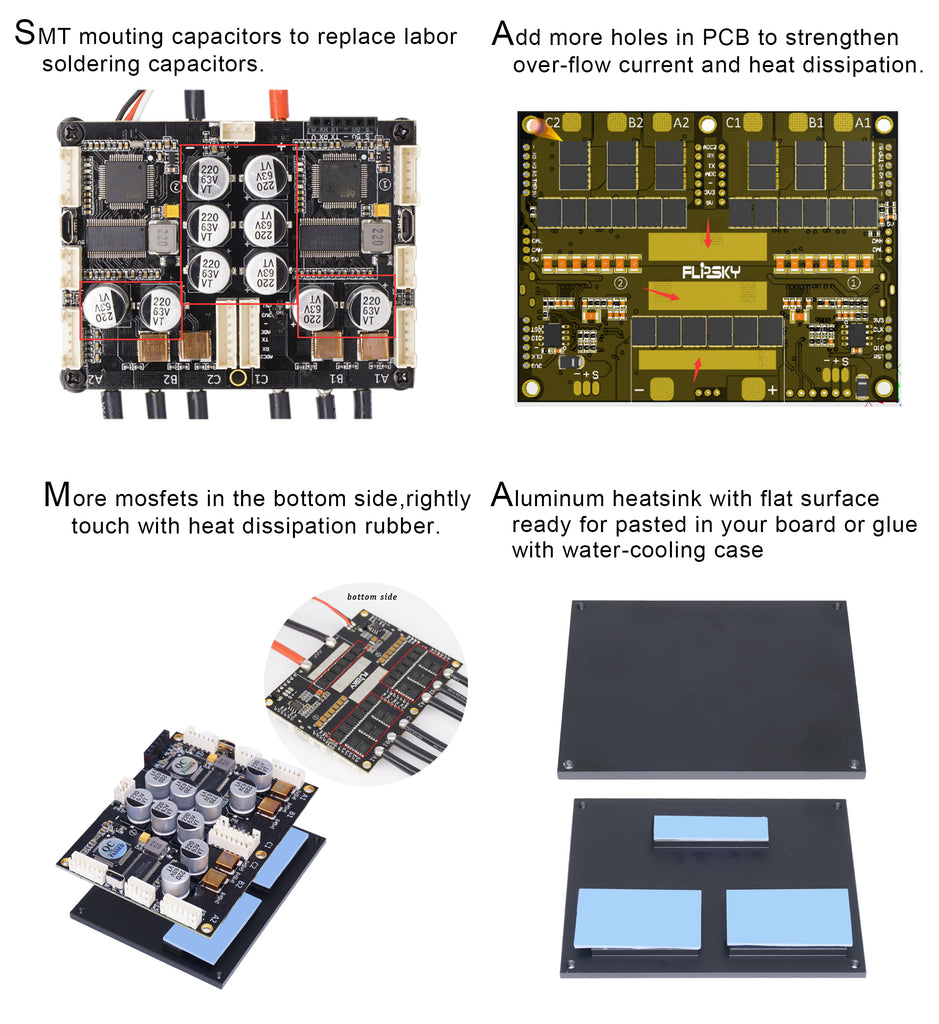
- Thermal Management: The ESC is designed with an anodized aluminum heatsink and additional PCB holes to strengthen overflow current and heat dissipation. Ensure the heatsink is clean and free from obstructions to allow for proper airflow. The mosfets on the bottom side are designed to touch heat dissipation rubber, which should be maintained for optimal cooling.
- Regular Inspection: Periodically inspect all wiring and connectors for signs of wear, damage, or loose connections. Replace any damaged components immediately.
- Cleanliness: Keep the ESC clean and free from dust, dirt, and moisture. Use a soft, dry brush or compressed air to remove debris. Avoid using liquids or solvents.
- Environmental Conditions: Operate the ESC within its specified temperature and humidity ranges. Avoid exposure to extreme temperatures or direct water contact, especially if the product is not waterproof.
7. Troubleshooting
If you encounter issues with your Dual FSESC4.20 Plus, refer to the following common problems and solutions:
| Problem | Possible Cause | Solution |
|---|---|---|
| Motor not spinning or erratic behavior | Incorrect motor detection in VESC Tool, loose motor phase wires, incorrect Hall sensor wiring, motor fault. | Rerun Motor Setup Wizard in VESC Tool. Check all motor and sensor wire connections. Inspect motor for damage. |
| ESC not powering on | Battery not connected, low battery voltage, faulty LED button, internal ESC fault. | Check battery connection and voltage. Ensure LED button is correctly wired. If issues persist, contact support. |
| Overheating | Excessive current draw, insufficient cooling, high ambient temperature. | Reduce load on motors. Ensure heatsink is clean and has adequate airflow. Consider adding external cooling if operating in high-temperature environments. Check VESC Tool logs for temperature warnings. |
| Loss of communication with VESC Tool | Faulty USB cable, incorrect COM port selected, driver issues. | Try a different USB cable. Verify correct COM port in VESC Tool settings. Reinstall VESC drivers if necessary. |
For more advanced troubleshooting or issues not covered here, please refer to the VESC community forums or contact Flipsky support.
8. User Tips
- Always use a reliable power supply and battery with appropriate discharge rates for your motors to prevent damage to the ESC.
- Regularly update your VESC firmware to benefit from the latest features and bug fixes.
- When configuring in VESC Tool, start with conservative settings and gradually increase parameters as you gain experience and confidence in your setup.
- Consider adding a fuse to your main battery line for an extra layer of protection against short circuits.
9. Warranty and Support
9.1 Warranty Policy
The warranty period for consumable electronic products, including VESC, motors, and batteries, is 2 months from the 7th day after shipment (the shipping date is checked by logistic record). For non-electronic products, the warranty period is also 2 months from the 7th day after shipment.
We offer free repair or replacement for manufacturing failures. If a product is returned and analyzed as a manufacturing failure, we will bear the return shipping cost. If the issue is not a manufacturing defect, a discount may be provided for a new replacement (excluding shipping cost).
Conditions Not Covered by Warranty:
- Inability to provide proof of purchase channel.
- Mechanical damage to electronic components or the PCB.
- PCB board showing traces of repair soldering iron (excluding solder for cable bullet connectors).
- Wire damage or external impact damage.
- Water inflow for non-waterproof products.
- Abnormal applications beyond the product specifications.
- Products purchased from channels other than https://flipsky.net. For such products, contact the original purchase channel for support.
- For end-users, if a quality issue arises, please provide the after-sales warranty card number (shipped with your product package).
- For products transferred through personal second transactions, the original source order number or warranty card number must be provided. The warranty is valid only once per product; if the original ordered product has already utilized the warranty policy, it becomes invalid for subsequent transactions.
Clarification: Most products, especially VESC and motors, are 100% tested and shipped as good products. For any questions regarding VESC/Motor settings or connections, please contact us before installation. Flipsky's liability will not exceed the actual purchase price of the product.
We provide repair services for a reasonable charge for products out of warranty, excluding shipping costs.
This warranty policy is valid from November 1, 2018. Products ordered before this date follow the previous policy.
9.2 Technical Support
For technical assistance, questions, or warranty claims, please contact Flipsky support through their official website or the seller's contact information provided at the time of purchase. When contacting support, please have your product model, purchase date, and a detailed description of the issue ready.