
1. Introduction
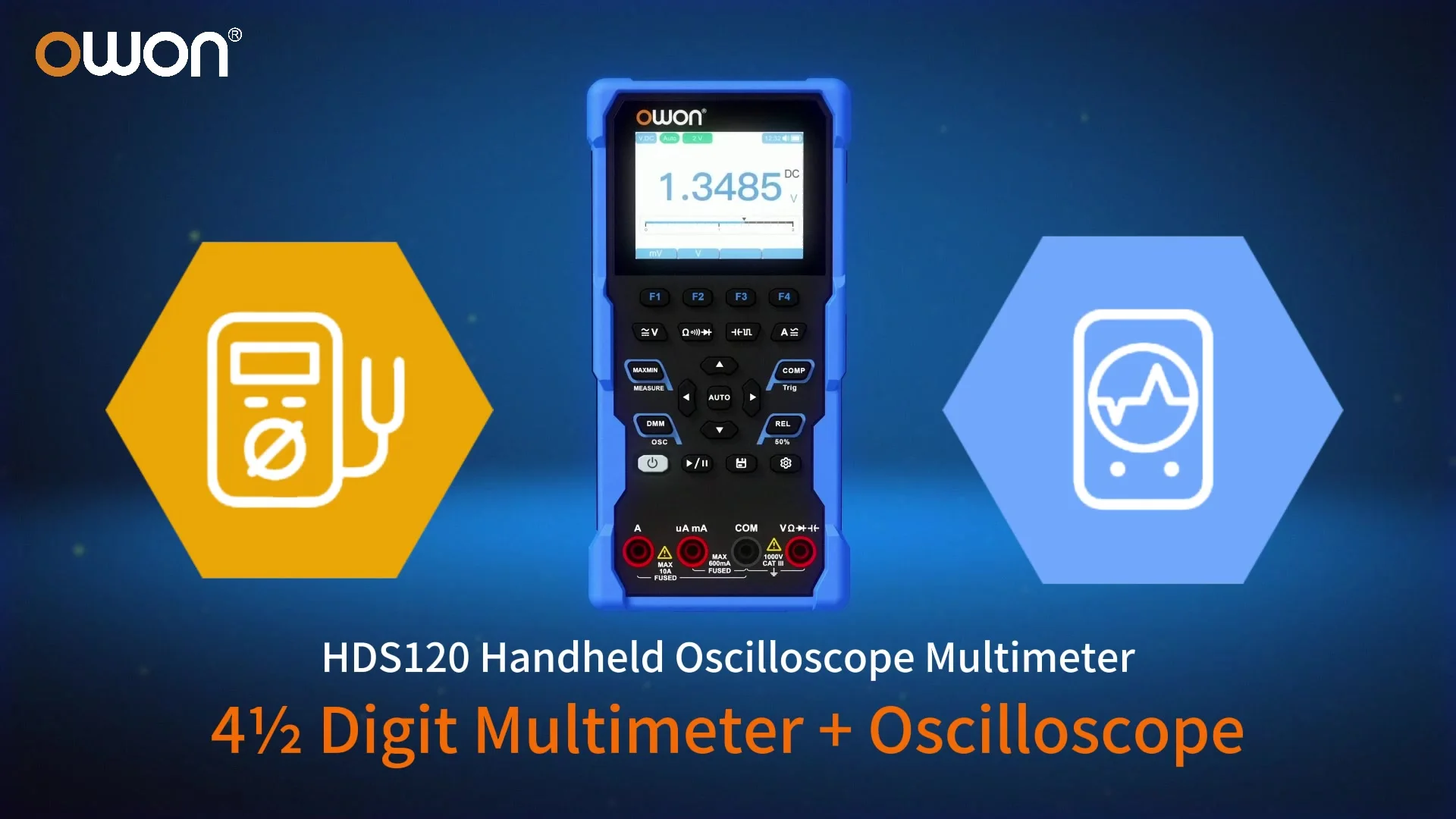
The OWON HDS120/HDS160 series is a versatile 2-in-1 handheld instrument combining the functionalities of a digital multimeter and an oscilloscope. Designed for precision and ease of use, it serves as a portable laboratory for various electrical measurement tasks. This manual provides essential information for the safe and effective operation of your device.

Key Features:
- 2-in-1 Functionality: Combines a 4½-digit multimeter (HDS120: 20000 counts, HDS160: 60000 counts) with a 1MHz Digital Storage Oscilloscope (DSO).
- True RMS: Provides accurate measurements for non-sinusoidal waveforms.
- 2.8-inch IPS Display: Offers a wide viewing angle and excellent display quality with dual theme options for clear data reading in various lighting conditions.
- Full Keypad Operation: Intuitive button design for easy and quick operation, improving work efficiency.
- Automatic Range: Simplifies measurements by automatically selecting the appropriate range.
- 18650 Lithium Battery: Powered by a 2600mAh 18650 lithium battery for extended usage and eliminates frequent battery replacement.
- Safety Compliance: CATIII 1000V standard ensures safe measurement of high-voltage waveforms up to 1000V.
2. Safety Information
Always adhere to safety precautions to prevent personal injury and damage to the instrument. This device is designed with several safety features, but proper handling is crucial.
General Safety Guidelines:
- Ensure the device is turned off before connecting or disconnecting test leads.
- Do not attempt to measure voltages or currents exceeding the specified maximum ratings.
- Always use the correct input terminals for the desired measurement function.
- Inspect test leads for damage before each use. Replace if any insulation is cracked or the conductor is exposed.
- Avoid operating the device in wet or damp conditions.
- Do not operate the device if it appears damaged or is not functioning properly.
Built-in Safety Features:
- Automatic Test Pen Detection: The instrument automatically switches measurement gears based on the insertion position of the test leads, preventing damage from incorrect operation.
- Current Gear Interval Reminder: If the current measurement gear is used for extended periods, an alert will sound to prevent fuse blowout.
- CATIII 1000V Compliance: Designed to safely measure high-voltage waveforms up to 1000V.
- Charging Protection: For safety, charging via USB is disabled when test probes are inserted into the instrument.


3. Package Contents
Upon unpacking, please verify that all items listed below are present and in good condition:
- Host Unit (OWON HDS120 or HDS160)
- Soft Carrying Bag
- USB Cable (Type-C)
- Multimeter Test Leads (Red and Black)
- User Manual (this document)

4. Setup
Battery Installation and Charging:
The HDS120/HDS160 is powered by a 2600mAh 18650 lithium battery, offering extended operational time. The battery compartment is located at the rear of the device.
- Locate the battery compartment cover on the back of the device.
- Open the cover and insert the 18650 lithium battery, ensuring correct polarity.
- Close the battery compartment cover securely.
- Connect the provided USB Type-C cable to the device's Type-C port and a suitable USB power adapter (not included) for charging.
- Important: Do not insert test leads into the instrument while it is charging to ensure measurement safety and prevent potential damage.

5. Operating Instructions
The OWON HDS120/HDS160 features a full button interface for intuitive control over its multimeter and oscilloscope functions.
General Operation:
- Power On/Off: Press and hold the power button to turn the device on or off.
- Mode Selection: Use the dedicated DMM (Digital Multimeter) and OSC (Oscilloscope) buttons to switch between modes.
- Function Buttons (F1-F4): These buttons provide context-sensitive options depending on the active mode.
- Navigation/Adjustment: Use the arrow keys to navigate menus or adjust parameters.
- AUTO Button: In oscilloscope mode, press AUTO for automatic waveform setup. In multimeter mode, it enables auto-ranging.
- REL Button: For relative measurement in multimeter mode.

Multimeter Functions:
The device offers a wide range of multimeter measurements, including:
- AC/DC Voltage (V)
- AC/DC Current (A)
- Resistance (Ω)
- Capacitance (F)
- Diode Test
- On-Off Warning (Continuity)
- Duty Ratio Test
- Frequency Test (Hz)
Connect the test leads to the appropriate input jacks (VΩHz, COM, uA/mA, A) for the desired measurement. The device's intelligent probe detection will automatically adjust the internal settings.

Oscilloscope Functions:
The oscilloscope mode allows for waveform visualization and analysis. Key features include:
- Waveform Automatic Measurement: Automatically calculates and displays parameters such as Vmax (maximum voltage), Vmin (minimum voltage), Vp-p (peak-to-peak voltage), Vavg (average voltage), Vrms (RMS voltage), and Frequency (Hz).
- Rapid Measurement of Strong Electrical Waveforms: Capable of directly measuring current waveforms using a probe, suitable for applications like three-phase electricity.


Display and Interface:
The 2.8-inch IPS screen provides a clear and vibrant display. It supports dual theme display modes (light and dark) to adapt to different lighting conditions, ensuring optimal visibility whether indoors or outdoors.

6. Specifications
Parameter Comparison (HDS160 vs. HDS120):
| Feature | HDS160 | HDS120 |
|---|---|---|
| CATIII1000V | √ | √ |
| Counts | 60000 | 20000 |
| Optimal Accuracy (DC) | ± 0.05% +5 | ± 0.1% +5 |
| DC Voltage | 1000V | 1000V |
| AC Voltage | 750V | 750V |
| AC/DC Current | 10A/10A | 10A/10A |
| Frequency | 60MHz | 20MHz |
| Resistance | 60MΩ | 100MΩ |
| Capacitance | 60mF | 20mF |
| Analog Bandwidth | 1MHz (only ACV scale) | |
| Voltage Vertical Range | 30mV~500V/grid | |
| Maximum Voltage Limit | 1000V DC+AC Peak value | |
| Auto Set | Time base / vertical amplitude / trigger value | |
| Battery | 18650 3.7V Lithium Battery | |
Multimeter Specification (HDS160):
| Measurement Type | Measurement Range | Accuracy | |
|---|---|---|---|
| DC Voltage (V) | 60.000mV / 600.00mV | ± (0.05% +5 dig) | |
| 6.0000V / 60.000V / 600.00V | ± (0.05% +5 dig) | ||
| 1000.0V | ± (0.1% +5 dig) | ||
| AC Voltage (V) | 600.00mV / 6.0000V / 60.000V / 600.00V | ± (0.1% +30dig) | |
| 750.00V | ± (0.1% +30dig) | ||
| DC Current (A) | 600.00μA / 6000.0μA | ± (0.15% +10dig) | |
| 60.000mA / 600.00mA | ± (0.15% +10dig) | ||
| 6.0000A / 10.000A | ± (0.15% +10dig) | ||
| AC Current (A) | 600.00μA / 6000.0μA / 60.000mA / 600.00mA | ± (0.5% +20dig) | |
| 6.0000A / 10.000A | ± (0.5% +20dig) | ||
| Resistance (Ω) | 600.00Ω / 6.0000kΩ / 60.000kΩ / 600.00kΩ | ± (0.15% +10dig) | |
| 6.0000MΩ / 60.000MΩ | ± (0.15% +10dig) | ||
| Capacitance (F) | 6.000nF / 60.00nF / 600.0nF / 6.000μF / 60.00μF | ± (2.0% +20dig) | |
| 600.0μF / 6.000mF / 60.00mF | ± (2.0% +20dig) | ||
| Frequency (Hz) | 600.00Hz / 6.0000kHz / 60.000kHz / 600.00kHz | ± (0.2% +10dig) | |
| 6.0000MHz / 60.000MHz | ± (0.2% +10dig) | ||
| Duty Cycle | 0.1%~99.9% (typical value: Vrms=1V, f=100Hz) | ± (1.2% +3dig) | |
| 0.1%~99.9% (≥1kHz) | ± (2.5% +10dig) | ||
| Diode | 3.0000V | ± (1.0% +10dig) | |
| On-Off | 1000.0Ω | Display | 60000 |
Multimeter Specification (HDS120):
| Measurement Type | Measurement Range | Accuracy | |
|---|---|---|---|
| DC Voltage (V) | 20.000mV / 200.00mV | ± (0.1% +5dig) | |
| 2.0000V / 20.000V / 200.00V | ± (0.1% +5dig) | ||
| 1000.0V | ± (0.15% +5dig) | ||
| AC Voltage (V) | 20.000mV / 200.00mv / 2.0000V / 20.000V / 200.00V | ± (0.6% +10dig) | |
| 750.00V | ± (0.8% +10dig) | ||
| DC Current (A) | 200.00uA / 2000.0uA | ± (0.8% +10dig) | |
| 20.000mA / 200.00mA | ± (0.8% +10dig) | ||
| 2.0000A / 10.000A | ± (1.5% +10dig) | ||
| AC Current (A) | 200.00uA / 2000.0uA / 20.000mA / 200.00mA | ± (0.8% +10dig) | |
| 2.0000A / 10.000A | ± (2.5% +10dig) | ||
| Resistance (Ω) | 200.00Ω / 2.0000kΩ / 20.000kΩ | ± (0.3% +5dig) | |
| 200.00kΩ / 2.0000MΩ | ± (0.3% +5dig) | ||
| 20.000MΩ / 100.00MΩ | ± (5.0% +10dig) | ||
| Capacitance (F) | 2.000nF | ± (5.0% +10dig) | |
| 20.00nF / 200.0nF / 2.000μF / 20.00μF / 200.0μF / 2.000mF / 20.00mF | ± (3.0% +10dig) | ||
| Frequency (Hz) | 200.00Hz / 2.0000kHz / 20.000kHz / 200.00kHz / 2.0000MHz / 20.000MHz | ± (0.1% +5dig) | |
| Duty Cycle | 0.1%~99.9% (typical value: Vrms=1V, f=100Hz) | ± (1.2% +3dig) | |
| 0.1%~99.9% (≥1kHz) | ± (2.5% +10dig) | ||
| Diode | 3.0000V | ± (1.0% +10dig) | |
| On-Off | 1000.0Ω | Display | 20000 |
Oscilloscope Specification:
| Feature | Value | Feature | Value |
|---|---|---|---|
| Analog Bandwidth | 1MHz (only ACV scale) | Maximum Sample Rate | 5.0MSa/s |
| Channel | 1 | Input Impedance | ≈10MΩ |
| Time Base Range | 2.5us~10s/div | Time Base Accuracy | ±(0.01% + 0.1div) |
| Voltage Vertical Sensitivity Range | 30mV~500V/grid | Current Vertical Sensitivity Range | 100μA~5A/grid |
| Vertical Amplitude Accuracy | ±(5% + 0.2div) | Measurement Function | Vmax, Vmin, Vp-p, Vavg, Vrms, Hz |
| Maximum Voltage Limit | 1000V DC+AC Peak value | Maximum Current Limit | 15A DC+AC Peak value |
| Trigger Mode | Auto/Normal/Single | Trigger Edge | Rise edge/Fall edge |
| Autoset | Time base/Vertical amplitude/Trigger value | ||
Other Specifications:
| Feature | Value | Feature | Value | Feature | Value |
|---|---|---|---|---|---|
| Low Battery Indication | √ | Sleep Mode | √ | Relative Measurement | √ |
| Backlight | √ | Input Protection | √ | Input Impedance | ≥10MΩ |
| Safety Compliance | CATIII1000V | LCD Size | 2.8” LCD | Weight (without package) | 0.35kg |
| Battery | 18650 | Dimension (L*W*H) | 93mm x 41.5mm x 188mm | ||
7. Maintenance
- Cleaning: Use a soft, damp cloth to clean the exterior of the device. Do not use abrasive cleaners or solvents.
- Battery Care: To prolong battery life, avoid fully discharging the 18650 lithium battery frequently. Charge the device regularly, especially if it will be stored for an extended period.
- Fuse Replacement: The device contains two ceramic fuses for protection. If a fuse blows due to prolonged high current use or misoperation, it must be replaced by a qualified technician with a fuse of the same type and rating. Refer to the specifications for fuse details.
- Storage: Store the device in a cool, dry place away from direct sunlight and extreme temperatures.
8. Troubleshooting
- Device Not Powering On: Check if the 18650 lithium battery is correctly installed and sufficiently charged.
- Erratic Readings: Ensure test leads are securely connected to the correct input terminals and that the appropriate measurement mode is selected.
- Fuse Blowout: If the device stops functioning during a high current measurement, a fuse may have blown. This is often indicated by the "Current Gear Interval Reminder" feature. Replace the fuse with one of the correct rating.
- Charging Issues: If the device does not charge, ensure the USB Type-C cable is properly connected and that no test probes are inserted into the instrument.
- Display Problems: If the screen is dim or unreadable, try adjusting the backlight settings or switching between the dual theme display modes.
9. User Tips
- Diode Test: When performing a diode test, the device provides an audible short whistle for good diode conditions, aiding in quick checks.
- Auto-Ranging: Utilize the "AUTO" function in multimeter mode for quick and convenient measurements without manually setting the range.
- Probe Connection: Always double-check that your test probes are inserted into the correct ports for the measurement you intend to perform. The device's automatic detection helps, but manual verification is always recommended.
- Waveform Analysis: For oscilloscope measurements, use the automatic waveform measurement feature to quickly obtain key parameters like Vmax, Vmin, Vp-p, Vavg, Vrms, and frequency.
10. Warranty and Support
For warranty information, technical support, or service inquiries, please refer to the official OWON website or contact your local distributor. Keep your purchase receipt as proof of purchase.