
Introduction
Welcome to your new Alpicool TAW series mobile refrigerator. This manual provides essential information for the safe and efficient operation, setup, and maintenance of your TAW35, TAW45, or TAW55 model. Designed for both vehicle and home use, this portable refrigerator offers rapid cooling and smart control for all your outdoor adventures and indoor cooling needs.
Safety Information
Please read all safety instructions carefully before using the appliance to prevent injury or damage. Keep this manual for future reference.
- Ensure the power supply voltage matches the specifications of the refrigerator.
- Do not operate the appliance if the power cord is damaged. Contact qualified service personnel for repair.
- Place the refrigerator on a stable, level surface to ensure proper operation and prevent tipping.
- Allow adequate ventilation around the unit (at least 10 cm clearance on all sides) to prevent overheating. Do not block ventilation openings.
- Avoid exposing the refrigerator to direct sunlight, rain, or extreme temperatures.
- Do not immerse the appliance in water or other liquids.
- Keep children away from the appliance, especially when it is operating.
- Disconnect the power supply before cleaning or performing any maintenance.
Package Contents
Please check that all items are included in your package:
- Alpicool TAW Series Mobile Refrigerator (TAW35, TAW45, or TAW55)
- AC Power Adapter (for household 220V use)
- DC Car Power Cable (2.5m, for vehicle 12V/24V use)
- User Manual
- Optional accessories may include: Detachable Lithium Battery, Basket, Cutting Board.
Product Overview & Features
The Alpicool TAW series mobile refrigerator is designed for versatility and convenience, offering advanced cooling technology for various applications.

Key Features:
- Rapid Refrigeration: Equipped with compressor cooling technology, capable of reaching -20°C quickly.
- Dual-Zone, Dual-Control: Separate compartments allow for simultaneous freezing and refrigeration, with independent temperature control.
- Smart Control: Features an intuitive LED display panel and Bluetooth connectivity for mobile app control.
- Portable Design: Includes a pull handle and durable wheels (pulley design) for easy transport.
- Versatile Power: Supports 12V/24V DC for vehicle use and 220V AC for home use.
- USB Charging Port: Conveniently charge your mobile devices directly from the refrigerator.
- Integrated Accessories: Built-in bottle opener, internal LED light, and a removable cutting board for added utility.
- Optional Detachable Lithium Battery: Provides cordless operation for extended portability.


Setup
1. Unpacking
Carefully remove the refrigerator from its packaging. Retain all packaging materials for future transport or storage.
2. Placement
Place the refrigerator on a firm, level surface. Ensure there is at least 10 cm (4 inches) of clear space around all sides of the unit for proper ventilation. Avoid placing it near heat sources or in direct sunlight.
3. Power Connection
Your Alpicool TAW series refrigerator can be powered by both AC (household) and DC (vehicle) power sources.
- For Household Use (220V AC): Connect the provided AC power adapter to the refrigerator's AC input port. Plug the other end of the adapter into a standard 220V wall outlet.
- For Vehicle Use (12V/24V DC): Connect the provided DC car power cable to the refrigerator's DC input port. Plug the other end into your vehicle's 12V or 24V cigarette lighter socket.
4. Optional Detachable Lithium Battery Installation
If your model includes a detachable lithium battery, install it into the designated battery compartment on the side of the refrigerator. Ensure it clicks securely into place. The battery allows for cordless operation.

Operating Instructions
1. Power On/Off
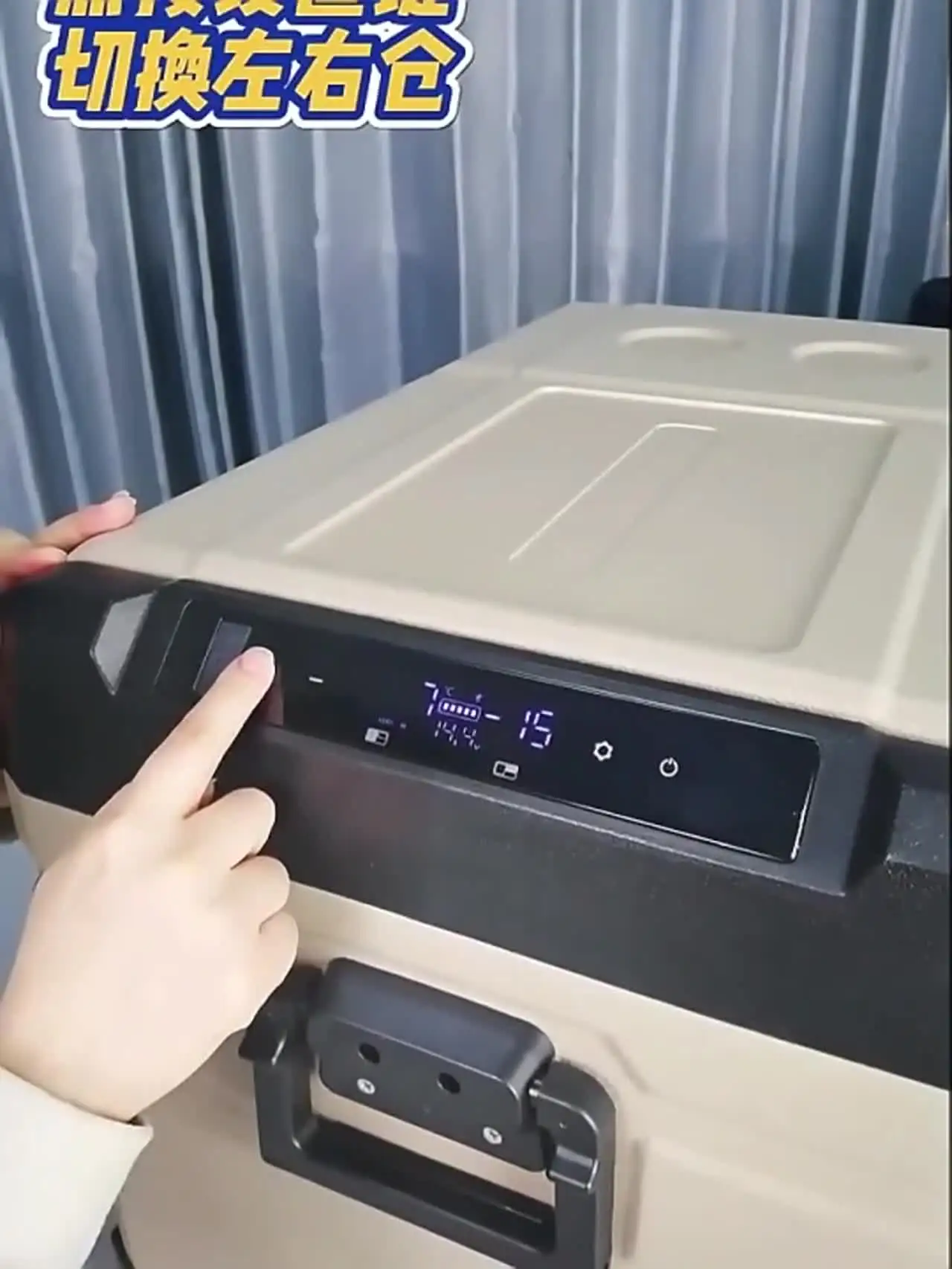
Press the power button on the control panel to turn the refrigerator on or off. The LED display will illuminate when the unit is powered on.
2. Temperature Adjustment
Use the '+' and '-' buttons on the control panel to set your desired temperature. The display will show the current temperature inside the compartments and the target temperature. The temperature range is typically -20°C to 20°C.
3. Dual-Zone Control
For models with two compartments, you can switch between controlling the left and right zones independently. Refer to the control panel interface for specific buttons to select and adjust each zone's temperature. This allows for simultaneous freezing and refrigeration.
4. Mobile App Control (Bluetooth)
For enhanced control, download the Alpicool mobile app from your app store. Enable Bluetooth on your smartphone, open the app, and connect to your refrigerator. You can then monitor temperature, adjust settings, and switch operating modes remotely.

5. USB Charging Port
A USB port is located on the control panel. You can use this port to charge your mobile phone or other small electronic devices while the refrigerator is powered on.
6. Integrated Bottle Opener
Utilize the convenient bottle opener integrated into the unit's design for easy access to beverages.
7. Cutting Board
Some models feature a removable cutting board integrated into the lid, providing a convenient surface for food preparation during outdoor activities.

Maintenance
1. Cleaning
- Always disconnect the power supply before cleaning.
- Wipe the interior and exterior surfaces with a soft cloth dampened with mild detergent and warm water.
- Do not use abrasive cleaners, harsh chemicals, or sharp objects, as these can damage the surfaces.
- Ensure the drain plug (if present) is clean and free of debris to allow for proper drainage.
- Periodically clean the ventilation grilles to ensure optimal airflow and cooling efficiency.
2. Storage
If the refrigerator will not be used for an extended period:
- Empty all contents and clean the interior thoroughly.
- Leave the lid slightly ajar to prevent odors and mold growth.
- Store the unit in a dry, well-ventilated area, away from direct sunlight and extreme temperatures.
- If equipped with a detachable battery, remove it and store it separately in a cool, dry place, ensuring it is partially charged (around 50%) for long-term storage.
Troubleshooting
If you encounter issues with your Alpicool TAW series refrigerator, please refer to the following common troubleshooting steps:
- Unit not powering on: Check if the power cable is securely connected to both the refrigerator and the power source. Verify that the power source (wall outlet or vehicle socket) is functional. If using a battery, ensure it is charged and correctly installed.
- Not cooling effectively: Confirm that the temperature settings are correct. Ensure the lid is properly sealed. Check that ventilation openings are not blocked. Avoid overfilling the compartments, which can restrict airflow.
- Displaying an error code: If an error code appears on the LED display, consult the Alpicool mobile app or the manufacturer's support for specific meanings and solutions.
- Excessive noise: Ensure the refrigerator is placed on a stable and level surface. Check for any loose items inside or around the unit that might be causing vibrations.
- Mobile app not connecting: Make sure Bluetooth is enabled on your smartphone and the refrigerator is powered on. Ensure you are within Bluetooth range. Try restarting both the app and the refrigerator.
If the problem persists after attempting these steps, please contact customer support.
Specifications
Below are the detailed specifications for the Alpicool TAW series mobile refrigerators:
| Feature | TAW35 | TAW45 | TAW55 |
|---|---|---|---|
| Item Volume | 35L | 45L | 55L |
| Temperature Range | -20°C to 20°C | -20°C to 20°C | -20°C to 20°C |
| Rated Voltage | 12V/24V/220V | 12V/24V/220V | 12V/24V/220V |
| Rated Power | 60W | 60W | 60W |
| Net Weight | 17.6kg | 18.4kg | 19.1kg |
| Gross Weight | 18.8kg | 19.8kg | 20.2kg |
| Item Length | 771mm | 771mm | 771mm |
| Item Width | 460mm | 460mm | 460mm |
| Item Height | 440mm | 505mm | 570mm |
| Packaging Size (L*W*H) | 711*460*440mm | 711*460*505mm | 711*460*570mm |
| Capacity (330ml cans) | 52 | 66 | 82 |
| Capacity (550ml bottles) | 36 | 48 | 55 |
| Material | Plastic | Plastic | Plastic |
| External Testing Certification | CE | CE | CE |
Note: Dimensions and capacities are approximate and may vary slightly.

Warranty & Support
For warranty information, technical support, or service inquiries, please contact your retailer or the manufacturer directly. Keep your proof of purchase, such as your receipt or order confirmation, as it will be required for any warranty claims.