
1. Introduction
This manual provides detailed instructions for the installation, operation, and maintenance of your new Srnubi Android 12 Carplay 2Din Auto Car Radio. Please read this manual thoroughly before using the product to ensure proper functionality and safety. This multimedia system is designed to enhance your driving experience with advanced features like Android 12, Carplay, GPS navigation, and more, specifically tailored for Toyota Yaris models from 2012 to 2017.
2. Package Contents
Please check the package carefully to ensure all items are present and undamaged. If any items are missing or damaged, please contact your retailer.

- Main Machine Unit
- Vehicle-Specific Frame
- Power Cable
- RCA Cable
- USB Cable (x2)
- GPS Antenna
- 4G RCA Cable (for 4G Function models only)
- Installation Tool (Gift)
- Camera Input Cable
- User Manual
3. Specifications
| Feature | Specification |
|---|---|
| Operating System | Android 12 |
| Processor Type | T10/S10/X10: Octa-UIS7862 (8 core 2*A75+6*A55) |
| Processor Speed | T10/S10/X10: 1.8GHZ |
| RAM | 6G/4G/2G/1G (depending on model variant) |
| ROM (Internal Storage) | 128G (up to 256GB depending on model variant) |
| Display Size | 9 inches |
| Resolution | 1024*600 / 1280*720 (depending on model variant) |
| Output Power | 4 x 45W |
| Voltage | 12 V |
| Item Weight | 1.4kg |
| Item Size | 35*20*12 cm |
| Tuner Type | T10/S10/X10: FM/AM |
| Preset Station | FM 87.50 |
| Bluetooth | All Support (Bluetooth 5.0) |
| Wi-Fi | All Support |
| 4G Network | Supports GSM900 (Band 8), DCS1800 (Band 3), CDMA (BandC0), DT-SCDMA (Band 34), WCDMA (Band 1), CDMA2000 (BandC0), DT-LTE (Band 39/40/41), FDD-LTE (Band 3), TD-LTE (Band 40/41) |
| Special Features | Wi-Fi function, Support steering wheel control, Support 3G/4G Network, Support Can-Bus, Built-in GPS, Mobile Phone, MP3 players, Voice Control, CarPlay, Android Auto, Reversing Input, Split Screen |
| Digital Media Format | Mp3, MP4, WMA, JPEG |
| OSD Language | Multi-language support including English, Chinese, Arabic, Russian, French, Spanish, etc. |
| Certification | CE |

4. Setup and Installation
Professional installation is recommended. Ensure the vehicle's power is disconnected before beginning installation.
4.1. Pre-Installation Check
- Verify the product model and year match your Toyota Yaris (2012-2017).
- Compare the installation position of the new unit with your car's dashboard.
- Ensure the power cable interface is compatible.

4.2. Wiring Diagram
Connect the unit to the standard wiring of the car using the provided 'pin to pin' connectors. Refer to the diagram below for specific connections.


- Power Cable: Connect to the vehicle's power supply.
- RCA Cable: For audio/video input/output.
- USB Cables: Two USB ports for external devices.
- GPS Antenna: Connect for navigation functionality.
- 4G Antenna: Connect for 4G network access (if applicable).
- CANBUS Connector: Required for original car functions like steering wheel control and air conditioning settings.
- Camera Input: For connecting a rear-view camera.
- Optical Fiber Digital Signal Output: For advanced audio systems.
5. Operating Instructions
Your Srnubi car radio offers a wide range of features to enhance your driving experience. This section covers the basic operation of key functionalities.
5.1. User Interface and Navigation
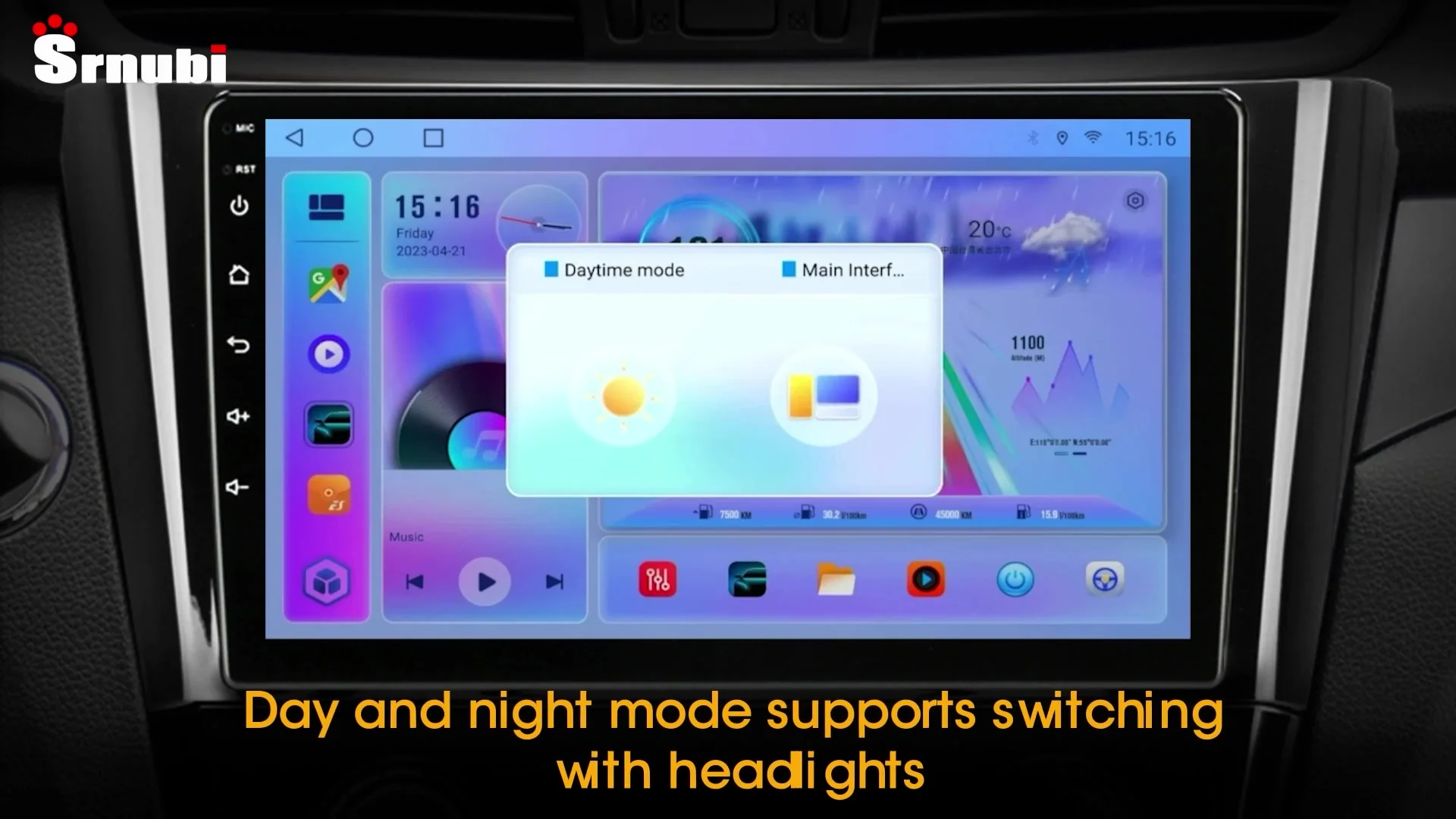
The system runs on Android 12, offering a modern and intuitive user interface. You can switch between day and night modes, which can be set to automatically switch with your vehicle's headlights.

The system supports customizable window applications and page layouts. You can arrange your favorite apps and widgets on the home screen for quick access.
5.2. Multimedia Features
5.2.1. Audio Playback and DSP
Enjoy high-quality audio with the built-in Digital Signal Processor (DSP) and 48-band equalizer. Customize sound settings for various music genres and optimize the sound field for different seating positions.

5.2.2. Video Playback and Split Screen
The unit supports various video formats and features a 'Float Video Function' allowing video playback in a floating window. The split-screen display enables you to run two applications simultaneously, for example, navigation and video playback.


5.2.3. FM/AM Radio
Access your favorite radio stations with the built-in FM/AM tuner. The interface allows for easy station selection and preset management.
5.3. Connectivity
5.3.1. Bluetooth 5.0
Connect your smartphone via Bluetooth 5.0 for hands-free calling, music streaming, and access to your phone's contacts. The system supports dialing directly from the unit.

5.3.2. Wireless CarPlay & Android Auto
Seamlessly integrate your smartphone with Wireless CarPlay (for Apple devices) and Android Auto (for Android devices). Access navigation, music, calls, and messages directly from the car's display.


5.4. Navigation
The unit comes with built-in GPS and supports various navigation apps like Google Maps, iGO, Navitel, and Sygic. Enjoy free map navigation and real-time traffic updates.

5.5. Driving Assistance Features
5.5.1. Streaming Media & Rear Camera
The system supports streaming media, providing a real-time view of road conditions to improve safety. When reversing, the display automatically switches to the rear-view camera with parking lines for easy maneuvering.

5.5.2. ADAS DVR
Connect an optional ADAS DVR via USB for advanced driving assistance features, including Lane Departure Warning System (LDWS) and Forward Collision Warning System (FCWS).

5.5.3. TPMS (Tire Pressure Monitoring System)
With an optional TPMS, the system can display the pressure and temperature of all four tires in real-time, enhancing driving safety.

5.6. Steering Wheel Control
The unit supports original car steering wheel control buttons, allowing you to manage media playback, volume, and calls without taking your hands off the wheel.

5.7. Customizable Button Lights
Adjust the color of the physical buttons on the unit to match your car's interior lighting or your personal preference.

6. Maintenance
- Cleaning: Use a soft, dry cloth to clean the screen and exterior. Avoid abrasive cleaners or solvents.
- Software Updates: Periodically check for software updates to ensure optimal performance and access to new features. Updates can typically be found in the system settings or on the manufacturer's website.
- Temperature: Avoid exposing the unit to extreme temperatures, which can affect its performance and lifespan.
- Power: Ensure stable power supply to prevent damage to the unit.
7. Troubleshooting
| Problem | Possible Cause | Solution |
|---|---|---|
| Unit does not power on | Loose power connection, blown fuse, vehicle battery issue | Check power cable connections. Inspect vehicle fuses. Ensure vehicle battery is charged. |
| No sound | Volume too low, mute activated, speaker wiring issue, incorrect audio source selected | Increase volume. Check mute status. Verify speaker connections. Select correct audio source. |
| GPS not working/inaccurate | GPS antenna not connected or obstructed, outdated maps, poor satellite signal | Ensure GPS antenna is properly connected and has a clear view of the sky. Update maps if necessary. |
| Bluetooth connection issues | Device not in pairing mode, unit not discoverable, interference | Ensure both devices are in pairing mode. Restart Bluetooth on both devices. Move closer to the unit. |
| Steering wheel controls not working | CANBUS not connected or configured, incorrect wiring | Verify CANBUS connection and configuration in settings. Check wiring. |
8. User Tips
- Customize Your Home Screen: Take advantage of the customizable window applications and page layouts to place your most used apps and widgets for quick and safe access while driving.
- Optimize Audio: Experiment with the DSP settings and 48-band equalizer to find the perfect sound profile for your music and vehicle acoustics.
- Stay Updated: Regularly check for system software updates to ensure you have the latest features and performance enhancements.
- Safety First: Utilize features like Wireless CarPlay/Android Auto and steering wheel controls to minimize distractions and keep your focus on the road.
- Expand Functionality: Consider adding optional accessories like an ADAS DVR or TPMS to further enhance safety and convenience.
9. Warranty and Support
The Srnubi Android 12 Carplay 2Din Auto Car Radio comes with a 365-day warranty from the date of purchase. This warranty covers manufacturing defects and malfunctions under normal use. Please retain your proof of purchase for warranty claims.
For technical support, troubleshooting assistance, or warranty inquiries, please contact your original retailer or the manufacturer's customer service. Refer to the contact information provided with your purchase documentation.