
Introduction
This manual provides detailed instructions for the installation and use of the Cocheskon RZ-FD19 16-pin wiring harness adapter with integrated Canbus box decoder. This product is specifically designed to facilitate the seamless integration of an aftermarket Android car radio into Ford F150 Raptor vehicles manufactured between 2009 and 2019, ensuring proper communication between the vehicle's systems and the new head unit.

Figure 1: Cocheskon RZ-FD19 Wiring Harness Adapter with Canbus Box and Antenna Adapter. Note: The image displays compatibility for Ford F150 Raptor 2009-2018, while the product is compatible with 2009-2019 models.
Safety Information
Always disconnect the vehicle's battery before performing any electrical work. Incorrect installation can lead to damage to the vehicle's electrical system or the new head unit. If you are unsure about any step, consult a professional automotive technician.
- Ensure all connections are secure and properly insulated.
- Do not force connectors; they are designed to fit in only one orientation.
- Verify vehicle compatibility (Ford F150 Raptor 2009-2019) before installation.
Package Contents
Verify that all components are present before beginning installation:
- 1x Cocheskon 16-pin Wiring Harness Adapter
- 1x Canbus Box Decoder (integrated or separate, as per model variant)
- 1x Antenna Adapter (if included in your package)
Setup and Installation
This section outlines the steps for installing the wiring harness and Canbus box. Refer to the wiring diagram for specific connections.
- Preparation:
- Park the vehicle on a level surface and engage the parking brake.
- Turn off the ignition and remove the key.
- Disconnect the negative terminal of the vehicle's battery to prevent electrical shorts.
- Carefully remove the factory car radio from the dashboard. Refer to your vehicle's service manual for specific removal instructions.
- Connect the Wiring Harness:
- Connect the 16-pin connector of the Cocheskon wiring harness to the corresponding port on your new Android car radio.
- Connect the vehicle-specific connectors from the Cocheskon harness to the factory wiring harnesses in your Ford F150 Raptor. These connectors are designed to be plug-and-play.
- Canbus Box Connection:
- The Canbus box decoder is integrated into the wiring harness. Ensure all connections to and from the Canbus box are secure. The Canbus box translates vehicle data (e.g., steering wheel controls, ignition status, reverse gear signal) into a format compatible with your Android radio.
- Antenna Connection (if applicable):
- If an antenna adapter is included, connect it between the vehicle's antenna cable and the antenna input on your Android radio.
- Verify Connections:
- Double-check all connections to ensure they are firm and correctly seated.
- Refer to the detailed wiring diagram below for visual guidance.
- Test Functionality:
- Before fully reassembling the dashboard, temporarily reconnect the vehicle's battery.
- Turn on the ignition and power on the Android radio.
- Test basic functions such as power, audio output, steering wheel controls (if supported by your radio and vehicle), and reverse camera input (if applicable).
- If any issues arise, refer to the Troubleshooting section.
- Final Assembly:
- Once all functions are verified, disconnect the battery again.
- Carefully route all cables to avoid pinching or interference.
- Reinstall the Android car radio into the dashboard and secure it.
- Reconnect the negative battery terminal.
- Recheck all functions.
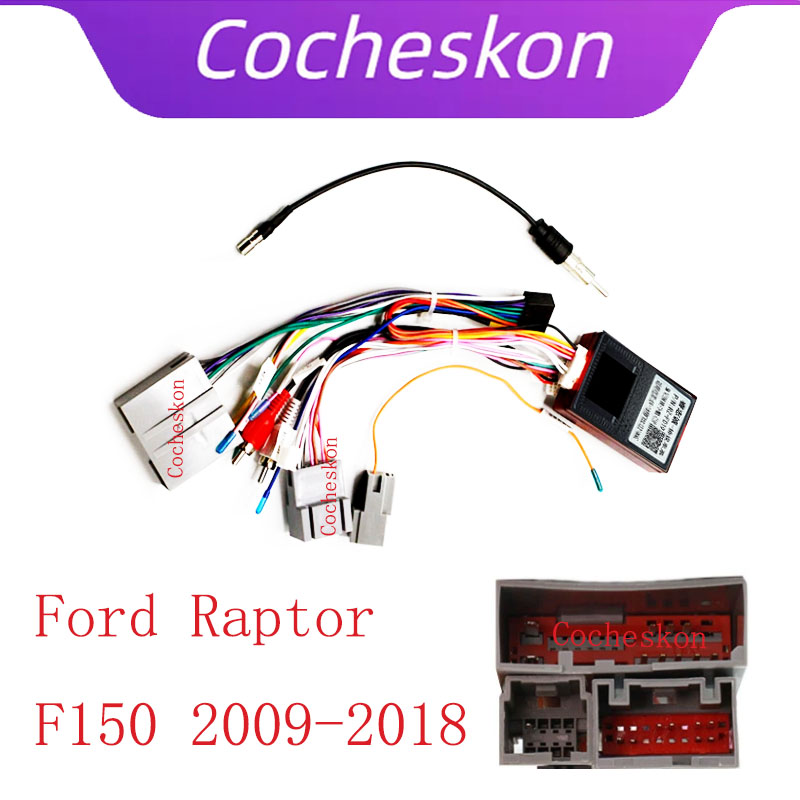
Figure 2: Detailed Wiring Diagram for the Cocheskon RZ-FD19 Harness and Canbus Box. This diagram illustrates the connections for power, speakers, steering wheel controls, and other vehicle signals.
Operating Instructions
The Cocheskon RZ-FD19 harness and Canbus box operate automatically once correctly installed. Their primary function is to enable your Android car radio to communicate with your vehicle's systems.
- Power On/Off: The Android radio should power on and off with the vehicle's ignition.
- Steering Wheel Controls: If your Android radio supports steering wheel controls, the Canbus box will translate the vehicle's signals, allowing you to use your factory steering wheel buttons to control the radio (e.g., volume, track skip). Configuration may be required within your Android radio's settings.
- Reverse Gear Signal: The Canbus box provides the reverse gear signal to the Android radio, which is essential for automatic camera display when shifting into reverse.
- Illumination: The Canbus box typically provides an illumination signal, allowing the radio's backlight to dim or brighten with the vehicle's headlights.
Maintenance
The Cocheskon RZ-FD19 wiring harness and Canbus box are designed for maintenance-free operation. No regular servicing is required.
- Keep connections dry and free from moisture.
- Avoid exposing the Canbus box to extreme temperatures or direct physical impact.
- If you need to access the wiring again, ensure the vehicle's battery is disconnected first.
Troubleshooting
If you encounter issues after installation, review the following common problems and solutions:
| Problem | Possible Cause | Solution |
|---|---|---|
| Android radio does not power on. | Loose power connection, incorrect wiring, blown fuse. | Check all power connections (12V constant, 12V ignition, ground). Verify vehicle fuses. Ensure the 16-pin connector is fully seated in the radio. |
| Steering wheel controls do not work. | Canbus box not communicating, radio settings incorrect, incompatible radio. | Ensure the Canbus box is correctly connected. Check your Android radio's settings for steering wheel control configuration. Some radios require manual mapping. Confirm your radio supports external steering wheel control input. |
| No sound from speakers. | Speaker wires incorrectly connected, radio settings, amplifier issues. | Verify all speaker wire connections from the harness to the radio and to the vehicle. Check radio's audio settings (e.g., fader, balance, mute). If your vehicle has a factory amplifier, ensure the amplifier turn-on wire (usually blue/white or blue) is connected. |
| Reverse camera does not activate. | Reverse signal wire not connected, radio settings. | Ensure the reverse signal wire from the harness is connected to the radio's reverse input. Check the Android radio's settings for reverse camera activation. |
Specifications
| Feature | Detail |
|---|---|
| Brand | Cocheskon |
| Model | RZ-FD19 |
| Compatibility | Ford F150 Raptor (2009-2019) |
| Item Type | Cables, Adapters & Sockets |
| Interface | CANbUS/UART |
| Special Features | CAN to UART conversion |
| Voltage | 12V |
| Origin | Mainland China |
User Tips
- Double-Check Vehicle Year: Ensure your Ford F150 Raptor falls within the 2009-2019 range for optimal compatibility.
- Radio Configuration: After installation, navigate through your Android radio's settings to configure steering wheel controls and other Canbus-related features. Many Android head units have a "Factory Settings" or "Car Settings" menu where Canbus protocols can be selected.
- Professional Installation: While designed for DIY, if you are uncomfortable with automotive electrical work, professional installation is recommended to avoid potential damage.
Warranty and Support
Cocheskon products are manufactured to high standards. For any technical support or warranty inquiries, please contact your point of purchase or the official Cocheskon support channels. Keep your purchase receipt as proof of purchase.
This product is intended for use by individuals with a basic understanding of automotive electrical systems. Improper installation may void warranty.


