
1. Product Overview
The VEVOR Aquarium Light is a high-performance, full-spectrum LED lighting system designed to enhance the aquatic environment and promote healthy growth for fish and plants. Featuring an LCD monitor for personalized adjustments, a 24/7 natural light mode, and a durable, waterproof design, this light provides vibrant and uniform illumination for various aquarium sizes.
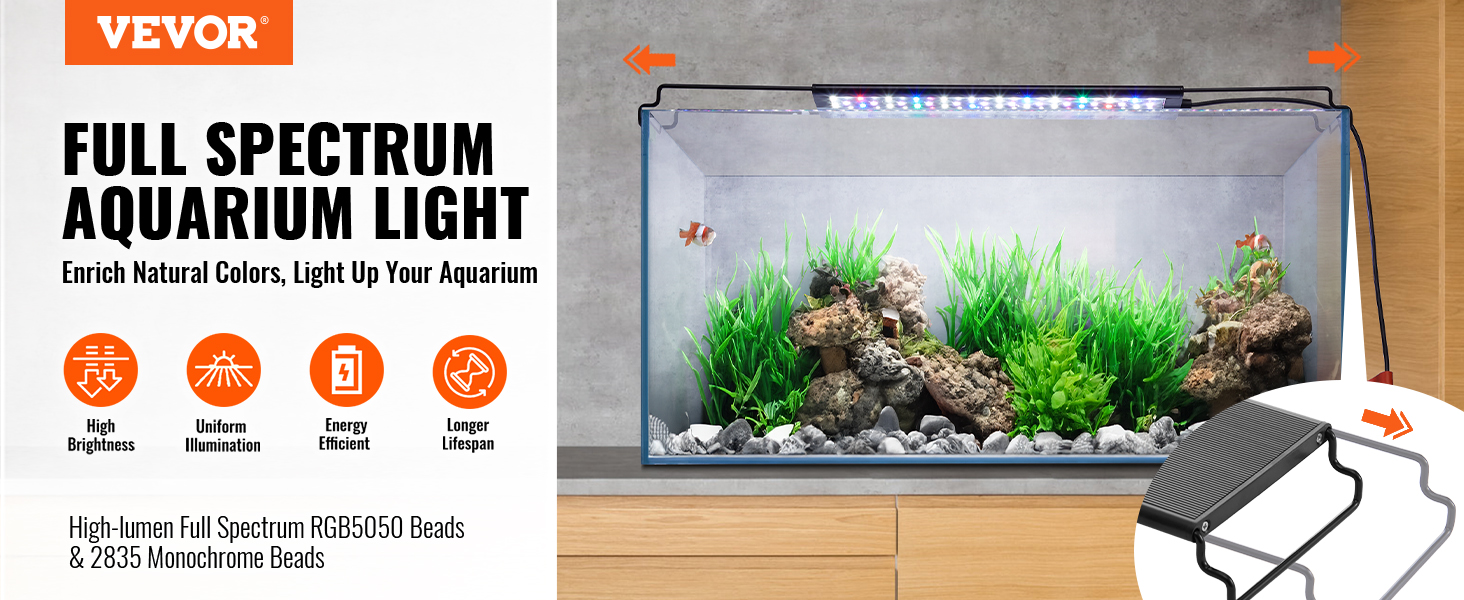
Key features include high-lumen RGB5050 and 2835 monochrome LEDs, customizable color and brightness settings, a programmable LCD display, power-off memory function, and an IP67 waterproof rating.
2. Package Contents
Before installation, please verify that all items are present and in good condition:
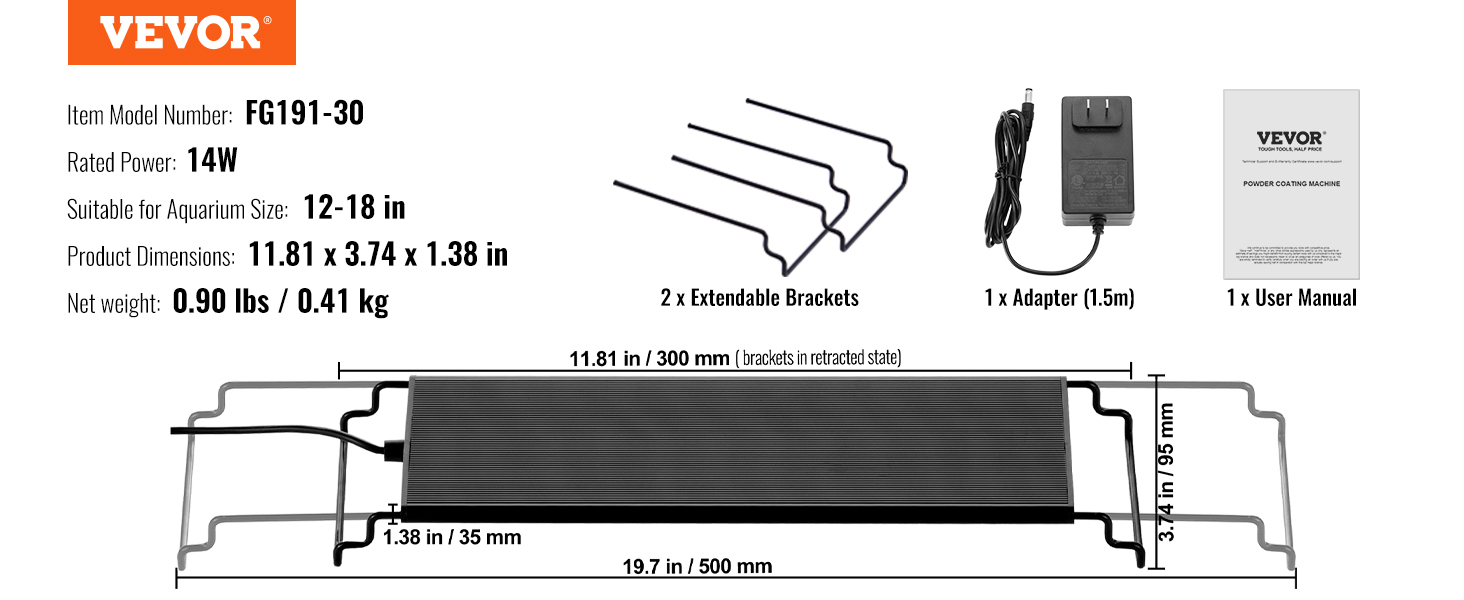
- 1 x VEVOR Aquarium Light
- 2 x Extendable Brackets
- 1 x Power Adapter (1.5m cable)
- 1 x User Manual (this document)
3. Setup and Installation
- Unpack: Carefully remove all components from the packaging.
- Attach Brackets: Slide the two extendable brackets onto each end of the aquarium light fixture.
- Position Light: Place the light fixture on top of your aquarium. The brackets are adjustable and can extend up to 3.94 inches (100 mm) on a single side, or 7.87 inches (200 mm) in total, to fit tanks ranging from 12 to 54 inches, depending on your specific model. Ensure the light is securely seated on the tank edges.
- Connect Power: Plug the power adapter into the light fixture's input port, then plug the adapter into a suitable power outlet.

Important: Ensure the power adapter's plug type is compatible with your region's electrical outlets. If not, a suitable adapter may be required.
4. Operating Instructions
4.1. LCD Monitor and Controls
The integrated LCD monitor and control panel allow for precise customization of your aquarium's lighting. The display shows the local time and current lighting settings.

4.2. Setting Time and Basic Operation
- Power On: Connect the light to power. The LCD screen will illuminate.
- Set Current Time: Use the 'SET' button to enter time setting mode. Use the Up/Down arrows to adjust hours and minutes, then 'SET' again to confirm.
- Manual On/Off: Press the power button (
 ) to manually turn the light on or off.
4.3. 24/7 Natural Mode
This mode simulates a natural light cycle throughout the day, with gradual transitions from dawn to dusk, including daytime and nighttime lighting. This promotes a healthy environment for aquatic life.

4.4. Customizable Settings (DIY Mode)
In DIY mode, you can adjust the following parameters:
- Colors: Choose from 7 different colors for night lighting.
- Brightness: Adjust brightness with 10 levels.
- RGB Ratio: Control the ratio of Red, Green, and Blue LEDs for precise color temperature adjustment.
- Timers: Set two independent timers for daytime and nighttime lighting periods.
Use the 'DIY' button to cycle through programmable settings (L1-L5) and the Up/Down arrows to adjust values. Press 'M' to save your custom settings.
4.5. Power-Off Memory Function
The light is equipped with an intelligent power-off memory function. In the event of a power outage, the light will automatically restore the last used lighting mode and settings once power is re-established, ensuring consistent operation without manual resetting.

5. Maintenance
- Cleaning: Due to its IP67 waterproof rating, the light can withstand splashes. For cleaning, gently wipe the fixture with a soft, damp cloth. Do not use abrasive cleaners or immerse the power adapter in water.
- Heat Dissipation: The 1.2mm aluminum alloy shell is designed for efficient heat dissipation. Ensure the light is not covered or placed in an enclosed space that could hinder airflow, to maintain optimal performance and lifespan.
- Regular Checks: Periodically check the power cable and connections for any signs of wear or damage.
6. Troubleshooting
- Light Not Turning On:
- Check if the power adapter is securely plugged into both the light fixture and the wall outlet.
- Ensure the power outlet is functional by testing it with another device.
- Verify that the power button on the controller has been pressed.
- Flickering Light:
- The VEVOR Aquarium Light is designed to be flicker-free. If flickering occurs, check all connections.
- Try plugging the light into a different power outlet.
- If the issue persists, contact customer support.
- Settings Not Saving:
- Ensure you press the 'M' button to save your custom settings in DIY mode.
- The power-off memory function should retain the last settings. If not, try resetting the light by unplugging and replugging it.
7. Specifications
| Feature | Description |
|---|---|
| Item Model Number (12-18 inch) | FG191-30 |
| Rated Power (12-18 inch) | 14W |
| Suitable for Aquarium Size (FG191-30) | 12-18 inches |
| Product Dimensions (FG191-30, retracted) | 11.81 x 3.74 x 1.38 in / 300 x 95 x 35 mm |
| Net Weight (FG191-30) | 0.90 lbs / 0.41 kg |
| Fixture Type | Clip-On (with extendable brackets) |
| LED Types | RGB5050 and 2835 Monochrome Beads |
| Lifespan | Up to 30,000 hours |
| Waterproof Rating | IP67 |
| Shell Material | 1.2mm Aluminum Alloy |
| Origin | Mainland China |
Note: Specifications may vary slightly for different models (e.g., FG191-45, FG191-60, etc.) based on tank size and power requirements.
8. User Tips
- Check Power Plug: Before purchasing or using, confirm that the power adapter's plug type (e.g., EU, US) is compatible with your local electrical outlets to avoid the need for additional converters.
- Optimal Placement: Position the light centrally over your aquarium for the most uniform illumination. Adjust the extendable brackets to ensure a snug and stable fit.
- Gradual Light Changes: When introducing new lighting schedules or intensity, make changes gradually over several days to allow your fish and plants to adapt without stress.
- Utilize DIY Mode: Experiment with the DIY mode's color, brightness, and RGB ratio settings to find the perfect aesthetic for your aquarium and to best support the specific needs of your aquatic plants and inhabitants.
9. Warranty and Support
For warranty information, technical support, or any questions regarding your VEVOR Aquarium Light, please refer to the contact information provided on the product packaging or visit the official VEVOR website.