
1. Introduction
Welcome to the ECWORD G104 Smart Watch user manual. This guide provides essential information for setting up, operating, and maintaining your new smartwatch. The G104 Smart Watch features a 1.83-inch square HD IPS screen, Bluetooth call functionality, comprehensive health monitoring, and a variety of sports modes to support your active lifestyle.

Figure 1: ECWORD G104 Smart Watch in various colors.
2. Package Contents
Please check the package for the following items:
- ECWORD G104 Smart Watch
- Charging Cable (Magnetic)
- User Manual (English and Spanish)
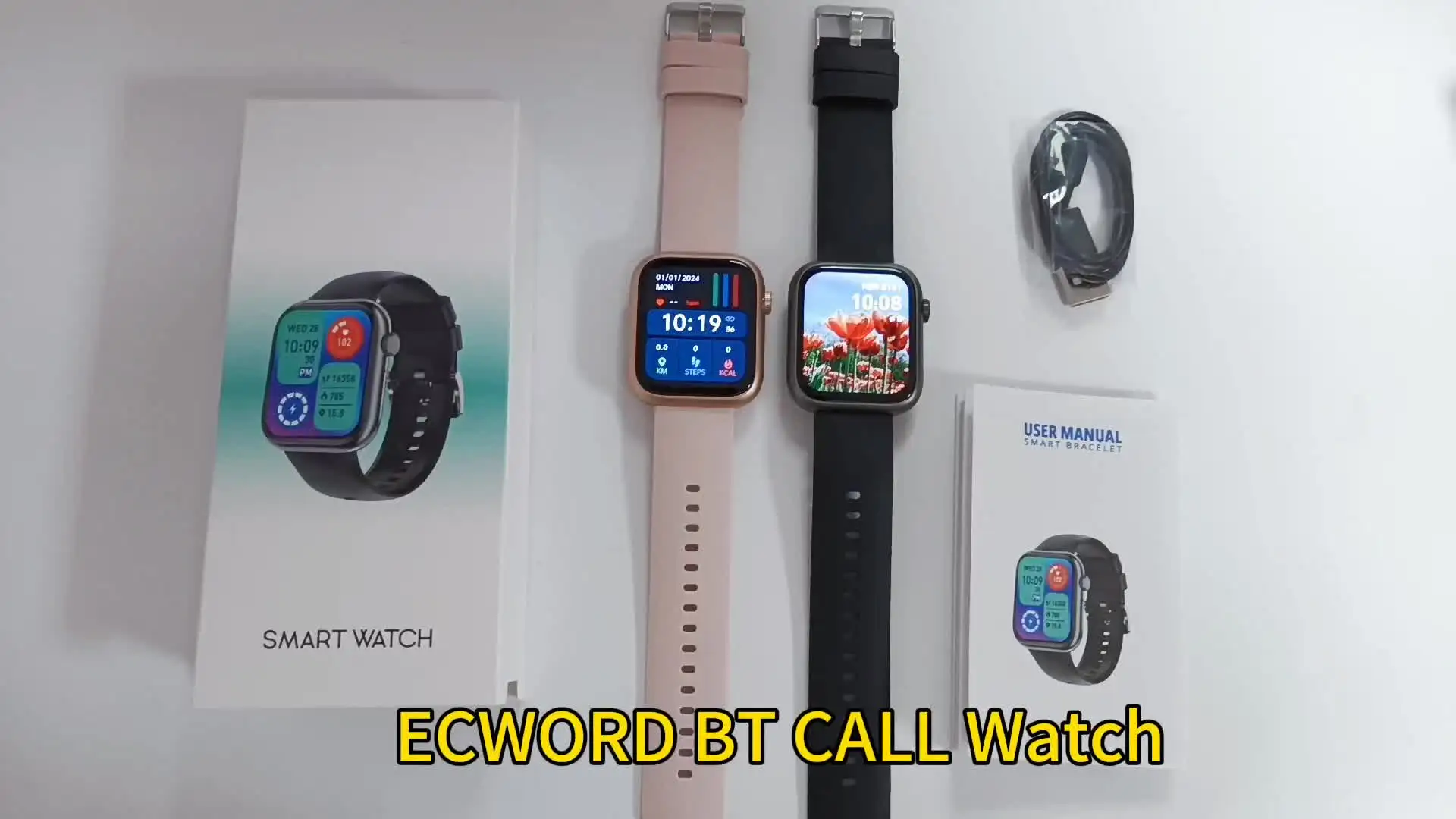
Video 1: Unboxing and overview of the ECWORD G104 Smart Watch and its contents, including the English and Spanish user manual.
3. Setup Guide
3.1 Charging the Smart Watch
- Connect the magnetic charging cable to the charging points on the back of the watch.
- Connect the USB end of the cable to a standard USB power adapter (not included) or a computer's USB port.
- Ensure the watch screen indicates charging. A full charge typically takes 2-3 hours.
3.2 App Installation (Dafit APP)
To unlock the full potential of your G104 Smart Watch, download and install the Dafit app on your smartphone.
- Scan the QR code provided in the included user manual or search for "Dafit" in your smartphone's app store (Google Play Store for Android, Apple App Store for iOS).
- Install the Dafit app.
- Ensure your smartphone's Bluetooth is enabled.
3.3 Pairing with Your Smartphone
- Open the Dafit app on your smartphone.
- Follow the on-screen instructions to create an account or log in.
- In the app, navigate to the device section and select "Add Device" or a similar option.
- The app will search for available Bluetooth devices. Select "G104" or the corresponding device name when it appears.
- Confirm the pairing request on both your watch and smartphone.
- Once paired, the watch will synchronize time and data with your phone.
Compatibility: The ECWORD G104 Smart Watch is compatible with Android 5.0 / iOS 9.0 and above.
4. Operating Instructions
4.1 Basic Navigation
- Touch Screen: Swipe left, right, up, or down to navigate through menus and functions. Tap to select.
- Side Button: Press the side button to wake the screen, return to the watch face, or access the main menu.

Figure 2: Watch face display.
4.2 Watch Faces and Menu Styles
- Customize Watch Face: Long press on the watch face to change it. More options are available through the Dafit app.
- Menu Styles: The watch supports multiple menu interaction designs, including Ferris wheel dynamic rotation, honeycomb, and arc list menus. You can switch between these styles in the watch settings.

Figure 3: Multiple menu options for UI interaction.
4.3 Health Monitoring
The G104 Smart Watch provides comprehensive health monitoring features:
- Heart Rate Monitor: Continuously tracks your heart rate.
- Blood Oxygen Monitor (SpO2): Measures your blood oxygen saturation.
- Sleep Monitor: Analyzes your sleep patterns.
- Blood Pressure Monitor: Provides blood pressure readings.

Figure 4: 7x24 hours health function monitoring, including heart rate.
4.4 Activity Tracking & Sports Modes
The watch tracks various activities and offers over 123 sports modes:
- Activity Tracked: Steps Tracker, Distance Tracker, Calorie Tracker.
- Sports Modes: Walking, Running, Cycling, Mountaineering, Basketball, Football, Golf, Yoga, Dancing, Baseball, Indoor Cycling, Free Training, and more. Select the corresponding exercise mode to track your performance.

Figure 5: Selection of 123+ sports modes.
4.5 Communication Features
- Bluetooth Call: Answer and dial calls directly from your watch using high-fidelity speakers.
- Message & Call Reminders: Receive notifications for messages and incoming calls.
- Push Message: Get push notifications from your paired smartphone.
- AI Voice Assistant: Connect to Bluetooth and long-press the watch's voice assistant function to issue instructions.

Figure 6: Smart Voice Call HD original sound feature.
4.6 Other Functions
- Remote Control: Control certain functions on your phone (e.g., camera shutter).
- World Time: Display time for different time zones.
- Countdown: Set a countdown timer.
- Alarm: Set alarms.
- Stopwatch: Use as a stopwatch.
- Cycle Tracking: For menstrual cycle tracking.
- Find Phone: Locate your paired smartphone.
- Calculator: Basic calculator function.
- Games: Simple games for entertainment.
- Flashlight: Use the screen as a flashlight.
- Power Saving Mode: Extend battery life by enabling this mode in settings.
5. Maintenance
5.1 Cleaning
- Wipe the watch screen and body with a soft, dry, lint-free cloth.
- For stubborn smudges, slightly dampen the cloth with water.
- Avoid using harsh chemicals, abrasive materials, or aerosol sprays.
- Clean the charging contacts regularly to ensure proper charging.
5.2 Water Resistance (IP67)
The ECWORD G104 Smart Watch is IP67 deep waterproof. This means it is protected against dust and can withstand immersion in water up to 1 meter for up to 30 minutes. It is suitable for daily use, such as hand washing, rain, or splashes.

Figure 7: IP67 deep waterproof feature.
Important: IP67 rating does not mean the watch is suitable for swimming, diving, hot showers, or saunas. Exposure to hot water, steam, or high-velocity water may compromise the seal and cause damage not covered by warranty.
5.3 Battery Care
- Avoid fully discharging the battery frequently.
- Do not expose the watch to extreme temperatures.
- Use only the provided magnetic charging cable.
6. Troubleshooting
- Watch not turning on: Ensure the watch is fully charged. Connect it to the charger for at least 30 minutes.
- Cannot pair with phone: Make sure Bluetooth is enabled on your phone and the watch is within range. Restart both the watch and the phone, then try pairing again through the Dafit app.
- Inaccurate health data: Ensure the watch is worn snugly on your wrist, not too tight or too loose. Clean the sensors on the back of the watch. Note that smartwatches are not medical devices and readings are for reference only.
- Notifications not received: Check app permissions on your phone to ensure the Dafit app has access to notifications. Verify that notifications are enabled in the Dafit app settings and on the watch.
- Short battery life: Reduce screen brightness, disable unnecessary features (e.g., continuous heart rate monitoring if not needed), and enable power saving mode.
7. Specifications

Figure 8: Product parameter overview.
| Feature | Specification |
|---|---|
| Model | G104 |
| Screen Size | 1.83 inch |
| Resolution | 240*284 |
| Screen Material | IPS |
| Chipset | JL7012F6 |
| Memory | 64MB |
| Battery Capacity | 250mAh |
| Battery Life | 3-5 days |
| Heart Rate Sensor | HX3600 |
| Charging Method | Magnetic charging |
| Bluetooth Version | 5.3 |
| Compatible OS | Android 5.0 / iOS 9.0 and above |
| Waterproof Grade | IP67 |
| Dimensions (approx.) | 45.7mm (L) x 39mm (W) x 11mm (T) |
8. User Tips
- Water Exposure: While the watch is IP67 rated for water resistance, it is not recommended for swimming, diving, or prolonged submersion in water. Avoid exposure to hot water or steam.
- App Connection: If you experience issues with the watch connecting to the Dafit app, ensure the app is running in the background and has all necessary permissions enabled on your smartphone.
- Watch Face Customization: Explore the extensive watch face options available in the Dafit app to personalize your smartwatch.
9. Warranty and Support
For warranty information and technical support, please refer to the documentation provided with your purchase or contact the seller directly. Keep your proof of purchase for any warranty claims.