
1. Product Overview
The SMARTEK STBT-TW5800 are advanced True Wireless Stereo (TWS) earbuds featuring Active Noise Cancellation (ANC), Bluetooth 5.3 connectivity, and convenient wireless charging. Designed for comfort and superior sound quality, these earbuds provide an immersive audio experience with clear calls and intuitive touch controls.

Figure 1: SMARTEK STBT-TW5800 Product Overview
2. Setup
2.1. Package Contents
Please check that all items are present in your package:
- SMARTEK STBT-TW5800 Earbuds (Left & Right)
- Charging Case
- USB Charging Cable
- Ear Tips (S, M, L sizes)
- User Manual (this document)
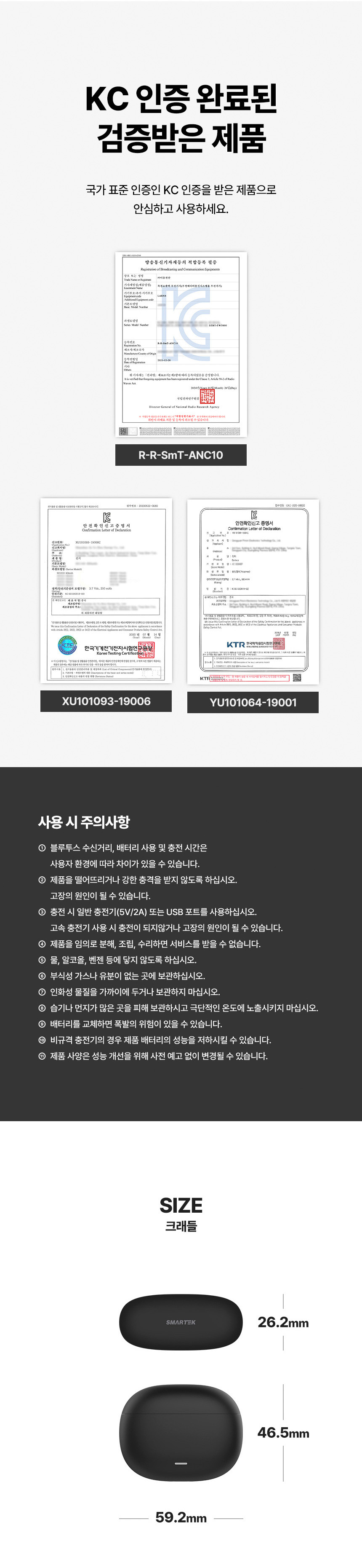
Figure 2: Package Contents (Main unit, charging cable, ear tips, manual)
2.2. Charging the Earbuds and Case
Before first use, fully charge the earbuds and charging case.
- Wired Charging: Connect the provided USB charging cable to the charging port on the case and a power source. The LED indicator on the case will show the charging status.
- Wireless Charging: Place the charging case on a compatible wireless charging pad. The LED indicator will illuminate to confirm charging.
Charging Time:
- Charging Case: Approximately 1 hour 30 minutes
- Earbuds: Approximately 1 hour

Figure 3: Wireless Charging and LED Indicator
2.3. Initial Pairing
- Open the charging case. The earbuds will automatically power on and enter pairing mode.
- On your smartphone or other Bluetooth-enabled device, go to the Bluetooth settings.
- Search for available devices and select "STBT-TW5800" from the list.
- Once connected, a voice prompt will confirm successful pairing.

Figure 4: Bluetooth 5.3 Connection and Pairing Steps
2.4. Ear Tip Selection
Choose the ear tips that provide the most comfortable and secure fit. A proper seal is crucial for optimal sound quality and effective Active Noise Cancellation.

Figure 5: Ear tip selection for comfortable and stable wear
3. Operating Instructions
3.1. Power On/Off
- Power On: Open the charging case, and the earbuds will automatically power on.
- Power Off: Place the earbuds back into the charging case and close the lid. They will automatically power off and begin charging.
3.2. Touch Controls
The STBT-TW5800 earbuds feature intuitive touch controls on each earbud for easy management of music and calls.
| Action | Control |
|---|---|
| Play/Pause Music | Single tap on either earbud |
| Next Track | Double tap on the right earbud |
| Previous Track | Double tap on the left earbud |
| Answer/End Call | Single tap on either earbud |
| Reject Call | Long press on either earbud |
| Activate Voice Assistant | Triple tap on either earbud |

Figure 6: Earbud touch control diagram
3.3. Active Noise Cancellation (ANC) and Ambient Sound Mode
The earbuds offer three sound modes to suit your environment:
- ANC ON: Reduces external noise for an immersive listening experience.
- Ambient Sound ON: Allows you to hear your surroundings while enjoying your audio, enhancing safety.
- ANC OFF: Standard audio mode without noise cancellation or ambient sound.
To switch between these modes, long press on one of the earbuds (typically the right earbud, but may vary). The modes will cycle in the order: ANC ON → Ambient Sound ON → ANC OFF.

Figure 7: One-touch control for ANC, Ambient Sound, and ANC Off modes
4. Maintenance
4.1. Cleaning
- Regularly clean the earbuds and charging case with a soft, dry, lint-free cloth.
- Remove the ear tips and clean them with mild soap and water. Ensure they are completely dry before reattaching.
- Gently clean the charging contacts on both the earbuds and inside the case to ensure proper charging.
4.2. Storage
- Always store the earbuds in their charging case when not in use to protect them from damage and keep them charged.
- Avoid storing the product in environments with extreme temperatures, high humidity, or direct sunlight.
4.3. Precautions for Use
- Do not disassemble, repair, or modify the product yourself.
- Avoid using the product in extremely hot or cold environments.
- Do not use the product while it is charging.
- Protect the product from drops or strong impacts.
- Keep the product away from water and moisture.
- Do not use corrosive chemicals for cleaning.
- Keep out of reach of children and pets.
- Use the product only for its intended purpose.
- Product specifications and appearance are subject to change without prior notice for performance improvement.
5. Troubleshooting
5.1. Earbuds Not Connecting/Pairing
- Ensure both earbuds and the charging case are sufficiently charged.
- Turn off and then turn on Bluetooth on your device.
- Delete "STBT-TW5800" from your device's Bluetooth paired devices list.
- Place both earbuds back into the charging case, close the lid, wait a few seconds, then open the lid again.
- Repeat the initial pairing steps (Section 2.3).
- Ensure the earbuds are within the effective Bluetooth range (up to 10 meters) of your device.
5.2. No Sound or Low Volume
- Check the volume level on both your connected device and the earbuds.
- Ensure the earbuds are properly seated in your ears and the ear tips provide a good seal.
- Try cleaning the earbud mesh and charging contacts.
5.3. One Earbud Not Working
- Place both earbuds back into the charging case, close the lid, and then reopen it.
- Ensure both earbuds are charged.
- Perform a re-pairing procedure as described in Section 5.1.
6. Specifications
| Feature | Specification |
|---|---|
| Model Name | STBT-TW5800 |
| ANC (Active Noise Cancellation) | 22dB |
| Bluetooth Version | 5.3 |
| Wireless Range | ≥10 meters |
| Driver Unit | 10mm x 2EA |
| Microphone Sensitivity | -38 ± 3dB |
| Frequency Response | 20-20kHz |
| Charging Case Battery Capacity | 350mAh |
| Earbud Battery Capacity | 40mAh x 2EA |
| Charging Time (Case) | Approx. 1 hour 30 minutes |
| Charging Time (Earbuds) | Approx. 1 hour |
| Usage Time | Approx. 6 hours |
| Material | ABS |
| Style | In-ear |
| Charging Method | Cable, Wireless |
| Control | Touch Button |
| Origin | Mainland China |
| Case Dimensions (L x W x H) | 59.2 x 26.2 x 46.5mm |
| Case Weight | 29g |
| Earbud Dimensions (L x W) | 21 x 32.4mm |
| Earbud Weight | 4g (each) |
| KC Certification Numbers | R-R-SST-ANC10, YU101064-19001, XU101093-19006 |

Figure 8: Detailed Product Specifications
7. User Tips
- For optimal Active Noise Cancellation, ensure you select the correct ear tip size that provides a snug and comfortable seal in your ear canal.
- Regularly clean your ear tips and the earbud mesh to maintain hygiene and prevent sound degradation.
- Keep the charging case charged, especially if you rely on ANC, as it can consume more battery.
- When not actively listening, placing the earbuds back in their case will automatically turn them off and charge them, extending their overall lifespan.
8. Warranty and Support
Your SMARTEK STBT-TW5800 earbuds are covered by a manufacturer's warranty against defects in materials and workmanship. Please refer to your purchase documentation for specific warranty terms and conditions.
8.1. Customer Service
For technical support, warranty claims, or any inquiries regarding your product, please contact our customer service team:
- Phone: 070-7405-1415
- Manufacturer: (주)이음전산 (Eumjeonsan Co., Ltd.)
- Country of Manufacture: China
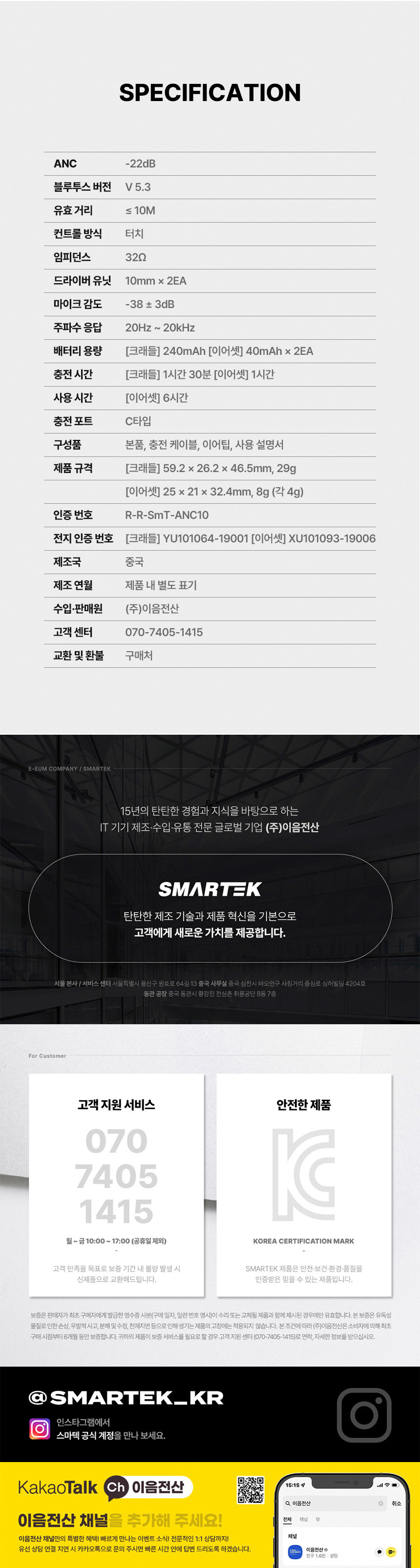
Figure 9: SMARTEK Customer Service Information