1. Introduction
Thank you for choosing the VEVOR 155A 3-in-1 TIG Welder. This multifunctional unit is designed for HF TIG welding, ARC (MMA) welding, and a specialized cleaning mode, making it suitable for a wide range of metals including stainless steel, iron, mild steel, copper, and nickel. This manual provides essential information for safe operation, setup, maintenance, and troubleshooting to ensure optimal performance and longevity of your welding machine.

2. Safety Information
Always prioritize safety when operating welding equipment. Failure to follow safety guidelines can result in serious injury or death.
- Electric Shock: Welding current can cause fatal electric shock. Ensure proper grounding and insulation. Never touch live electrical parts.
- Fumes and Gases: Welding produces fumes and gases that can be hazardous to health. Work in a well-ventilated area or use a fume extractor.
- Arc Rays: Arc rays can burn eyes and skin. Always wear a welding helmet with appropriate shade, safety glasses, and protective clothing.
- Fire and Explosion: Welding sparks can cause fire or explosion. Keep flammable materials away from the welding area. Have a fire extinguisher readily available.
- Burns: Hot metal and sparks can cause severe burns. Wear protective gloves, long sleeves, and other appropriate personal protective equipment (PPE).
- Noise: High noise levels can damage hearing. Wear ear protection.
3. Product Overview
3.1. Package Contents
- 1 x VEVOR 155A 3-in-1 TIG Welder (Model VV-TW-155A)
- 1 x 12FT/3.66 m QQ150 Welding Gun
- 1 x 6.56FT/2 m Ground Clamp
- 1 x 5.58FT/1.7 m Power Cable
- 1 x 9.84FT/3 m Gas Pipe
- 2 x Hose Clamps
3.2. Control Panel

- Current Display: Digital display showing the welding current.
- Pre Gas & Gas Delay: Controls the pre-flow and post-flow of shielding gas.
- Laboursaving Modes (2T/4T): Toggle between 2T (Spot Welding) and 4T (Continuous Welding) modes.
- Torch Switch: Connection point for the welding torch.
- Positive Terminal: Output terminal for positive connection.
- TIG Torch Connection: Dedicated connection for the TIG torch.
- Negative Terminal: Output terminal for negative connection.
- Over Heat Light: Indicator for overheating.
- Modes Switch: Selector for TIG, MMA (ARC), and Clean modes.
- Current Knob: Adjusts the welding current (10A to 155A).
3.3. Rear Panel
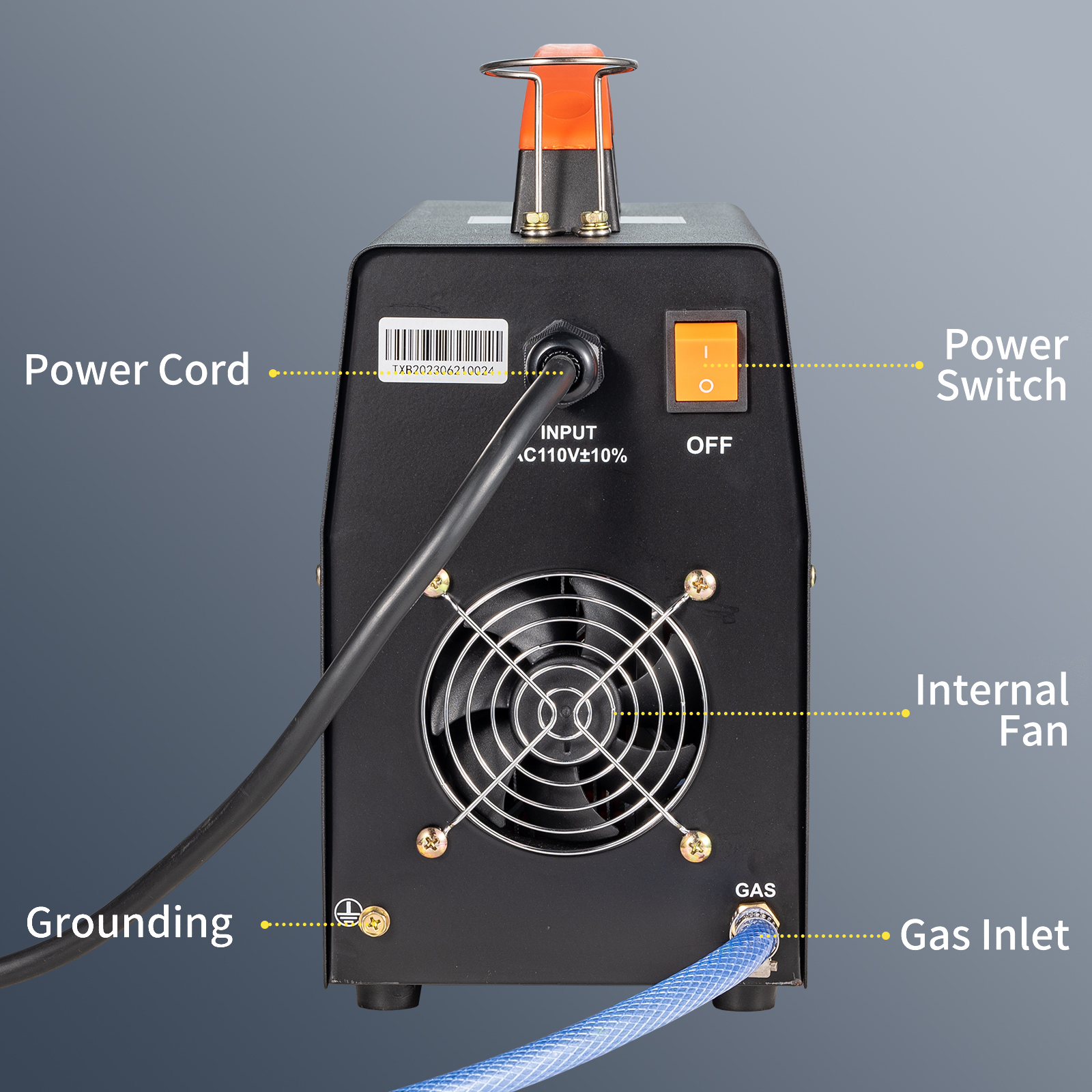
- Power Cord: Main power input connection.
- Power Switch: ON/OFF switch for the unit.
- Internal Fan: Cooling fan for heat dissipation.
- Grounding: Grounding terminal for safety.
- Gas Inlet: Connection point for shielding gas supply.
4. Setup
4.1. Electrical Connection
- Ensure the power switch on the rear panel is in the 'OFF' position.
- Connect the provided power cable to the power input on the rear panel.
- Plug the power cable into a suitable AC110V±10%(50/60Hz) power outlet. Ensure the outlet is properly grounded.
- Connect the grounding terminal on the rear panel to a reliable earth ground.
4.2. Gas Connection (for TIG Welding)
- Attach one end of the provided gas pipe to the Gas Inlet on the rear panel. Secure it with a hose clamp.
- Connect the other end of the gas pipe to your shielding gas regulator (not included) on your gas cylinder (e.g., Argon). Secure it with the second hose clamp.
- Ensure all gas connections are tight to prevent leaks.
4.3. Torch and Ground Clamp Connection

- For TIG Welding:
- Connect the QQ150 Welding Gun to the TIG Torch Connection on the front panel.
- Connect the Ground Clamp to the Positive Terminal.
- For ARC (MMA) Welding:
- Connect the electrode holder (not included) to the Positive Terminal.
- Connect the Ground Clamp to the Negative Terminal.
- For Clean Mode:
- Connect the cleaning brush (not included) to the Positive Terminal.
- Connect the Ground Clamp to the Negative Terminal.
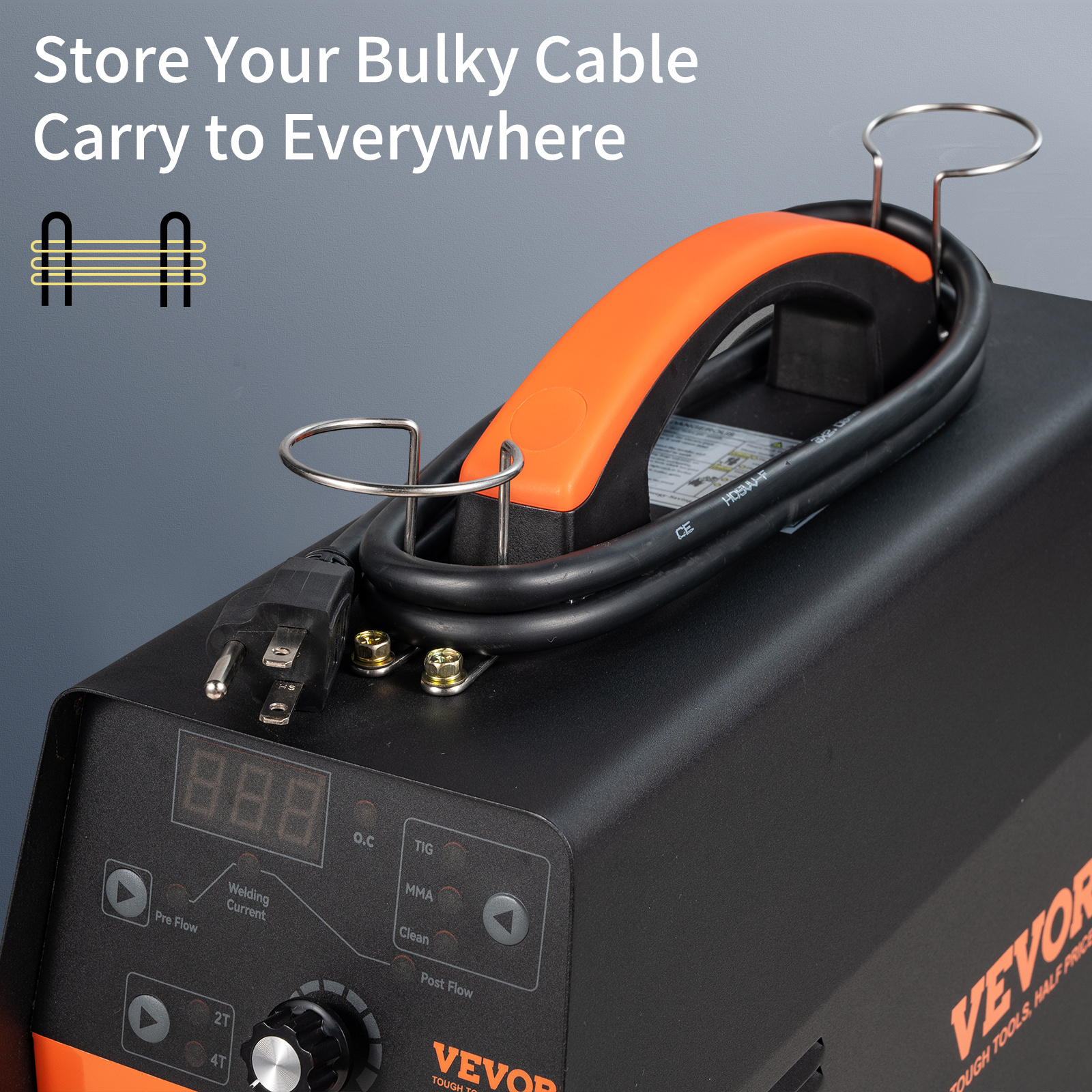
4.4. Cable Management

Utilize the integrated cable holders on top of the unit to neatly store bulky cables, the welding gun, and the power cable when not in use or during transport.
5. Operating Instructions
5.1. Power On/Off
- To power on, flip the Power Switch on the rear panel to the 'ON' position. The digital display will illuminate.
- To power off, flip the Power Switch to the 'OFF' position.
5.2. Mode Selection
Use the Modes Switch on the front panel to select your desired operation mode:
- TIG: For Gas Tungsten Arc Welding.
- MMA (ARC): For Shielded Metal Arc Welding.
- Clean: For post-welding cleaning processes.
5.3. Current Adjustment
Rotate the Current Knob on the front panel to adjust the welding current from 10A to 155A. The selected current will be shown on the Current Display.
5.4. 2T/4T Mode (TIG Welding)

The 2T/4T switch allows for different torch trigger functionalities:
- 2T (Spot Welding): Press and hold the torch trigger to weld; release to stop. Suitable for short welds, tack welding, and thin plate welding.
- 4T (Continuous Welding): Press and release the torch trigger to start welding; press and release again to stop. Ideal for prolonged welding projects, reducing finger fatigue.
5.5. Pre Gas & Gas Delay (TIG Welding)
Adjust the Pre Gas and Post Gas settings to ensure proper shielding gas flow before and after the arc. This prevents oxidation of the weld pool and ensures clean, high-quality welds.
5.6. Welding Techniques and Materials

- Suitable Metals: Stainless Steel, Iron, Mild Steel, Copper, Nickel.
- Maximum Welding Thickness: 0.1"/3 mm.
- Recommended TIG Welding Rods: 1/16" (1.6 mm), 3/32" (2.4 mm).
- Recommended MMA Welding Rods: E6010 (3/32"-2.4 mm), E6011 (3/32"-2.4 mm), E6013 (1/16"-1.6 mm, 3/32"-2.4 mm), E7014 (3/32"-2.4 mm), and E7018 (3/32"-2.4 mm).

6. Maintenance
6.1. Cooling System

The unit features a professionally crafted cooling fan (4500 RPM) and a unique air channel design to enhance heat dissipation. Regularly inspect the internal fan and air vents for dust and debris. Clean as necessary using compressed air to ensure optimal airflow and prevent overheating.
6.2. General Cleaning
Keep the welder clean and free from dust, dirt, and moisture. The unit is designed to be dustproof and waterproof to a certain extent, but regular cleaning will prolong its lifespan.
6.3. Cable and Connection Inspection
Periodically check all cables, connections, and the welding torch for wear, damage, or loose connections. Replace any damaged components immediately.

Inspect the TIG torch head components (collet, collet body, ceramic nozzle, tungsten electrode) for wear and replace them as needed to maintain welding quality.
7. Troubleshooting
| Problem | Possible Cause | Solution |
|---|---|---|
| Welder does not power on | No power supply; Power switch off; Faulty power cable | Check power outlet and circuit breaker; Ensure power switch is ON; Inspect and replace power cable if damaged. |
| Over Heat Light is on | Unit is overheating due to prolonged use or blocked vents | Allow the unit to cool down; Ensure cooling fan and vents are clear of obstructions. |
| Poor arc start or unstable arc (TIG/MMA) | Incorrect current setting; Contaminated electrode/tungsten; Poor ground connection; Insufficient gas flow (TIG) | Adjust current; Clean or replace electrode/tungsten; Ensure ground clamp has good contact; Check gas supply and flow rate. |
| Excessive spatter (MMA) | Incorrect current; Improper electrode angle or arc length | Adjust current; Maintain proper electrode angle and arc length. |
| Porous welds (TIG) | Insufficient shielding gas; Gas leaks; Contaminated base metal | Check gas supply and flow; Inspect gas lines for leaks; Clean base metal thoroughly before welding. |
8. Specifications
| Feature | Specification |
|---|---|
| Model | VV-TW-155A |
| Functions | TIG, ARC (MMA), Clean |
| Output Current | 155A |
| Input Voltage | AC110V±10%(50/60Hz) |
| Duty Cycle | 30% at 104 °F |
| Suitable Metals | Stainless Steel, Iron, Mild Steel, Copper, Nickel |
| Welding Thickness (Max) | 0.1"/3 mm |
| Insulation Grade | F |
| Item Size | 14.6" x 5.9" x 11.8" (37 x 15 x 30 cm) |
| Item Weight | 14 lb (6.35 kg) |
| Certification | CE |
9. User Tips
- For beginners, start with lower current settings and practice on scrap metal to get a feel for the machine and different welding modes.
- Always ensure your workpiece is clean and free of rust, paint, or oil for the best welding results and to prevent contamination.
- When using TIG, maintain a consistent arc length and torch angle for smooth, uniform beads.
- The 4T mode is particularly useful for longer welds, as it allows you to release the trigger after initiating the arc, reducing hand strain.
10. Warranty and Support
For warranty information, technical support, or service inquiries, please contact VEVOR customer service through their official channels. Keep your purchase receipt and product model number (VV-TW-155A) handy for faster assistance.


