
1. Introduction
The YM519 is a professional multi-language OBD2/EOBD+CAN code reader designed to help you diagnose and resolve common vehicle issues. It features a new generation UI for faster response and display, a durable TPU protective case, and comfortable silicone buttons. This device supports full OBD2 modes, battery voltage testing, live data stream, and includes a comprehensive DTC library.

Figure 1: YM519 OBD2 Scanner highlighting its main features.
Video 1: Product demonstration showing connection, code reading, erasing, data stream, battery test, I/M readiness, and language selection.
2. Setup
- Locate the OBD2 Port: The OBD2 interface is typically located under the dashboard on the driver's side. Common positions are marked A and B in Figure 2, while others might be in positions C, D, or E.
- Connect the Scanner: Plug the YM519 scanner's OBD2 connector firmly into your vehicle's OBD2 port. The device is powered directly from the vehicle's port, requiring no extra charger.
- Power On: Once connected, the scanner will automatically power on.
- Select Language: Navigate to the 'Setting' menu and select your preferred language from the 13 available options, including English, French, Spanish, German, Russian, Italian, Portuguese, Finnish, Dutch, Chinese, Japanese, and Korean.

Figure 2: Common locations for the OBD2 interface in a vehicle.
3. Operating Instructions
The YM519 scanner provides a user-friendly interface with clear icons for various functions. Use the navigation buttons (UP, DOWN, LEFT, RIGHT, OK, EXIT, F1, F2) to operate the device.
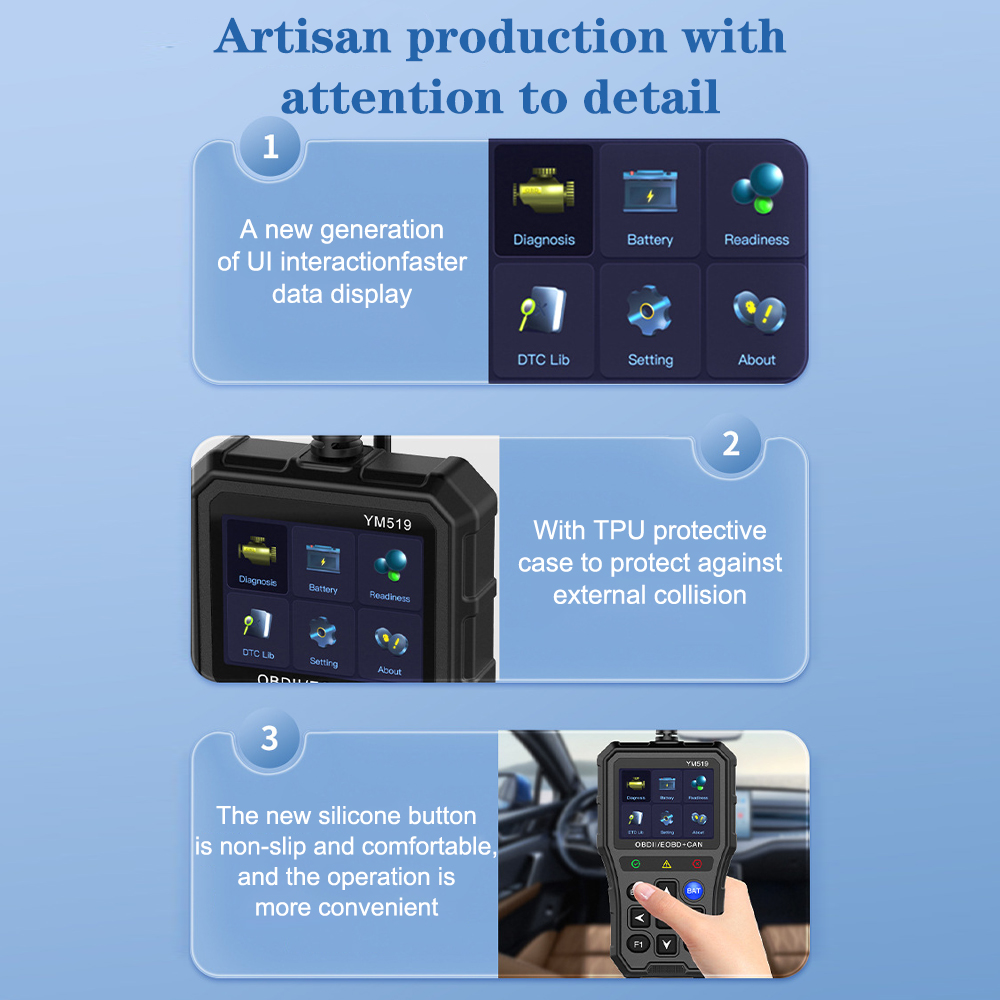
Figure 3: YM519 scanner with labeled buttons and screen.
3.1. Diagnostic Functions
- Read Codes: Select 'Diagnosis' then 'Read Codes' to retrieve engine or emission-related fault codes (DTCs). The scanner displays stored, pending, and permanent codes.
- Erase Codes: After addressing the vehicle's issue, select 'Diagnosis' then 'Erase Codes' to clear the fault codes and turn off the Check Engine Light. Confirm the action when prompted.
- Live Data Stream: View real-time PCM (Powertrain Control Module) data in both text and graph modes. This allows monitoring of various sensor readings and engine parameters.
- I/M Readiness: Perform an I/M (Inspection/Maintenance) readiness test to check if your vehicle is ready for an emission test. This function also allows for fault code definition queries.
- DTC Lookup: The YM519 has a built-in library of over 35,000 DTCs, allowing you to search for code definitions directly on the device without needing an internet connection.
- Vehicle Information: Access important vehicle information such as VIN (Vehicle Identification Number), CID (Calibration ID), and CVN (Calibration Verification Number).
- Oxygen Sensor Test: Conduct tests on the oxygen sensors to ensure they are functioning correctly.
- Component Test (Mode 6): Perform tests on specific components and systems.

Figure 4: Reading trouble codes from the diagnostic menu.

Figure 5: Engine light status before and after erasing codes.

Figure 6: Live PCM data stream in text and graph format.

Figure 7: I/M Readiness display, indicating emission system status.

Figure 8: DTC Lookup feature for quick fault code identification.
3.2. Battery Test Functions
The YM519 includes exclusive features for battery testing:
- Battery Voltage Reading: Get an instant reading of your vehicle's battery voltage.
- Battery Voltage Monitoring: Monitor the battery voltage over time, observing its curve and stability.
- Battery Life Assessment: An exclusive feature that provides an assessment of the battery's overall health and life.

Figure 9: Built-in voltage test displaying battery measurement and life assessment.
4. Maintenance
- Protective Case: The YM519 comes with a TPU protective case to guard against external collisions, ensuring durability and longevity.
- Non-slip Design: Its unique non-slip shell design allows for convenient one-handed operation.
- Button Care: The new silicone buttons are designed for comfort and ease of use. Keep them clean and free from debris for optimal performance.
- Screen Care: The 2.8-inch color screen should be cleaned with a soft, dry cloth. Avoid abrasive cleaners.
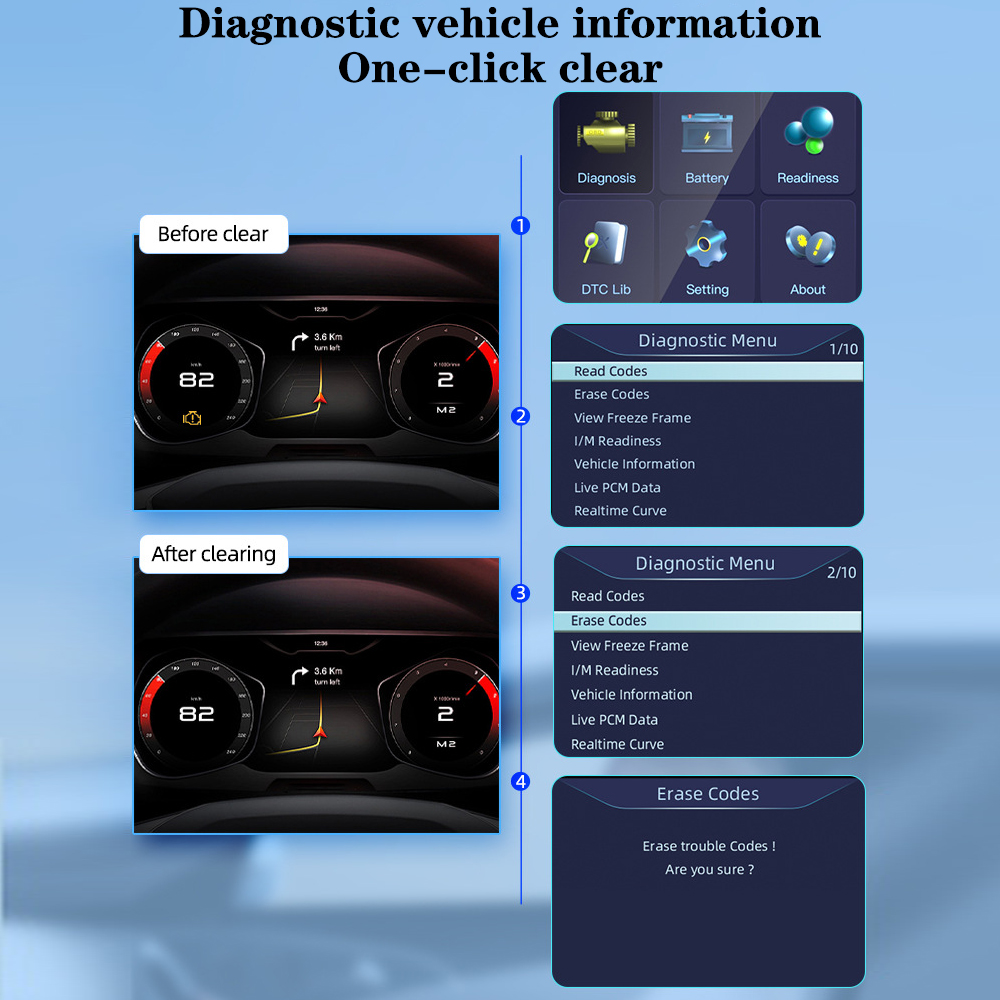
Figure 10: Design features for durability and user experience.
5. Troubleshooting
- No Power/Device Not Turning On: Ensure the OBD2 connector is firmly plugged into the vehicle's OBD2 port. The device draws power directly from the vehicle. Check your vehicle's battery status if the device still doesn't power on.
- Communication Error: Verify that your vehicle supports OBDII/EOBD protocols. Ensure the connection is secure. Try turning the ignition key to the 'ON' position (engine off) before connecting the scanner.
- Incorrect Readings: Ensure the vehicle's engine is running (for live data) or the ignition is on (for codes). If readings seem inconsistent, try clearing codes and re-scanning.
- Check Engine Light Remains On After Clearing Codes: This indicates that the underlying issue causing the fault code has not been resolved. The light will reappear until the problem is fixed.
User Tips
- Vehicle Compatibility: Ensure your vehicle is compatible with OBD2/EOBD standards. The YM519 supports a wide range of vehicles, including models like the Opel Astra G 1.7dti, but always verify your car's specific protocol.
- Regular Checks: Use the scanner for regular checks, especially if you notice symptoms like increased fuel consumption, unusual engine noise, or increased engine temperature, which can indicate underlying issues.
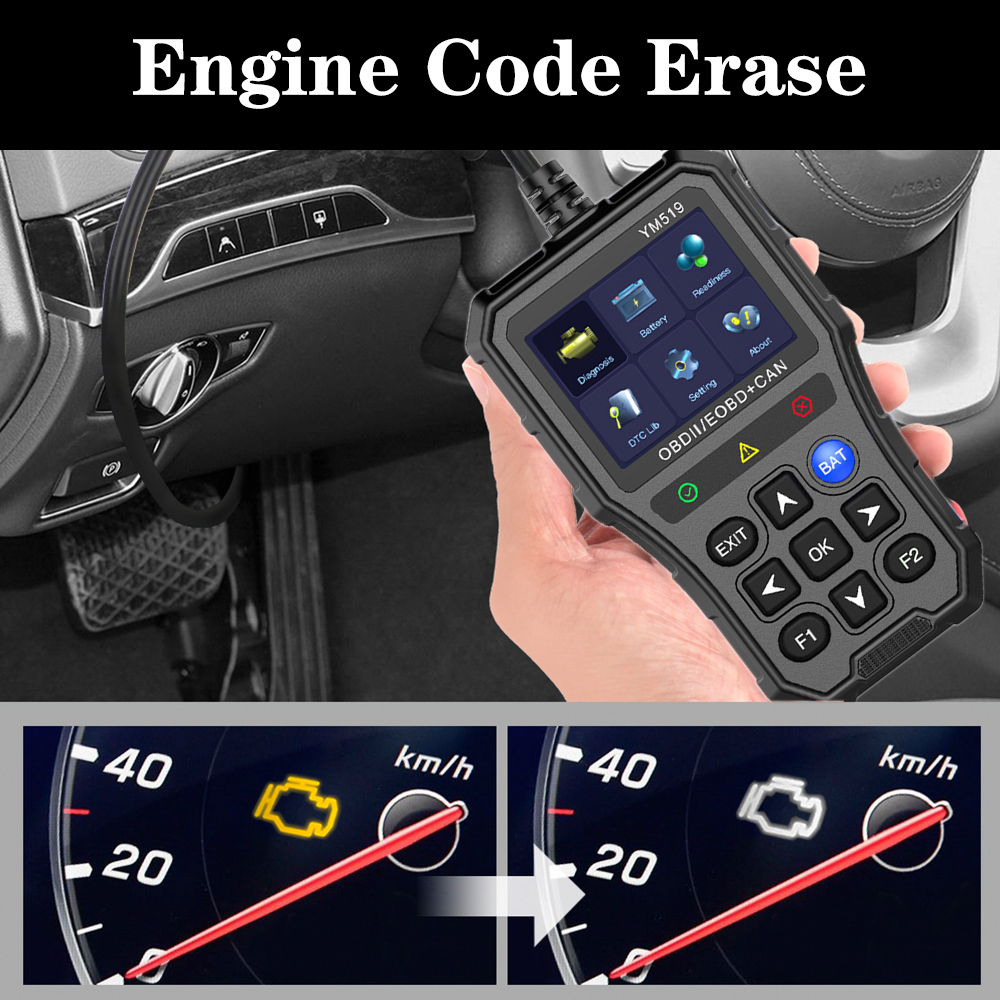
Figure 11: Common symptoms of engine faults.
6. Specifications
| Feature | Description |
|---|---|
| Model | YM519 |
| Item Type | Code Readers & Scan Tools |
| Display | 2.8 inch Color Screen |
| DTC Library | 35,000+ codes |
| Supported Protocols | 9 standard OBDII/EOBD protocols (SAE J1850 PWM, SAE J1850 VPW, ISO9141-2, ISO14230-4 KWP (5 baud init), ISO14230-4 KWP (fast init), ISO15765-4 CAN (11bit ID, 500 Kbaud), ISO15765-4 CAN (29bit ID, 500 Kbaud), ISO15765-4 CAN (11bit ID, 250 Kbaud), ISO15765-4 CAN (ID 29bit, 251 Kbaud)) |
| Supported Languages | 13 languages (Chinese, English, Korean, Japanese, Russian, Polish, Portuguese, Finnish, Italian, French, Spanish, Dutch, German) |
| Dimensions (H x W x D) | 14.50 cm (5.70 in) x 8.50 cm (3.34 in) x 2.60 cm (1.02 in) |
| Weight | 0.4 kg |
| Certification | CE |
| Origin | Mainland China |
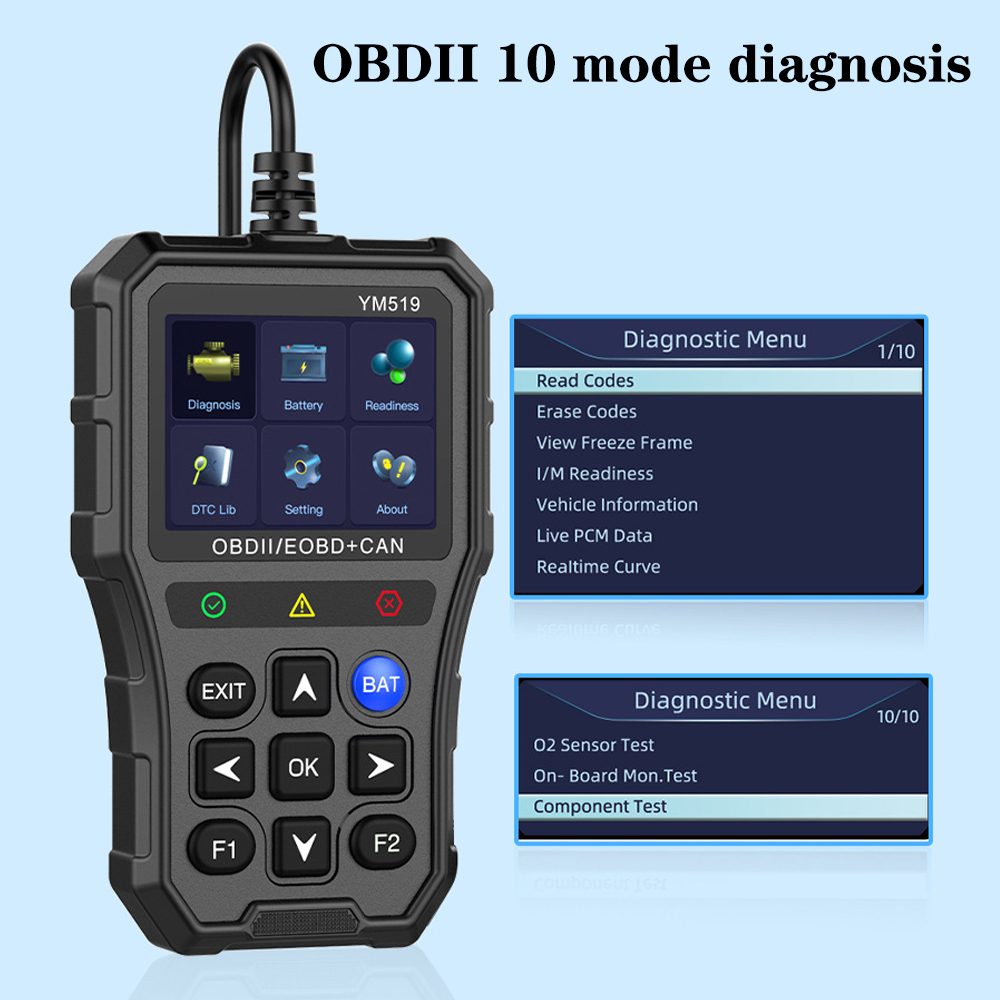
Figure 12: YM519 scanner dimensions.
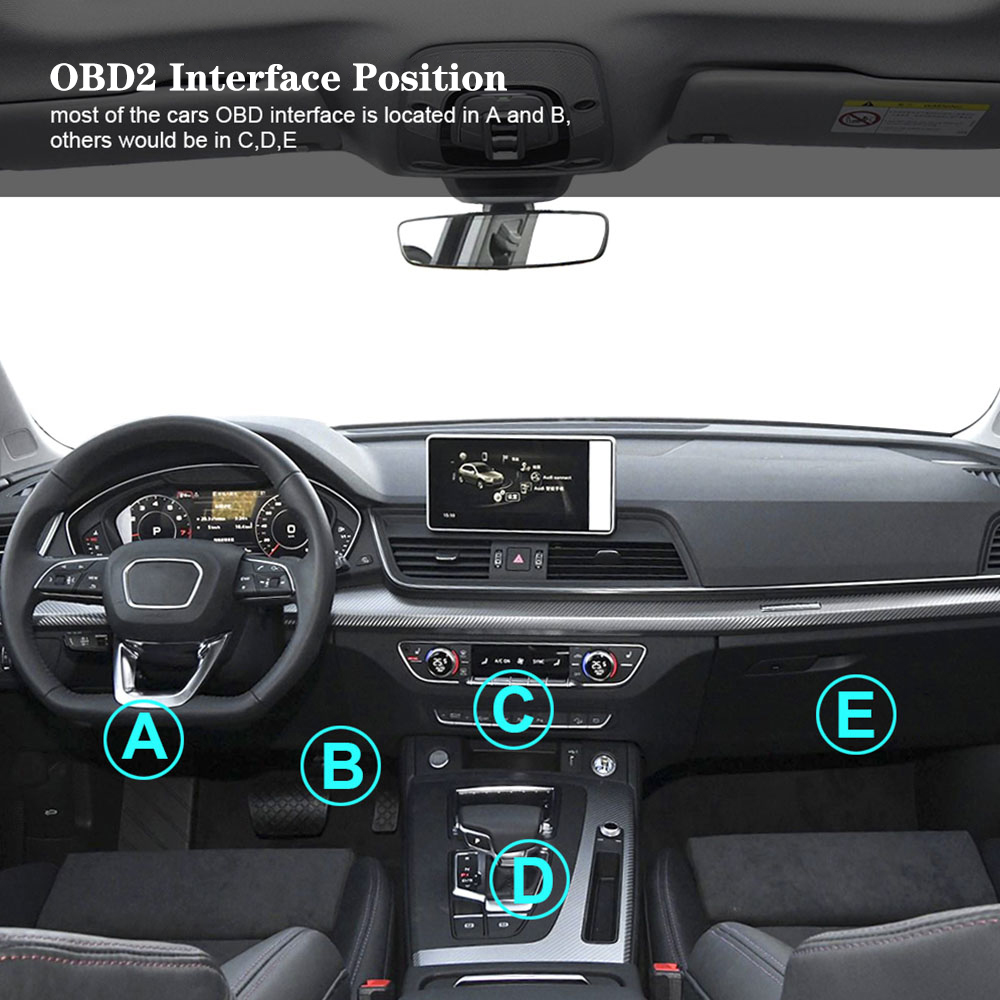
Figure 13: Supported protocols and languages for the YM519 scanner.
7. Warranty and Support
For any technical assistance, warranty claims, or detailed inquiries not covered in this manual, please refer to the included English Manual or contact the FINTUKIE NO2 Store directly through the platform where you purchased the product. Keep your purchase records for warranty purposes.